react-email review
Our full-package browser build from react-email 6.9.2 reached 1,832.2 KB minified and 564 KB gzipped, which is a warning to keep this toolchain in a server or build process. React Email supplies typed React components for table-based email markup, a local template browser, Tailwind processing, and HTML or plain-text rendering. It does not send mail or prove inbox parity. Current 6.9.3 is a workspace patch release whose preview UI now preserves sidebar state and scroll position while switching templates; the react-email API itself did not change in that release.
React Email 6.9.2 took 12.5 seconds and 78 MB to install on our box, with 118 packages, bundled types, and 0 audit findings; its full browser build was 564 KB gzipped. Use current 6.9.3 for server-side React email authoring, and keep delivery plus real-inbox testing outside the preview toolchain.
We installed it
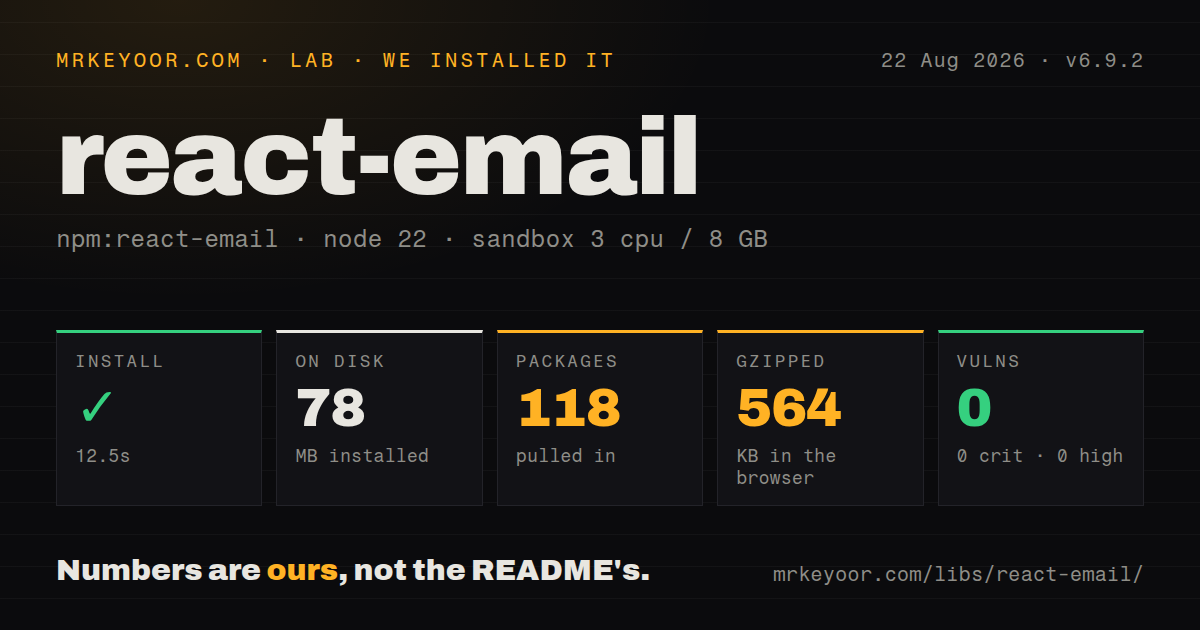
| Install | ✓ · 12.5s | 118 packages on disk · 78 MB |
| Import | ✓ | ESM import works · require() works · ESM package with exports map |
| Browser | 564 KB | gzipped (1832.2 KB minified), bundled with esbuild |
| Types | ✓ | TypeScript types bundled |
| Known vulns | 0 | 0 critical · 0 high · 0 moderate · 0 low (npm audit) |
Answers from our run
Does react-email install cleanly?
Yes. In a fresh container with an empty cache, npm install react-email finished in 13 seconds, leaving 118 packages and 78 MB on disk. npm audit reported no known vulnerabilities.
How much does react-email add to a browser bundle?
564 KB gzipped (1832.2 KB minified) when the whole package is bundled for the browser with esbuild. Importing only part of it is usually smaller.
Does react-email work with both ESM and CommonJS?
Yes. Both import 'react-email' and require('react-email') worked in Node 22 in our run. The package is published as ESM with an exports map.
Does react-email include TypeScript types?
Yes, type declarations ship inside the package, so no @types install is needed.
react-email or mjml: which should you use?
mjml: Choose it for an email-specific markup language and compiler without React component semantics. React Email 6.9.2 took 12.5 seconds and 78 MB to install on our box, with 118 packages, bundled types, and 0 audit findings; its full browser build was 564 KB gzipped.
When should you not use react-email?
Your production runtime is below Node 20: current react-email declares node >=20.0.0
Use it if
- Your application already uses React and transactional templates benefit from typed props and shared JSX components
- Designers and engineers need a local template browser with live updates and per-client compatibility warnings
- Your server will render HTML and plain text before passing both forms to Resend, SES, Nodemailer, or another transport
- You maintain enough templates to justify reusable email primitives, Tailwind-to-email processing, and automated export
- Your production runtime is below Node 20: current react-email declares node >=20.0.0
- You already have finished HTML and only need delivery: this package brings a CLI, preview application, compiler, components, and 22 direct dependencies in the measured 6.9.2 package
- You intend to import the whole package into browser application code: our full-package build was 564 KB gzipped and includes authoring tools that recipients never need
- Your team avoids React or wants email-specific markup: MJML and Maizzle provide different authoring models without React peer dependencies
- A browser preview is your only client test: Gmail, Outlook, Apple Mail, mobile apps, dark mode, and delivery providers can each alter the final result
Setup reality
We installed react-email 6.9.2 in 12.5 seconds on a clean Node 22 image. It left 118 packages and 78 MB on disk. The package declared 22 direct dependencies, 2 peer dependencies, React and React DOM, and npm audit found 0 known vulnerabilities. Its unpacked size was 4,868 KB under MIT, and its engine requires Node 20 or newer.
The CLI reads ./emails unless --dir points elsewhere. It discovers default exports in .js, .jsx, and .tsx files recursively, while folders whose names start with _ stay out of the template list. email dev uses port 3000 by default. Files under emails/static work in local previews only; recipient-facing images need absolute, publicly reachable URLs. PreviewProps supplies sample UI data and does not validate real send data.
Version 6.9.2 is ESM with an exports map, bundled declarations, and separate import and require conditions. Both module styles loaded in our sandbox. Rendering and previewing require no provider credential. Delivery remains a second system with its own SMTP password or API key, retries, suppression handling, and observability. Keep render on the server or in a build job instead of sending the measured 1,832.2 KB browser build to clients.
email export removes its output directory before rebuilding, so dedicate that path to generated files. email build similarly recreates .react-email, installs preview-app dependencies with npm, and must run before email start. Tailwind converts supported classes for email output, but CSS support still differs by inbox. Place Head inside Tailwind when classes generate media rules, inspect plain text separately, and run real inbox tests for the clients your users have.
Patterns
Build a typed transactional template create-typed-template
import { Body, Button, Container, Head, Html, Preview, Text } from 'react-email';

type WelcomeProps = { name: string; verifyUrl: string };

export default function WelcomeEmail({ name, verifyUrl }: WelcomeProps) {
  return (
    <Html lang="en">
      <Head />
      <Preview>Confirm your account</Preview>
      <Body style={{ backgroundColor: '#f6f6f6', fontFamily: 'Arial, sans-serif' }}>
        <Container style={{ backgroundColor: '#fff', padding: '24px' }}>
          <Text>Hello {name},</Text>
          <Button href={verifyUrl}>Verify account</Button>
        </Container>
      </Body>
    </Html>
  );
}
Version 6 exports these components from react-email; validate user data and URLs before rendering.
Give the preview UI sample props define-preview-data
type ReceiptProps = { customer: string; total: string };

function Receipt({ customer, total }: ReceiptProps) {
  return <Text>{customer}, your total is {total}.</Text>;
}

Receipt.PreviewProps = { customer: 'Ada', total: '$42.00' } satisfies ReceiptProps;
export default Receipt;
PreviewProps appears in local tooling and does not become validation or a production default.
Preview a non-default email directory start-template-preview
npx react-email dev --dir ./src/emails --port 3001 --clients outlook,gmailThe clients option filters compatibility checks; it does not run Outlook or Gmail renderers.
Hide shared modules from the sidebar organize-template-files
emails/
  _shared/
    footer.tsx
  account-created.tsx
  password-reset.tsx
  static/
    logo.png
The CLI scans default-exported .js, .jsx, and .tsx templates; a directory whose name starts with _ is treated as support code.
Convert Tailwind classes for email apply-tailwind-styles
import { Body, Head, Html, Tailwind, Text } from 'react-email';

export default function Notice() {
  return (
    <Html>
      <Tailwind>
        <Head />
        <Body className="bg-white p-6">
          <Text className="text-base leading-6 text-slate-900">Payment received</Text>
        </Body>
      </Tailwind>
    </Html>
  );
}
Head belongs inside Tailwind when a class produces a media rule that cannot be inlined.
Point email images at a public host use-hosted-images
import { Img } from 'react-email';

const baseUrl = process.env.PUBLIC_ASSET_URL ?? 'http://localhost:3000';

export function Logo() {
  return <Img src={`${baseUrl}/logo.png`} width="160" height="48" alt="Example" />;
}
The preview server's static directory is local tooling; sent messages need an absolute URL that recipients can fetch.
Render HTML with real application props render-email-html
import { render } from 'react-email';
import WelcomeEmail from './emails/welcome-email';

const html = await render(
  <WelcomeEmail name={user.name} verifyUrl={verifyUrl} />,
);
render is asynchronous in version 6 and belongs in a server or build process.
Generate the plain-text part render-email-text
const text = await render(
  <WelcomeEmail name={user.name} verifyUrl={verifyUrl} />,
  { plainText: true },
);
Inspect the generated links and spacing because plain text is derived from the rendered markup.
Hand both outputs to an SMTP transport send-through-nodemailer
const element = <WelcomeEmail name={user.name} verifyUrl={verifyUrl} />;
const [html, text] = await Promise.all([
  render(element),
  render(element, { plainText: true }),
]);

await transporter.sendMail({
  from: 'Example <hello@example.com>',
  to: user.email,
  subject: 'Confirm your account',
  html,
  text,
});
Nodemailer owns authentication and delivery; react-email only produces the message bodies.
Export readable HTML artifacts export-generated-html
npx react-email export --dir ./emails --outDir ./generated-emails --prettyThe command removes an existing output directory, so never aim it at a folder containing hand-edited files.
Export text files for another backend export-plain-text
npx react-email export --dir ./emails --outDir ./generated-text --plainTextStatic export uses template-side sample data; render at send time when each recipient needs different props.
Build the preview app before starting it deploy-preview-build
npx react-email build --dir ./emails
npx react-email start
build recreates .react-email and installs its dependencies; start fails when that generated app is missing.
Alternatives
| Package | Registry | Pick it when |
|---|---|---|
| mjml | npm | Choose it for an email-specific markup language and compiler without React component semantics. |
| @maizzle/framework | npm | Choose it for HTML templates, Tailwind CSS, layouts, and a static email build pipeline. |
| email-templates | npm | Choose it when a Node service needs template rendering, previews, localization hooks, and transport integration in one workflow. |
| nodemailer | npm | Choose it when HTML and text already exist and SMTP delivery is the remaining job. |
More web frontend guides
postcss · react · react-dom · tailwindcss · clsx · htmlparser2 · the whole shelf →
How this guide is made: grounded in the library's documentation, release notes, changelog, and issue history, on a fixed rubric — not a hands-on install of every release. The 50 most-downloaded entries are additionally install-verified in clean containers. Corrections: contact the desk.