nodemailer review
Our Nodemailer 9.0.5 install was a dependency-free Node package for constructing MIME messages and handing them to SMTP, sendmail, streams, or supported transports. createTransport holds connection and authentication settings; sendMail accepts recipients, text or HTML bodies, attachments, headers, envelopes, and DKIM configuration. It does not supply an inbox, campaign manager, bounce processor, or delivery network. Version 9.0.5 focuses on message safety: it removes control characters from more header positions, normalizes parsed addresses so headers and envelopes agree, escapes List-* comments, and blocks injection through DKIM tags and a header-key callback.
Nodemailer 9.0.5 remains a sensible SMTP client for Node services that already own provider credentials and delivery operations. Use an HTTPS provider SDK on edge or SMTP-blocked hosts, and do not mistake message submission for deliverability management.
We installed it
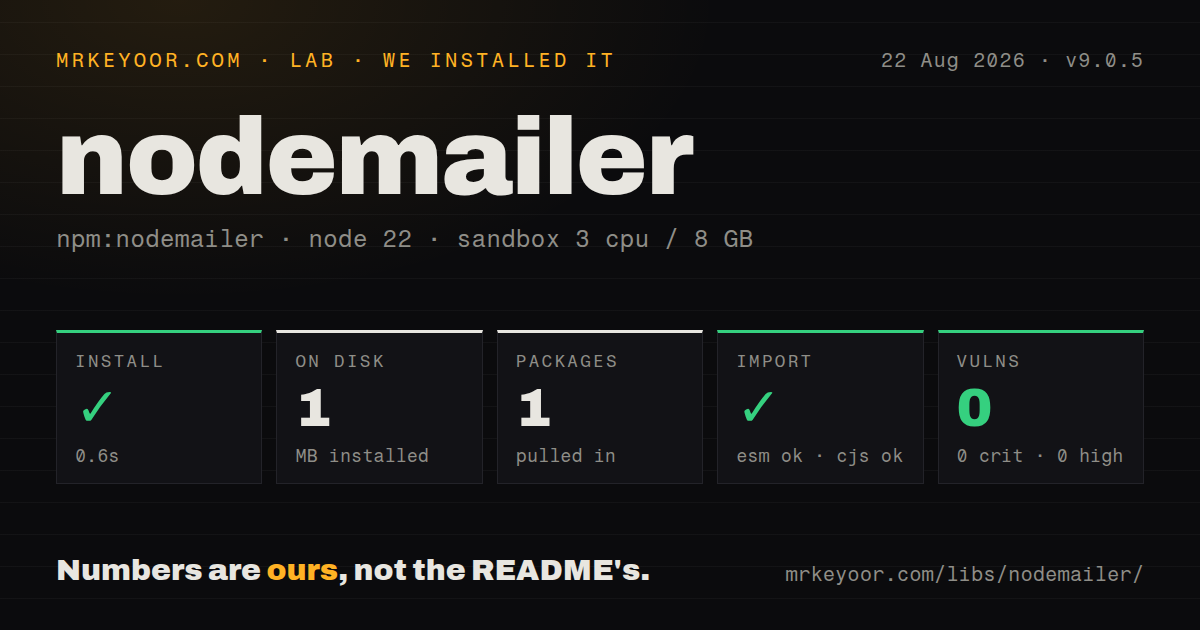
| Install | ✓ · 0.6s | 1 package on disk · 1 MB |
| Import | ✓ | ESM import works · require() works · CommonJS package |
| Browser | n/a | could not be bundled for the browser (Node-only code, most likely) |
| Types | — | no TypeScript types found |
| Known vulns | 0 | 0 critical · 0 high · 0 moderate · 0 low (npm audit) |
Answers from our run
Does nodemailer install cleanly?
Yes. In a fresh container with an empty cache, npm install nodemailer finished in 0.6s, leaving 1 package and 1 MB on disk. npm audit reported no known vulnerabilities.
Can nodemailer run in a browser?
Not directly: esbuild could not bundle it for the browser in our run, which normally means it depends on Node built-ins. Use it on the server, or find a browser-targeted alternative.
Does nodemailer work with both ESM and CommonJS?
Yes. Both import 'nodemailer' and require('nodemailer') worked in Node 22 in our run. The package is published as CommonJS.
Does nodemailer include TypeScript types?
No type declarations were found in our install, so TypeScript users need their own declarations.
nodemailer or resend: which should you use?
resend: Choose it when a provider-owned HTTP API, React email workflow, and serverless-friendly transport are worth committing to Resend. Nodemailer 9.0.5 remains a sensible SMTP client for Node services that already own provider credentials and delivery operations.
When should you not use nodemailer?
The runtime is a browser or edge worker. Our esbuild browser bundle failed, consistent with Nodemailer's dependence on Node networking, TLS, DNS, streams, and filesystem modules
Use it if
- Your Node service sends transactional mail through a standard SMTP endpoint and should remain portable between providers
- Messages need MIME attachments, inline images, internationalized addresses, custom headers, or DKIM signing without hand-building wire text
- You run enough sends to benefit from SMTP connection pooling and can manage queueing, retry policy, and provider limits yourself
- Local development needs stream output or an Ethereal preview before any message reaches a real recipient
- The runtime is a browser or edge worker. Our esbuild browser bundle failed, consistent with Nodemailer's dependence on Node networking, TLS, DNS, streams, and filesystem modules
- You need campaigns, templates, suppression lists, analytics, bounce webhooks, or delivery reputation tooling. Nodemailer only prepares and submits messages
- Outbound SMTP is blocked on your host or serverless platform. A provider's HTTPS SDK avoids port 465 and 587 restrictions
- First-party TypeScript declarations are required. Our package inspection found none, and the README directs type questions to @types/nodemailer maintainers
- You plan to fix TLS errors with rejectUnauthorized: false. That disables certificate verification; repair the certificate chain, host name, or SMTP configuration instead
Setup reality
We installed Nodemailer 9.0.5 in a fresh Node 22 Bookworm container with no cache. npm completed in 0.6 seconds and left one package taking 1 MB on disk. The package is 776 KB unpacked with zero direct and zero peer dependencies. npm audit reported zero known vulnerabilities. It is CommonJS without an exports map; require() and ESM import both worked. No TypeScript declarations were present. The package metadata still declares Node >=6.0.0.
SMTP setup is the work. You need a host, port, authenticated user, secret or OAuth2 token, and an allowed sender identity. Port 465 uses secure: true from the first byte. Port 587 normally uses secure: false and upgrades through STARTTLS, so false does not mean plaintext delivery. verify() checks connectivity and authentication before the first send, though it cannot guarantee that a particular envelope sender or recipient will pass provider policy. Keep secrets outside source and rotate them like other production credentials.
Firewalls, hosting providers, and ISPs commonly block SMTP ports, producing ETIMEDOUT before Nodemailer can authenticate. Gmail usually needs OAuth2 or an app password and may rewrite the From address to the authenticated account. TLS failures can come from an incorrect secure setting, an old SMTP endpoint, hostname mismatch, or local antivirus interception. When connecting to an IP address, set tls.servername to the certificate's DNS name. Do not make rejectUnauthorized false a permanent workaround.
The browser bundle could not be built by esbuild, which is a useful platform boundary rather than a packaging nuisance. Keep mail submission on a trusted Node server. For bursts, set pool: true and reuse the transporter; close it during shutdown so sockets do not hold the process open. Attachments can stream from disk or remote URLs, but untrusted message objects should set disableFileAccess and disableUrlAccess to stop templates from turning paths or URLs into data exfiltration.
Patterns
Configure an SMTP relay create-smtp-transport
import nodemailer from "nodemailer";

const mailer = nodemailer.createTransport({
  host: "smtp.example.com",
  port: 587,
  secure: false,
  auth: {
    user: process.env.SMTP_USER,
    pass: process.env.SMTP_PASSWORD,
  },
});
Use secure: true for port 465. Port 587 normally starts plain and upgrades with STARTTLS even though secure is false.
Check SMTP access before sending verify-smtp
try {
  await mailer.verify();
  console.log("SMTP is ready");
} catch (error) {
  console.error("SMTP check failed", error);
}
verify checks DNS, connection, TLS, and authentication. Provider policy can still reject a later From address or recipient.
Send matching text and HTML bodies send-text-and-html
const info = await mailer.sendMail({
  from: { name: "Acme Billing", address: "billing@example.com" },
  to: "ada@example.net",
  subject: "Receipt 42",
  text: "Your receipt is ready.",
  html: "<p>Your receipt is ready.</p>",
});
console.log(info.messageId);
The SMTP server decides whether the sender is authorized. A text alternative helps clients and filters that do not consume HTML.
Attach generated file content attach-buffer
await mailer.sendMail({
  from: "billing@example.com",
  to: "ada@example.net",
  subject: "CSV export",
  text: "The export is attached.",
  attachments: [{
    filename: "accounts.csv",
    content: Buffer.from("id,email\n42,ada@example.net\n"),
    contentType: "text/csv",
  }],
});
Buffers and streams avoid writing temporary files. Account for provider message-size limits after MIME encoding.
Reference an attachment from HTML embed-inline-image
await mailer.sendMail({
  from: "hello@example.com",
  to: "ada@example.net",
  subject: "Welcome",
  html: '<p>Welcome</p><img src="cid:logo@example" alt="Acme">',
  attachments: [{ filename: "logo.png", path: "./logo.png", cid: "logo@example" }],
});
The cid must match the HTML reference and should be unique inside the message. Inline files still count toward total message size.
Preview mail in an Ethereal inbox preview-with-ethereal
const account = await nodemailer.createTestAccount();
const testMailer = nodemailer.createTransport({
  host: account.smtp.host,
  port: account.smtp.port,
  secure: account.smtp.secure,
  auth: { user: account.user, pass: account.pass },
});
const info = await testMailer.sendMail({ from: "dev@example.com", to: "test@example.net", subject: "Preview", text: "Hello" });
console.log(nodemailer.getTestMessageUrl(info));
Ethereal captures the message instead of delivering it. The returned URL displays the rendered MIME output for development checks.
Reuse connections for a send queue pool-smtp-connections
const pooledMailer = nodemailer.createTransport({
  pool: true,
  host: "smtp.example.com",
  port: 465,
  secure: true,
  maxConnections: 4,
  maxMessages: 80,
  auth: { user: process.env.SMTP_USER, pass: process.env.SMTP_PASSWORD },
});

process.on("SIGTERM", () => pooledMailer.close());
Pooling saves SMTP handshakes. Queue pressure and provider rate limits remain application concerns, and close releases open sockets.
Separate headers from the SMTP envelope set-envelope
await mailer.sendMail({
  from: "Support <support@example.com>",
  to: "ada@example.net",
  subject: "Ticket update",
  text: "Your ticket changed.",
  envelope: {
    from: "bounces@example.com",
    to: ["ada@example.net"],
  },
});
Bounce handling follows the envelope sender, while users see the From header. Your provider must authorize both identities.
Apply a DKIM signature sign-with-dkim
const signedMailer = nodemailer.createTransport({
  ...smtpOptions,
  dkim: {
    domainName: "example.com",
    keySelector: "mail2026",
    privateKey: process.env.DKIM_PRIVATE_KEY,
  },
});
Publish the matching public key at mail2026._domainkey.example.com. Keep the private key out of source and normalize line breaks when loading it from an environment variable.
Authenticate with an OAuth2 access token send-oauth2-smtp
const gmailMailer = nodemailer.createTransport({
  service: "gmail",
  auth: {
    type: "OAuth2",
    user: process.env.GMAIL_USER,
    accessToken: process.env.GMAIL_ACCESS_TOKEN,
  },
});
A static access token expires. Production OAuth2 setup needs refresh-token handling or a provision callback that supplies fresh tokens.
Block file and URL reads from message data harden-untrusted-message
await mailer.sendMail({
  ...untrustedMessageFields,
  from: "notifications@example.com",
  disableFileAccess: true,
  disableUrlAccess: true,
});
Enable both flags when templates or API input can influence attachments or content. They prevent path and URL values from reading local or remote data.
Generate MIME without delivering it stream-generated-message
const streamMailer = nodemailer.createTransport({ streamTransport: true, buffer: true });
const info = await streamMailer.sendMail({
  from: "a@example.com",
  to: "b@example.net",
  subject: "Archive copy",
  text: "Stored as MIME.",
});
const rawMessage = info.message;
Stream transport builds the message but does not submit it. With buffer: true, info.message is a Buffer suitable for tests or archival.
Alternatives
| Package | Registry | Pick it when |
|---|---|---|
| resend | npm | Choose it when a provider-owned HTTP API, React email workflow, and serverless-friendly transport are worth committing to Resend |
| postmark | npm | Choose it for transactional delivery through Postmark's API with provider templates, message streams, and delivery events |
| @sendgrid/mail | npm | Choose it when SendGrid already owns delivery, templates, suppression handling, and account analytics for the application |
More infra guides
semver · boto3 · opentelemetry-api · @opentelemetry/api · psutil · distro · the whole shelf →
How this guide is made: grounded in the library's documentation, release notes, changelog, and issue history, on a fixed rubric — not a hands-on install of every release. The 50 most-downloaded entries are additionally install-verified in clean containers. Corrections: contact the desk.