react-clientside-effect review
Our test found a client-only registry hidden behind a React higher-order component. react-clientside-effect 1.2.8 collects props from every mounted instance of one generated wrapper, reduces that list, and passes the result to a handler after mounts, updates, and unmounts. It can coordinate document title, body classes, scroll locks, or theme attributes across scattered marker components. It does nothing during server rendering and supplies no policy for precedence, cleanup, refs, or types.
react-clientside-effect 1.2.8 installed in 0.9 seconds but added a 9.8 KB minified browser bundle and no TypeScript declarations in our sandbox. Keep it for client-only marker components that truly aggregate across the tree; ordinary application effects belong in useEffect or a focused package.
We installed it
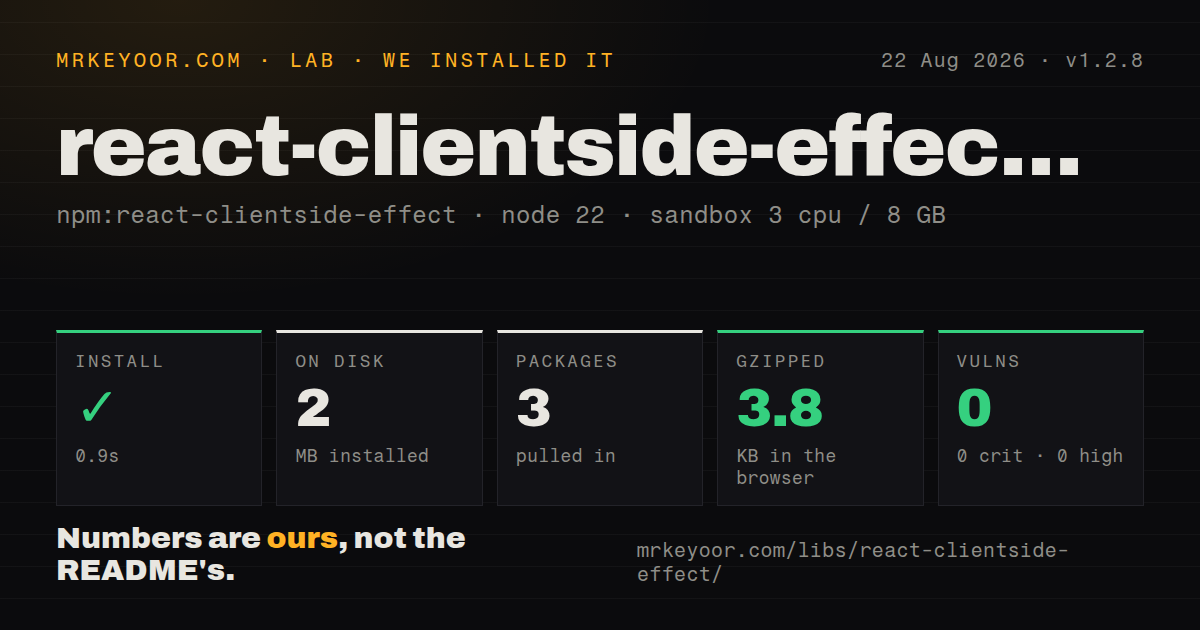
| Install | ✓ · 0.9s | 3 packages on disk · 2 MB |
| Import | ✓ | ESM import works · require() works · CommonJS package |
| Browser | 3.8 KB | gzipped (9.8 KB minified), bundled with esbuild |
| Types | — | no TypeScript types found |
| Known vulns | 0 | 0 critical · 0 high · 0 moderate · 0 low (npm audit) |
Answers from our run
Does react-clientside-effect install cleanly?
Yes. In a fresh container with an empty cache, npm install react-clientside-effect finished in 0.9s, leaving 3 packages and 2 MB on disk. npm audit reported no known vulnerabilities.
How much does react-clientside-effect add to a browser bundle?
3.8 KB gzipped (9.8 KB minified) when the whole package is bundled for the browser with esbuild. Importing only part of it is usually smaller.
Does react-clientside-effect work with both ESM and CommonJS?
Yes. Both import 'react-clientside-effect' and require('react-clientside-effect') worked in Node 22 in our run. The package is published as CommonJS.
Does react-clientside-effect include TypeScript types?
No type declarations were found in our install, so TypeScript users need their own declarations.
react-clientside-effect or react-helmet-async: which should you use?
react-helmet-async: Use it for document title and head tags with request-scoped server rendering. react-clientside-effect 1.2.8 installed in 0.9 seconds but added a 9.8 KB minified browser bundle and no TypeScript declarations in our sandbox.
When should you not use react-clientside-effect?
One component owns the effect; useEffect gives clearer local cleanup without a hidden shared registry
Use it if
- Several mounted markers must contribute to one browser-global effect
- A component library needs a declarative wrapper for body state or scroll locking
- Committed lifecycle effects and React 16.8 through 19 peer support fit an existing HOC design
- You can make reduction order, empty-state cleanup, and Strict Mode repetition explicit
- One component owns the effect; useEffect gives clearer local cleanup without a hidden shared registry
- Head tags must render on the server; the README says this package performs no server-side collection
- Tree position determines precedence; the reducer receives registration order rather than a documented React ancestry traversal
- Bundled TypeScript declarations are required; our install found none in version 1.2.8
- Consumers need forwarded refs or hooks; the generated class spreads props but exposes neither facility
Setup reality
Our clean Node 22 install of react-clientside-effect 1.2.8 took 0.9 seconds. It left 3 packages and 2 MB on disk, with 1 direct dependency and 1 React peer. npm audit reported 0 known vulnerabilities. The package is 36 KB unpacked under MIT. require() and ESM import worked, but there is no exports map and our install found no TypeScript declarations.
The direct dependency is @babel/runtime, while React must already satisfy ^16.8, ^17, ^18, or ^19. No provider, credential, native build, stylesheet, or config file is involved. The README examples mistakenly import react-side-effect and show a server mapper in the signature; the shipped client package takes the reducer and client handler, then wraps a component.
Each HOC factory call creates one mounted-instance array shared by every use of that generated component, including separate React roots. componentDidMount registers, componentDidUpdate recalculates, and componentWillUnmount removes the instance. Registration order is not guaranteed to match conceptual nesting, so include an explicit priority when last-wins behavior matters. The wrapper extends PureComponent, making in-place prop mutation easy to miss.
Our browser probe measured 9.8 KB minified and 3.8 KB gzipped. The handler must tolerate duplicate development calls under Strict Mode and must undo old global state when the reduced list becomes empty. A one-way handler such as incrementing a counter will drift. Refs are not forwarded to the wrapped component, and server rendering never populates the registry or emits an aggregate.
Patterns
Implement create document title create-document-title
import withClientSideEffect from 'react-clientside-effect';

function TitleMarker() { return null; }

export const DocumentTitle = withClientSideEffect(
  (items) => items.at(-1)?.title ?? '',
  (title) => { document.title = title; }
)(TitleMarker);
This create document title example runs only after a client commit in version 1.2.8. Its handler must restore the global target when no marker remains.
Implement render title marker render-title-marker
function BillingScreen() {
  return (
    <>
      <DocumentTitle title="Billing" />
      <main>...</main>
    </>
  );
}
This render title marker example runs only after a client commit in version 1.2.8. Its handler must restore the global target when no marker remains.
Implement merge body styles merge-body-styles
const BodyStyle = withClientSideEffect(
  (items) => Object.assign({}, ...items.map((item) => item.style)),
  (style) => {
    document.body.style.backgroundColor = style.backgroundColor || '';
    document.body.style.overflow = style.overflow || '';
  }
)(() => null);
This merge body styles example runs only after a client commit in version 1.2.8. Its handler must restore the global target when no marker remains.
Implement lock body scroll lock-body-scroll
const ScrollLock = withClientSideEffect(
  (items) => items.some((item) => item.enabled),
  (locked) => {
    document.body.style.overflow = locked ? 'hidden' : '';
  }
)(() => null);

<ScrollLock enabled={isModalOpen} />
This lock body scroll example runs only after a client commit in version 1.2.8. Its handler must restore the global target when no marker remains.
Implement toggle body class toggle-body-class
const BodyFlag = withClientSideEffect(
  (items) => items.some((item) => item.active),
  (active) => document.body.classList.toggle('has-overlay', active)
)(() => null);
This toggle body class example runs only after a client commit in version 1.2.8. Its handler must restore the global target when no marker remains.
Implement set theme attribute set-theme-attribute
const ThemeMarker = withClientSideEffect(
  (items) => items.reduce(
    (best, item) => !best || item.priority > best.priority ? item : best,
    null
  )?.theme ?? null,
  (theme) => {
    if (theme) document.documentElement.dataset.theme = theme;
    else delete document.documentElement.dataset.theme;
  }
)(() => null);
This set theme attribute example runs only after a client commit in version 1.2.8. Its handler must restore the global target when no marker remains.
Implement aggregate class names aggregate-class-names
const managed = new Set(['route-dark', 'route-wide', 'route-print']);

const BodyClasses = withClientSideEffect(
  (items) => new Set(items.flatMap((item) => item.classes || [])),
  (active) => {
    for (const name of managed) {
      document.body.classList.toggle(name, active.has(name));
    }
  }
)(() => null);
This aggregate class names example runs only after a client commit in version 1.2.8. Its handler must restore the global target when no marker remains.
Implement wrap children wrap-children
import { Children } from 'react';

function Marker({ children }) {
  return children ? Children.only(children) : null;
}

const BodyMode = withClientSideEffect(
  (items) => items.at(-1)?.mode ?? 'default',
  applyBodyMode
)(Marker);
This wrap children example runs only after a client commit in version 1.2.8. Its handler must restore the global target when no marker remains.
Implement cleanup empty state cleanup-empty-state
const reduceBanner = (items) =>
  items.length ? items[items.length - 1].message : null;

const applyBanner = (message) => {
  if (message) showGlobalBanner(message);
  else hideGlobalBanner();
};

const BannerMarker = withClientSideEffect(reduceBanner, applyBanner)(() => null);
This cleanup empty state example runs only after a client commit in version 1.2.8. Its handler must restore the global target when no marker remains.
Implement inspect in test inspect-in-test
const view = render(
  <>
    <BodyFlag active={false} />
    <BodyFlag active />
  </>
);

expect(BodyFlag.peek()).toBe(true);
view.unmount();
This inspect in test example runs only after a client commit in version 1.2.8. Its handler must restore the global target when no marker remains.
Implement pass immutable props pass-immutable-props
const style = useMemo(
  () => ({ backgroundColor: dark ? '#111' : '#fff' }),
  [dark]
);

return <BodyStyle style={style} />;
This pass immutable props example runs only after a client commit in version 1.2.8. Its handler must restore the global target when no marker remains.
Implement declare types declare-types
declare module 'react-clientside-effect' {
  import type { ComponentType } from 'react';
  export default function withClientSideEffect<P, S>(
    reduce: (props: P[]) => S,
    apply: (state: S) => void
  ): (component: ComponentType<P>) => ComponentType<P> & { peek(): S };
}
This declare types example runs only after a client commit in version 1.2.8. Its handler must restore the global target when no marker remains.
Alternatives
| Package | Registry | Pick it when |
|---|---|---|
| react-helmet-async | npm | Use it for document title and head tags with request-scoped server rendering |
| react-side-effect | npm | Use it only for established code that depends on its server peek and rewind model |
| @react-hookz/web | npm | Use it when one maintained browser hook can own the effect without cross-tree aggregation |
More web frontend guides
postcss · react · react-dom · tailwindcss · clsx · htmlparser2 · the whole shelf →
How this guide is made: grounded in the library's documentation, release notes, changelog, and issue history, on a fixed rubric — not a hands-on install of every release. The 50 most-downloaded entries are additionally install-verified in clean containers. Corrections: contact the desk.