pyodbc review
pyodbc 5.3.0 is a compiled DB-API 2.0 adapter for ODBC data sources. Python gets connections, cursors, qmark parameters, transactions, and catalog calls, while an operating-system driver manager and a vendor driver handle the database protocol. That split lets the same API reach SQL Server, DB2, Oracle, PostgreSQL, MySQL, and other sources. It also explains our result: pip installed one 1 MB package, but `import pyodbc` failed because `libodbc.so.2` was absent. Version 5.3.0 adds Python 3.14 wheels, drops Python 3.8, improves Homebrew detection, and fixes a NULL-pointer type check.
pyodbc 5.3.0 installed in 0.2 seconds but could not import in our sandbox because `libodbc.so.2` was missing. Install it only when you can own the ODBC manager, vendor driver, TLS configuration, and blocking-call model; a green pip step alone proves very little.
We installed it
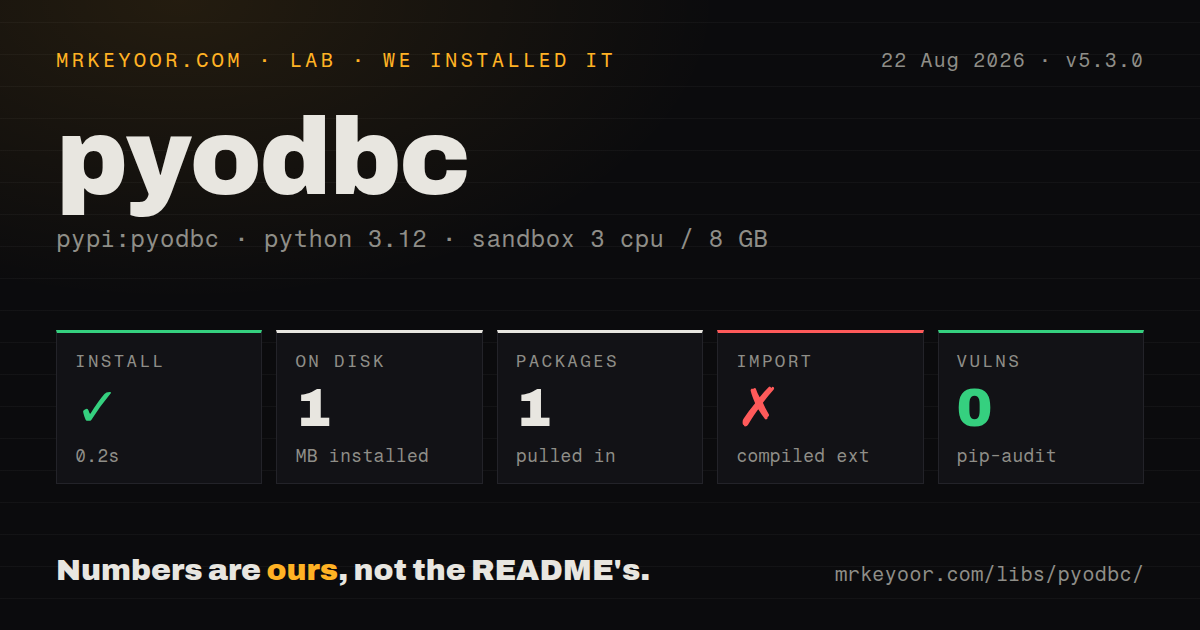
| Install | ✓ · 0.2s | 1 package on disk · 1 MB |
| Import | ✗ | import pyodbc · compiled extensions · requires Python >=3.9 |
| Known vulns | 0 | (pip-audit) |
Answers from our run
Does pyodbc install cleanly?
Yes. In a fresh container with an empty cache, pip install pyodbc finished in 0.2s, leaving 1 package and 1 MB on disk. pip-audit reported no known vulnerabilities.
What does pyodbc need to run?
Python >=3.9, and a platform wheel with compiled extensions. In our run import pyodbc failed, so it needs extra system packages.
pyodbc or mssql-python: which should you use?
mssql-python: Use Microsoft's newer SQL Server driver when its bundled connectivity model fits a new deployment. pyodbc 5.3.0 installed in 0.2 seconds but could not import in our sandbox because libodbc.so.2 was missing.
When should you not use pyodbc?
Operating-system packages cannot be added. Our successful wheel installation was followed by an import failure for missing libodbc.so.2, before a connection was possible.
Use it if
- SQL Server or Azure SQL is the target and the deployment already standardizes on Microsoft's ODBC driver.
- One DB-API surface must connect to several enterprise systems that already have approved ODBC drivers.
- Windows machines manage DSNs and registered drivers through existing operating-system administration.
- Cross-vendor catalog methods such as `tables()`, `columns()`, and `primaryKeys()` are useful for inspection tooling.
- Operating-system packages cannot be added. Our successful wheel installation was followed by an import failure for missing `libodbc.so.2`, before a connection was possible.
- The service needs native asyncio calls and cannot run blocking database work in threads. pyodbc exposes a synchronous DB-API.
- Only PostgreSQL or MySQL is in scope and a native driver provides clearer vendor types without an ODBC manager layer.
- You expect pip to install the database driver. Unix systems still need unixODBC and every platform needs the appropriate vendor driver.
- The schema depends heavily on vendor types such as SQL Server `DATETIMEOFFSET`, geography, or custom values that require converter code.
Setup reality
We installed pyodbc 5.3.0 in a fresh Python 3.12 Bookworm sandbox. pip reported success in 0.2 seconds and left one package using 1 MB. The wheel had 0 direct Python dependencies, required Python 3.9 or newer, included compiled .so code, carried an MIT license, and had no py.typed marker. pip-audit found 0 known vulnerabilities. import pyodbc failed with ImportError: libodbc.so.2: cannot open shared object file: No such file or directory.
A wheel does not bundle the ODBC manager. Debian-family images need the unixODBC runtime; source builds also need headers and a C++ compiler. Homebrew commonly supplies unixODBC on macOS, while Windows includes its manager. Install the target database's driver separately. pyodbc.drivers() lists the exact registered names visible to the process, and a DRIVER={...} connection string must use one of them. DSNs are optional and move driver, server, and database settings into host configuration.
Microsoft ODBC Driver 18 for SQL Server enables encrypted connections by default. Development servers with untrusted certificates fail until you install a trusted certificate or explicitly set TrustServerCertificate=yes for that environment. Keep passwords or access tokens outside checked-in strings. Value placeholders use ?; they cannot bind table or column identifiers. Autocommit defaults off, so call commit() or rollback(). Closing a connection with pending writes rolls them back.
Database calls block the calling thread. The timeout argument to connect() covers login, while connection.timeout applies to statements when the driver honors it. Avoid sharing a connection casually between threads. fast_executemany can cut batch round trips, but it buffers parameters and behaves differently across drivers. Test it with the exact manager, vendor library, CPU architecture, TLS settings, and license acceptance used in the deployment image.
Patterns
List drivers visible to Python check-drivers
import pyodbc
print(pyodbc.drivers())
print(pyodbc.dataSources())
Run this after import succeeds. An empty list means the manager cannot see a registered vendor driver.
Open a SQL Server connection connect-sql-server
conn = pyodbc.connect(
    'DRIVER={ODBC Driver 18 for SQL Server};SERVER=db;DATABASE=app;UID=user;PWD=secret;Encrypt=yes',
    timeout=5,
)
The driver label must exactly match `pyodbc.drivers()`; keep the password outside source code.
Bind values with qmark placeholders parameterize-query
cursor = conn.cursor()
cursor.execute('SELECT id, email FROM users WHERE email = ? AND active = ?', email, 1)
row = cursor.fetchone()
Question marks bind values only. Whitelist identifiers rather than interpolating user text.
Commit or roll back a unit of work commit-transaction
try:
    conn.execute('UPDATE accounts SET balance = balance - ? WHERE id = ?', 100, 1)
    conn.execute('UPDATE accounts SET balance = balance + ? WHERE id = ?', 100, 2)
    conn.commit()
except pyodbc.Error:
    conn.rollback()
    raise
Autocommit is off unless requested, and closing an uncommitted connection discards its writes.
Batch inserts with fast executemany bulk-insert
cursor = conn.cursor()
cursor.fast_executemany = True
cursor.executemany('INSERT INTO users (id, email) VALUES (?, ?)', rows)
conn.commit()
Memory use and support depend on the vendor driver, so benchmark bounded batches in the real image.
Convert rows to dictionaries map-rows
cursor.execute('SELECT id, email FROM users')
columns = [item[0] for item in cursor.description]
rows = [dict(zip(columns, row)) for row in cursor.fetchall()]
Rows allow numeric positions and attribute-style column access, not dictionary string subscripts.
Classify a database exception handle-sqlstate
try:
    cursor.execute(sql, params)
except pyodbc.Error as exc:
    sqlstate = exc.args[0] if exc.args else None
    print(sqlstate)
    raise
Use SQLSTATE before matching vendor message text, and roll back a failed transaction before reuse.
Limit statement execution time set-query-timeout
conn = pyodbc.connect(conn_str, timeout=5)
conn.timeout = 30
cursor = conn.cursor()
cursor.execute('SELECT * FROM large_table')
`connect(..., timeout=5)` limits login; `conn.timeout` is the separate statement limit.
Use an administrator-managed DSN connect-with-dsn
conn = pyodbc.connect(
    'DSN=Reporting;UID=reader;PWD=' + password,
    timeout=5,
)
The DSN must exist in the driver manager visible to this process; user and system DSNs are different scopes.
Read column metadata inspect-columns
cursor = conn.cursor()
for column in cursor.columns(table='users', schema='dbo'):
    print(column.column_name, column.type_name, column.nullable)
Catalog results and identifier casing vary by driver, so do not assume every vendor populates every field.
Close cursor and connection explicitly close-resources
cursor = conn.cursor()
try:
    cursor.execute('SELECT 1')
    print(cursor.fetchone()[0])
finally:
    cursor.close()
    conn.close()
Closing a connection rolls back pending work when autocommit is disabled; commit successful writes first.
Decode a vendor-specific value add-output-converter
def decode_binary(value):
    return bytes(value) if value is not None else None

conn.add_output_converter(pyodbc.SQL_VARBINARY, decode_binary)
row = conn.execute('SELECT payload FROM events WHERE id = ?', event_id).fetchone()
Converters are registered per connection and receive raw bytes; test nulls and the exact driver type code.
Alternatives
| Package | Registry | Pick it when |
|---|---|---|
| mssql-python | PyPI | Use Microsoft's newer SQL Server driver when its bundled connectivity model fits a new deployment. |
| sqlalchemy | PyPI | Use it for pooling and SQL composition, knowing its SQL Server dialect may still call pyodbc underneath. |
| psycopg | PyPI | Use it when PostgreSQL is the sole target and native protocol behavior is preferable. |
| aioodbc | PyPI | Use it when asyncio integration is needed and thread-backed ODBC calls are acceptable. |
More data guides
numpy · pandas · fsspec · pyarrow · lxml · sqlalchemy · the whole shelf →
How this guide is made: grounded in the library's documentation, release notes, changelog, and issue history, on a fixed rubric — not a hands-on install of every release. The 50 most-downloaded entries are additionally install-verified in clean containers. Corrections: contact the desk.