PyMySQL review
Our Python 3.12 install left a 1 MB pure-Python MySQL client that imported successfully in 0.14 seconds. PyMySQL implements Python's DB-API 2.0 for MySQL and MariaDB, so applications open a connection, execute parameterized SQL through cursors, fetch rows, and commit or roll back transactions. It has no compiled extension, which makes deployment predictable on systems without MySQL client headers. Version 1.2 changes TLS negotiation, stops ping() from reconnecting by default, exposes SQLSTATE on protocol exceptions, accepts MySQL 8 alias syntax in executemany inserts, and rejects non-finite Decimal parameters.
PyMySQL is a sensible portable DB-API driver when install simplicity matters more than peak decoding speed. Version 1.2 deserves a deliberate rollout because TLS behavior, ping(), deprecated connection arguments, and error details changed.
We installed it
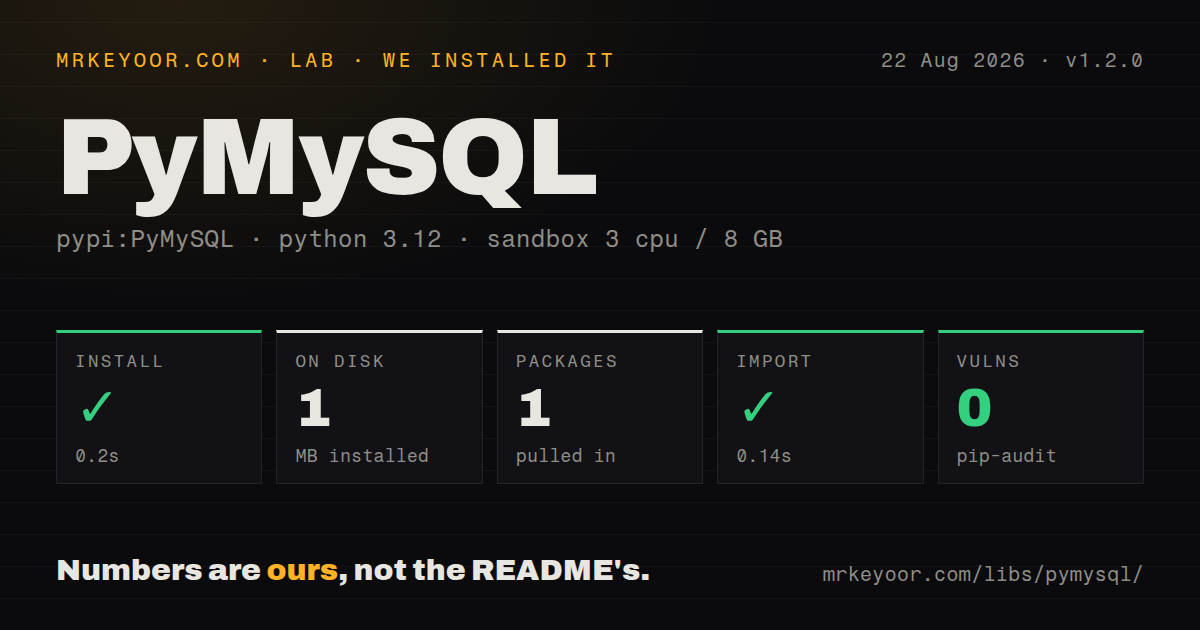
| Install | ✓ · 0.2s | 1 package on disk · 1 MB |
| Import | ✓ | import pymysql in 0.14s · pure Python · requires Python >=3.9 |
| Known vulns | 0 | (pip-audit) |
Answers from our run
Does PyMySQL install cleanly?
Yes. In a fresh container with an empty cache, pip install PyMySQL finished in 0.2s, leaving 1 package and 1 MB on disk. pip-audit reported no known vulnerabilities.
What does PyMySQL need to run?
Python >=3.9, and nothing compiled: it is pure Python. In our run import pymysql succeeded in 0.14s.
PyMySQL or mysqlclient: which should you use?
mysqlclient: Choose it when a compiled DB-API driver and faster row processing fit the deployment. PyMySQL is a sensible portable DB-API driver when install simplicity matters more than peak decoding speed.
When should you not use PyMySQL?
Query and row-decoding throughput dominates and a C extension is acceptable; mysqlclient is the better benchmark candidate
Use it if
- You need a DB-API MySQL driver that installs without a compiler or libmysqlclient
- Your SQLAlchemy or Django deployment values portable wheels and readable Python protocol code over maximum row-decoding speed
- You need DictCursor for mapping rows or SSCursor for reading a large result without buffering it all
- Your target is a supported MySQL or MariaDB LTS release on CPython 3.9 or newer or current PyPy
- Query and row-decoding throughput dominates and a C extension is acceptable; mysqlclient is the better benchmark candidate
- Your server code is asyncio; PyMySQL performs blocking socket work, while aiomysql supplies an async interface based on its protocol code
- You expect the driver to pool connections; PyMySQL opens connections and leaves pooling to SQLAlchemy or another layer
- You plan to share one connection across threads; DB-API threadsafety level 1 permits sharing the module, not connection objects
- You cannot review the 1.2 TLS and liveness changes; configured SSL now requires TLS, and ping() no longer reconnects unless old behavior is explicitly requested
Setup reality
Our fresh Python 3.12 installation of PyMySQL 1.2.0 completed in 0.2 seconds. One package occupied 1 MB, and pip-audit reported zero known vulnerabilities. The distribution declares two direct dependencies, requires Python 3.9 or later, and is pure Python. It does not ship py.typed, and its package metadata did not state a license. import pymysql succeeded in 0.14 seconds.
A username, password, host, and database normally come from your deployment's secret store. Use database and password keyword arguments; db and passwd now emit DeprecationWarning. MySQL's sha256_password and caching_sha2_password authentication need the rsa extra. MariaDB ed25519 authentication needs the ed25519 extra. Choose utf8mb4 explicitly when the application must store the full Unicode range.
Autocommit is off unless you enable it. A successful INSERT followed by connection close is not durable without commit(), so put transaction boundaries in code and roll back exceptions. Parameters use DB-API %s placeholders even for non-string values. Pass values separately as a tuple or mapping; interpolating SQL with f-strings gives attackers control of the statement.
Version 1.2 prefers TLS when the server supports it. Supplying verification, a context, or other SSL settings makes TLS required and raises OperationalError if the server cannot negotiate it. Use ssl_disabled only when a trusted local transport or proxy owns encryption. connect_timeout has a finite default, while read_timeout and write_timeout default to no limit. Long-lived services need explicit timeouts and a pool that replaces dead connections because ping() now avoids implicit reconnection.
Patterns
Open a dictionary-row connection connect-database
import pymysql.cursors

conn = pymysql.connect(
    host='db.internal', user='app', password=secret, database='shop',
    charset='utf8mb4', cursorclass=pymysql.cursors.DictCursor,
)
Use database and password; the older db and passwd names warn in version 1.2.
Bind values separately from SQL query-parameters
with conn.cursor() as cursor:
    cursor.execute(
        'SELECT id, email FROM users WHERE email = %s',
        (email,),
    )
    user = cursor.fetchone()
A one-value tuple needs the comma. Do not use Python formatting or f-strings for untrusted values.
Commit writes or roll them back commit-transaction
try:
    with conn.cursor() as cursor:
        cursor.execute('UPDATE stock SET count = count - %s WHERE sku = %s', (1, sku))
    conn.commit()
except Exception:
    conn.rollback()
    raise
Autocommit is disabled by default, and closing a connection does not preserve uncommitted changes.
Batch compatible inserts insert-many
rows = [('a@example.com',), ('b@example.com',)]
with conn.cursor() as cursor:
    cursor.executemany('INSERT INTO users (email) VALUES (%s)', rows)
conn.commit()
PyMySQL combines recognized INSERT VALUES calls; other statement shapes may execute once per row.
Read rows without buffering the result stream-query
from pymysql.cursors import SSDictCursor

with conn.cursor(SSDictCursor) as cursor:
    cursor.execute('SELECT id, payload FROM events ORDER BY id')
    for row in cursor:
        consume(row)
Finish or close the streaming cursor before issuing another query on the same connection.
Classify a duplicate key handle-duplicate
try:
    cursor.execute('INSERT INTO users (email) VALUES (%s)', (email,))
except pymysql.err.IntegrityError as error:
    if error.args[0] == 1062:
        raise EmailExists from error
    raise
Match the numeric server error code rather than text that can vary by server or locale.
Verify the database certificate require-tls
conn = pymysql.connect(
    host='db.example.com', user='app', password=secret, database='shop',
    ssl_ca='/etc/ssl/certs/private-ca.pem',
    ssl_verify_cert=True, ssl_verify_identity=True,
)
In 1.2, supplying SSL options requires TLS and fails if the server cannot negotiate it.
Bound connection and socket waits set-timeouts
conn = pymysql.connect(
    host='db.internal', user='app', password=secret, database='shop',
    connect_timeout=5, read_timeout=30, write_timeout=30,
)
Read and write timeouts otherwise have no limit, so a stalled server can hold a worker.
Replace a dead connection explicitly check-connection
try:
    conn.ping()
except pymysql.err.Error:
    conn.close()
    conn = open_connection()
Version 1.2 changed ping() to avoid reconnecting by default and deprecated its reconnect argument.
Support modern password plugins install-auth-extra
python -m pip install 'PyMySQL[rsa]'
# MariaDB ed25519 instead:
python -m pip install 'PyMySQL[ed25519]'
The base install may fail authentication when the server selects a plugin whose crypto dependency is optional.
Put SQLAlchemy pooling in front use-sqlalchemy-pool
from sqlalchemy import create_engine

engine = create_engine(
    database_url, pool_pre_ping=True, pool_recycle=300,
    pool_size=5, max_overflow=5,
)
PyMySQL itself does not provide a connection pool. Choose recycle settings from the server's idle timeout.
Preview escaped SQL while debugging inspect-sql
sql = cursor.mogrify(
    'SELECT id FROM users WHERE email = %s AND active = %s',
    (email, True),
)
print(sql)
The rendered text contains parameter values, so keep it out of production logs when queries include secrets or personal data.
Alternatives
| Package | Registry | Pick it when |
|---|---|---|
| mysqlclient | PyPI | Choose it when a compiled DB-API driver and faster row processing fit the deployment |
| mysql-connector-python | PyPI | Choose Oracle's driver when vendor documentation and its optional acceleration matter |
| aiomysql | PyPI | Choose it for asyncio services that need nonblocking MySQL calls |
More data guides
numpy · pandas · fsspec · pyarrow · lxml · sqlalchemy · the whole shelf →
How this guide is made: grounded in the library's documentation, release notes, changelog, and issue history, on a fixed rubric — not a hands-on install of every release. The 50 most-downloaded entries are additionally install-verified in clean containers. Corrections: contact the desk.