pygments review
Pygments 2.21.0 is a Python syntax highlighter that labels source text with lexical token types, then gives those tokens to formatters for HTML, terminal color, LaTeX, SVG, images, and other outputs. Its README says it handles more than 500 languages and text formats. It does not build an AST or decide whether code is valid. The 2.21.0 release adds BitBake, Caddyfile, CEL, and PureScript lexers plus the Night Owl style. It also supports Python 3.15, fixes catastrophic backtracking in XML detection, and leaves quote characters literal in HTML formatter output. In our sandbox, `import pygments` worked in 0.01 seconds; the distribution is pure Python and has no `py.typed` marker.
Our Pygments 2.21.0 install finished in 0.3 seconds, occupied 6 MB, imported in 0.01 seconds, and showed 0 known vulnerabilities, so broad server-side highlighting costs little to add. Use it for lexical color across many formats; choose a parser for structural work, and isolate highlighting when strangers supply the source.
We installed it
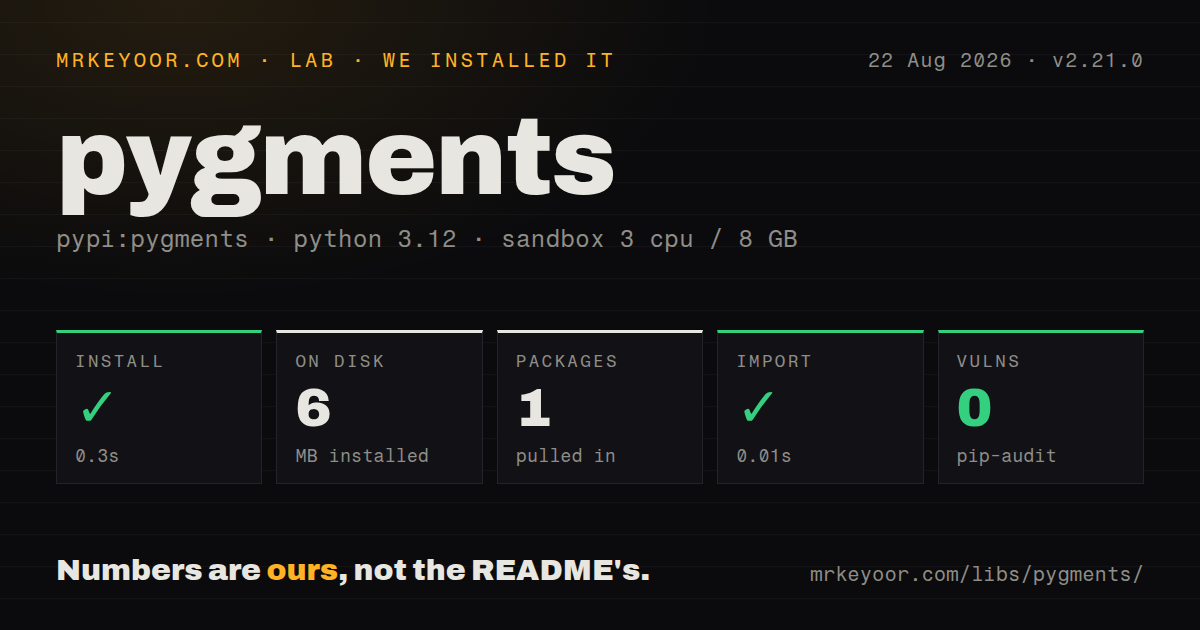
| Install | ✓ · 0.3s | 1 package on disk · 6 MB |
| Import | ✓ | import pygments in 0.01s · pure Python · requires Python >=3.9 |
| Known vulns | 0 | (pip-audit) |
Answers from our run
Does pygments install cleanly?
Yes. In a fresh container with an empty cache, pip install pygments finished in 0.3s, leaving 1 package and 6 MB on disk. pip-audit reported no known vulnerabilities.
What does pygments need to run?
Python >=3.9, and nothing compiled: it is pure Python. In our run import pygments succeeded in 0.01s.
pygments or tree-sitter: which should you use?
tree-sitter: Choose tree-sitter 0.26.0 when you need incremental parse trees, named nodes, and structural queries instead of ready-made HTML formatters. Our Pygments 2.21.0 install finished in 0.3 seconds, occupied 6 MB, imported in 0.01 seconds, and showed 0 known vulnerabilities, so broad server-side highlighting costs little to add.
When should you not use pygments?
You need syntax trees, symbol resolution, structural queries, validation, or refactoring. Pygments emits lexical token types and none of those parser results
Discussed on
- hnGitHub dropped Pygments184 points
- hnPygments, a generic syntax highlighter85 points
- hnPocoo (Flask, Jinja 2, Pygments, Sphinx, Werkzeug)32 points
- hnAsk HN: check out my micro app - pygments syntax highlighter via HTTP25 points
- hnPygments, a Generic Syntax Highlighter14 points
Use it if
- A Python documentation site or code host must highlight many languages on the server through one API
- The same token stream needs to become classed HTML, ANSI terminal text, LaTeX, SVG, or an image
- Source pages need formatter controls such as numbered lines, linkable line IDs, selected-line emphasis, and swappable color styles
- Your team has a private DSL and wants its lexer, formatter, filter, or style discoverable by Pygments, Sphinx, MkDocs, and `pygmentize` through package entry points
- You need syntax trees, symbol resolution, structural queries, validation, or refactoring. Pygments emits lexical token types and none of those parser results
- A public endpoint cannot run highlighting in isolated workers with timeouts and concurrency limits. The project gives no execution-time guarantee for arbitrary input
- Highlighting happens only in a browser with no Python service. Our installation consumed 6 MB on the server, while highlight.js or Prism can do client-side rendering
- Your type-checking policy accepts only distributions that declare PEP 561 inline types. Our inspection of 2.21.0 found no `py.typed` marker
- Stored HTML or golden token output must remain byte-identical after upgrades. Version 2.21.0 changes lexer boundaries across many languages and changes how `HtmlFormatter` emits quotes
Setup reality
We installed Pygments 2.21.0 in a fresh, unprivileged Python 3.12 Bookworm sandbox with 3 CPUs, 8 GB of RAM, and no cache. Installation finished in 0.3 seconds and left one package using 6 MB. import pygments worked in 0.01 seconds, while pip-audit reported 0 known vulnerabilities. The sandbox report counted one direct dependency, found pure Python code, and confirmed Python 3.9 or newer. It found no py.typed marker. Its license scan returned unknown; current PyPI metadata declares BSD-2-Clause.
No account, token, background service, or required config file stands between installation and first output. HTML needs one extra piece: HtmlFormatter returns a classed fragment by default, without its stylesheet. Generate CSS with get_style_defs() using the same formatter settings as the markup. If you choose Night Owl, new in 2.21.0, set that style on both paths. noclasses=True avoids a separate stylesheet by repeating inline declarations, which increases output size on long listings.
Language selection needs a policy. get_lexer_by_name() is predictable when the caller supplies an alias; filename lookup can inspect the source to break ties. Unknown aliases or filenames raise ClassNotFound. The CLI docs call content-only guessing unreliable, so a user-facing service should fall back to TextLexer instead of silently choosing a doubtful grammar. Lexer defaults also remove leading and trailing newlines and add a final newline. Set stripnl=False or ensurenl=False when exact whitespace matters.
Treat untrusted source as a workload limit problem. The project says a malformed or adversarial input can keep a matcher running indefinitely or consume substantial memory. Version 2.21.0 fixes one XML backtracking case, but the README still recommends a short process timeout and a cap on concurrent workers. Installed plugins run as Python code in the host process. Windows terminal coloring requires the windows-terminal extra; redirected output should avoid ANSI formatters.
Patterns
Render source as classed HTML render-html-fragment
from pygments import highlight
from pygments.formatters.html import HtmlFormatter
from pygments.lexers import get_lexer_by_name

lexer = get_lexer_by_name("python", stripnl=False)
formatter = HtmlFormatter(cssclass="source", wrapcode=True)
fragment = highlight(code, lexer, formatter)
`HtmlFormatter` returns a fragment with token class names by default. `wrapcode=True` adds a `<code>` element, but the page still needs matching CSS.
Build the stylesheet for Night Owl export-theme-css
from pathlib import Path
from pygments.formatters.html import HtmlFormatter

formatter = HtmlFormatter(style="night-owl", cssclass="source")
css = formatter.get_style_defs(".source")
Path("syntax.css").write_text(css, encoding="utf-8")
Pygments 2.21.0 adds the `night-owl` style. The selector passed to `get_style_defs()` must match the wrapper used for rendered fragments.
Handle an unknown language explicitly resolve-language-alias
from pygments.lexers import TextLexer, get_lexer_by_name
from pygments.util import ClassNotFound

try:
    lexer = get_lexer_by_name(language, ensurenl=False)
except ClassNotFound:
    lexer = TextLexer(ensurenl=False)
`get_lexer_by_name()` raises `ClassNotFound` for an unsupported alias. A `TextLexer` fallback keeps the input readable without claiming a language match.
Use both filename and content for lexer choice infer-lexer-from-file
from pygments.lexers import TextLexer, get_lexer_for_filename
from pygments.util import ClassNotFound

try:
    lexer = get_lexer_for_filename(filename, code, stripnl=False)
except ClassNotFound:
    lexer = TextLexer(stripnl=False)
`get_lexer_for_filename()` uses source text to rank multiple filename matches. A filename with no matching lexer still raises `ClassNotFound`.
Number, link, and emphasize lines add-line-navigation
from pygments.formatters.html import HtmlFormatter

formatter = HtmlFormatter(
    linenos="inline",
    linenostart=80,
    linespans="src",
    hl_lines=[2, 4],
)
`hl_lines` counts from 1 inside the supplied snippet, even when `linenostart` displays 80. `linespans="src"` creates IDs such as `src-80`.
Return a self-styled HTML fragment embed-inline-styles
from pygments import highlight
from pygments.formatters import HtmlFormatter
from pygments.lexers import JsonLexer

fragment = highlight(
    payload,
    JsonLexer(),
    HtmlFormatter(style="default", noclasses=True),
)
`noclasses=True` puts declarations on each generated span. It removes the stylesheet step at the cost of larger repeated markup.
Color output only for an interactive terminal color-terminal-output
import sys

from pygments import highlight
from pygments.formatters import Terminal256Formatter
from pygments.lexers import PythonLexer

rendered = (
    highlight(code, PythonLexer(), Terminal256Formatter())
    if sys.stdout.isatty()
    else code
)
sys.stdout.write(rendered)
`Terminal256Formatter` emits ANSI escape sequences. Checking `isatty()` keeps redirected files and pipelines free of color control bytes.
Read comments from the token stream inspect-comment-tokens
from pygments import lex
from pygments.lexers import PythonLexer
from pygments.token import Comment

comments = [
    text
    for token_type, text in lex(code, PythonLexer())
    if token_type in Comment
]
Pygments token membership includes child types such as `Comment.Single`. The result carries lexical labels, with no scope or symbol information.
Retag TODO and FIXME inside comments mark-code-tags
from pygments import highlight
from pygments.formatters import HtmlFormatter
from pygments.lexers import PythonLexer

lexer = PythonLexer()
lexer.add_filter("codetagify", codetags=["TODO", "FIXME"])
html = highlight(code, lexer, HtmlFormatter())
The `codetagify` filter changes matching words only inside comments and docstrings. Formatters receive those matches as `Comment.Special` tokens.
Create a complete HTML file write-standalone-html
from pathlib import Path

from pygments import highlight
from pygments.formatters import HtmlFormatter
from pygments.lexers import PythonLexer

page = highlight(
    code,
    PythonLexer(),
    HtmlFormatter(full=True, title="worker.py", style="night-owl"),
)
Path("worker.html").write_text(page, encoding="utf-8")
`full=True` produces a complete document and includes style rules. Fragment mode is the better fit when an existing layout owns the page shell.
Generate an HTML page with pygmentize highlight-from-cli
pygmentize -l python -f html \
  -O full,style=night-owl,linenos=inline \
  -o worker.html worker.py
`-l` and `-f` bypass inference, while `-o` prevents terminal formatting from becoming the default. The `-O` value is comma-separated.
Expose a lexer through package metadata register-custom-lexer
[project.entry-points."pygments.lexers"]
acme-log = "acme_lexer:AcmeLogLexer"
Pygments discovers custom lexers from the `pygments.lexers` entry-point group in installed distributions. Entry-point results are cached inside a running process, so install plugins before workers start.
Alternatives
| Package | Registry | Pick it when |
|---|---|---|
| tree-sitter | PyPI | Choose tree-sitter 0.26.0 when you need incremental parse trees, named nodes, and structural queries instead of ready-made HTML formatters. |
| rich | PyPI | Choose Rich 15.0.0 when the deliverable is a terminal UI, traceback, or syntax panel; Rich depends on Pygments for its code coloring. |
| highlight.js | npm | Choose highlight.js 11.12.0 when highlighting belongs in a browser or Node process and language autodetection is useful. |
| prismjs | npm | Choose Prism 1.30.0 for a browser site that loads an explicit set of language components and controls its own theme assets. |
More utils guides
lru-cache · type-fest · ajv · zod · p-limit · find-up · the whole shelf →
How this guide is made: grounded in the library's documentation, release notes, changelog, and issue history, on a fixed rubric — not a hands-on install of every release. The 50 most-downloaded entries are additionally install-verified in clean containers. Corrections: contact the desk.