posthtml-parser review
posthtml-parser 0.12.1 synchronously converts an HTML or XML string into PostHTML's small tree shape: a root array containing text strings and element objects with `tag`, optional `attrs`, and optional `content`. It preserves case and encoded entities by default, with switches for XML rules, locations, directives, CDATA, and valueless attributes. Our install bundled TypeScript declarations, but its 43.4 KB gzipped browser build is substantial for a parser that provides no DOM methods, selectors, validation, sanitizing, or rendering.
Our posthtml-parser 0.12.1 install took 1.3 seconds, left 7 packages and 2 MB on disk, and bundled to 43.4 KB gzipped with 0 audit findings. Use it when PostHTML's exact tree is the interface; use parse5 or Cheerio when standards behavior or selectors are the actual requirement.
We installed it
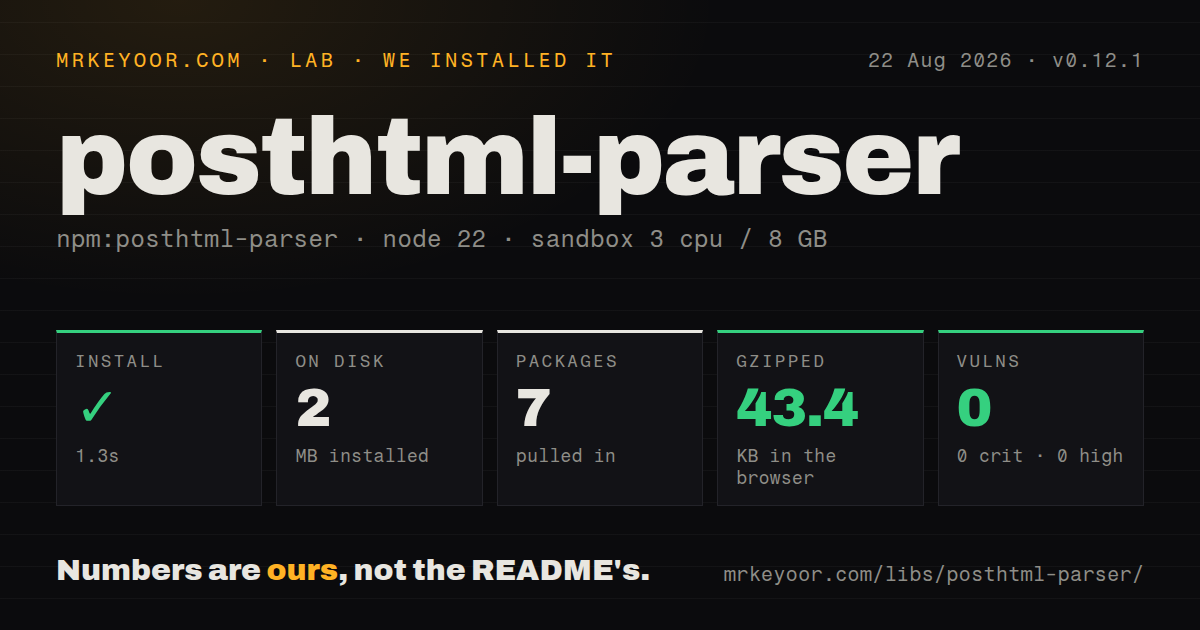
| Install | ✓ · 1.3s | 7 packages on disk · 2 MB |
| Import | ✓ | ESM import works · require() works · CommonJS package |
| Browser | 43.4 KB | gzipped (135.7 KB minified), bundled with esbuild |
| Types | ✓ | TypeScript types bundled |
| Known vulns | 0 | 0 critical · 0 high · 0 moderate · 0 low (npm audit) |
Answers from our run
Does posthtml-parser install cleanly?
Yes. In a fresh container with an empty cache, npm install posthtml-parser finished in 1 seconds, leaving 7 packages and 2 MB on disk. npm audit reported no known vulnerabilities.
How much does posthtml-parser add to a browser bundle?
43.4 KB gzipped (135.7 KB minified) when the whole package is bundled for the browser with esbuild. Importing only part of it is usually smaller.
Does posthtml-parser work with both ESM and CommonJS?
Yes. Both import 'posthtml-parser' and require('posthtml-parser') worked in Node 22 in our run. The package is published as CommonJS.
Does posthtml-parser include TypeScript types?
Yes, type declarations ship inside the package, so no @types install is needed.
posthtml-parser or parse5: which should you use?
parse5: Use it for HTML-standard parsing and serialization with browser-like tree construction. Our posthtml-parser 0.12.1 install took 1.3 seconds, left 7 packages and 2 MB on disk, and bundled to 43.4 KB gzipped with 0 audit findings.
When should you not use posthtml-parser?
CSS selectors, parent links, DOM methods, or mutation helpers are required; the result is plain strings, arrays, and objects.
Use it if
- A PostHTML transform needs its native array-and-object tree rather than a browser DOM.
- Tag case, attribute case, or encoded entities must remain unchanged unless explicitly configured.
- Custom server-template directives need recognition alongside HTML nodes.
- Synchronous parsing of build-time strings is acceptable and element-level source locations are enough.
- CSS selectors, parent links, DOM methods, or mutation helpers are required; the result is plain strings, arrays, and objects.
- HTML-standard tree construction and matching serialization matter more than PostHTML compatibility; use parse5.
- Large input must be streamed because the public parser consumes one string and returns the complete tree synchronously.
- Every text and comment token needs a source span; `sourceLocations` attaches location data to element nodes.
- A small client bundle matters: our measured import was 135.7 KB minified and 43.4 KB gzipped.
Setup reality
Our posthtml-parser 0.12.1 install finished in 1.3 seconds and left 7 packages using 2 MB on disk. The package is 40 KB unpacked, declares 1 direct dependency and 0 peers, and produced 0 known vulnerabilities in npm audit. It requires Node 16 or newer and has no native build, credential, or config file.
The published entry is CommonJS with no exports map. Named ESM import and CommonJS require() both worked on Node 22, and TypeScript declarations ship in the package. There is no default export. Pass a string, so convert fs.readFile buffers with toString('utf8') or read with an encoding.
Parsing is synchronous and materializes the whole tree. Text, comments, and recognized directives can be strings, while elements are objects whose attrs and content keys may be absent. Walkers must branch on node type. sourceLocations adds one-based positions to elements, not a complete token map.
xmlMode changes parsing rules for void elements, scripts, styles, CDATA, and self-closing tags. decodeEntities changes returned values, while lowercasing attribute names has a documented speed cost. Our browser bundle measured 135.7 KB minified and 43.4 KB gzipped. Install posthtml-render for serialization or the main posthtml package for a parse-transform-render pipeline.
Patterns
Parse HTML into a PostHTML tree parse-html-string
import { parser } from 'posthtml-parser';

const tree = parser('<main><h1>Hello</h1></main>');
console.dir(tree, { depth: null });
parser is synchronous and returns an array whose entries are text strings or element objects.
Load the named export from CommonJS require-commonjs
const { parser } = require('posthtml-parser');
const tree = parser('<p>CommonJS</p>');
Version 0.10.0 removed the default parser export; destructure the named parser export.
Parse an HTML file parse-file
import { readFile } from 'node:fs/promises';
import { parser } from 'posthtml-parser';

const html = await readFile('input.html', 'utf8');
const tree = parser(html);
Pass an encoding to readFile or call buffer.toString('utf8'); the declared parser input is a string, not a Buffer.
Walk every element recursively walk-tree
function walk(nodes, visit) {
  for (const node of nodes) {
    if (typeof node !== 'object' || node === null) continue;
    visit(node);
    if (Array.isArray(node.content)) walk(node.content, visit);
  }
}

walk(tree, (node) => console.log(node.tag));
Text, comments, and directives are strings, and content may be absent; the tree has no built-in walk method or parent pointer.
Collect link targets collect-links
const links = [];
walk(tree, (node) => {
  if (node.tag === 'a' && typeof node.attrs?.href === 'string') {
    links.push(node.attrs.href);
  }
});
Attribute values can also be numbers or booleans in the exported type, so narrow the value before string operations.
Change attributes in the parsed tree edit-attributes
walk(tree, (node) => {
  if (node.tag === 'a') {
    node.attrs = { ...node.attrs, rel: 'noopener noreferrer' };
  }
});
Mutation changes the in-memory tree only; use posthtml-render or the full posthtml package to produce HTML afterward.
Decode character entities decode-entities
const tree = parser('<p title="Tom & Ada">A < B</p>', {
decodeEntities: true,
});decodeEntities defaults to false, so enabling it changes the stored text and attribute values rather than only parser metadata.
Lowercase tag and attribute names normalize-name-case
const tree = parser('<My-Card DATA-ID="7"></My-Card>', {
  lowerCaseTags: true,
  lowerCaseAttributeNames: true,
});
Both options default to false, lowerCaseTags does not apply in XML mode, and the README warns that lowercasing attribute names has a noticeable speed cost.
Parse XML-style markup parse-xml
const tree = parser('<feed><entry id="1" /></feed>', {
  xmlMode: true,
});
XML mode affects case, self-closing elements, CDATA, void elements, and script/style handling; it is a parsing-semantics choice.
Attach line and column locations track-source-locations
const tree = parser('<section>
  <h2>Title</h2>
</section>', {
  sourceLocations: true,
});

console.log(tree[0].location);
Locations are one-based and exist on element objects only; text, comment, and directive strings receive no span.
Preserve PHP processing directives recognize-directives
const tree = parser('<?php echo "Hello"; ?><p>Hi</p>', {
  directives: [
    { name: '?php', start: '<', end: '>' },
  ],
});
A recognized directive is stored as its literal source string; use a RegExp name when several processing-instruction forms share markers.
Distinguish a valueless attribute preserve-valueless-attrs
const tree = parser('<input disabled value="">', {
  recognizeNoValueAttribute: true,
});

// attrs.disabled is true; attrs.value is ''
Without this option, a valueless attribute is stored as an empty string, making it indistinguishable from an explicitly empty value.
Alternatives
| Package | Registry | Pick it when |
|---|---|---|
| parse5 | npm | Use it for HTML-standard parsing and serialization with browser-like tree construction. |
| htmlparser2 | npm | Use it for direct streaming events or a lower-level parser without PostHTML's AST shape. |
| cheerio | npm | Use it when CSS selectors and jQuery-like traversal are more useful than a compact transform tree. |
More utils guides
lru-cache · ajv · type-fest · p-limit · find-up · js-yaml · the whole shelf →
How this guide is made: grounded in the library's documentation, release notes, changelog, and issue history, on a fixed rubric — not a hands-on install of every release. The 50 most-downloaded entries are additionally install-verified in clean containers. Corrections: contact the desk.