postgres review
The npm package `postgres`, usually called Postgres.js, is a direct PostgreSQL client built around tagged template literals. A plain interpolation becomes a bound value, while `sql()` helpers construct quoted identifiers, row lists, and composable query fragments. The client opens connections lazily and provides pooling, prepared statements, scoped transactions and savepoints, cursors, COPY streams, LISTEN/NOTIFY, cancellation, reserved connections, and logical-replication subscriptions. It does not supply migrations, models, or schema-derived result types. Version 3.4.9 fixes the TypeScript regression from 3.4.8 that made the SQL value inside `sql.begin()` appear non-callable.
postgres 3.4.9 installed in 0.4 seconds with 0 direct dependencies and left 1 MB in our sandbox, but its browser bundle failed as expected for a database driver. It fits SQL-first services once numeric conversion, TLS, pool size, prepared statements, and shutdown are explicit decisions.
We installed it
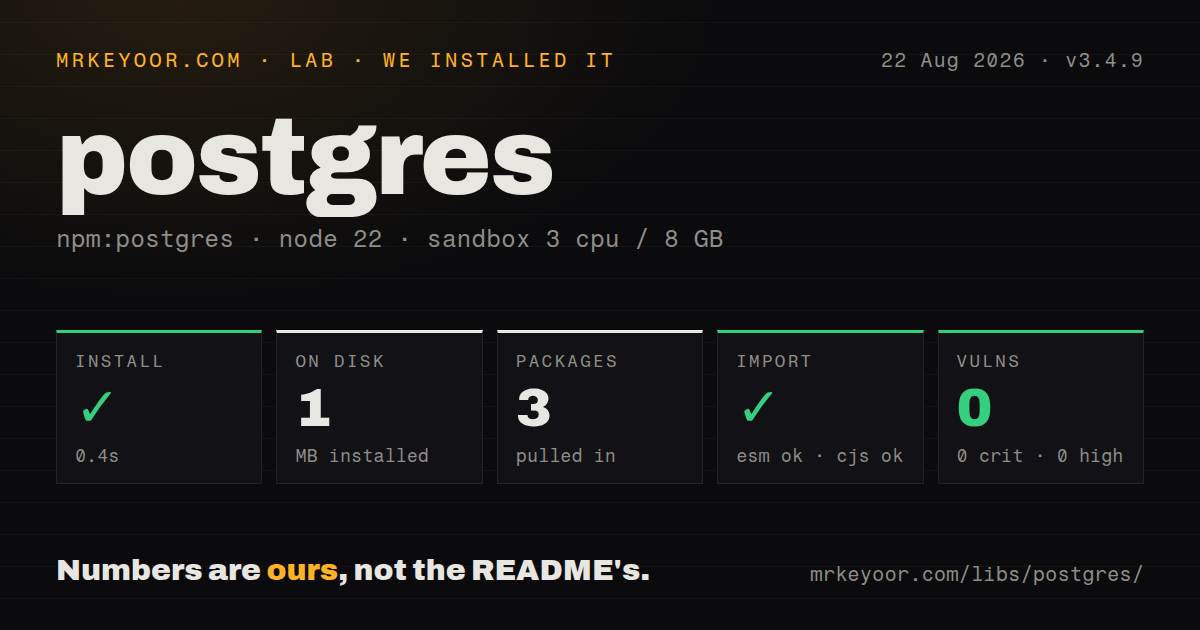
| Install | ✓ · 0.4s | 3 packages on disk · 1 MB |
| Import | ✓ | ESM import works · require() works · ESM package with exports map |
| Browser | n/a | could not be bundled for the browser (Node-only code, most likely) |
| Types | ✓ | TypeScript types bundled |
| Known vulns | 0 | 0 critical · 0 high · 0 moderate · 0 low (npm audit) |
Answers from our run
Does postgres install cleanly?
Yes. In a fresh container with an empty cache, npm install postgres finished in 0.4s, leaving 3 packages and 1 MB on disk. npm audit reported no known vulnerabilities.
Can postgres run in a browser?
Not directly: esbuild could not bundle it for the browser in our run, which normally means it depends on Node built-ins. Use it on the server, or find a browser-targeted alternative.
Does postgres work with both ESM and CommonJS?
Yes. Both import 'postgres' and require('postgres') worked in Node 22 in our run. The package is published as ESM with an exports map.
Does postgres include TypeScript types?
Yes, type declarations ship inside the package, so no @types install is needed.
postgres or pg: which should you use?
pg: Use it for the standard node-postgres API and the widest compatibility with Node database tools and ORMs. postgres 3.4.9 installed in 0.4 seconds with 0 direct dependencies and left 1 MB in our sandbox, but its browser bundle failed as expected for a database driver.
When should you not use postgres?
An ORM, migration tool, or monitoring library requires the node-postgres Pool and Client contract. Support for pg remains broader across Node database tooling.
Use it if
- The data layer is intentionally SQL-first and should bind ordinary interpolations without a separate query builder.
- Cursors, COPY streams, notifications, savepoints, or reserved sessions need to be exposed through one driver.
- A service values a dependency-free client with bundled TypeScript declarations and runtime paths beyond standard Node.
- Dynamic inserts and updates can be constrained to an application-owned allowlist of columns.
- An ORM, migration tool, or monitoring library requires the node-postgres `Pool` and `Client` contract. Support for `pg` remains broader across Node database tooling.
- Queries must be checked against a schema at compile time. A Postgres.js result generic is an assertion; Kysely or Drizzle adds a typed query layer.
- The application expects `bigint`, `numeric`, `decimal`, and `count(*)` to become ordinary JavaScript numbers. Unsafe numeric values remain strings unless you set a conversion policy.
- PgBouncer runs in transaction mode but prepared statements cannot be disabled. Postgres.js prepares queries automatically unless `prepare: false` is set.
- Corporate policy rejects the Unlicense. This package does not use the more common MIT, BSD, or Apache license text.
Setup reality
We installed postgres 3.4.9 in a fresh Node 22 Bookworm container in 0.4 seconds. It left 3 packages using 1 MB, while the package itself is 408 KB unpacked and declares 0 direct dependencies with 0 peers. npm audit reported 0 known vulnerabilities. The client requires Node 12 or newer and bundles TypeScript declarations. It is marked ESM with an exports map; both ESM import and require() worked in our sandbox.
Calling postgres() creates a lazy client, not a verified connection. Run a simple startup query when invalid credentials, DNS, TLS, or firewall rules should fail the service immediately. Connection settings can come from a URL, an options object, or libpq-style environment variables. Options override URL values. Do not copy examples that disable certificate verification; choose ssl settings that match the provider's CA and hostname requirements.
The default pool can open 10 connections per client instance, so multiply that by processes, workers, and serverless concurrency. Set max, timeouts, and lifetime for the deployment. Automatic prepared statements can conflict with transaction-pooling proxies. Catalog type discovery on the first connection also needs sufficient permissions. Database bigint and exact decimals commonly arrive as strings, and interpolating undefined raises UNDEFINED_VALUE unless a transform maps it.
Use the SQL value passed into sql.begin() for every statement that belongs to that transaction; the outer client may pick another pooled connection. Reserved connections must be released. Call sql.end() during shutdown so sockets do not keep the process alive. Our browser-targeted esbuild run failed, which matches a database driver meant for server and worker runtimes rather than frontend code.
Patterns
Create a bounded client and bind values connect-and-query
import postgres from 'postgres'

const sql = postgres(process.env.DATABASE_URL, {
  max: 8,
  connect_timeout: 10,
  idle_timeout: 20,
  ssl: 'require',
})

const rows = await sql`
  select id, email from users where created_at >= ${since}
`
Plain interpolations become PostgreSQL parameters. Creating the client does not connect, so issue a startup query when connection failure must stop boot.
Insert selected object fields insert-allowlisted-object
const input = { email, displayName, role: 'admin' }

const [user] = await sql`
  insert into users ${sql(input, 'email', 'displayName')}
  returning id, email, display_name
`
Pass permitted column names explicitly. `sql(input)` would turn every object key into an inserted identifier.
Insert several rows in one statement insert-many-rows
const users = [
  { email: 'a@example.com', active: true },
  { email: 'b@example.com', active: false },
]

const inserted = await sql`
  insert into users ${sql(users, 'email', 'active')}
  returning id
`
Every row should have a consistent allowlisted shape. The helper expands values into one parameterized INSERT statement.
Build a constrained partial update update-selected-fields
const allowed = ['display_name', 'timezone']
const patch = Object.fromEntries(
  Object.entries(request.body).filter(([key]) => allowed.includes(key)),
)

await sql`
  update users set ${sql(patch, ...Object.keys(patch))}
  where id = ${userId}
`
Identifier quoting prevents syntax injection, but the allowlist decides which legitimate columns a caller is authorized to change.
Add a conditional SQL fragment compose-optional-filter
const activeFilter = onlyActive ? sql`and active = true` : sql``

const users = await sql`
  select id, email
  from users
  where created_at >= ${since}
  ${activeFilter}
  order by id
`
Keep the inner fragment unawaited until it is placed in the complete outer query. An empty tagged fragment contributes no SQL.
Separate identifiers from values quote-dynamic-identifier
const table = 'users'
const sortColumn = 'created_at'
const minimumAge = 21

const rows = await sql`
  select * from ${sql(table)}
  where age >= ${minimumAge}
  order by ${sql(sortColumn)} desc
`
`sql(string)` quotes an identifier, while a plain interpolation binds a value. An identifier still needs an application allowlist.
Keep statements on one transaction connection run-transaction
const account = await sql.begin(async tx => {
  const [created] = await tx`
    insert into accounts (owner_id) values (${ownerId}) returning *
  `
  await tx`
    insert into audit_log (event, account_id) values ('account.created', ${created.id})
  `
  return created
})
Only the callback's `tx` value is pinned to the transaction connection. Queries through the outer `sql` client are outside it.
Roll back one optional transaction step use-savepoint
await sql.begin(async tx => {
  await tx`update jobs set state = 'running' where id = ${jobId}`

  try {
    await tx.savepoint(async nested => {
      await nested`insert into optional_events (job_id) values (${jobId})`
    })
  } catch (error) {
    logOptionalEventFailure(error)
  }
})
A failed savepoint callback rolls back to that savepoint. The outer transaction can continue if the error is caught deliberately.
Process rows with cursor backpressure stream-cursor-batches
await sql`
  select id, payload from events order by id
`.cursor(500, async rows => {
  await sendBatch(rows)
})
The cursor waits for the callback promise before requesting another batch. A thrown error stops iteration and rejects the outer promise.
Load tab-separated data through COPY copy-from-stream
import { pipeline } from 'node:stream/promises'
import { Readable } from 'node:stream'

const source = Readable.from(['Ada\t36\n', 'Alan\t41\n'])
const target = await sql`copy people (name, age) from stdin`.writable()
await pipeline(source, target)
COPY input must match the declared column order and text format. The writable stream is returned through a promise.
Reconcile after LISTEN reconnects listen-for-notifications
await sql.listen(
  'jobs',
  payload => handleJob(JSON.parse(payload)),
  () => sql`select * from pending_jobs()`.forEach(handleJob),
)

await sql.notify('jobs', JSON.stringify({ id: 42 }))
Notifications can be missed during a disconnect. The ready callback runs again after reconnect and should reconcile durable database state.
Drain database connections on termination shutdown-pool
process.once('SIGTERM', async () => {
  try {
    await sql.end({ timeout: 5 })
  } finally {
    process.exit(0)
  }
})
`sql.end()` closes the pool and waits for active work up to the configured timeout. Open sockets otherwise keep Node alive.
Alternatives
| Package | Registry | Pick it when |
|---|---|---|
| pg | npm | Use it for the standard node-postgres API and the widest compatibility with Node database tools and ORMs. |
| kysely | npm | Use it when schema-aware TypeScript queries matter while the code should still resemble SQL. |
| slonik | npm | Use it for tagged SQL with stricter token composition, interceptors, and runtime result validation options. |
More data guides
numpy · pandas · fsspec · pyarrow · lxml · sqlalchemy · the whole shelf →
How this guide is made: grounded in the library's documentation, release notes, changelog, and issue history, on a fixed rubric — not a hands-on install of every release. The 50 most-downloaded entries are additionally install-verified in clean containers. Corrections: contact the desk.