puppeteer review
Puppeteer 25.8.0 is a Node.js browser-control library for Chrome and Firefox through Chrome DevTools Protocol or WebDriver BiDi. It launches or connects to a browser, opens pages, locates elements, types and clicks, evaluates code in the page, observes network traffic, captures screenshots, and prints PDFs. The main `puppeteer` package manages a compatible Chrome download, while `puppeteer-core` leaves browser installation and executable selection to the application. This is server-side automation; our esbuild browser target failed. Version 25.8.0 adds a `followSymlinks` option, gives a recovery instruction for partially downloaded browser folders, and moves its browser manager to 3.2.1.
Puppeteer 25.8.0 is a direct, well-documented way to drive Chrome from Node and a good building block for screenshots, PDFs, crawlers, and Chrome-focused checks. Choose a test platform for a full cross-browser suite, and treat the browser binary, sandbox, cache, and OS packages as deployment dependencies rather than npm details.
We installed it
| Install | ✓ · 21s | 26 packages on disk · 30 MB |
| Import | ✓ | ESM import works · require() works · ESM package with exports map |
| Browser | n/a | could not be bundled for the browser (Node-only code, most likely) |
| Types | ✓ | TypeScript types bundled |
| Known vulns | 0 | 0 critical · 0 high · 0 moderate · 0 low (npm audit) |
Answers from our run
Does puppeteer install cleanly?
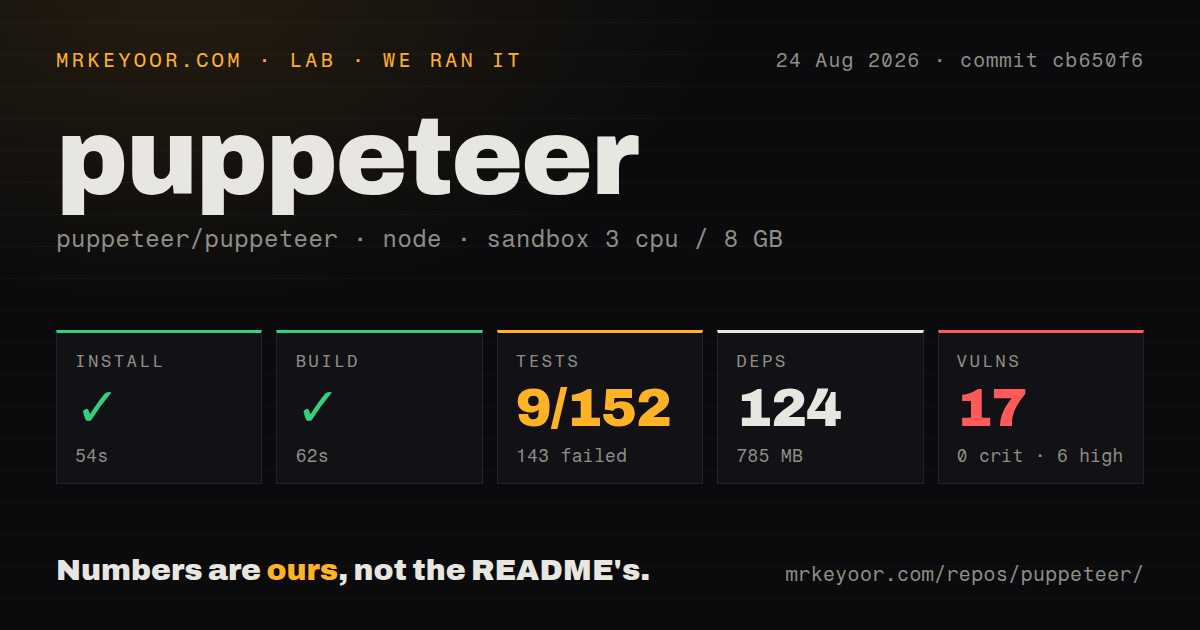
Yes. In a fresh container with an empty cache, npm install puppeteer finished in 21 seconds, leaving 26 packages and 30 MB on disk. npm audit reported no known vulnerabilities.
Can puppeteer run in a browser?
Not directly: esbuild could not bundle it for the browser in our run, which normally means it depends on Node built-ins. Use it on the server, or find a browser-targeted alternative.
Does puppeteer work with both ESM and CommonJS?
Yes. Both import 'puppeteer' and require('puppeteer') worked in Node 22 in our run. The package is published as ESM with an exports map.
Does puppeteer include TypeScript types?
Yes, type declarations ship inside the package, so no @types install is needed.
puppeteer or playwright: which should you use?
playwright: Use it for Chromium, Firefox, and WebKit testing with an integrated runner, fixtures, traces, retries, and parallel workers. Puppeteer 25.8.0 is a direct, well-documented way to drive Chrome from Node and a good building block for screenshots, PDFs, crawlers, and Chrome-focused checks.
When should you not use puppeteer?
You want a complete cross-browser test product with fixtures, assertions, retries, parallel workers, trace viewing, and reports in one package. Puppeteer is primarily the browser driver.
Use it if
- A Node job needs Chrome-specific screenshots, PDFs, crawling, DevTools protocol access, or repeatable browser interaction.
- The project wants Puppeteer to select and install the Chrome revision tested with the library release.
- Browser automation is one part of a custom worker, scraper, audit tool, or test setup rather than a complete test-runner requirement.
- Accessible-name, text, CSS, XPath, or custom selector queries need to coexist with direct page evaluation and network events.
- You want a complete cross-browser test product with fixtures, assertions, retries, parallel workers, trace viewing, and reports in one package. Puppeteer is primarily the browser driver.
- Safari or WebKit coverage is required. Puppeteer documents Chrome and Firefox; it does not supply a WebKit browser target.
- The deployment platform cannot run a browser process or install its operating-system libraries. A successful npm install does not make a restricted serverless runtime capable of launching Chrome.
- An install-time browser download is unacceptable, while the team also refuses to own a compatible system browser. `puppeteer-core` removes the download only by transferring that versioning work to you.
- The code must execute in a browser bundle. Our esbuild browser build failed, which matches Puppeteer's use of Node processes, files, sockets, and downloaded browser executables.
Setup reality
We installed puppeteer 25.8.0 in a fresh Node 22 Bookworm container. npm succeeded in 21 seconds, left 26 packages, and used 30 MB. The package declares 6 direct dependencies, no peers, and 136 KB unpacked, with Apache-2.0 licensing and Node 22.12 or newer required. npm audit found zero known vulnerabilities. Both require() and ESM import worked, and TypeScript declarations are bundled. The esbuild browser target failed, as expected for a Node browser launcher.
The npm package and the browser are separate moving parts. puppeteer normally runs an install script to fetch compatible Chrome; several current package managers block dependency scripts unless allowed. When the executable is missing, run npx puppeteer browsers install in the deployed environment or configure the approved install script. Browser files live in Puppeteer's cache, which may not be carried from a build stage into a runtime image. A partial cache directory now produces a recovery instruction in 25.8.0.
Containers need Chrome's shared libraries, fonts, a writable profile and cache, enough shared memory, and an intentional sandbox setup. Prefer the project's supported container guidance or image. Disabling the sandbox is a security trade, not a routine fix. Run untrusted pages in isolated workers with CPU, memory, network, and time limits. puppeteer-core avoids managed downloads, but executablePath must point to a compatible browser that exists on every target host.
Navigation waits describe browser events, not application readiness. networkidle can hang on pages with analytics, streaming, or long polling, while domcontentloaded may be too early for client rendering. Wait for a specific locator or state your code owns. Locators retry actionability checks; raw element handles can go stale after rerenders. Close pages and browsers in finally, cap navigation and action timeouts, and consume request interception events exactly once or intercepted requests remain paused.
Patterns
Open a page and close the browser launch-and-navigate
import puppeteer from 'puppeteer';

const browser = await puppeteer.launch();
try {
  const page = await browser.newPage();
  await page.goto('https://example.com', { waitUntil: 'domcontentloaded' });
  await page.locator('h1').wait();
} finally {
  await browser.close();
}
Headless mode is the default. Wait for a page condition tied to the job instead of assuming one navigation event means all client-side work is finished.
Save a full-page image at a fixed viewport capture-screenshot
await page.setViewport({
  width: 1280,
  height: 800,
  deviceScaleFactor: 1,
});
await page.screenshot({
  path: 'page.png',
  fullPage: true,
});
Set viewport and scale explicitly so local and CI captures use the same responsive breakpoint and pixel density.
Create an A4 PDF with CSS backgrounds print-pdf
await page.goto('https://example.com/report', { waitUntil: 'networkidle2' });
await page.pdf({
  path: 'report.pdf',
  format: 'A4',
  printBackground: true,
  margin: { top: '12mm', right: '12mm', bottom: '12mm', left: '12mm' },
});
PDF uses print media rules unless you emulate another media type. Background graphics are omitted unless `printBackground` is enabled.
Use locators for a form action fill-and-submit
await page.locator('input[name=email]').fill('dev@example.com');
await page.locator('input[name=password]').fill(process.env.TEST_PASSWORD);
await Promise.all([
  page.waitForNavigation({ waitUntil: 'domcontentloaded' }),
  page.locator('button[type=submit]').click(),
]);
Start the navigation wait before the click so a fast response cannot be missed. Keep test credentials out of source and screenshots.
Locate a control through ARIA find-by-accessible-name
await page.locator('::-p-aria(Search)').fill('browser automation');
await page.locator('::-p-aria(Submit)').click();

const result = await page
  .locator('::-p-text(browser automation)')
  .waitHandle();
Puppeteer's `aria` and text selectors are useful when generated class names change. Accessible names still need to be unique enough to identify the intended control.
Pass serializable values into the page evaluate-page-code
const result = await page.evaluate((selector, taxRate) => {
  const text = document.querySelector(selector)?.textContent ?? '0';
  const subtotal = Number(text.replace(/[^0-9.]/g, ''));
  return { subtotal, total: subtotal * (1 + taxRate) };
}, '#subtotal', 0.18);
The function executes in the browser realm and cannot read surrounding Node variables. Pass inputs as arguments and return values that can cross the protocol boundary.
Map matching links into plain objects extract-list
const links = await page.$$eval('a.result', (anchors) =>
  anchors.map((anchor) => ({
    href: anchor.href,
    text: anchor.textContent?.trim() ?? '',
  })),
);
DOM nodes cannot be returned to Node as useful objects. Extract strings, numbers, arrays, and plain records while the callback is still inside the page.
Block images while continuing other requests intercept-network
await page.setRequestInterception(true);
page.on('request', (request) => {
  if (request.resourceType() === 'image') {
    request.abort();
  } else {
    request.continue();
  }
});
After interception is enabled, every request needs exactly one resolution. An exception or forgotten branch leaves the request paused and can stall navigation.
Save and restore browser cookies persist-session
import { readFile, writeFile } from 'node:fs/promises';

await writeFile('cookies.json', JSON.stringify(await browser.cookies()));

const saved = JSON.parse(await readFile('cookies.json', 'utf8'));
await browser.setCookie(...saved);
Cookie files contain session credentials. Protect them like passwords, keep them out of Git, and expect expiry or server-side revocation.
Launch a managed system Chrome use-installed-browser
import puppeteer from 'puppeteer-core';

const browser = await puppeteer.launch({
  executablePath: '/usr/bin/google-chrome',
  headless: true,
});
`puppeteer-core` does not download Chrome. Your image or host must install a compatible executable and keep its path stable across environments.
Repair a missing browser cache install-browser
npx puppeteer browsers install chrome

# Inspect available browser commands
npx puppeteer browsers --help
Run browser installation in the same user and cache context as the runtime, or configure `cacheDirectory` so build and execution agree on the location.
Bound navigation and locator waits set-timeouts
page.setDefaultNavigationTimeout(30_000);
page.setDefaultTimeout(10_000);

await page.goto(url, { waitUntil: 'domcontentloaded' });
await page.locator('[data-ready=true]').wait();
Separate navigation and general action limits. A specific ready marker gives a clearer failure than waiting indefinitely for the network to become idle.
Alternatives
| Package | Registry | Pick it when |
|---|---|---|
| playwright | npm | Use it for Chromium, Firefox, and WebKit testing with an integrated runner, fixtures, traces, retries, and parallel workers. |
| webdriverio | npm | Use it when WebDriver, Appium, cloud device services, or a plugin-heavy test runner fit the existing test estate. |
| selenium-webdriver | npm | Use it for standards-based control of an established Selenium Grid across several vendor browsers. |
More testing guides
pytest · chai · vitest · playwright · jsdom · axe-core · the whole shelf →
How this guide is made: grounded in the library's documentation, release notes, changelog, and issue history, on a fixed rubric — not a hands-on install of every release. The 50 most-downloaded entries are additionally install-verified in clean containers. Corrections: contact the desk.