cypress review
Cypress is a browser test runner for end-to-end and component tests. Specs use Cypress's queued `cy.*` commands while an app shows the browser, command history, DOM snapshots, requests, screenshots, and failures. It can drive Chromium-family browsers, Firefox, Electron, and experimental WebKit; stub traffic with `cy.intercept()`; retry queries and assertions; and run framework components through adapters. Version 15.21.0 adds `cypress tap`, a CLI bridge that can inspect and rerun an open Cypress session for an AI agent. It also adds a guest-telemetry disable switch, deprecates `cy.exec()` in favor of `cy.task()`, and fixes WebKit interception hangs, runtime `blockHosts` overrides, Windows spec-list refresh, and several assertion and retry-reporting bugs.
Cypress 15.21.0 is a strong fit when browser-test debugging and retried DOM commands matter more than ordinary async control. Start elsewhere when WebKit certainty, popup workflows, or service-free distributed execution are hard requirements.
We installed it
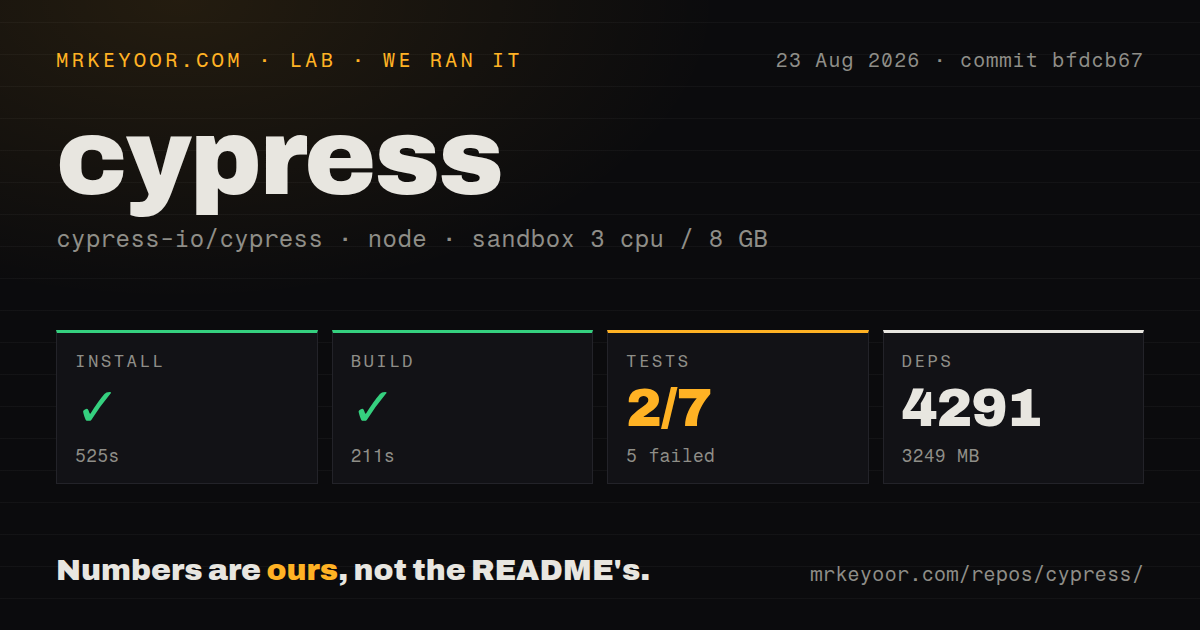
| Install | ✓ · 25s | 162 packages on disk · 33 MB |
| Import | ✓ | ESM import works · require() works · CommonJS package with exports map |
| Browser | n/a | could not be bundled for the browser (Node-only code, most likely) |
| Types | ✓ | TypeScript types bundled |
| Known vulns | 0 | 0 critical · 0 high · 0 moderate · 0 low (npm audit) |
Answers from our run
Does cypress install cleanly?
Yes. In a fresh container with an empty cache, npm install cypress finished in 25 seconds, leaving 162 packages and 33 MB on disk. npm audit reported no known vulnerabilities.
Can cypress run in a browser?
Not directly: esbuild could not bundle it for the browser in our run, which normally means it depends on Node built-ins. Use it on the server, or find a browser-targeted alternative.
Does cypress work with both ESM and CommonJS?
Yes. Both import 'cypress' and require('cypress') worked in Node 22 in our run. The package is published as CommonJS with an exports map.
Does cypress include TypeScript types?
Yes, type declarations ship inside the package, so no @types install is needed.
cypress or playwright: which should you use?
playwright: Choose it for first-class Chromium, Firefox, and WebKit projects plus popup and multi-page control. Cypress 15.21.0 is a strong fit when browser-test debugging and retried DOM commands matter more than ordinary async control.
When should you not use cypress?
Safari-engine coverage is a release gate. Cypress still labels WebKit support experimental, while Playwright treats WebKit as a normal browser project.
Use it if
- Frontend developers want an interactive runner where a failed command can be inspected with its DOM snapshot and network activity.
- Tests need automatic retrying around DOM queries and assertions instead of hand-written polling loops.
- The same team wants end-to-end tests and React, Vue, Angular, or Svelte component tests under one command model.
- Network stubbing, browser storage control, screenshots, videos, and test isolation should be available from one runner.
- Safari-engine coverage is a release gate. Cypress still labels WebKit support experimental, while Playwright treats WebKit as a normal browser project.
- The suite depends on several browser tabs, popup windows, browser extensions, or other automation outside Cypress's in-page model.
- Your team expects test commands to be ordinary promises. Cypress queues `cy.*` calls and warns against assigning or awaiting their return values, which requires a different mental model.
- CI images must stay small and cannot persist a binary cache. The npm package manages a separate Cypress app download and verifies it before runs.
- You need built-in distributed orchestration without a hosted service or custom sharding. Cypress documents parallelization and load balancing through Cypress Cloud.
Setup reality
We installed Cypress 15.21.0 in a clean Node 22 Bookworm container. npm finished in 25 seconds, left 162 packages using 33 MB, and reported no known vulnerabilities at any severity. The npm package declares 39 direct dependencies and no peers, contains bundled TypeScript declarations, and requires Node ^20.1.0 || ^22.0.0 || >=24.0.0. CommonJS require() and ESM import both worked. Our browser build failed in esbuild, which fits a Node-side test runner and installer rather than code meant for an application bundle.
Installing the npm package is only part of CI setup. Cypress keeps its executable in a global per-version cache and can download it during package installation. Cache the directory reported by cypress cache path, then run cypress verify in the job image. CYPRESS_CACHE_FOLDER moves that cache; CYPRESS_INSTALL_BINARY selects a mirror, local archive, URL, or disabled download. Linux containers also need the system libraries listed by Cypress. Official Cypress Docker images remove much of that OS work and make the included browser versions explicit.
The first cypress open creates a config and asks you to choose end-to-end or component testing. Put baseUrl, spec patterns, retries, timeouts, and setupNodeEvents in cypress.config.ts. Keep secrets in CYPRESS_* environment variables or CI secret storage. Values placed in config can reach browser-side test code, so do not assume the config file is a private credential boundary. Version 15.21.0 adds CYPRESS_DISABLE_GUEST_TELEMETRY for teams that also want anonymous open-mode and CLI reporting disabled.
Cypress commands are scheduled, then executed later; they are not normal promises. Return Cypress chains from helpers, use aliases to share yielded values, and put operating-system work in cy.task(). The current release deprecates cy.exec(). Cross-origin flows need cy.origin(), and cached login state belongs in cy.session(). Parallel recording, load balancing, and historical run features are Cypress Cloud concerns, so decide early whether local CI sharding is enough.
Patterns
Set the application URL and retries configure-e2e
import { defineConfig } from 'cypress'

export default defineConfig({
  e2e: {
    baseUrl: 'http://localhost:3000',
    retries: { runMode: 2, openMode: 0 },
    setupNodeEvents(on, config) {
      return config
    },
  },
})
Start the application before `cypress run`. Retries rerun a failed test, while individual queries retry within their command timeout.
Submit a login form test-user-flow
describe('sign in', () => {
  it('opens the account page', () => {
    cy.visit('/login')
    cy.get('[data-cy=email]').type('ada@example.com')
    cy.get('[data-cy=password]').type('correct horse battery staple', { log: false })
    cy.get('[data-cy=submit]').click()
    cy.url().should('include', '/account')
  })
})
Cypress retries `get` and the URL assertion. `{ log: false }` keeps the typed password out of the Command Log.
Replace a network response stub-api-response
cy.intercept('GET', '/api/projects', {
  statusCode: 200,
  body: [{ id: 7, name: 'Atlas' }],
}).as('projects')

cy.visit('/projects')
cy.wait('@projects').its('response.statusCode').should('eq', 200)
cy.contains('Atlas').should('be.visible')
Register intercept before the application sends the request. This tests the UI contract without exercising the real API.
Wait for an application request inspect-real-request
cy.intercept('POST', '/api/orders').as('createOrder')
cy.get('[data-cy=buy]').click()
cy.wait('@createOrder').then(({ request, response }) => {
  expect(request.body.quantity).to.eq(2)
  expect(response?.statusCode).to.eq(201)
})
An intercept without a static response observes the real request and response.
Reuse authenticated browser state cache-login-session
beforeEach(() => {
  cy.session('admin', () => {
    cy.request('POST', '/api/login', { email: 'admin@example.com', password: Cypress.env('ADMIN_PASSWORD') })
  }, {
    validate() {
      cy.request('/api/me').its('status').should('eq', 200)
    },
  })
})
The setup must create cookies or storage that Cypress can restore. Validation prevents reuse of an expired session.
Complete a second-origin step test-cross-origin
cy.visit('/connect')
cy.contains('Continue').click()
cy.origin('https://login.example.net', { args: { email: 'ada@example.com' } }, ({ email }) => {
  cy.get('input[type=email]').type(email)
  cy.get('button[type=submit]').click()
})
Values passed into `cy.origin()` must be serializable. Commands in the callback execute against the named origin.
Load stable test data read-fixture
cy.fixture('users/ada.json').then((user) => {
  cy.intercept('GET', '/api/me', { body: user })
})
Fixture files live under the configured fixtures folder. Register the route before visiting code that calls it.
Move privileged work to Node run-node-task
// cypress.config.ts
setupNodeEvents(on, config) {
  on('task', {
    seedDatabase(name: string) {
      return seedDatabase(name).then(() => null)
    },
  })
  return config
}

// spec
cy.task('seedDatabase', 'empty-account')
A task must return a serializable value or promise and cannot resolve to undefined. Cypress 15.21.0 recommends tasks over deprecated `cy.exec()`.
Advance an application timer control-time
cy.clock(new Date('2026-08-25T12:00:00Z').getTime())
cy.visit('/countdown')
cy.tick(60_000)
cy.contains('Time expired').should('be.visible')
Call `cy.clock()` before application timers are created. Version 15.21.0 updates the faked performance object through newer fake timers.
Keep an assertion in the query chain retry-custom-check
cy.get('[data-cy=total]')
  .should('be.visible')
  .and('have.text', '$42.00')
Queries and attached assertions retry together. Extracting the element into a plain variable would lose that retry behavior.
Create a typed login command add-custom-command
// cypress/support/commands.ts
Cypress.Commands.add('loginByApi', (email: string, password: string) => {
  return cy.request('POST', '/api/login', { email, password })
})

// cypress/support/index.d.ts
declare global {
  namespace Cypress {
    interface Chainable {
      loginByApi(email: string, password: string): Chainable<Response<unknown>>
    }
  }
}
export {}
Load the command file from the support entry. Keep the declaration in TypeScript's included files.
Exercise a React component mount-react-component
import { mount } from 'cypress/react'
import { Counter } from './Counter'

describe('<Counter />', () => {
  it('increments', () => {
    mount(<Counter initial={1} />)
    cy.contains('button', 'Increase').click()
    cy.contains('output', '2').should('be.visible')
  })
})
Component testing needs the matching Cypress framework adapter and dev-server configuration selected during setup.
Alternatives
| Package | Registry | Pick it when |
|---|---|---|
| playwright | npm | Choose it for first-class Chromium, Firefox, and WebKit projects plus popup and multi-page control. |
| webdriverio | npm | Choose it for WebDriver or Appium ecosystems, including native-mobile automation. |
| puppeteer | npm | Choose it for browser scripting, scraping, and targeted Chrome or Firefox checks without Cypress's test UI. |
More testing guides
pytest · chai · vitest · playwright · jsdom · axe-core · the whole shelf →
How this guide is made: grounded in the library's documentation, release notes, changelog, and issue history, on a fixed rubric — not a hands-on install of every release. The 50 most-downloaded entries are additionally install-verified in clean containers. Corrections: contact the desk.