@testing-library/react review
React Testing Library 16.3.2 renders React components into a DOM test environment and queries the result through roles, accessible names, labels, text, and other user-facing output. It wraps React DOM rendering and `act()` around common updates, while deliberately withholding component instances and internal state. The package handles rendering and queries; realistic input sequences usually come from `@testing-library/user-event`, and extra DOM matchers come from `@testing-library/jest-dom`. Version 16.3.2 fixes TypeScript inference for React 19's `onCaughtError` render option. Our complete browser import was 97.6 KB gzipped, which is a test-tool cost rather than application code.
@testing-library/react 16.3.2 installed in 2.2 seconds, occupied 14 MB across 19 packages, and returned 0 audit findings in our sandbox; its complete browser import was 97.6 KB gzipped. Use it for DOM-level React behavior, and keep layout plus multi-page claims in a real browser suite.
We installed it
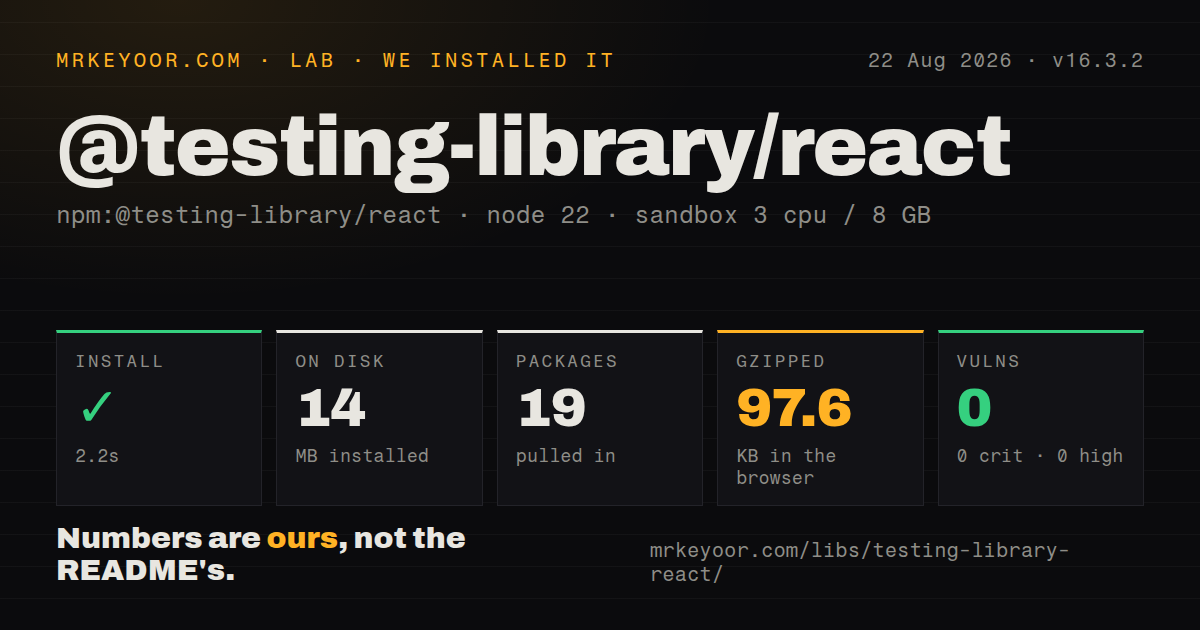
| Install | ✓ · 2.2s | 19 packages on disk · 14 MB |
| Import | ✓ | ESM import works · require() works · CommonJS package |
| Browser | 97.6 KB | gzipped (377 KB minified), bundled with esbuild |
| Types | ✓ | TypeScript types bundled |
| Known vulns | 0 | 0 critical · 0 high · 0 moderate · 0 low (npm audit) |
Answers from our run
Does @testing-library/react install cleanly?
Yes. In a fresh container with an empty cache, npm install @testing-library/react finished in 2 seconds, leaving 19 packages and 14 MB on disk. npm audit reported no known vulnerabilities.
How much does @testing-library/react add to a browser bundle?
97.6 KB gzipped (377 KB minified) when the whole package is bundled for the browser with esbuild. Importing only part of it is usually smaller.
Does @testing-library/react work with both ESM and CommonJS?
Yes. Both import '@testing-library/react' and require('@testing-library/react') worked in Node 22 in our run. The package is published as CommonJS.
Does @testing-library/react include TypeScript types?
Yes, type declarations ship inside the package, so no @types install is needed.
@testing-library/react or @playwright/test: which should you use?
@playwright/test: Choose it when layout, navigation, browser APIs, or full end-to-end behavior must run in an actual browser. @testing-library/react 16.3.2 installed in 2.2 seconds, occupied 14 MB across 19 packages, and returned 0 audit findings in our sandbox; its complete browser import was 97.6 KB gzipped.
When should you not use @testing-library/react?
Correctness depends on layout, CSS painting, element coordinates, scrolling, media, canvas, WebGL, or native navigation; jsdom cannot reproduce those browser systems
Use it if
- React component tests should survive internal refactors as long as visible behavior and accessibility stay the same
- Jest or Vitest already provides a DOM environment and the suite needs one role, label, text, and async query vocabulary
- Forms, provider integration, loading states, and errors need fast coverage below the end-to-end layer
- The project runs React 18 or 19 and can install the matching React DOM and Testing Library peers
- Correctness depends on layout, CSS painting, element coordinates, scrolling, media, canvas, WebGL, or native navigation; jsdom cannot reproduce those browser systems
- The test strategy requires shallow rendering, component instances, or assertions on hook internals; this API exposes rendered DOM instead
- A flow spans pages, cookies, downloads, permissions, or a real backend; Playwright or Cypress covers that boundary
- A chart or canvas wrapper exposes almost no semantic DOM; a passing query may prove only the wrapper exists
- The dependency could enter a production bundle; our full import built to 377 KB minified and 97.6 KB gzipped, so keep it in devDependencies and test-only modules
Setup reality
We installed @testing-library/react 16.3.2 in a fresh Node 22 Bookworm container in 2.2 seconds. The environment ended with 19 packages using 14 MB, and npm audit reported 0 known vulnerabilities at every severity. The package has 1 direct dependency and 5 peer dependencies, is 400 KB unpacked, requires Node 18 or newer, uses the MIT license, and bundles TypeScript declarations. It is CommonJS without an exports map; both require() and ESM import worked.
The 5 peers cover React, React DOM, @testing-library/dom, and the matching React type packages. Since version 16, DOM Testing Library is an explicit peer installation. A test runner must also supply a DOM: Vitest commonly selects jsdom, while modern Jest uses the separate jest-environment-jsdom package. @testing-library/jest-dom is optional and adds assertions such as toBeInTheDocument() and toBeVisible().
Realistic interaction is another package, @testing-library/user-event. Create a user with userEvent.setup() and await its calls. getBy returns immediately or throws, queryBy returns null when absent, and findBy waits for a match. waitFor() retries its callback, so clicks, renders, and other side effects inside that callback may execute several times. Version 16.3.2 changes React 19 onCaughtError type inference, not runtime query behavior.
Updates started outside wrapped user actions can still produce act() warnings. Treat the warning as evidence that the test has not observed the complete update instead of suppressing it globally. Provider helpers are useful, but mutable stores and query clients should be created per test to prevent state leakage. Our browser build reached 377 KB minified and 97.6 KB gzipped. It belongs only in the test graph, and any assertion about geometry or native browser behavior needs a real-browser companion.
Patterns
Find the heading by role and accessible name render-and-query
import {render, screen} from '@testing-library/react';

test('greets the account owner', () => {
  render(<Greeting name='Ada' />);
  expect(
    screen.getByRole('heading', {name: /hello ada/i})
  ).toBeInTheDocument();
});
`toBeInTheDocument()` comes from `@testing-library/jest-dom`, so register that package once in the runner setup. The role query checks the same accessible name exposed to assistive technology.
Submit a form through user-level events type-and-click
import userEvent from '@testing-library/user-event';

test('submits login', async () => {
  const user = userEvent.setup();
  render(<Login onSubmit={onSubmit} />);
  await user.type(screen.getByLabelText(/email/i), 'ada@example.com');
  await user.click(screen.getByRole('button', {name: /log in/i}));
  expect(onSubmit).toHaveBeenCalled();
});
Install `user-event` separately and await every operation. It dispatches the focus, keyboard, input, and mouse sequence that a single `fireEvent` call skips.
Wait for a heading created after a request find-async-content
render(<Profile userId='42' />);
const heading = await screen.findByRole('heading', {
  name: /ada lovelace/i,
});
expect(heading).toBeVisible();
A `findBy` query waits for its match within the configured timeout. Use `getBy` when the element must already exist, so an unexpected delay fails immediately.
Use a nullable query for missing content assert-absence
expect(screen.queryByRole('alert')).not.toBeInTheDocument();`queryBy` returns null when there is no match. A `getBy` absence check never reaches the assertion because the query throws first.
Observe a loading indicator leave the DOM wait-for-removal
import {waitForElementToBeRemoved} from '@testing-library/react';

await waitForElementToBeRemoved(() => (
  screen.queryByText(/loading/i)
));
The target must exist when waiting starts. If it may disappear before this line, await the final state instead of starting a removal observer on null.
Centralize router and application providers wrap-providers
function Providers({children}) {
  return (
    <MemoryRouter>
      <AppProvider>{children}</AppProvider>
    </MemoryRouter>
  );
}

export function renderApp(ui, options) {
  return render(ui, {wrapper: Providers, ...options});
}
Construct mutable stores, query clients, and router state for each test. Reusing one provider instance can carry cached data and subscriptions into the next case.
Prefer roles and labels before test IDs choose-accessible-query
const save = screen.getByRole('button', {name: /save/i});
const email = screen.getByLabelText(/email address/i);
const status = screen.getByText(/saved successfully/i);
If an interactive element has no usable role or name, the failed query may be exposing an accessibility defect. Add a test ID only when the UI has no meaningful user-facing selector.
Change props without creating another tree rerender-props
const {rerender} = render(<Counter value={1} />);
expect(screen.getByText('1')).toBeInTheDocument();

rerender(<Counter value={2} />);
expect(screen.getByText('2')).toBeInTheDocument();
`rerender()` preserves the mounted component and its local state. Calling `render()` again creates an additional root and answers a different lifecycle question.
Exercise a reusable hook with `renderHook()` test-hook
import {act, renderHook} from '@testing-library/react';

test('increments', () => {
  const {result} = renderHook(() => useCounter());
  act(() => result.current.increment());
  expect(result.current.count).toBe(1);
});
Current React Testing Library includes `renderHook()`. The retired separate hooks testing package is unnecessary for React 18 or 19 projects.
Retry only the eventual assertion retry-assertion
import {waitFor} from '@testing-library/react';

await waitFor(() => {
  expect(api.save).toHaveBeenCalledTimes(1);
});
`waitFor()` can call its callback several times. Keep clicks, mock changes, and renders outside the callback or one retry may repeat the action under test.
Select a duplicate button within one row scope-query
import {within} from '@testing-library/react';

const row = screen.getByRole('row', {name: /ada/i});
const remove = within(row).getByRole('button', {name: /delete/i});
await user.click(remove);
`within()` narrows the DOM region while preserving accessible queries. It is a better fit than adding unique test IDs to repeated controls in a table.
Print the DOM's accessible role map debug-roles
import {logRoles} from '@testing-library/react';

const {container} = render(<App />);
screen.debug();
logRoles(container);
`screen.debug()` shows markup; `logRoles()` shows the roles and accessible names available to role queries. Use both before weakening a selector that should have matched.
Alternatives
| Package | Registry | Pick it when |
|---|---|---|
| @playwright/test | npm | Choose it when layout, navigation, browser APIs, or full end-to-end behavior must run in an actual browser. |
| cypress | npm | Choose it when the team wants an interactive runner for browser component tests and end-to-end flows. |
| @testing-library/react-native | npm | Choose it for React Native host elements and events rather than browser DOM nodes. |
More testing guides
pytest · chai · vitest · playwright · jsdom · axe-core · the whole shelf →
How this guide is made: grounded in the library's documentation, release notes, changelog, and issue history, on a fixed rubric — not a hands-on install of every release. The 50 most-downloaded entries are additionally install-verified in clean containers. Corrections: contact the desk.