peewee review
Peewee 4.4.0 is a compact Python ORM and SQL query builder for SQLite, PostgreSQL, MySQL, and MariaDB, with models, relations, transactions, pooling, bulk operations, full-text and database-specific extensions, and new asyncio database classes. Version 4.4 adds numbered Python migrations, the `pwmigrate` CLI, basic model-to-schema diffs, safer instance deletion, bounded scalar queries, and stricter behavior on closed connections. Our measured 4.3.0 install was a single 1 MB package and imported in 0.24 seconds, but it did not include `py.typed`. Peewee fits applications that want SQL visible beneath models; teams needing first-class static typing or a large migration ecosystem should compare alternatives.
Our peewee 4.3.0 install took 0.3 seconds, occupied 1 MB as a single package, imported in 0.24 seconds, and had 0 pip-audit findings, but shipped no `py.typed`. Current 4.4.0 is a practical small ORM for SQL-aware teams; choose SQLAlchemy or Django when typing, mapper depth, or migration tooling carries more weight than footprint.
We installed it
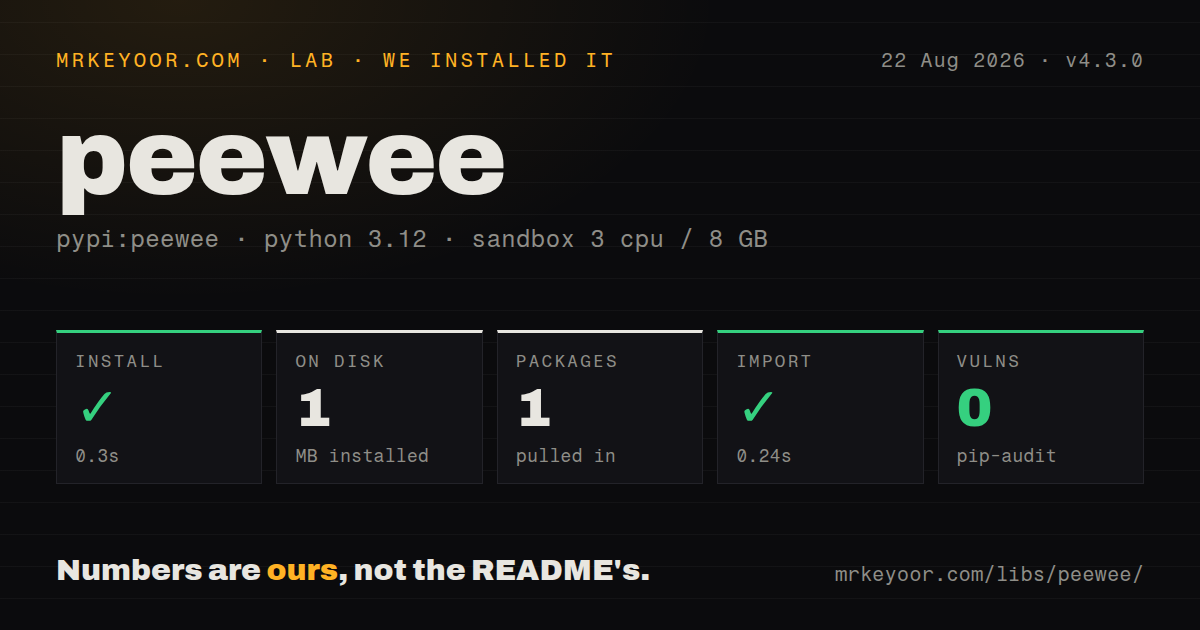
| Install | ✓ · 0.3s | 1 package on disk · 1 MB |
| Import | ✓ | import peewee in 0.24s · pure Python · requires Python >=3.8 |
| Known vulns | 0 | (pip-audit) |
Answers from our run
Does peewee install cleanly?
Yes. In a fresh container with an empty cache, pip install peewee finished in 0.3s, leaving 1 package and 1 MB on disk. pip-audit reported no known vulnerabilities.
What does peewee need to run?
Python >=3.8, and nothing compiled: it is pure Python. In our run import peewee succeeded in 0.24s.
peewee or sqlalchemy: which should you use?
sqlalchemy: Choose it for a deeper mapper, unit of work, broad dialect support, and Alembic's established migration workflow. Our peewee 4.3.0 install took 0.3 seconds, occupied 1 MB as a single package, imported in 0.24 seconds, and had 0 pip-audit findings, but shipped no py.typed.
When should you not use peewee?
Strict mypy or Pyright coverage of ORM queries is a release requirement. Our 4.3.0 distribution had no py.typed, so downstream checking cannot rely on official inline typing.
Use it if
- A Python service wants model objects and relations while retaining direct access to joins, CTEs, window functions, expressions, and generated SQL.
- SQLite is a primary deployment target and Playhouse extensions such as FTS, pragmas, backups, or pooled connections are useful.
- The project prefers a small ORM layer and can own connection lifetime, schema review, and database-specific behavior.
- Async access should use aiosqlite, asyncpg, or aiomysql through Peewee's version 4 asyncio layer without replacing the query language.
- Strict mypy or Pyright coverage of ORM queries is a release requirement. Our 4.3.0 distribution had no `py.typed`, so downstream checking cannot rely on official inline typing.
- A mature migration graph with branch merging, autogenerate review workflows, and a large plugin ecosystem is central. Peewee 4.4's diff-based migration runner is new and intentionally basic.
- The domain needs a unit-of-work identity map, session-scoped change tracking, or SQLAlchemy's mapper depth. Peewee models save explicitly and expose a smaller object model.
- One code path must hide every SQLite, PostgreSQL, and MySQL difference. Conflict clauses, JSON operations, full-text search, locking, server cursors, and DDL still vary by backend.
- Developers will access foreign-key attributes in loops without planning joins or prefetches. That pattern can issue one query per row and hide an N+1 problem behind normal attribute access.
Setup reality
We installed peewee 4.3.0 in a clean Python 3.12 Bookworm container. The install finished in 0.3 seconds and left 1 package using 1 MB. pip-audit found 0 known vulnerabilities. Metadata reported 10 direct dependencies, Python 3.8 or newer, pure Python code, and no declared license. The GitHub repository identifies MIT. import peewee succeeded in 0.24 seconds. The distribution did not ship py.typed, so runtime convenience does not translate into official downstream type checking.
SQLite works through the standard library. PostgreSQL, MySQL, and async backends require the matching optional extra and external driver. Put connection URLs in environment configuration, not model modules. A DatabaseProxy or deferred database lets models import before deployment settings are known. Version 4.4 rejects database URLs with no database name, catching a common malformed PostgreSQL URL. Create tables only for initial or disposable setups; existing production schemas belong in reviewed migrations.
Connections are not application-global magic. Open and close them at request or task boundaries, size pools across every process, and keep network I/O outside transactions. SQLite permits one writer at a time, so WAL mode helps readers but does not remove write contention. Peewee 4.3 rolls back transactions left open when pooled connections return. Version 4.4 makes commit or rollback on a closed database raise instead of silently opening a connection.
Foreign-key access may execute another query. Select joined models when reading one relation and use prefetch() for child collections; inspect query.sql() when query count or backend syntax is unclear. Async models must bind to an async database and call async operations rather than running sync database work on the event loop. Version 4.4's pwmigrate can generate diffs and run numbered scripts, but generated DDL still needs review, a backup plan, and database-specific testing before production.
Patterns
Map related SQLite tables define-models
from peewee import *

db = SqliteDatabase('app.db', pragmas={'journal_mode': 'wal', 'foreign_keys': 1})

class Base(Model):
    class Meta:
        database = db

class User(Base):
    username = CharField(unique=True)

class Note(Base):
    user = ForeignKeyField(User, backref='notes', on_delete='CASCADE')
    body = TextField()
SQLite enforces foreign keys only when the pragma is on. Declaring a model does not migrate an existing table.
Bind models after loading configuration defer-database
from peewee import DatabaseProxy, Model
from playhouse.db_url import connect

database = DatabaseProxy()

class Base(Model):
    class Meta:
        database = database

database.initialize(connect(os.environ['DATABASE_URL']))
Version 4.4 raises `ValueError` when the URL contains no database name, including a common two-slash PostgreSQL typo.
Create rows and branch on absence create-and-fetch
user = User.create(username='huey')
found = User.get_or_none(User.username == 'huey')
other, created = User.get_or_create(username='mickey')
`get()` raises the model's `DoesNotExist`; `get_or_none()` makes expected absence an explicit value branch.
Hydrate a related row in one query join-relation
query = (
    Note.select(Note, User)
    .join(User)
    .where(User.username == 'huey')
)
for note in query:
    print(note.user.username, note.body)
Select the related model as well as joining it; otherwise attribute access can still trigger another query.
Load parent collections without N+1 reads prefetch-children
from peewee import prefetch

users = User.select().where(User.active == True)
notes = Note.select().order_by(Note.id.desc())
for user in prefetch(users, notes):
    for note in user.notes:
        print(note.body)
`prefetch()` runs one query per relation level and joins objects in Python. It does not impose a separate limit per parent.
Increment inside SQL atomic-update
updated = (
    Counter.update(value=Counter.value + 1)
    .where(Counter.key == key)
    .execute()
)
if updated != 1:
    raise LookupError(key)
An expression update avoids two workers reading one old value and writing the same incremented result.
Use a savepoint inside a transaction run-transaction
with db.atomic():
    order = Order.create(user=user)
    with db.atomic():
        OrderLine.insert_many(lines).execute()
    order.recalculate()
    order.save()
The inner `atomic()` becomes a savepoint. Keep external calls outside the transaction, especially when SQLite writers compete.
Upsert rows in bounded batches bulk-upsert
from peewee import chunked, EXCLUDED

with db.atomic():
    for batch in chunked(rows, 500):
        (User.insert_many(batch)
         .on_conflict(
             conflict_target=[User.username],
             update={User.email: EXCLUDED.email},
         )
         .execute())
Choose a batch size below the backend's parameter limit. Supported conflict targets and syntax differ across databases.
View SQL and parameters separately inspect-sql
query = User.select().where(User.username.startswith('a'))
sql, params = query.sql()
print(sql)
print(params)
The values remain bound parameters. Do not interpolate untrusted input just to reproduce a statement in logs.
Close a request database connection manage-connection
def database_scope():
    db.connect(reuse_if_open=True)
    try:
        yield db
    finally:
        if not db.is_closed():
            db.close()
Wire this to framework request cleanup, and multiply the pool limit by every application process.
Create a version 4.4 migration write-migration
# migrations/001_add_active.py
from peewee import BooleanField

def up(migrator, db):
    migrator.add_column('user', 'active', BooleanField(default=True))

def down(migrator, db):
    migrator.drop_column('user', 'active')

# pwmigrate up
The runner records numbered script names. Review generated diffs and decide whether a destructive down migration belongs in production.
Iterate through an async database stream-async-query
from playhouse.pwasyncio import AsyncPostgresqlDatabase

db = AsyncPostgresqlDatabase('app')

async with db:
    query = Event.select().order_by(Event.id)
    async for event in db.iterate(query):
        await consume(event)
await db.close_pool()
Bind models to the async database and use its async methods. A synchronous query still blocks the event loop.
Alternatives
| Package | Registry | Pick it when |
|---|---|---|
| sqlalchemy | PyPI | Choose it for a deeper mapper, unit of work, broad dialect support, and Alembic's established migration workflow. |
| django | PyPI | Choose it when ORM, migrations, admin, authentication, forms, and the web framework should be one integrated stack. |
| sqlmodel | PyPI | Choose it when Pydantic-shaped models and SQLAlchemy underneath fit a typed API service. |
| tortoise-orm | PyPI | Choose it for an async-first ORM whose public operations are awaitable from the start. |
More data guides
numpy · pandas · fsspec · pyarrow · lxml · sqlalchemy · the whole shelf →
How this guide is made: grounded in the library's documentation, release notes, changelog, and issue history, on a fixed rubric — not a hands-on install of every release. The 50 most-downloaded entries are additionally install-verified in clean containers. Corrections: contact the desk.