django review
Django 6.1 is a full Python web framework built around models, migrations, URL dispatch, views, templates, forms, sessions, authentication, caching, security middleware, and a staff admin. Its parts share conventions: a model can drive schema changes, validation, queries, forms, and admin screens. The current release adds configurable fetch modes for deferred model fields, database-level ForeignKey delete actions, and a multi-backend MAILERS setting. Those additions matter on established applications, but 6.1 also raises the floor to Python 3.12 and starts an email configuration migration that finishes in Django 7.0.
Django 6.1 earns its weight when a product will use several of its connected systems, especially models, auth, forms, migrations, and admin. A small API should start elsewhere, and upgrades need attention to Python 3.12, MAILERS, database delete semantics, and third-party backend compatibility.
We installed it
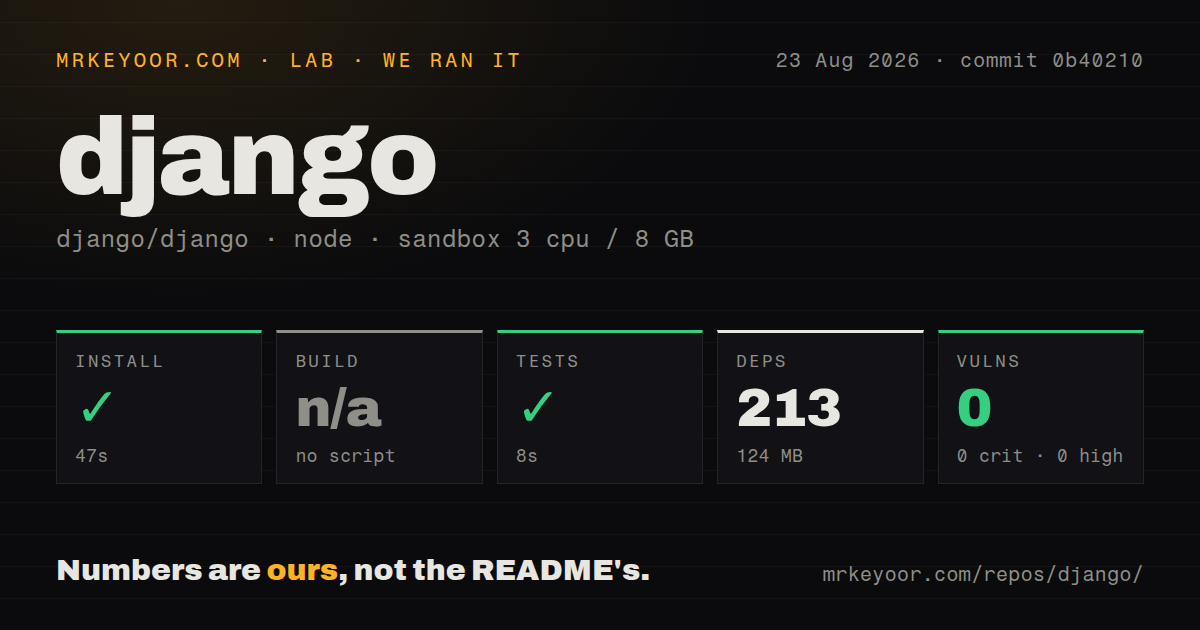
| Install | ✓ · 0.9s | 3 packages on disk · 41 MB |
| Import | ✓ | import django in 0.10s · pure Python · requires Python >=3.12 |
| Known vulns | 0 | (pip-audit) |
Answers from our run
Does django install cleanly?
Yes. In a fresh container with an empty cache, pip install django finished in 0.9s, leaving 3 packages and 41 MB on disk. pip-audit reported no known vulnerabilities.
What does django need to run?
Python >=3.12, and nothing compiled: it is pure Python. In our run import django succeeded in 0.10s.
django or fastapi: which should you use?
fastapi: Pick it for typed API services where async request handling and generated OpenAPI matter more than an integrated admin and template stack. Django 6.1 earns its weight when a product will use several of its connected systems, especially models, auth, forms, migrations, and admin.
When should you not use django?
The service is a narrow JSON API with no use for templates, forms, admin, sessions, or Django's ORM. FastAPI or Litestar gives that shape fewer framework conventions.
Use it if
- A database-backed product needs an ORM, migrations, login, permissions, forms, server-rendered pages, and an internal admin under one release policy.
- Staff need searchable CRUD screens quickly, and the Django admin can remain a trusted operations interface rather than a customer UI.
- Your team prefers documented conventions for project layout, security settings, deployment checks, database transactions, and long-term upgrades.
- The application benefits from mature extensions such as Django REST framework, django-allauth, Channels, Wagtail, or Celery integration.
- The service is a narrow JSON API with no use for templates, forms, admin, sessions, or Django's ORM. FastAPI or Litestar gives that shape fewer framework conventions.
- Every database operation must be async-native. Django has async views and async QuerySet methods, but transactions still require sync code wrapped with sync_to_async in the documented 6.1 model.
- Python 3.11 or older must remain supported. Django 6.1 requires Python 3.12 and officially supports the latest patch releases of 3.12, 3.13, and 3.14.
- You want database cascades to emit Django delete signals. The new DB_CASCADE path runs in the database and does not call pre_delete or post_delete.
- A custom database backend cannot absorb 6.1 interface changes. The release changes introspection tuples, binary placeholder hooks, GIS hooks, and several backend feature flags.
Setup reality
We installed Django 6.1 in a fresh unprivileged Python 3.12 Bookworm container. pip finished in 0.9 seconds; 3 packages occupied 41 MB afterwards. Our inspection counted 5 direct dependencies, found pure Python code, and found no py.typed marker. import django worked in 0.10 seconds, and pip-audit found 0 known vulnerabilities. The package requires Python 3.12 or newer. Its installed metadata did not provide a usable license value.
startproject creates settings, URLs, ASGI, and WSGI entry points, but production settings remain your job. Move SECRET_KEY, database credentials, mail credentials, and host lists into environment-backed configuration. Pick a database driver, run migrations, configure static and uploaded media storage, and execute manage.py check --deploy. The development server and SQLite defaults are learning tools, not a production topology.
Django 6.1 introduces MAILERS for named email backends. Existing EMAIL_* settings still work with deprecation warnings and are scheduled for replacement in 7.0. The cache, database, storage, tasks, and mail systems each use aliases, so configuration errors often surface only when a less-used alias is selected. Treat migrations as source files: commit them, review their SQL, and resolve parallel-branch conflicts before deployment.
ASGI permits async views, yet sync middleware or synchronous ORM work causes context switches. Use async QuerySet methods where available and keep transactions in a synchronous function called through sync_to_async. Static files need collectstatic plus a serving layer. Uploaded files need separate durable storage. Multiple application workers are normal, so cache locks, scheduled work, and in-memory state cannot assume one process.
Patterns
Create a project and one app create-project
python -m pip install Django==6.1
django-admin startproject config .
python manage.py startapp articles
python manage.py runserver
Add articles to INSTALLED_APPS before creating its migrations. runserver is only for development.
Define an article table define-model
from django.conf import settings
from django.db import models

class Article(models.Model):
    title = models.CharField(max_length=200)
    body = models.TextField()
    author = models.ForeignKey(settings.AUTH_USER_MODEL, on_delete=models.CASCADE)
    published_at = models.DateTimeField(null=True, blank=True)
Reference AUTH_USER_MODEL rather than importing the built-in User class, so a custom user model remains possible.
Generate and apply schema changes apply-migrations
python manage.py makemigrations articles
python manage.py sqlmigrate articles 0001
python manage.py migrate
python manage.py showmigrations articles
Commit migration files. sqlmigrate lets reviewers inspect the database operations before deployment.
Avoid an author N plus one query query-related-data
articles = (
    Article.objects
    .filter(published_at__isnull=False)
    .select_related("author")
    .order_by("-published_at")[:20]
)
QuerySets are lazy. select_related joins the single-valued author relation before the loop accesses it.
Connect a view to a typed path map-view-url
from django.shortcuts import get_object_or_404, render
from django.urls import path

def article_detail(request, pk):
    article = get_object_or_404(Article, pk=pk)
    return render(request, "articles/detail.html", {"article": article})

urlpatterns = [path("articles/<int:pk>/", article_detail, name="article-detail")]
get_object_or_404 turns a missing row into an HTTP 404 instead of leaking Article.DoesNotExist.
Render escaped model content render-template
<article>
  <h1>{{ article.title }}</h1>
  <p>{{ article.author.get_username }}</p>
  <div>{{ article.body|linebreaks }}</div>
</article>
Django escapes variables by default. Do not apply safe to text supplied by users unless it has been sanitized.
Save a ModelForm with a server-owned author validate-model-form
class ArticleForm(forms.ModelForm):
    class Meta:
        model = Article
        fields = ["title", "body"]

form = ArticleForm(request.POST or None)
if request.method == "POST" and form.is_valid():
    article = form.save(commit=False)
    article.author = request.user
    article.save()
Excluding author keeps clients from assigning ownership. commit=False lets the view fill it before the insert.
Give staff a searchable article list register-admin
from django.contrib import admin

@admin.register(Article)
class ArticleAdmin(admin.ModelAdmin):
    list_display = ["title", "author", "published_at"]
    search_fields = ["title", "body"]
    list_filter = ["published_at"]
The admin assumes trusted staff. Build a separate customer interface with narrower permissions and workflows.
Require an authenticated session protect-view
from django.contrib.auth.decorators import login_required

@login_required
def account(request):
    return render(request, "account.html")
Set LOGIN_URL or include Django's auth URLs, or anonymous users may be redirected to a route that does not exist.
Lock and update a row atomically run-transaction
from django.db import transaction

@transaction.atomic
def reserve(article_id):
    article = Article.objects.select_for_update().get(pk=article_id)
    article.views += 1
    article.save(update_fields=["views"])
select_for_update must run inside a transaction and has database-specific behavior. SQLite does not provide the same row lock.
Define named Django 6.1 mail backends configure-mailers
MAILERS = {
    "default": {
        "BACKEND": "django.core.mail.backends.smtp.EmailBackend",
        "OPTIONS": {"host": "smtp.example.com", "port": 587},
    },
    "console": {"BACKEND": "django.core.mail.backends.console.EmailBackend"},
}
MAILERS replaces EMAIL_BACKEND and related EMAIL settings in Django 7.0. Put credentials in environment-backed settings.
Run production configuration checks check-deployment
python manage.py check --deploy
python manage.py collectstatic --noinput
python manage.py migrate --check
These commands catch common settings and migration problems, but they do not provide an application server or serve uploaded media.
Alternatives
| Package | Registry | Pick it when |
|---|---|---|
| fastapi | PyPI | Pick it for typed API services where async request handling and generated OpenAPI matter more than an integrated admin and template stack. |
| flask | PyPI | Pick it when you want a small WSGI core and are willing to choose the ORM, auth, validation, and migration pieces yourself. |
| litestar | PyPI | Pick it for an ASGI-first typed service that wants dependency injection and API tooling without Django's project model. |
More web backend guides
ws · urllib3 · requests · undici · anyio · express · the whole shelf →
How this guide is made: grounded in the library's documentation, release notes, changelog, and issue history, on a fixed rubric — not a hands-on install of every release. The 50 most-downloaded entries are additionally install-verified in clean containers. Corrections: contact the desk.