pdfkit review
PDFKit 0.20.1 builds PDFs through drawing and document commands in Node or a browser. A `PDFDocument` is a readable stream that accepts positioned text, embedded fonts, JPEG and PNG images, vector paths, tables, forms, links, outlines, encryption options, and tagged structure. The current release steers new code toward the named `PDFDocument` export and adds experimental `pdfkit/output` helpers plus browser-side file registration. It remains a PDF canvas API, so it does not interpret an HTML page or CSS layout.
PDFKit 0.19.1 used 24 MB and installed in 2.2 seconds with 0 audit findings in our sandbox; npm has since published 0.20.1 with new browser output plumbing. Use it when drawing and streaming a PDF is the job, and use Chromium or a declarative renderer when automatic page layout is the job.
We installed it
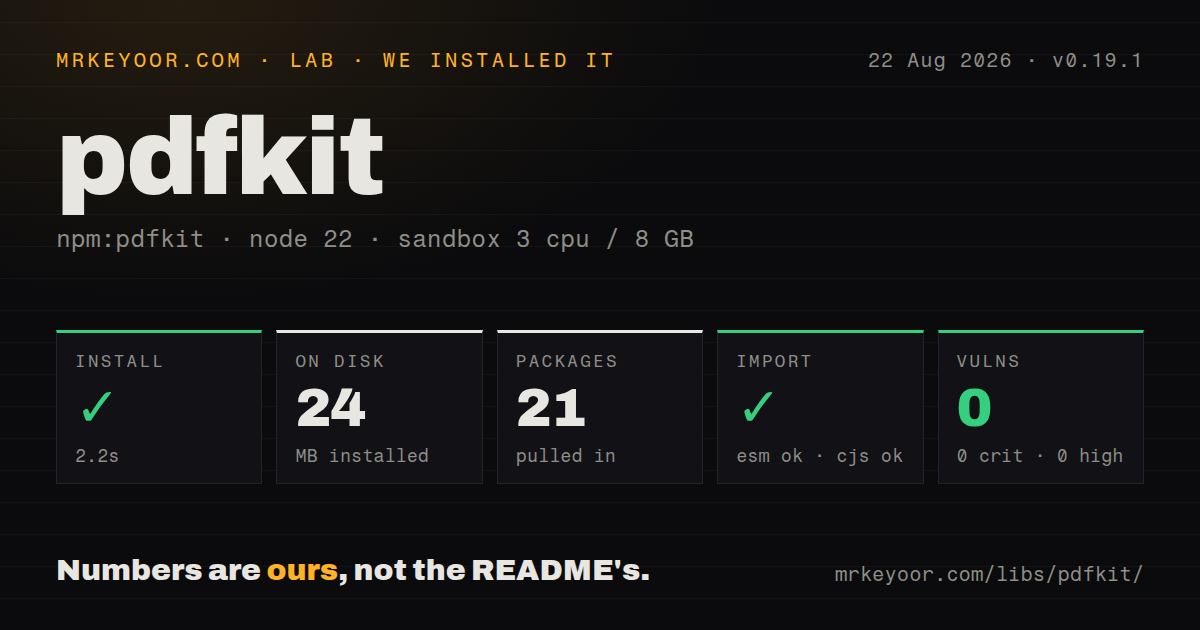
| Install | ✓ · 2.2s | 21 packages on disk · 24 MB |
| Import | ✓ | ESM import works · require() works · CommonJS package |
| Browser | n/a | could not be bundled for the browser (Node-only code, most likely) |
| Types | — | no TypeScript types found |
| Known vulns | 0 | 0 critical · 0 high · 0 moderate · 0 low (npm audit) |
Answers from our run
Does pdfkit install cleanly?
Yes. In a fresh container with an empty cache, npm install pdfkit finished in 2 seconds, leaving 21 packages and 24 MB on disk. npm audit reported no known vulnerabilities.
Can pdfkit run in a browser?
Not directly: esbuild could not bundle it for the browser in our run, which normally means it depends on Node built-ins. Use it on the server, or find a browser-targeted alternative.
Does pdfkit work with both ESM and CommonJS?
Yes. Both import 'pdfkit' and require('pdfkit') worked in Node 22 in our run. The package is published as CommonJS.
Does pdfkit include TypeScript types?
No type declarations were found in our install, so TypeScript users need their own declarations.
pdfkit or pdf-lib: which should you use?
pdf-lib: Choose it when existing PDFs must be loaded and modified as well as created. PDFKit 0.19.1 used 24 MB and installed in 2.2 seconds with 0 audit findings in our sandbox; npm has since published 0.20.1 with new browser output plumbing.
When should you not use pdfkit?
The document already exists as HTML and CSS. PDFKit has no browser layout engine, so Chromium printing usually preserves that source with less code.
Use it if
- Structured invoice, report, label, ticket, or certificate data must become a precisely drawn PDF.
- A Node endpoint should stream bytes directly to a file or HTTP response without starting Chromium.
- The document needs PDF-native features such as embedded fonts, vector paths, AcroForms, outlines, encryption, or tagged content.
- The team can write page-flow rules and compare rendered fixtures across the viewers it supports.
- The document already exists as HTML and CSS. PDFKit has no browser layout engine, so Chromium printing usually preserves that source with less code.
- A small client bundle is required. Our measured 0.19.1 install occupied 24 MB, and the package brings font shaping, line breaking, PNG, compression, hashing, and cipher code.
- Grid, floats, footnotes, running sections, and complex reflow must happen automatically. The README still lists higher-level layout work as future functionality.
- First-party TypeScript declarations are mandatory. We found none in the measured 0.19.1 package, and the current 0.20.1 metadata still has no `types` entry.
- The team cannot run font and page-break fixtures in production-like conditions. A missing font, unsupported glyph, or forgotten `doc.end()` can leave output wrong or incomplete.
- Accessible PDF compliance is expected by default. Tagged output still needs correct structure, reading order, language, alternate text, and artifact marking from application code.
Setup reality
We installed PDFKit 0.19.1 in a clean Node 22 Bookworm sandbox. npm completed in 2.2 seconds, left 21 packages using 24 MB, and reported 0 vulnerabilities at all severities. That measured package had 6 direct dependencies, no peers, and 8324 KB unpacked. It shipped no TypeScript declarations. npm now serves 0.20.1, so we did not assign the 0.19.1 size or audit result to the newer patch.
The measured package was CommonJS without an exports map; both require() and ESM import worked. Current documentation prefers the named PDFDocument export for a future ESM-only transition. A browser build of 0.19.1 failed under our generic esbuild check. The 0.20.1 README instead documents browser-specific entry points, explicit standard-font registration, and experimental toBlob and toBytes helpers.
Pipe or attach an output collector before adding content, then call doc.end() once. Streaming saves memory, but flushed pages cannot be edited. Turn on bufferPages only when later code must add totals or backfill earlier pages, since every retained page costs memory.
Font files or buffers must exist where the document is generated, and PDF/A requires embedded fonts. Browser code has no filesystem, so 0.20.1 adds module-wide registerFile() data for path-based calls. Headers, footers, orphan handling, reading order, and long-table behavior remain your code. Test real fonts and page breaks in Acrobat, browsers, Preview, and any print path you promise to support.
Patterns
Write a PDF file stream write-pdf-file
const PDFDocument = require('pdfkit');
const fs = require('node:fs');

const doc = new PDFDocument({ size: 'A4', margin: 50 });
doc.pipe(fs.createWriteStream('invoice.pdf'));
doc.fontSize(20).text('Invoice');
doc.end();
`doc.end()` writes the trailer and allows the destination to finish. Omitting it leaves consumers waiting on an incomplete document.
Pipe a PDF into an HTTP response stream-http-response
res.setHeader('Content-Type', 'application/pdf');
res.setHeader('Content-Disposition', 'attachment; filename=report.pdf');

const doc = new PDFDocument();
doc.pipe(res);
doc.text('Quarterly report');
doc.end();
Set response headers first. Once PDF bytes are sent, a generation error cannot be replaced with an ordinary JSON error body.
Flow text through two columns wrap-multicolumn-text
doc.font('Times-Roman').fontSize(11).text(body, {
  width: 495,
  columns: 2,
  columnGap: 24,
  align: 'justify',
  paragraphGap: 8,
});
Text layout advances the document cursor. Record or reset `doc.x` and `doc.y` before placing unrelated elements.
Embed deployment fonts register-custom-font
doc.registerFont('Body', 'assets/Inter-Regular.ttf');
doc.registerFont('Body Bold', 'assets/Inter-Bold.ttf');

doc.font('Body').fontSize(11).text('Normal text');
doc.font('Body Bold').text('Important text');
The exact font files must be present as paths or buffers. PDF/A output cannot rely on the built-in unembedded AFM fonts.
Fit a supported raster image place-image
doc.image('assets/logo.png', 50, 60, {
  fit: [160, 80],
  align: 'center',
  valign: 'center',
});
JPEG and PNG work directly. Convert WebP or other raster formats before passing them to this API.
Isolate vector drawing state draw-vector-card
doc.save()
  .roundedRect(50, 160, 495, 90, 8)
  .fillAndStroke('#f8fafc', '#94a3b8')
  .fillColor('#0f172a')
  .fontSize(14)
  .text('Account summary', 70, 185)
  .restore();
`save()` and `restore()` contain transforms, fills, and strokes so later page elements do not inherit them.
Lay out a paginated table render-table
doc.table({
  columnStyles: [120, '*', 80],
  rowStyles: (row) => row === 0 ? { backgroundColor: '#e2e8f0' } : {},
  data: [
    ['SKU', 'Description', 'Amount'],
    ['A-10', 'Annual plan', '$120.00'],
  ],
});
Exercise long cells, spans, headers, and custom fonts against the same PDFKit version used in production.
Draw a header on added pages add-page-header
const doc = new PDFDocument({ margin: 60 });

doc.on('pageAdded', () => {
  doc.fontSize(9).fillColor('gray').text('ACME REPORT', 60, 30, { align: 'right' });
  doc.fillColor('black');
});
The first page exists before this listener is attached. Draw its header separately or set `autoFirstPage: false`.
Add totals after pagination add-page-numbers
const doc = new PDFDocument({ bufferPages: true });
// Add all document content here.
const range = doc.bufferedPageRange();
for (let i = range.start; i < range.start + range.count; i += 1) {
  doc.switchToPage(i);
  doc.text(`Page ${i + 1} of ${range.count}`, 50, 780, { align: 'center' });
}
doc.end();
`bufferPages` keeps pages editable until flush or end and raises memory use as reports grow.
Create an external link add-clickable-link
doc.fillColor('blue').text('View order online', {
  link: 'https://example.com/orders/42',
  underline: true,
});
doc.fillColor('black');
Validate untrusted destinations and reset link and color options before continuing ordinary text.
Place text in the structure tree tag-accessible-paragraph
const doc = new PDFDocument({ lang: 'en-US', tagged: true });

doc.addStructure(doc.struct('P', () => {
  doc.text('This paragraph participates in the reading order. ');
}));
One tagged paragraph does not meet PDF/UA. Every meaningful element needs correct order, semantics, and artifact handling.
Collect browser output as a Blob create-browser-blob
const PDFDocument = require('pdfkit');
const blobStream = require('blob-stream');

const doc = new PDFDocument();
const stream = doc.pipe(blobStream());
doc.text('Browser-generated PDF');
doc.end();

stream.on('finish', () => {
  const url = stream.toBlobURL('application/pdf');
  window.open(url);
});
Browser output needs an explicit collector. In 0.20.1, `pdfkit/output` provides experimental helpers as another option.
Alternatives
| Package | Registry | Pick it when |
|---|---|---|
| pdf-lib | npm | Choose it when existing PDFs must be loaded and modified as well as created. |
| jspdf | npm | Choose it for client-side generation and its established browser plugin collection. |
| puppeteer | npm | Choose it when HTML and CSS are the document source and Chromium deployment is acceptable. |
| @react-pdf/renderer | npm | Choose it for React components and stylesheet-driven PDF layout. |
More data guides
numpy · fsspec · pandas · sqlalchemy · pyarrow · lxml · the whole shelf →
How this guide is made: grounded in the library's documentation, release notes, changelog, and issue history, on a fixed rubric — not a hands-on install of every release. The 50 most-downloaded entries are additionally install-verified in clean containers. Corrections: contact the desk.