passport review
Passport 0.7.0 is Express and Connect middleware that runs a named authentication strategy, places the resulting principal on the request, and optionally links that identity to a server-side login session. The core does not hash passwords, issue tokens, create users, define routes, or decide authorization. Those jobs belong to application code and separately installed strategies. The 0.7.0 change makes `assignProperty` authentication populate `req.authInfo` by default unless `authInfo` is disabled. Our package check found a small CommonJS server module with no bundled types.
passport 0.7.0 installed in 1.3 seconds and occupied 1 MB in our sandbox, but that tiny core includes neither TypeScript declarations nor the account and policy layers required for a finished login system. Keep it for Express apps that benefit from interchangeable strategies; choose a fuller auth system for new products that want those missing pieces together.
We installed it
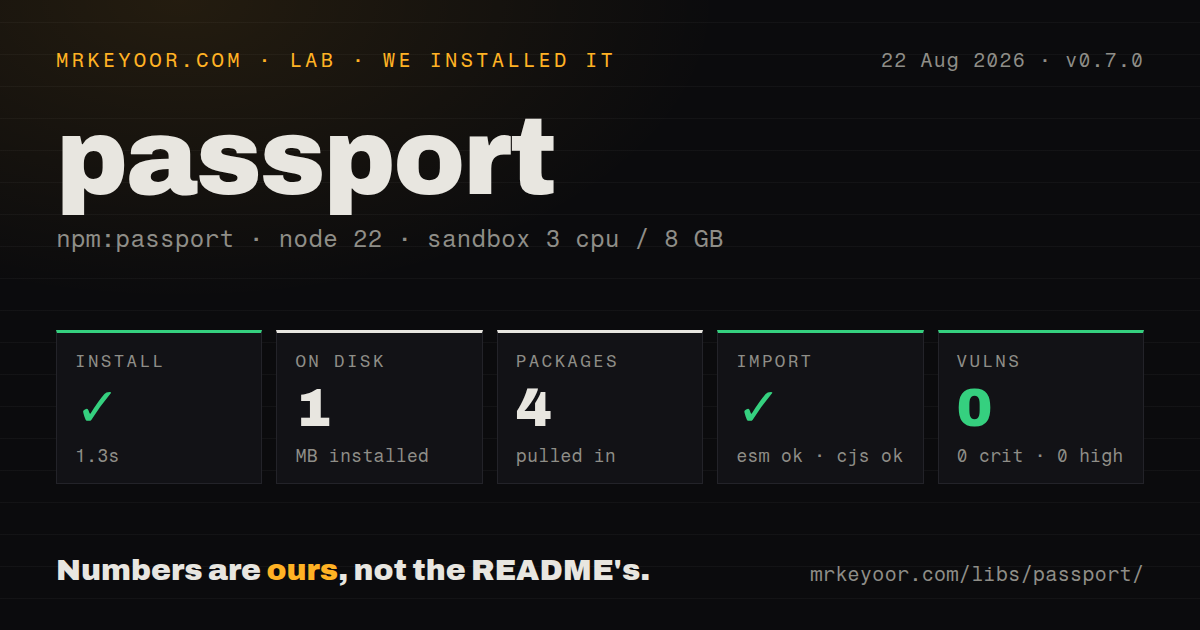
| Install | ✓ · 1.3s | 4 packages on disk · 1 MB |
| Import | ✓ | ESM import works · require() works · CommonJS package |
| Browser | n/a | could not be bundled for the browser (Node-only code, most likely) |
| Types | — | no TypeScript types found |
| Known vulns | 0 | 0 critical · 0 high · 0 moderate · 0 low (npm audit) |
Answers from our run
Does passport install cleanly?
Yes. In a fresh container with an empty cache, npm install passport finished in 1 seconds, leaving 4 packages and 1 MB on disk. npm audit reported no known vulnerabilities.
Can passport run in a browser?
Not directly: esbuild could not bundle it for the browser in our run, which normally means it depends on Node built-ins. Use it on the server, or find a browser-targeted alternative.
Does passport work with both ESM and CommonJS?
Yes. Both import 'passport' and require('passport') worked in Node 22 in our run. The package is published as CommonJS.
Does passport include TypeScript types?
No type declarations were found in our install, so TypeScript users need their own declarations.
passport or better-auth: which should you use?
better-auth: Choose it for a TypeScript-oriented system that includes sessions, account flows, adapters, and plugins. passport 0.7.0 installed in 1.3 seconds and occupied 1 MB in our sandbox, but that tiny core includes neither TypeScript declarations nor the account and policy layers required for a finished login system.
When should you not use passport?
Passport is not an identity product. It provides no registration, password reset, MFA enrollment, account UI, or user database.
Use it if
- An Express application needs local login, OAuth, OpenID Connect, SAML, JWT, or another strategy behind one request convention.
- The application should own user records, routes, redirects, session data, and failure responses while a strategy handles protocol verification.
- You are maintaining an existing Passport system and want to keep its established `req.user` and `authenticate()` integration.
- Browser login needs server-side sessions and you can provide explicit serialization and deserialization callbacks.
- Passport is not an identity product. It provides no registration, password reset, MFA enrollment, account UI, or user database.
- A TypeScript-first project that requires first-party declarations should look elsewhere; our install contained no types, and community definitions are a separate dependency.
- Authentication success does not answer authorization questions. Roles, tenants, ownership, and policy enforcement remain application code.
- Every strategy needs its own audit. Strategy packages have independent maintainers, release dates, protocol decisions, and dependency graphs.
- Do not target browsers or edge workers. Our browser bundle failed, and Passport expects Node request middleware plus server-side session behavior.
Setup reality
Our install of passport 0.7.0 finished in 1.3 seconds in a fresh Node 22 Bookworm container. It left 4 packages and 1 MB on disk, and npm audit reported 0 vulnerabilities at every severity. Passport declares 3 direct dependencies and 0 peers, with 240 KB unpacked. It is an MIT-licensed CommonJS package without an exports map. require() and ESM import both worked, but the package contains no TypeScript declarations.
The core cannot verify a password or OAuth response alone. Add a strategy, register it with passport.use(), and decide how failure reaches the client. Session login also needs express-session mounted before passport.initialize() and passport.session(). Serialize a stable user identifier, then load the current user during deserialization. Session persistence, expiry, and storage are owned by the session middleware and its store, not by Passport 0.7.0.
Current Passport regenerates a session on login and logout to reduce fixation risk. keepSessionInfo copies existing session values into the new session, which is useful for a cart but unsafe as a casual default. req.logout() requires a callback. Provider strategies also need exact callback URLs, state handling, secrets, and correct HTTPS proxy settings. A provider rejecting the callback URI is usually a registration mismatch rather than a route-order problem.
No TypeScript types were present in our measured package; @types/passport supplies request augmentation separately, and strategies may need additional declarations. The package could not be bundled for a browser with esbuild, consistent with its Node-only middleware role. For JSON endpoints, use a custom authentication callback instead of redirects, and call req.logIn() yourself if that branch should create a session. Add rate limits, CSRF defenses, authorization checks, and account policy outside Passport.
Patterns
Put session state before Passport mount-session-middleware
const session = require('express-session');
const passport = require('passport');

app.use(session({
  secret: process.env.SESSION_SECRET,
  resave: false,
  saveUninitialized: false,
  store: sessionStore,
  cookie: { httpOnly: true, sameSite: 'lax', secure: true },
}));
app.use(passport.initialize());
app.use(passport.session());
Use a persistent store outside development. Secure cookies also depend on correct HTTPS termination and Express proxy settings.
Check a username and password verify-password
const LocalStrategy = require('passport-local');

passport.use(new LocalStrategy(async (username, password, done) => {
  try {
    const user = await User.findOne({ username });
    if (!user || !(await verifyPassword(user, password))) return done(null, false);
    return done(null, user);
  } catch (error) {
    return done(error);
  }
}));
Password hashing, throttling, lockout rules, and neutral error text stay in application code rather than `passport-local`.
Keep only an identifier in the session store-session-user
passport.serializeUser((user, done) => done(null, user.id));
passport.deserializeUser(async (id, done) => {
  try {
    done(null, await User.findById(id));
  } catch (error) {
    done(error);
  }
});
Deserialization can query the database for every authenticated request, so fetch only fields downstream handlers need.
Redirect after form authentication login-with-redirect
app.post('/login', passport.authenticate('local', {
  successRedirect: '/account',
  failureRedirect: '/login',
}));
Redirect responses suit browser forms. An API client usually needs a custom callback and an explicit JSON status.
Return a JSON login response login-json-api
app.post('/api/login', (req, res, next) => {
  passport.authenticate('local', (error, user, info) => {
    if (error) return next(error);
    if (!user) return res.status(401).json({ error: 'invalid credentials' });
    req.logIn(user, (loginError) => {
      if (loginError) return next(loginError);
      res.json({ id: user.id });
    });
  })(req, res, next);
});
The custom callback owns success and failure. Call `req.logIn()` when successful authentication should persist a session.
Reject requests without a session user protect-route
function requireUser(req, res, next) {
  if (req.isAuthenticated()) return next();
  return res.status(401).json({ error: 'authentication required' });
}

app.get('/api/account', requireUser, (req, res) => res.json(req.user));
This middleware checks identity only. Tenant, role, and resource-ownership decisions need a separate policy layer.
End the login session logout-session
app.post('/logout', (req, res, next) => {
  req.logout((error) => {
    if (error) return next(error);
    req.session.destroy((destroyError) => {
      if (destroyError) return next(destroyError);
      res.clearCookie('connect.sid');
      res.sendStatus(204);
    });
  });
});
`req.logout()` is asynchronous in current Passport. Destroying application session data and clearing its cookie are additional operations.
Verify a bearer token without a session authenticate-jwt
const { Strategy: JwtStrategy, ExtractJwt } = require('passport-jwt');

passport.use(new JwtStrategy({
  jwtFromRequest: ExtractJwt.fromAuthHeaderAsBearerToken(),
  secretOrKey: process.env.JWT_SECRET,
}, (payload, done) => done(null, { id: payload.sub })));

app.get('/api/me', passport.authenticate('jwt', { session: false }), handler);
Production validation should pin algorithms and check issuer, audience, expiry, and key rotation; one shared secret is rarely the whole policy.
Wire an OAuth redirect and callback start-oauth
app.get('/auth/google', passport.authenticate('google', { scope: ['openid', 'email', 'profile'] }));
app.get('/auth/google/callback',
  passport.authenticate('google', { failureRedirect: '/login' }),
  (req, res) => res.redirect('/account')
);
Register the exact HTTPS callback URL with the provider, then review whether the chosen strategy supports state and PKCE as required.
Carry selected state through login preserve-cart-session
app.post('/login', passport.authenticate('local', {
  successRedirect: '/checkout',
  failureRedirect: '/login',
  keepSessionInfo: true,
}));
`keepSessionInfo` retains pre-login values after session regeneration. Leave it off when untrusted session data should be discarded.
Alternatives
| Package | Registry | Pick it when |
|---|---|---|
| better-auth | npm | Choose it for a TypeScript-oriented system that includes sessions, account flows, adapters, and plugins. |
| @auth/express | npm | Choose Auth.js when provider configuration and its Express integration cover the required sign-in flows. |
| openid-client | npm | Choose it when OpenID Connect and OAuth protocol control matters more than a shared strategy abstraction. |
More security guides
cryptography · jose · pyjwt · dompurify · jsonwebtoken · requests-oauthlib · the whole shelf →
How this guide is made: grounded in the library's documentation, release notes, changelog, and issue history, on a fixed rubric — not a hands-on install of every release. The 50 most-downloaded entries are additionally install-verified in clean containers. Corrections: contact the desk.