openid-client review
openid-client 6.8.7 handles OAuth 2.0 and OpenID Connect protocol work in JavaScript runtimes with Fetch and Web Crypto. It discovers server metadata, constructs authorization requests, checks callbacks and ID tokens, refreshes or revokes tokens, and covers PAR, JAR, JARM, DPoP, device flow, CIBA, and FAPI extensions. It does not create your user database, cookie session, or login screen. Version 6.8.7 fixes the `claims` helper so `const { claims } = tokens; claims()` keeps working after destructuring. Our full-package browser build measured 80.8 KB minified and 24 KB gzipped.
openid-client 6.8.7 installed in 0.9 seconds with 3 packages, 2 MB on disk, and 0 audit findings in our sandbox; its full browser import was 24 KB gzipped. Use it when your team wants protocol-level control and will own sessions and token storage, otherwise an application auth framework removes more work.
We installed it
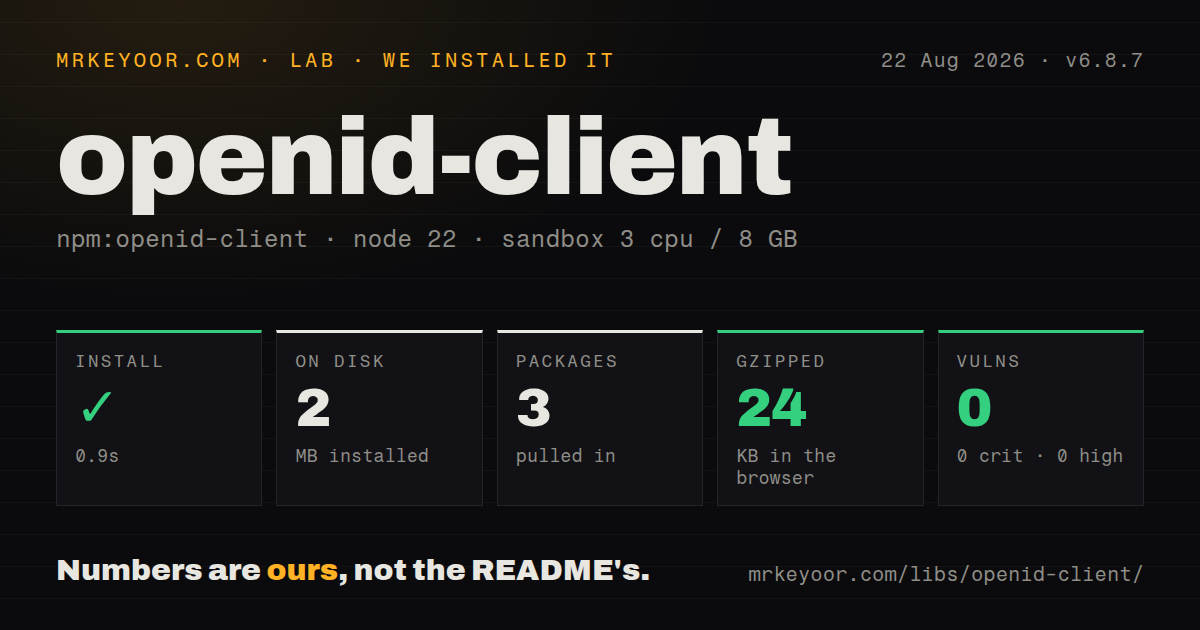
| Install | ✓ · 0.9s | 3 packages on disk · 2 MB |
| Import | ✓ | ESM import works · require() works · ESM package with exports map |
| Browser | 24 KB | gzipped (80.8 KB minified), bundled with esbuild |
| Types | ✓ | TypeScript types bundled |
| Known vulns | 0 | 0 critical · 0 high · 0 moderate · 0 low (npm audit) |
Answers from our run
Does openid-client install cleanly?
Yes. In a fresh container with an empty cache, npm install openid-client finished in 0.9s, leaving 3 packages and 2 MB on disk. npm audit reported no known vulnerabilities.
How much does openid-client add to a browser bundle?
24 KB gzipped (80.8 KB minified) when the whole package is bundled for the browser with esbuild. Importing only part of it is usually smaller.
Does openid-client work with both ESM and CommonJS?
Yes. Both import 'openid-client' and require('openid-client') worked in Node 22 in our run. The package is published as ESM with an exports map.
Does openid-client include TypeScript types?
Yes, type declarations ship inside the package, so no @types install is needed.
openid-client or oauth4webapi: which should you use?
oauth4webapi: Use it when lower-level OAuth primitives are preferable to openid-client's Configuration helpers. openid-client 6.8.7 installed in 0.9 seconds with 3 packages, 2 MB on disk, and 0 audit findings in our sandbox; its full browser import was 24 KB gzipped.
When should you not use openid-client?
The feature request includes sessions, cookies, account linking, provider presets, and callbacks. Auth.js works at that application layer.
Use it if
- A service needs direct OpenID Connect code flow with PKCE, state, nonce, issuer, and token checks.
- The provider requires DPoP, PAR, JARM, private key client authentication, CIBA, or a FAPI profile.
- Protocol code must run across Node, Bun, Deno, browsers, or worker runtimes that provide Fetch and Web Crypto.
- A Passport application wants the strategy maintained in the same repository as its OAuth implementation.
- The feature request includes sessions, cookies, account linking, provider presets, and callbacks. Auth.js works at that application layer.
- The project depends on the version 5 `Issuer` and `Client` classes. Version 6 replaces them with `Configuration` and exported functions, so migration is a rewrite.
- CommonJS must run on an older Node release. The README supports `require(esm)` only from Node 20.19.0, 22.12.0, or 23.0.0 and newer matching lines.
- The production issuer uses plain HTTP or publishes inconsistent metadata. Strict discovery and endpoint checks reject that server, and bypassing them weakens the flow.
- Nobody owns one-time state, nonce and verifier storage, refresh-token rotation, and session identity. openid-client deliberately leaves those pieces to the application.
Setup reality
We installed openid-client 6.8.7 in a fresh Node 22 Bookworm sandbox in 0.9 seconds. The install left 3 packages and 2 MB on disk. Its own archive was 244 KB unpacked with 2 direct dependencies and 0 peer dependencies. npm audit reported 0 vulnerabilities at every severity. The package bundles TypeScript declarations, uses ESM with an exports map, and both require() and ESM import worked on our box. A full esbuild import measured 80.8 KB minified and 24 KB gzipped.
The runtime needs Fetch, Web Crypto, URL, and related web APIs. CommonJS depends on Node's require(esm) support; the project names Node 20.19.0, 22.12.0, and 23.0.0 as the relevant floors. Discovery performs network I/O, so build one Configuration during startup and reuse it. Give discovery the issuer identifier rather than a copied well-known URL. HTTPS endpoints and exact issuer metadata are expected in production.
Register the client ID, redirect URI, and authentication method with the provider. Keep a client secret or signing key out of source. Proxy, mTLS, and custom transport behavior go through the documented customFetch hook. For code flow, create fresh PKCE verifier, state, and nonce values per attempt, store them against the browser's server-side session, then supply the exact callback URL and saved values to authorizationCodeGrant().
Delete one-time checks after a successful exchange. If refresh tokens rotate, serialize refreshes per grant: two workers can spend the same old token, and the later write may store an invalid credential. Version 6.8.7 only changes helper binding, so tokens.claims() remains readable while destructured claims() now works too. Token validation does not establish an application session; your code still decides the subject mapping, cookie policy, logout behavior, and token storage encryption.
Patterns
Discover metadata once and reuse it discover-provider
import * as oidc from "openid-client";

const config = await oidc.discovery(
  new URL(process.env.OIDC_ISSUER),
  process.env.OIDC_CLIENT_ID,
  process.env.OIDC_CLIENT_SECRET,
);
Pass the issuer identifier, not the well-known document URL. Cache the resulting Configuration instead of repeating discovery for every login.
Start code flow with one-time checks start-authorization-code
const verifier = oidc.randomPKCECodeVerifier();
const challenge = await oidc.calculatePKCECodeChallenge(verifier);
const state = oidc.randomState();
const nonce = oidc.randomNonce();

req.session.oidc = { verifier, state, nonce };
const url = oidc.buildAuthorizationUrl(config, {
  redirect_uri: "https://app.example/callback",
  scope: "openid email profile",
  code_challenge: challenge,
  code_challenge_method: "S256",
  state,
  nonce,
});
res.redirect(url.href);
Generate verifier, state, and nonce per attempt and bind them to the browser session. The PKCE verifier never belongs in the redirect URL.
Validate the returned authorization response handle-authorization-callback
const callbackUrl = new URL(req.originalUrl, "https://app.example");
const saved = req.session.oidc;

const tokens = await oidc.authorizationCodeGrant(config, callbackUrl, {
  pkceCodeVerifier: saved.verifier,
  expectedState: saved.state,
  expectedNonce: saved.nonce,
});
delete req.session.oidc;

const claims = tokens.claims();
req.session.user = { sub: claims.sub, email: claims.email };
Use the full callback URL including its query. Remove saved one-time values after success, and require ID-token claims for an OpenID Connect login.
Call the helper fixed in 6.8.7 destructure-claims-helper
const tokens = await oidc.authorizationCodeGrant(config, callbackUrl, checks);
const { claims } = tokens;
const idTokenClaims = claims();

if (!idTokenClaims) {
  throw new Error("Provider returned no ID token");
}
Older releases could lose the method receiver after destructuring. Version 6.8.7 supports this call, though `tokens.claims()` is easier to recognize.
Store refresh-token rotation safely refresh-access-token
const next = await oidc.refreshTokenGrant(config, stored.refreshToken, {
  scope: "openid email offline_access",
});
const ttlSeconds = next.expiresIn();

await tokenStore.replace(userId, {
  accessToken: next.access_token,
  refreshToken: next.refresh_token ?? stored.refreshToken,
  expiresAt: ttlSeconds === undefined ? undefined : Date.now() + ttlSeconds * 1000,
});
A provider can rotate the refresh token or omit a replacement. Serialize updates for one grant so parallel refreshes do not overwrite the valid credential.
Request an application token request-client-credentials
const tokens = await oidc.clientCredentialsGrant(config, {
  scope: "reports:read",
  resource: "https://api.example",
});

const response = await fetch("https://api.example/reports", {
  headers: { authorization: `Bearer ${tokens.access_token}` },
});
Client credentials identify the application rather than a user, so no ID token or end-user subject is expected. Cache the token until near expiry.
Check the UserInfo subject fetch-userinfo
const claims = tokens.claims();
if (!claims) throw new Error("ID token required");

const profile = await oidc.fetchUserInfo(
  config,
  tokens.access_token,
  claims.sub,
);
Supplying the ID-token `sub` makes the client reject a UserInfo response for a different subject.
Bind token and API calls with DPoP refresh-with-dpop
const keyPair = await oidc.randomDPoPKeyPair();
const DPoP = oidc.getDPoPHandle(config, keyPair);

const tokens = await oidc.authorizationCodeGrant(
  config, callbackUrl, checks, undefined, { DPoP },
);
const response = await oidc.fetchProtectedResource(
  config,
  tokens.access_token,
  new URL("https://api.example/me"),
  "GET",
  undefined,
  undefined,
  { DPoP },
);
Reuse one DPoP handle for the related token and resource requests. The handle tracks nonces returned by the authorization or resource server.
Poll a device authorization request start-device-flow
const pending = await oidc.initiateDeviceAuthorization(config, {
  scope: "openid profile",
});

showCode(pending.user_code, pending.verification_uri_complete ?? pending.verification_uri);
const tokens = await oidc.pollDeviceAuthorizationGrant(config, pending);
The helper observes the server's polling interval. The surrounding UI still needs cancellation and a restart path when the user code expires.
Revoke a saved refresh token revoke-refresh-token
await oidc.tokenRevocation(config, stored.refreshToken, {
  token_type_hint: "refresh_token",
});
await tokenStore.delete(userId);
Remote revocation does not delete your cookie or database row. Clear the local token and session state even when the provider cannot revoke.
Build provider logout when available build-provider-logout
const logout = oidc.buildEndSessionUrl(config, {
  id_token_hint: stored.idToken,
  post_logout_redirect_uri: "https://app.example/signed-out",
  state: oidc.randomState(),
});

req.session.destroy(() => res.redirect(logout.href));
Some discovery documents omit `end_session_endpoint`. Local session destruction must work even when no provider logout URL exists.
Attach the maintained Passport strategy use-passport-strategy
import passport from "passport";
import * as oidc from "openid-client";
import { Strategy } from "openid-client/passport";

const config = await oidc.discovery(issuer, clientId, clientSecret);
passport.use("oidc", new Strategy(
  { config, callbackURL, scope: "openid email" },
  (tokens, done) => done(null, tokens.claims()),
));
The strategy lives at `openid-client/passport`. Session middleware must run first because redirects need temporary state tied to one user.
Alternatives
| Package | Registry | Pick it when |
|---|---|---|
| oauth4webapi | npm | Use it when lower-level OAuth primitives are preferable to openid-client's Configuration helpers. |
| @auth/core | npm | Use it when provider adapters, callbacks, cookies, and sessions belong in the chosen auth layer. |
| next-auth | npm | Use it in an existing Next.js application built around the Auth.js route and session model. |
| passport-openidconnect | npm | Use it only for a legacy Passport strategy whose limited OAuth feature set is sufficient. |
More security guides
cryptography · jose · pyjwt · dompurify · jsonwebtoken · requests-oauthlib · the whole shelf →
How this guide is made: grounded in the library's documentation, release notes, changelog, and issue history, on a fixed rubric — not a hands-on install of every release. The 50 most-downloaded entries are additionally install-verified in clean containers. Corrections: contact the desk.