jose review
Our August 22 install of jose 6.2.10 finished in 0.4 seconds, left one package and 1 MB on disk, and produced no npm audit findings. jose implements the JOSE standards in JavaScript: JWT claim validation, JWS signing and verification, JWE encryption, JWK conversion, and local or remote JWKS key selection. Its Web Crypto based API runs in Node, browsers, Workers, Deno, Bun, and other compatible runtimes. Current release 6.2.12 keeps the v6 public surface and changes the machinery underneath it. Its release notes name fewer copies during AES-GCM work, one encoding pass for single-signature JWS input, shared-header normalization for General JWE, and deduplication of pending JWKS key imports. It also shortens the generated API guidance. No new public operation was announced in this release.
Our jose 6.2.10 install took 0.4 seconds, occupied 1 MB, pulled zero dependencies, and returned zero audit findings, so its package cost is easy to justify when an application needs JOSE primitives. Install current 6.2.12 for JWT, JWS, JWE, and JWKS work across Web Crypto runtimes; choose an authentication framework when the missing piece is session or authorization policy.
We installed it
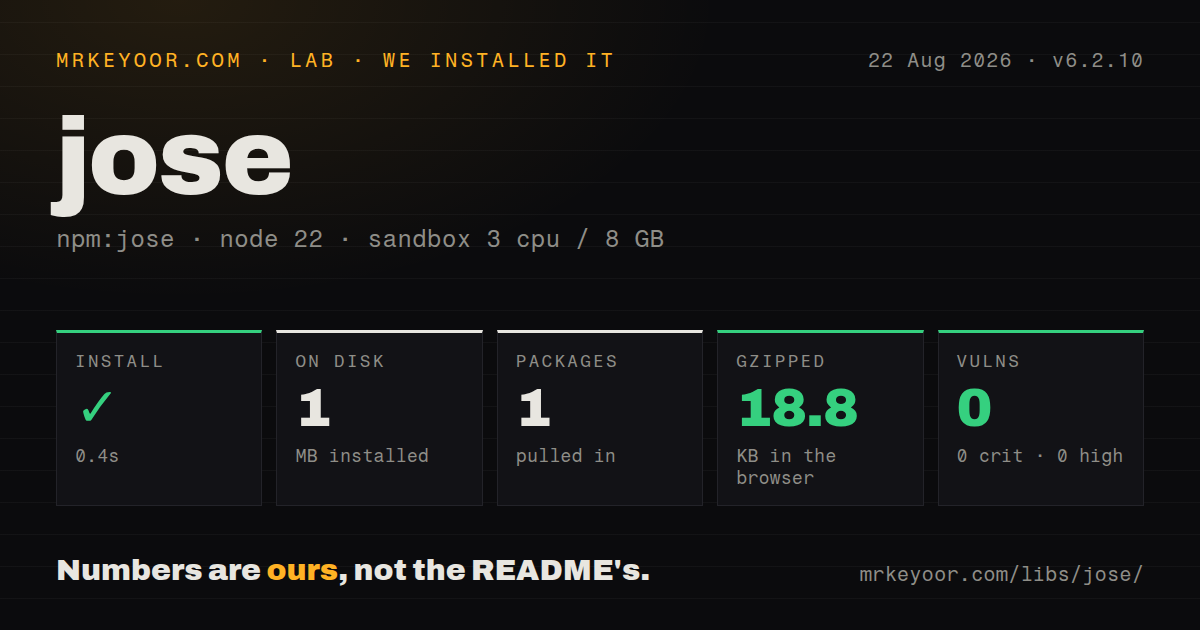
| Install | ✓ · 0.4s | 1 package on disk · 1 MB |
| Import | ✓ | ESM import works · require() works · ESM package with exports map |
| Browser | 18.8 KB | gzipped (59.6 KB minified), bundled with esbuild |
| Types | ✓ | TypeScript types bundled |
| Known vulns | 0 | 0 critical · 0 high · 0 moderate · 0 low (npm audit) |
Answers from our run
Does jose install cleanly?
Yes. In a fresh container with an empty cache, npm install jose finished in 0.4s, leaving 1 package and 1 MB on disk. npm audit reported no known vulnerabilities.
How much does jose add to a browser bundle?
18.8 KB gzipped (59.6 KB minified) when the whole package is bundled for the browser with esbuild. Importing only part of it is usually smaller.
Does jose work with both ESM and CommonJS?
Yes. Both import 'jose' and require('jose') worked in Node 22 in our run. The package is published as ESM with an exports map.
Does jose include TypeScript types?
Yes, type declarations ship inside the package, so no @types install is needed.
jose or jsonwebtoken: which should you use?
jsonwebtoken: Pick it for a CommonJS Node service whose scope is ordinary JWT signing and verification. Our jose 6.2.10 install took 0.4 seconds, occupied 1 MB, pulled zero dependencies, and returned zero audit findings, so its package cost is easy to justify when an application needs JOSE primitives.
When should you not use jose?
You need login flows, sessions, revocation, replay prevention, or authorization rules. The project's security policy assigns all of those jobs to the application.
Use it if
- A v6 verifier must share code between Node and a Web Crypto based edge or browser runtime.
- Your issuer publishes rotating signing keys and you need a remote JWKS resolver with cache age, cooldown, timeout, and reload controls.
- The job includes JWE, JSON JWS serializations, PEM or JWK conversion, or thumbprints in addition to compact signed JWTs.
- Zero direct dependencies and bundled TypeScript declarations matter at the token verification boundary.
- You need login flows, sessions, revocation, replay prevention, or authorization rules. The project's security policy assigns all of those jobs to the application.
- Your CommonJS runtime cannot load ESM. The package declares `type: module`; require() succeeded in our Node 22 test, which does not make older loaders compatible.
- Your chosen runtime lacks the Web Crypto algorithm required by the issuer. The README keeps separate algorithm tables because support differs across Node, browsers, Workers, Deno, and Bun.
- The browser only displays decoded claims. Our all-exports build was 59.6 KB minified and 18.8 KB gzipped, while `jwt-decode` handles parsing without the signing, encryption, and key APIs.
- The service cannot cap attacker-controlled token, key, payload, header, or JWKS input. The security policy says jose generally leaves those size and request-rate limits to the caller.
Setup reality
Our test method used an unprivileged Node 22 Bookworm container with 3 CPUs, 8 GB of RAM, and no cache. We installed jose 6.2.10 there on August 22, 2026: npm finished in 0.4 seconds, one installed package occupied 1 MB, and audit reported 0 known vulnerabilities. The package had no direct or peer dependencies, 592 KB unpacked, an MIT license, bundled TypeScript declarations, and an exports map. ESM import and require() both loaded. An all-exports browser build measured 59.6 KB minified and 18.8 KB gzipped.
Zero dependencies does not remove key setup. Encode an HMAC secret into bytes, import private PEM with importPKCS8, public PEM with importSPKI, and a certificate's public key with importX509. Each PEM import needs its JOSE algorithm. Generated private keys are non-extractable unless you request extractable: true, so exporting a default generated pair can fail by design. jose never stores or rotates private material for you.
jwtVerify applies the policy you pass. Set accepted algorithms, issuer, audience, token type, required claims, and maximum age where the protocol calls for them. decodeJwt and decodeProtectedHeader only parse attacker-controlled input. importX509 extracts a public key; the security policy says it does not validate the certificate chain, dates, revocation, names, or issuer binding. Header values such as jku, x5u, and embedded jwk need an application-owned trust rule.
Create one createRemoteJWKSet resolver and reuse it so its in-memory key set, cooldown, and active reload survive a request. Version 6.2.12 deduplicates pending JWKS key imports, but it does not supply a shared cache across processes. Use a trusted HTTPS URL and protect any external cache writer because cached keys become verification keys. A remote resolver supports public signature keys only and requires exactly one match. Test the exact algorithm on every runtime; the package loading successfully does not prove that Web Crypto implements that algorithm.
Patterns
Verify an HS256 token with fixed policy verify-hmac-jwt
import { jwtVerify } from 'jose';

const value = process.env.JWT_SECRET;
if (!value) throw new Error('JWT_SECRET is missing');
const secret = new TextEncoder().encode(value);

const { payload, protectedHeader } = await jwtVerify(token, secret, {
  algorithms: ['HS256'],
  issuer: 'https://issuer.example',
  audience: 'orders-api',
  requiredClaims: ['exp'],
});
`jwtVerify` checks the signature and the configured claims in one call. Keep the allowed algorithm in application configuration instead of reading it from the token.
Sign a JWT that expires in 15 minutes issue-short-jwt
import { SignJWT } from 'jose';

const token = await new SignJWT({ role: 'editor' })
  .setProtectedHeader({ alg: 'HS256', typ: 'JWT' })
  .setSubject('user_123')
  .setIssuer('https://issuer.example')
  .setAudience('orders-api')
  .setIssuedAt()
  .setExpirationTime('15m')
  .sign(secret);
`SignJWT` requires an `alg` in the protected header. The `15m` duration is calculated from the current time when the token is built.
Resolve a rotating public signing key verify-remote-jwks
import { createRemoteJWKSet, jwtVerify } from 'jose';

const JWKS = createRemoteJWKSet(
  new URL('https://id.example/.well-known/jwks.json'),
);

export async function verifyAccessToken(token) {
  return jwtVerify(token, JWKS, {
    algorithms: ['RS256'],
    issuer: 'https://id.example',
    audience: 'orders-api',
  });
}
A remote resolver caches public signature keys and refetches after a missing `kid` only when its cooldown permits. Define it outside the request function to retain that state.
Verify against an in-memory key set verify-local-jwks
import { createLocalJWKSet, jwtVerify } from 'jose';

const resolveKey = createLocalJWKSet({ keys: publicKeys });
const result = await jwtVerify(token, resolveKey, {
  algorithms: ['ES256'],
  issuer: expectedIssuer,
  audience: expectedAudience,
});
`createLocalJWKSet` selects by protected-header metadata and requires one matching key. Construct another resolver after replacing the key-set object.
Import separate private and public PEM files import-pem-pair
import { importPKCS8, importSPKI } from 'jose';

const signingKey = await importPKCS8(privatePem, 'RS256');
const verificationKey = await importSPKI(publicPem, 'RS256');
PKCS #8 is the private-key input and SPKI is the public-key input. Both import calls need the JOSE algorithm that will use the key.
Generate an RSA pair that can be exported generate-exportable-keys
import { exportPKCS8, exportSPKI, generateKeyPair } from 'jose';

const { privateKey, publicKey } = await generateKeyPair('RS256', {
  extractable: true,
});
const privatePem = await exportPKCS8(privateKey);
const publicPem = await exportSPKI(publicKey);
Generated private keys default to non-extractable. Request extraction only when the application must persist or transfer the generated material.
Read a token before deciding how to route it inspect-untrusted-jwt
import { decodeJwt, decodeProtectedHeader } from 'jose';

const header = decodeProtectedHeader(token);
const claims = decodeJwt(token);
console.log({ alg: header.alg, issuer: claims.iss });
`decodeJwt` and `decodeProtectedHeader` perform no signature or claim validation. Treat every returned value as attacker-controlled until verification succeeds.
Encrypt and validate private JWT claims encrypt-jwt
import { EncryptJWT, generateSecret, jwtDecrypt } from 'jose';

const key = await generateSecret('A256GCM');
const token = await new EncryptJWT({ sub: 'user_123' })
  .setProtectedHeader({ alg: 'dir', enc: 'A256GCM' })
  .setIssuer('https://issuer.example')
  .setAudience('orders-api')
  .setIssuedAt()
  .setExpirationTime('10m')
  .encrypt(key);

const { payload } = await jwtDecrypt(token, key, {
  keyManagementAlgorithms: ['dir'],
  contentEncryptionAlgorithms: ['A256GCM'],
  issuer: 'https://issuer.example',
  audience: 'orders-api',
});
`EncryptJWT` creates a compact JWE whose claims are hidden from the holder. Pin both `alg` and `enc` choices when decrypting untrusted ciphertext.
Sign bytes without JWT claim rules sign-byte-payload
import { CompactSign } from 'jose';

const body = new TextEncoder().encode('invoice=42');
const signed = await new CompactSign(body)
  .setProtectedHeader({ alg: 'HS256' })
  .sign(secret);
`CompactSign` accepts bytes and produces compact JWS. It does not add or validate JWT claims such as `iss`, `aud`, or `exp`.
Handle expiry separately from signature failure classify-jose-errors
import { errors, jwtVerify } from 'jose';

try {
  return await jwtVerify(token, verificationKey, policy);
} catch (error) {
  if (error instanceof errors.JWTExpired) return refreshSession();
  if (error instanceof errors.JWSSignatureVerificationFailed) return rejectToken();
  throw error;
}
`JWTExpired` also covers a token older than `maxTokenAge`. A bad signature has the separate `JWSSignatureVerificationFailed` class and code.
Allow 30 seconds of skew and cap token age bound-token-age
const result = await jwtVerify(token, verificationKey, {
  algorithms: ['RS256'],
  issuer: expectedIssuer,
  audience: expectedAudience,
  clockTolerance: '30s',
  maxTokenAge: '1h',
});
`clockTolerance` applies to `nbf` and `exp`, plus `iat` when maximum age is checked. `maxTokenAge` requires an `iat` claim.
Give a public JWK a repeatable key ID publish-public-jwk
import { calculateJwkThumbprint, exportJWK } from 'jose';

const jwk = await exportJWK(publicKey);
jwk.kid = await calculateJwkThumbprint(jwk);
jwk.alg = 'RS256';
jwk.use = 'sig';

const jwks = { keys: [jwk] };
`calculateJwkThumbprint` derives a stable identifier from the public JWK members. Publish the public key only; private JWK fields do not belong in a JWKS response.
Alternatives
| Package | Registry | Pick it when |
|---|---|---|
| jsonwebtoken | npm | Pick it for a CommonJS Node service whose scope is ordinary JWT signing and verification. |
| fast-jwt | npm | Compare it in a Node benchmark when JWT throughput, rather than JWE or cross-runtime support, is the reason for changing libraries. |
| jwt-decode | npm | Use it in interface code that reads untrusted claims for display and never makes an access decision from them. |
| paseto | npm | Choose it when both ends can use PASETO and you want protocol versions with a smaller set of cryptographic choices. |
More security guides
cryptography · pyjwt · dompurify · jsonwebtoken · requests-oauthlib · oauthlib · the whole shelf →
How this guide is made: grounded in the library's documentation, release notes, changelog, and issue history, on a fixed rubric — not a hands-on install of every release. The 50 most-downloaded entries are additionally install-verified in clean containers. Corrections: contact the desk.