jsonwebtoken review
jsonwebtoken 9.0.3 creates and validates signed JWTs with Node's crypto implementation. Its verify call can enforce the signature algorithm, expiration, activation time, maximum age, issuer, audience, subject, nonce, and token ID before returning claims. HMAC, RSA, RSA-PSS, and ECDSA families are supported; encryption and the wider JOSE feature set are outside the package. The 9.0.3 release updates jws to 4.0.1. Our browser build failed, and package inspection found no TypeScript declarations, which makes this a Node JavaScript dependency rather than a cross-runtime token toolkit.
jsonwebtoken 9.0.3 installed in 0.9 seconds with 0 audit findings, but our browser build failed and the package shipped no TypeScript types. It remains a practical fit for established Node services using synchronous signing or callback JWKS lookup; new ESM, edge, encrypted-token, or typed projects should start with jose.
We installed it
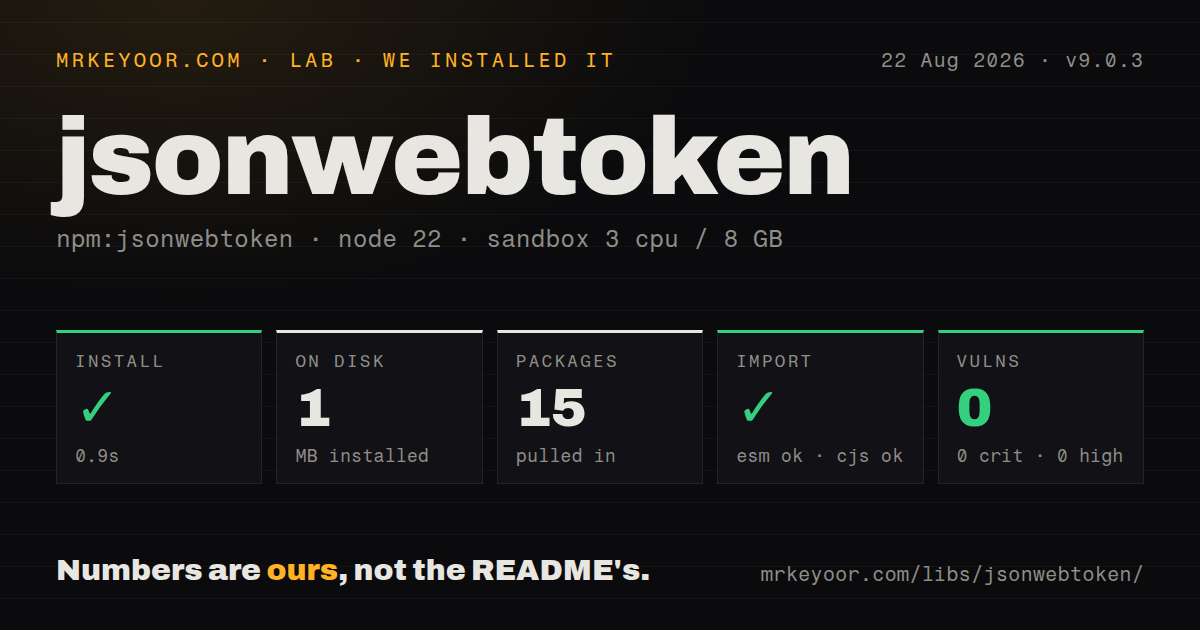
| Install | ✓ · 0.9s | 15 packages on disk · 1 MB |
| Import | ✓ | ESM import works · require() works · CommonJS package |
| Browser | n/a | could not be bundled for the browser (Node-only code, most likely) |
| Types | — | no TypeScript types found |
| Known vulns | 0 | 0 critical · 0 high · 0 moderate · 0 low (npm audit) |
Answers from our run
Does jsonwebtoken install cleanly?
Yes. In a fresh container with an empty cache, npm install jsonwebtoken finished in 0.9s, leaving 15 packages and 1 MB on disk. npm audit reported no known vulnerabilities.
Can jsonwebtoken run in a browser?
Not directly: esbuild could not bundle it for the browser in our run, which normally means it depends on Node built-ins. Use it on the server, or find a browser-targeted alternative.
Does jsonwebtoken work with both ESM and CommonJS?
Yes. Both import 'jsonwebtoken' and require('jsonwebtoken') worked in Node 22 in our run. The package is published as CommonJS.
Does jsonwebtoken include TypeScript types?
No type declarations were found in our install, so TypeScript users need their own declarations.
jsonwebtoken or jose: which should you use?
jose: Choose it for promise-based ESM across Node, browsers, and edge runtimes, including JWE or EdDSA. jsonwebtoken 9.0.3 installed in 0.9 seconds with 0 audit findings, but our browser build failed and the package shipped no TypeScript types.
When should you not use jsonwebtoken?
The verifier runs in a browser, Worker, or edge isolate. Our esbuild browser build failed against this Node crypto package.
Discussed on
Use it if
- A Node service already depends on jsonwebtoken's synchronous returns, thrown errors, or error-first callbacks.
- HMAC, RSA, RSA-PSS, or ECDSA signatures must be created or checked synchronously.
- One verification call should enforce token age plus issuer, audience, subject, nonce, or clock tolerance.
- An existing JWKS client can resolve the selected public key through the `getKey` callback.
- The verifier runs in a browser, Worker, or edge isolate. Our esbuild browser build failed against this Node crypto package.
- The protocol needs JWE, EdDSA, or detached payloads. The documented algorithm table stops at HMAC, RSA, RSA-PSS, and ECDSA signatures.
- Third-party declaration packages are prohibited. Version 9.0.3 contains no types and therefore needs `@types/jsonwebtoken` in TypeScript.
- Call sites require promise-first ESM. The package is CommonJS without an exports map and offers sync returns or callbacks.
- The dependency needs frequent feature delivery. Version 9.0.3 only moves jws, and GitHub currently groups 208 issues and pull requests as open.
Setup reality
We installed jsonwebtoken 9.0.3 in a fresh Node 22 Bookworm sandbox. npm completed in 0.9 seconds, leaving 15 packages and 1 MB on disk. The package itself is 100 KB unpacked, declares 10 direct dependencies and 0 peers, and carries an MIT license. npm audit reported 0 known vulnerabilities. Node >=12 and npm >=6 are declared. We found no bundled TypeScript types.
This is CommonJS without an exports map. require() and ESM import both worked through Node interop, while esbuild could not create a browser bundle. Keep it on the server and store private keys or HMAC secrets outside the repository. Version 9 rejects RSA keys below 2048 bits and asymmetric key-type mismatches unless explicit compatibility flags weaken those checks.
Without a callback, sign and verify block and return or throw. Adding a callback selects the error-first asynchronous API; there is no promise result. Remote JWKS resolution therefore needs the callback form or a wrapper. Treat the header's kid as hostile, let a JWKS client resolve it, restrict algorithms, and verify issuer plus audience. decode performs no signature check and cannot support authorization.
A numeric expiresIn is seconds, while a string without a unit is parsed as milliseconds. Prefer 900 or '15m', never '900' when you mean 15 minutes. Do not place a standard claim in both the payload and its sign option. A valid signature proves who signed the bytes, not that each returned property has the type or permission your application expects.
Patterns
Issue a 15-minute HMAC token sign-hmac-token
const jwt = require('jsonwebtoken');

const token = jwt.sign(
  { sub: user.id, scope: ['orders:read'] },
  process.env.JWT_SECRET,
  {
    algorithm: 'HS256',
    issuer: 'https://auth.example.com',
    audience: 'orders-api',
    expiresIn: '15m',
  },
);
Generate the secret from random bytes and restrict the algorithm explicitly. The `m` suffix prevents 15 from being parsed as milliseconds.
Create an RS256 token sign-rsa-token
const fs = require('node:fs');
const jwt = require('jsonwebtoken');

const privateKey = fs.readFileSync('/run/secrets/jwt-private.pem');
const token = jwt.sign({ sub: 'user-42' }, privateKey, {
  algorithm: 'RS256',
  keyid: '2026-08-primary',
  expiresIn: '10m',
});
RSA moduli under 2,048 bits fail in version 9 unless an unsafe override is used. `keyid` identifies the public key during rotation.
Verify signature and intended recipient verify-expected-claims
const jwt = require('jsonwebtoken');

const claims = jwt.verify(token, publicKey, {
  algorithms: ['RS256'],
  issuer: 'https://auth.example.com',
  audience: 'orders-api',
  clockTolerance: 5,
});

if (typeof claims.sub !== 'string') {
  throw new Error('missing subject');
}
These options validate token context as well as cryptography. Apply a schema to returned claims before using roles or identifiers.
Branch on verification error classes handle-verification-errors
const jwt = require('jsonwebtoken');

try {
  return jwt.verify(token, key, verifyOptions);
} catch (error) {
  if (error instanceof jwt.TokenExpiredError) return { status: 'expired' };
  if (error instanceof jwt.NotBeforeError) return { status: 'too-early' };
  if (error instanceof jwt.JsonWebTokenError) return { status: 'invalid' };
  throw error;
}
Use class names and their `expiredAt` or `date` properties. Error message strings are unsuitable as a stable interface.
Inspect key ID before verification decode-token-header
const jwt = require('jsonwebtoken');

const decoded = jwt.decode(token, { complete: true });
if (!decoded || typeof decoded === 'string') {
  throw new Error('malformed token');
}
console.log(decoded.header.kid, decoded.header.alg);
`decode` authenticates nothing. Treat `kid` as untrusted lookup input and enforce an allowlisted key source.
Verify through a JWKS callback verify-with-key-callback
const jwt = require('jsonwebtoken');

function getKey(header, callback) {
  if (header.alg !== 'RS256' || typeof header.kid !== 'string') {
    return callback(new Error('unexpected JWT header'));
  }
  keyStore.get(header.kid, callback);
}

jwt.verify(
  token,
  getKey,
  { algorithms: ['RS256'], issuer, audience },
  (error, claims) => {
    if (error) return next(error);
    req.auth = claims;
    next();
  },
);
Supplying a key function requires the callback form of `verify`. Add caching, timeouts, and request bounds in the JWKS client.
Set activation and expiry windows set-not-before
const jwt = require('jsonwebtoken');

const token = jwt.sign({ sub: job.id }, secret, {
  notBefore: '30s',
  expiresIn: '5m',
  jwtid: crypto.randomUUID(),
});
Both relative windows are based on `iat`. Supplying `nbf` or `exp` again inside the payload is rejected.
Enforce maximum token age limit-token-age
const claims = jwt.verify(token, key, {
  algorithms: ['RS256'],
  maxAge: '20m',
  clockTolerance: 5,
});
`maxAge` reads `iat`, so the issuer must include a trustworthy issued-at value for this policy.
Recover random bytes from base64 use-base64-hmac-secret
const jwt = require('jsonwebtoken');

const secret = Buffer.from(process.env.JWT_SECRET_B64, 'base64');
const claims = jwt.verify(token, secret, {
  algorithms: ['HS256'],
});
Decode only when configuration stores base64 for raw random bytes. Using the encoded characters themselves produces another HMAC key.
Bind an ID token to its nonce verify-nonce
const claims = jwt.verify(idToken, providerPublicKey, {
  algorithms: ['RS256'],
  issuer: providerIssuer,
  audience: clientId,
  nonce: session.expectedNonce,
});
Check nonce beside issuer and audience, then consume the stored expected value so it cannot be replayed.
Open an encrypted signing key sign-with-passphrase-key
const jwt = require('jsonwebtoken');

const token = jwt.sign(payload, {
  key: encryptedPrivateKey,
  passphrase: process.env.JWT_KEY_PASSPHRASE,
}, {
  algorithm: 'RS256',
  expiresIn: '10m',
});
When the key arrives as `{ key, passphrase }`, `algorithm` must be present rather than inferred.
Import CommonJS from an ESM module import-from-esm
import jwt from 'jsonwebtoken';

const token = jwt.sign(
  { sub: 'user-42' },
  process.env.JWT_SECRET,
  { expiresIn: '10m' },
);
Our Node 22 ESM probe succeeded through interop. Version 9.0.3 still lacks an exports map and packaged declarations.
Alternatives
| Package | Registry | Pick it when |
|---|---|---|
| jose | npm | Choose it for promise-based ESM across Node, browsers, and edge runtimes, including JWE or EdDSA. |
| fast-jwt | npm | Choose it after benchmarking shows signing or verification throughput is the limiting path. |
| njwt | npm | Choose it only where an existing service already follows nJwt's key and claim conventions. |
More security guides
cryptography · jose · pyjwt · dompurify · requests-oauthlib · oauthlib · the whole shelf →
How this guide is made: grounded in the library's documentation, release notes, changelog, and issue history, on a fixed rubric — not a hands-on install of every release. The 50 most-downloaded entries are additionally install-verified in clean containers. Corrections: contact the desk.