p-map review
p-map 7.0.6 runs an async mapper over a sync or async iterable while limiting pending mapper calls. Our browser build was 2.8 KB minified and 1.1 KB gzipped, and the package has no dependencies. pMap() collects values in input order; pMapIterable() yields them in that same order and limits completed values waiting on a slower consumer. Options cover aggregate failure handling and AbortSignal, while pMapSkip omits selected outputs. Release 7.0.6 fixes cleanup of an abort listener when the signal is already aborted. Concurrency is its boundary: priorities, starts per second, and a persistent queue belong elsewhere.
Our p-map 7.0.6 install took 0.3 seconds, left one 1 MB package, bundled to 1.1 KB gzipped, and had no audit findings, so it is an easy addition for ordered async mapping with a finite concurrency limit. Choose a queue for priorities or rate limits, and pass AbortSignal into the mapper for real cancellation.
We installed it
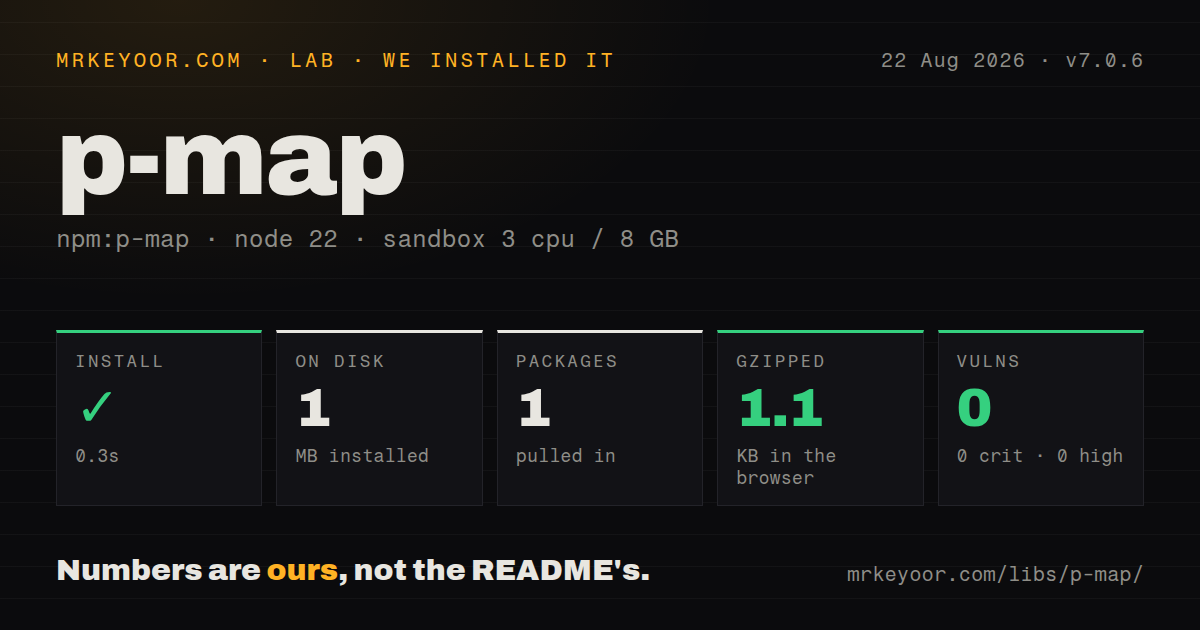
| Install | ✓ · 0.3s | 1 package on disk · 1 MB |
| Import | ✓ | ESM import works · require() works · ESM package with exports map |
| Browser | 1.1 KB | gzipped (2.8 KB minified), bundled with esbuild |
| Types | ✓ | TypeScript types bundled |
| Known vulns | 0 | 0 critical · 0 high · 0 moderate · 0 low (npm audit) |
Answers from our run
Does p-map install cleanly?
Yes. In a fresh container with an empty cache, npm install p-map finished in 0.3s, leaving 1 package and 1 MB on disk. npm audit reported no known vulnerabilities.
How much does p-map add to a browser bundle?
1.1 KB gzipped (2.8 KB minified) when the whole package is bundled for the browser with esbuild. Importing only part of it is usually smaller.
Does p-map work with both ESM and CommonJS?
Yes. Both import 'p-map' and require('p-map') worked in Node 22 in our run. The package is published as ESM with an exports map.
Does p-map include TypeScript types?
Yes, type declarations ship inside the package, so no @types install is needed.
p-map or p-limit: which should you use?
p-limit: Choose it when unrelated functions must share one concurrency counter. Our p-map 7.0.6 install took 0.3 seconds, left one 1 MB package, bundled to 1.1 KB gzipped, and had no audit findings, so it is an easy addition for ordered async mapping with a finite concurrency limit.
When should you not use p-map?
Promise.all() is enough when every operation may start immediately and the input already contains promises
Use it if
- pMap 7 can put a finite concurrency limit around one async operation over a known or generated sequence
- Outputs must retain input order although mapper calls finish in another order
- pMapIterable() should keep a slow database consumer from accumulating every completed result
- pMapSkip or AggregateError matches a batch that omits selected values or reports several failures together
- Promise.all() is enough when every operation may start immediately and the input already contains promises
- p-map limits pending work but has no priority, pause, persistent queue, or starts-per-second throttle; p-queue or p-throttle covers those policies
- Rejecting the outer map does not stop a fetch or file write already started unless the mapper receives and observes an AbortSignal
- pMap() and pMapIterable() both preserve input order, so neither yields whichever result finishes first
- Version 7 requires Node >=18 and publishes ESM, excluding an older runtime or build pipeline that cannot consume it
Setup reality
We installed p-map 7.0.6 in 0.3 seconds in a fresh, unprivileged Node 22 Bookworm sandbox with 3 CPUs and 8 GB of RAM. One package occupied 1 MB, and npm audit returned zero findings at every severity. The package declares 0 direct and 0 peer dependencies, is 36 KB unpacked, and bundles TypeScript declarations. It publishes ESM with an exports map; ESM import and require() both worked in our Node 22 check.
Our esbuild entry measured 2.8 KB minified and 1.1 KB gzipped. No credentials or config file exist. The important default is concurrency:Infinity, which gives an API or database no protection until code supplies a finite number. pMap() preserves input order. An async iterable is accepted, and p-map may have several next() requests pending up to the chosen concurrency, so a stateful producer must tolerate overlapping reads.
stopOnError defaults to true, rejecting after the first observed mapper failure while already started calls continue. Setting it false waits for the batch and then throws AggregateError if anything failed; successful outputs are not returned alongside that error. pMapSkip removes an item completely, so result indexes after a skipped value no longer correspond to input indexes. Neither mode performs retries.
The signal option is available on pMap(), not pMapIterable(). Aborting rejects the outer operation, but arbitrary work inside the mapper continues unless the same signal reaches fetch or another cancellable API. pMapIterable() uses backpressure to cap resolved values waiting on its consumer, and that number must be at least the concurrency value. Ordered yielding means one slow first item can hold later completed work despite the 1.1 KB helper's concurrency.
Patterns
Fetch records 4 at a time map-with-concurrency
import pMap from 'p-map';

const records = await pMap(ids, async id => {
  const response = await fetch(`/api/records/${id}`);
  if (!response.ok) throw new Error(`HTTP ${response.status}`);
  return response.json();
}, {concurrency: 4});
The result follows ids order even when the 4 pending requests finish in another sequence.
Number normalized rows by input position use-input-index
const rows = await pMap(values, async (value, index) => ({
  row: index + 1,
  normalized: await normalize(value),
}), {concurrency: 8});
index tracks input order; version 7.0.5 corrected it for promised values that resolved out of order.
Save values from a paginated generator map-async-iterable
async function* pages() {
  let cursor;
  do {
    const page = await fetchPage(cursor);
    for (const item of page.items) yield item;
    cursor = page.nextCursor;
  } while (cursor);
}

const saved = await pMap(pages(), saveItem, {concurrency: 3});
concurrency:3 can produce overlapping next() calls, so the async iterator must tolerate them.
Bound completed records waiting on a database stream-results
import {pMapIterable} from 'p-map';

for await (const record of pMapIterable(ids, fetchRecord, {
  concurrency: 8,
  backpressure: 16,
})) {
  await database.insert(record);
}
backpressure:16 caps resolved, unconsumed records and cannot be smaller than concurrency:8.
Omit disabled profiles skip-results
import pMap, {pMapSkip} from 'p-map';

const active = await pMap(users, async user => {
  const profile = await loadProfile(user.id);
  return profile.disabled ? pMapSkip : profile;
}, {concurrency: 5});
pMapSkip removes an output instead of inserting undefined, shifting every later result index.
Report every failed upload collect-errors
try {
  await pMap(files, uploadFile, {
    concurrency: 3,
    stopOnError: false,
  });
} catch (error) {
  if (!(error instanceof AggregateError)) throw error;
  for (const failure of error.errors) console.error(failure);
}
stopOnError:false waits for all inputs and throws AggregateError; successful upload results are not returned.
Cancel mapping and fetch after 5 seconds abort-mapping
const controller = new AbortController();

const work = pMap(urls, async url => {
  const response = await fetch(url, {signal: controller.signal});
  return response.text();
}, {concurrency: 4, signal: controller.signal});

setTimeout(() => controller.abort(), 5_000);
await work;
The same signal reaches p-map and fetch because the outer option cannot interrupt a request already started.
Apply migrations sequentially run-serially
const results = await pMap(migrations, migration => migration.run(), {
  concurrency: 1,
});
concurrency:1 preserves sequence; a for-of loop is simpler if no mapped result array is needed.
Write thumbnails without collecting the batch limit-memory
for await (const thumbnail of pMapIterable(imagePaths, createThumbnail, {
  concurrency: 4,
  backpressure: 4,
})) {
  await writeThumbnail(thumbnail);
}
Matching backpressure:4 to concurrency:4 limits completed thumbnails waiting in memory.
Map values supplied as promises map-promised-inputs
const promisedIds = rawIds.map(id => Promise.resolve(Number(id)));
const records = await pMap(promisedIds, fetchRecord, {concurrency: 6});
p-map awaits each input before mapping it, but creating an eager promise can start work outside the concurrency:6 limit.
Attach a path to parse failures preserve-source-errors
const results = await pMap(paths, async path => {
  try {
    return await parseFile(path);
  } catch (error) {
    throw new Error(`Failed to parse ${path}`, {cause: error});
  }
}, {concurrency: 4});
p-map forwards mapper errors, so the mapper must attach the path needed to identify a failed input.
Start at most 5 requests per second combine-with-rate-limit
import pMap from 'p-map';
import pThrottle from 'p-throttle';

const throttledFetch = pThrottle({
  limit: 5,
  interval: 1_000,
  strict: true,
})(fetchRecord);

const records = await pMap(ids, throttledFetch, {concurrency: 2});
p-throttle enforces 5 starts per 1,000 ms; p-map separately caps pending requests at 2.
Alternatives
| Package | Registry | Pick it when |
|---|---|---|
| p-limit | npm | Choose it when unrelated functions must share one concurrency counter |
| p-queue | npm | Choose it for priorities, interval caps, pause, and queue lifecycle events |
| @supercharge/promise-pool | npm | Choose it for a fluent pool API with per-item error handling |
More utils guides
lru-cache · type-fest · ajv · zod · p-limit · find-up · the whole shelf →
How this guide is made: grounded in the library's documentation, release notes, changelog, and issue history, on a fixed rubric — not a hands-on install of every release. The 50 most-downloaded entries are additionally install-verified in clean containers. Corrections: contact the desk.