p-queue review
p-queue 9.3.3 keeps promise-returning functions in an in-memory queue inside one JavaScript process. It limits concurrent work, controls how many tasks start per time window, changes waiting order with priorities, pauses admission, exposes queue pressure, and passes cancellation signals into tasks. It can also apply per-task timeouts and report queue events. No task is persisted or handed to another worker. Release 9.3.3 fixes a rate limiter defect that left work waiting after a fresh window opened when `intervalCap` exceeded 1. Our browser bundle measured 12 KB minified and 4.3 KB gzipped.
p-queue 9.3.3 installed in 1.1 seconds, used 1 MB across 3 packages, bundled to 4.3 KB gzipped, and returned 0 audit findings in our sandbox. It fits process-local API pressure and prioritization; any task that must outlive Node belongs in a persistent job system.
We installed it
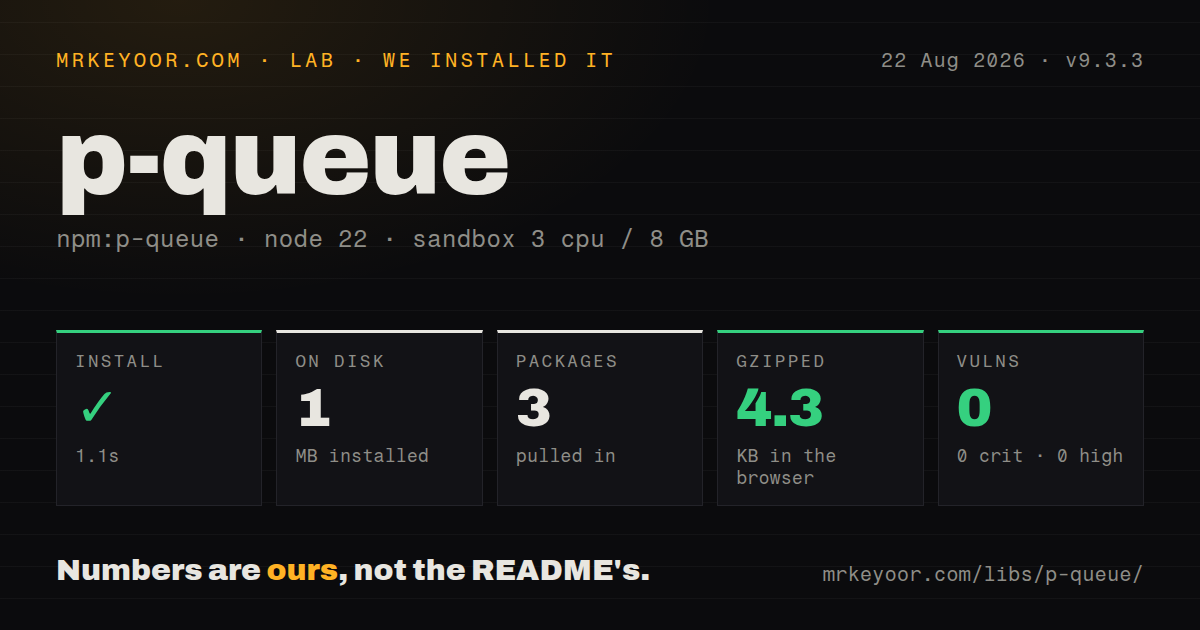
| Install | ✓ · 1.1s | 3 packages on disk · 1 MB |
| Import | ✓ | ESM import works · require() works · ESM package with exports map |
| Browser | 4.3 KB | gzipped (12 KB minified), bundled with esbuild |
| Types | ✓ | TypeScript types bundled |
| Known vulns | 0 | 0 critical · 0 high · 0 moderate · 0 low (npm audit) |
Answers from our run
Does p-queue install cleanly?
Yes. In a fresh container with an empty cache, npm install p-queue finished in 1 seconds, leaving 3 packages and 1 MB on disk. npm audit reported no known vulnerabilities.
How much does p-queue add to a browser bundle?
4.3 KB gzipped (12 KB minified) when the whole package is bundled for the browser with esbuild. Importing only part of it is usually smaller.
Does p-queue work with both ESM and CommonJS?
Yes. Both import 'p-queue' and require('p-queue') worked in Node 22 in our run. The package is published as ESM with an exports map.
Does p-queue include TypeScript types?
Yes, type declarations ship inside the package, so no @types install is needed.
p-queue or p-limit: which should you use?
p-limit: Choose it when a concurrency cap is the only rule and queue events or priorities would sit unused. p-queue 9.3.3 installed in 1.1 seconds, used 1 MB across 3 packages, bundled to 4.3 KB gzipped, and returned 0 audit findings in our sandbox.
When should you not use p-queue?
A fixed concurrency number is the entire requirement; p-limit solves that with less queue state and API surface
Use it if
- One API client needs both an in-flight ceiling and a limit on starts per time window
- Urgent interactive work must move ahead of background tasks that have not started
- A streaming producer needs queue-size backpressure before closures accumulate in memory
- Local async operations need pause, resume, events, AbortSignal propagation, or individual timeouts
- A fixed concurrency number is the entire requirement; `p-limit` solves that with less queue state and API surface
- Jobs must survive a restart, retry later, or execute on several hosts; p-queue stores functions only in this process
- The project supports Node 18 or earlier; version 9.3.3 requires Node 20
- You plan to use `clear()` as cancellation; promises for removed waiting tasks never settle according to the README
- Results must stream in source order from an iterable; `p-map` has an output contract closer to that job
Setup reality
We installed p-queue 9.3.3 in a clean Node 22 Bookworm container in 1.1 seconds. The environment ended with 3 packages using 1 MB, and npm audit reported 0 known vulnerabilities at every severity. P-queue has 2 direct dependencies and 0 peers, is 128 KB unpacked, carries an MIT license, and bundles TypeScript declarations. It is an ESM package with an exports map. Both require() and ESM import worked in our Node 22 check.
No credentials, native compilation, or config file are involved. The README still calls the package native ESM without a CommonJS export, so the successful require() on our current Node runtime should not be treated as compatibility with an older Node or bundler. Node 20 is the declared floor. A full browser import built to 12 KB minified and 4.3 KB gzipped, making client use possible when the queue behavior is worth shipping.
add() resolves when its task finishes. Awaiting every add() inside the producer loop serializes the workload before the queue can reach its configured concurrency. Enqueue first, retain or handle every returned promise, then await the batch or onIdle(). A timeout starts when work leaves the queue. It rejects p-queue's promise but cannot stop underlying I/O unless the task observes the provided AbortSignal.
concurrency limits running tasks; intervalCap limits starts. Fixed windows can burst at their boundary, while strict: true tracks a rolling window with extra bookkeeping. The 9.3.3 fix releases tasks correctly in a new multi-slot window. size excludes running work, which is counted by pending; producer backpressure should account for both. Use AbortController when waiting promises must reject. clear() removes queued functions and leaves their add() promises unresolved.
Patterns
Keep four fetches in flight limit-concurrency
import PQueue from 'p-queue';

const queue = new PQueue({concurrency: 4});
const jobs = urls.map(url => queue.add(() => fetch(url)));
const responses = await Promise.all(jobs);
Create the task promises without awaiting each addition. Awaiting inside the producer loop admits one task at a time and defeats the four-slot setting.
Cap starts as well as active work limit-start-rate
const queue = new PQueue({
  concurrency: 3,
  intervalCap: 10,
  interval: 1000,
});

await Promise.all(ids.map(id => queue.add(() => api.read(id))));
The queue may run 3 tasks together, while no more than 10 begin in a 1000 ms fixed window. These limits solve different upstream constraints.
Prevent a burst across interval boundaries use-sliding-window
const queue = new PQueue({
  intervalCap: 5,
  interval: 1000,
  strict: true,
});
Strict mode enforces 5 starts in every rolling 1000 ms span. It tracks individual timestamps and costs more than the default fixed-window counter.
Move one waiting job ahead by ID prioritize-task
const queue = new PQueue({concurrency: 1});
queue.add(() => rebuildAll(), {id: 'rebuild', priority: 0});
queue.add(() => refreshUser(userId), {id: `user-${userId}`, priority: 5});
queue.setPriority('rebuild', 10);
Priority changes apply only before a task starts, and scheduling order matters only with finite concurrency. Assign a stable ID to any waiting job that may be reprioritized.
Connect queued and running cancellation cancel-task
const controller = new AbortController();
const job = queue.add(
  ({signal}) => fetch(url, {signal}),
  {signal: controller.signal},
);

controller.abort();
await job;
Aborting removes waiting work and rejects its promise. Once the task runs, cancellation reaches the operation only because `fetch` receives p-queue's signal.
Override the default timeout for one task set-timeout
import PQueue, {TimeoutError} from 'p-queue';

const queue = new PQueue({concurrency: 4, timeout: 15_000});
try {
  await queue.add(() => createReport(), {timeout: 60_000});
} catch (error) {
  if (!(error instanceof TimeoutError)) throw error;
}
The 60-second clock begins when `createReport` starts, excluding queue wait time. Rejection releases the queue slot, but the report code must support cancellation to stop its own work.
Finish active work before changing shared state pause-and-drain
queue.pause();
await queue.onPendingZero();
await rotateCredentials();
queue.start();
`onPendingZero()` ignores the backlog and waits only for currently running tasks. Pausing first prevents another queued function from starting during the credential change.
Hold a producer below 500 waiting tasks bound-producer
for await (const row of source) {
  await queue.onSizeLessThan(500);
  queue.add(() => writeRow(row)).catch(reportFailure);
}
await queue.onIdle();
The threshold covers queued work only. Up to `concurrency` more tasks may already be running, and every unawaited `add()` promise still needs a rejection handler.
Wait for the exact queue state you need choose-drain-state
await queue.onEmpty();       // no waiting tasks
await queue.onPendingZero(); // no running tasks
await queue.onIdle();        // neither waiting nor running
An empty queue can still have work executing. Use `onIdle()` for final completion, and `onPendingZero()` after a pause when the backlog should remain intact.
Pause the batch after its first error fail-fast
items.forEach(item => {
  queue.add(() => processItem(item)).catch(() => {});
});

try {
  await Promise.race([queue.onError(), queue.onIdle()]);
} catch (error) {
  queue.pause();
  throw error;
}
`onError()` reports the failure but does not stop admission. Pause explicitly, and attach a handler to every `add()` promise so the same errors do not become unhandled rejections.
Report the jobs holding queue capacity inspect-saturation
if (queue.isSaturated) {
  console.warn({
    waiting: queue.size,
    running: queue.pending,
    tasks: queue.runningTasks,
  });
}
`runningTasks` is most useful when additions carry meaningful IDs. Its timing fields can identify one external call that keeps a concurrency slot occupied.
Reduce future starts during upstream trouble change-concurrency
queue.concurrency = 8;

if (upstreamIsDegraded()) {
  queue.concurrency = 2;
}
Changing the property affects later scheduling. Lowering it to 2 does not interrupt 8 operations that have already begun.
Alternatives
| Package | Registry | Pick it when |
|---|---|---|
| p-limit | npm | Choose it when a concurrency cap is the only rule and queue events or priorities would sit unused. |
| bottleneck | npm | Choose it for reservoirs, grouped limiters, richer throttling, or Redis-backed coordination. |
| async | npm | Choose it in callback-heavy systems already built around Async's collection and queue functions. |
| bullmq | npm | Choose it when Redis persistence, retries, schedules, workers, and restart recovery are requirements. |
More utils guides
lru-cache · type-fest · ajv · zod · p-limit · find-up · the whole shelf →
How this guide is made: grounded in the library's documentation, release notes, changelog, and issue history, on a fixed rubric — not a hands-on install of every release. The 50 most-downloaded entries are additionally install-verified in clean containers. Corrections: contact the desk.