oauth4webapi review
oauth4webapi is a low-level JavaScript toolkit for OAuth 2.0, OAuth 2.1, OpenID Connect, and FAPI client flows. Each protocol step is explicit: your code sends a discovery or token request, then passes the response to a matching processor that validates it. The library also covers PKCE, DPoP, PAR, JAR, JARM, CIBA, device authorization, JWT access tokens, and resource calls. It uses Fetch, Web Crypto, URL, Request, and Response so the same API can run in browsers, workers, Deno, Bun, and Node. Version 3.8.7 fixes portability of CryptoKey and JWK types and exposes the custom-fetch duplex option.
oauth4webapi 3.8.7 installed in 0.4 seconds as one 1 MB package with zero dependencies, and our browser build measured 48.8 KB minified and 13.9 KB gzipped. Choose it for explicit cross-runtime OAuth protocol work, not for a login framework that owns routes, sessions, renewal, and user records.
We installed it
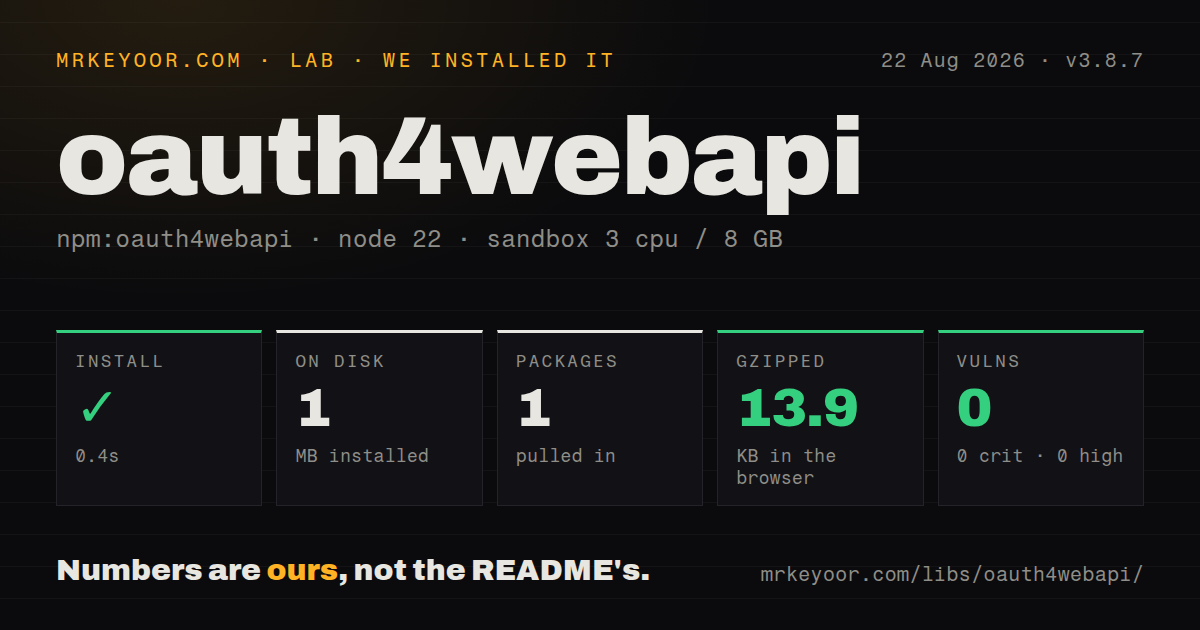
| Install | ✓ · 0.4s | 1 package on disk · 1 MB |
| Import | ✓ | ESM import works · require() works · ESM package with exports map |
| Browser | 13.9 KB | gzipped (48.8 KB minified), bundled with esbuild |
| Types | ✓ | TypeScript types bundled |
| Known vulns | 0 | 0 critical · 0 high · 0 moderate · 0 low (npm audit) |
Answers from our run
Does oauth4webapi install cleanly?
Yes. In a fresh container with an empty cache, npm install oauth4webapi finished in 0.4s, leaving 1 package and 1 MB on disk. npm audit reported no known vulnerabilities.
How much does oauth4webapi add to a browser bundle?
13.9 KB gzipped (48.8 KB minified) when the whole package is bundled for the browser with esbuild. Importing only part of it is usually smaller.
Does oauth4webapi work with both ESM and CommonJS?
Yes. Both import 'oauth4webapi' and require('oauth4webapi') worked in Node 22 in our run. The package is published as ESM with an exports map.
Does oauth4webapi include TypeScript types?
Yes, type declarations ship inside the package, so no @types install is needed.
oauth4webapi or openid-client: which should you use?
openid-client: Use it for a higher-level OpenID Connect client with discovery and flow helpers, especially in server applications. oauth4webapi 3.8.7 installed in 0.4 seconds as one 1 MB package with zero dependencies, and our browser build measured 48.8 KB minified and 13.9 KB gzipped.
When should you not use oauth4webapi?
The actual task is adding sign-in and sessions to an Express or Next.js app. oauth4webapi supplies protocol pieces, leaving cookies, redirects, account mapping, and session renewal to you.
Use it if
- OAuth client code must run in a Web API runtime such as Cloudflare Workers, Deno, Bun, a browser, or Node.
- The integration needs DPoP, pushed authorization requests, signed request or response objects, CIBA, device flow, or FAPI profiles.
- You are building a resource server that must validate RFC 9068 JWT access tokens with issuer metadata and JWKS.
- Your application already has a session model and wants direct control over every redirect, request, validation, cache, and token decision.
- The actual task is adding sign-in and sessions to an Express or Next.js app. oauth4webapi supplies protocol pieces, leaving cookies, redirects, account mapping, and session renewal to you.
- You cannot persist PKCE verifier, state, and OIDC nonce across the authorization redirect. The library generates and validates these values but does not store them.
- The project runs on Node older than 20. The README sets Node 20 as its baseline, and CommonJS require support depends on Node versions that enable `require(esm)`.
- Automatic discovery caching, token caching, refresh scheduling, or cookie handling is required. None of those application policies are built in.
- The team does not have time to read protocol-specific examples and error classes. A missed state check or token validation condition can become a security flaw, so this API should not be wired by guesswork.
Setup reality
We installed oauth4webapi 3.8.7 in a fresh Node 22 Bookworm container. npm completed in 0.4 seconds, left 1 package using 1 MB, and found no known vulnerabilities at any severity. The tarball is 340 KB unpacked with no direct or peer dependencies and an MIT license. It is ESM with an exports map, bundles TypeScript declarations, and worked through both require() and ESM import in our Node check.
The package does not create routes or sessions. An authorization-code login needs one handler to generate and save the PKCE verifier plus state or nonce, and another to validate the callback and exchange the code. Store those values in a server-side session tied to the browser. Keep client secrets and private keys out of browser code; public browser clients should use the public-client authentication shape and PKCE.
Discovery, JWKS, and token refresh policy belong to your application. Use the custom fetch hook when metadata needs caching, a proxy, mTLS setup, or platform-specific request options. Cached Response bodies must be cloned before reuse. Refresh-token rotation means persisting a newly returned refresh token before discarding the old one, and access-token expiry needs a safety margin to avoid simultaneous failing requests.
Node 20 is the documented baseline. CommonJS require only works where Node enables require(esm), despite succeeding in our Node 22 environment. The browser bundle measured 48.8 KB minified and 13.9 KB gzipped. Version 3.8.7 changes TypeScript portability for CryptoKey and JWK declarations and exposes a duplex type on custom fetch, so cross-runtime projects should rerun type checks after upgrading.
Patterns
Load and validate server metadata discover-issuer
import * as oauth from 'oauth4webapi';

const issuer = new URL('https://as.example.com');
const response = await oauth.discoveryRequest(issuer, { algorithm: 'oidc' });
const as = await oauth.processDiscoveryResponse(issuer, response);
Use `oidc` for `openid-configuration` and `oauth2` for OAuth authorization-server metadata. Choosing the wrong discovery convention often produces a 404.
Create a PKCE authorization redirect build-authorization-url
const client = { client_id };
const codeVerifier = oauth.generateRandomCodeVerifier();
const codeChallenge = await oauth.calculatePKCECodeChallenge(codeVerifier);
const state = oauth.generateRandomState();

const url = new URL(as.authorization_endpoint);
url.searchParams.set('client_id', client_id);
url.searchParams.set('redirect_uri', redirectUri);
url.searchParams.set('response_type', 'code');
url.searchParams.set('scope', 'openid email');
url.searchParams.set('code_challenge', codeChallenge);
url.searchParams.set('code_challenge_method', 'S256');
url.searchParams.set('state', state);
Persist the verifier and state in the user's server-side session before redirecting. They must be bound to the same browser callback.
Validate a callback and exchange its code exchange-code
const clientAuth = oauth.ClientSecretPost(clientSecret);
const params = oauth.validateAuthResponse(as, client, currentUrl, expectedState);
const response = await oauth.authorizationCodeGrantRequest(
  as, client, clientAuth, params, redirectUri, codeVerifier,
);
const tokens = await oauth.processAuthorizationCodeResponse(as, client, response);
Handle authorization response errors separately from network failures. Never skip state validation when the original request included state.
Require an ID token and match UserInfo validate-oidc-claims
const tokens = await oauth.processAuthorizationCodeResponse(as, client, response, {
  expectedNonce: nonce,
  requireIdToken: true,
});
const claims = oauth.getValidatedIdTokenClaims(tokens);

const userInfoResponse = await oauth.userInfoRequest(as, client, tokens.access_token);
const profile = await oauth.processUserInfoResponse(
  as, client, claims.sub, userInfoResponse,
);
The UserInfo processor compares its subject with the validated ID-token subject. Save the nonce before redirect and supply that exact value here.
Refresh and preserve rotation refresh-token
const response = await oauth.refreshTokenGrantRequest(
  as, client, clientAuth, refreshToken,
);
const tokens = await oauth.processRefreshTokenResponse(as, client, response);
const nextRefreshToken = tokens.refresh_token ?? refreshToken;
There is no background refresh. If the server rotates refresh tokens, commit the returned value atomically with the updated session.
Request a machine access token client-credentials
const parameters = new URLSearchParams({ scope: 'api:read' });
const response = await oauth.clientCredentialsGrantRequest(
  as, client, clientAuth, parameters,
);
const tokens = await oauth.processClientCredentialsResponse(as, client, response);
Cache the access token until shortly before expiry. Calling the token endpoint for every API request adds latency and load.
Use private-key JWT client authentication authenticate-private-key
const { privateKey } = await oauth.generateKeyPair('ES256');
const clientAuth = oauth.PrivateKeyJwt(privateKey);

const response = await oauth.clientCredentialsGrantRequest(
  as, client, clientAuth, new URLSearchParams(),
);
Keep the private key in server or worker secret storage. Version 3 uses authentication factory functions instead of embedding secret behavior in client metadata.
Attach DPoP to token requests bind-token-with-dpop
const keyPair = await oauth.generateKeyPair('ES256');
const DPoP = oauth.DPoP(client, keyPair);

const response = await oauth.clientCredentialsGrantRequest(
  as, client, clientAuth, parameters, { DPoP },
);
const tokens = await oauth.processClientCredentialsResponse(as, client, response);
DPoP servers may answer first with a nonce challenge. Preserve the DPoP handle and retry according to the documented nonce-error flow.
Send a bearer request through the helper call-protected-resource
const response = await oauth.protectedResourceRequest(
  accessToken,
  'GET',
  new URL('https://rs.example.com/api/me'),
  new Headers({ accept: 'application/json' }),
);
if (!response.ok) throw new Error(`resource returned ${response.status}`);
const data = await response.json();
Plan a branch for `WWWAuthenticateChallengeError` when the resource returns a challenge. A token refresh policy remains application code.
Check a token with the authorization server introspect-token
const response = await oauth.introspectionRequest(
  as, client, clientAuth, token,
);
const result = await oauth.processIntrospectionResponse(as, client, response);
if (!result.active) throw new Error('inactive token');
Introspection is a network call and can reveal sensitive token metadata. Cache only under a policy that respects revocation requirements.
Validate a JWT at the resource server validate-jwt-access-token
const claims = await oauth.validateJwtAccessToken(
  as, incomingRequest, 'https://rs.example.com',
);

const scopes = new Set(claims.scope?.split(' ') ?? []);
if (!scopes.has('api:write')) {
  return new Response(null, { status: 403 });
}
The helper checks protocol claims and signature, while your resource server must enforce scope, subject, tenant, and other application authorization rules.
Cache discovery through a custom fetch customize-fetch
const cache = new Map();
const response = await oauth.discoveryRequest(issuer, {
  [oauth.customFetch]: async (url, init) => {
    const key = String(url);
    const hit = cache.get(key);
    if (hit) return hit.clone();
    const result = await fetch(url, init);
    if (result.ok) cache.set(key, result.clone());
    return result;
  },
});
const as = await oauth.processDiscoveryResponse(issuer, response);
Clone a Response before caching or returning it twice because its body is consumable. Add expiry based on the issuer's operational policy.
Alternatives
| Package | Registry | Pick it when |
|---|---|---|
| openid-client | npm | Use it for a higher-level OpenID Connect client with discovery and flow helpers, especially in server applications. |
| arctic | npm | Use it for concise provider-specific OAuth integrations where advanced FAPI features are unnecessary. |
| jose | npm | Use it when the job is signing or verifying JWT, JWS, JWE, and JWKS data without running OAuth flows. |
| next-auth | npm | Use it when a Next.js application needs provider login, callbacks, cookies, and sessions as an integrated feature. |
More security guides
cryptography · jose · pyjwt · dompurify · jsonwebtoken · requests-oauthlib · the whole shelf →
How this guide is made: grounded in the library's documentation, release notes, changelog, and issue history, on a fixed rubric — not a hands-on install of every release. The 50 most-downloaded entries are additionally install-verified in clean containers. Corrections: contact the desk.