next-auth review
next-auth 4.24.15 is the stable Next.js package in the Auth.js project. It mounts authentication routes, runs OAuth or email sign-in flows, manages CSRF tokens and cookies, and exposes server and React session helpers. Sessions can be encrypted JWTs without a database or persisted through a separate adapter. The 4.24.15 security release binds OAuth state, nonce, and PKCE cookies to their provider, normalizes email addresses before validation, fixes malformed Bearer handling in getToken(), and restores CommonJS compatibility. The repository now recommends Better Auth for new projects except when a feature gap such as database-free stateless sessions matters.
next-auth 4.24.15 took 20.6 seconds and 347 MB to install in our sandbox, passed npm audit with 0 findings, and could not produce a browser bundle. Keep it for stable v4 Next.js deployments and database-free JWT sessions; follow the project's Better Auth recommendation for a new system unless a concrete gap blocks that choice.
We installed it
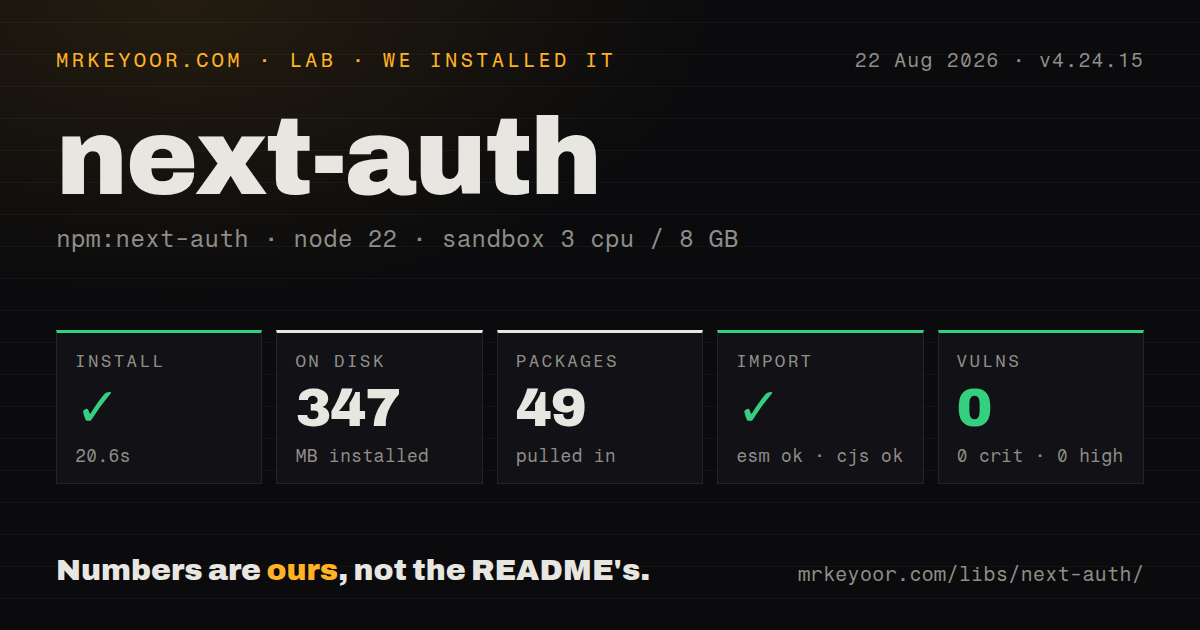
| Install | ✓ · 20.6s | 49 packages on disk · 347 MB |
| Import | ✓ | ESM import works · require() works · CommonJS package with exports map |
| Browser | n/a | could not be bundled for the browser (Node-only code, most likely) |
| Types | ✓ | TypeScript types bundled |
| Known vulns | 0 | 0 critical · 0 high · 0 moderate · 0 low (npm audit) |
Answers from our run
Does next-auth install cleanly?
Yes. In a fresh container with an empty cache, npm install next-auth finished in 21 seconds, leaving 49 packages and 347 MB on disk. npm audit reported no known vulnerabilities.
Can next-auth run in a browser?
Not directly: esbuild could not bundle it for the browser in our run, which normally means it depends on Node built-ins. Use it on the server, or find a browser-targeted alternative.
Does next-auth work with both ESM and CommonJS?
Yes. Both import 'next-auth' and require('next-auth') worked in Node 22 in our run. The package is published as CommonJS with an exports map.
Does next-auth include TypeScript types?
Yes, type declarations ship inside the package, so no @types install is needed.
next-auth or better-auth: which should you use?
better-auth: Use it for a new application when its session, credential, organization, and plugin model fits the product. next-auth 4.24.15 took 20.6 seconds and 347 MB to install in our sandbox, passed npm audit with 0 findings, and could not produce a browser bundle.
When should you not use next-auth?
You are beginning a new authentication system without a specific v4-only requirement; the maintainers recommend Better Auth for new projects
Use it if
- An existing Next.js application already uses the stable v4 API and needs another OAuth or email provider
- Encrypted stateless JWT sessions are required without adding a user-session database
- You want provider callbacks, restrictive cookie defaults, and CSRF protection while keeping identity data on your infrastructure
- The team can lock examples and documentation to v4 instead of mixing them with the v5 beta API
- You are beginning a new authentication system without a specific v4-only requirement; the maintainers recommend Better Auth for new projects
- Email and password is the core sign-in method; the Credentials provider supplies no registration, password hashing, reset flow, abuse protection, or account recovery
- You need built-in organizations, roles, fine-grained authorization, or an admin user interface; next-auth handles authentication and sessions, leaving those product features to your code
- Your team cannot tolerate two API generations in search results; npm latest is 4.24.15 while 5.0.0-beta.32 uses different imports, configuration, and environment conventions
- The authentication package must bundle for a browser entry; our esbuild browser build failed, and route, provider, adapter, and secret-handling code belongs on the server
Setup reality
We installed next-auth 4.24.15 in a fresh unprivileged Node 22 Bookworm container. npm completed in 20.6 seconds and left 49 packages using 347 MB on disk. The package was 2,380 KB unpacked with 9 direct dependencies and 5 peer dependencies. TypeScript declarations are included, the license is ISC, and npm audit reported 0 known vulnerabilities.
The package is CommonJS with an exports map. require() and ESM import both worked in our sandbox. A browser build with esbuild failed, which matches a package whose main job includes server routes, OAuth secrets, cookies, JWT handling, and provider callbacks. Import client helpers from next-auth/react only in client code, and keep NextAuth configuration plus server helpers out of modules that a browser bundler can reach.
Each OAuth provider needs a client ID, client secret, and callback URL registered with that provider. v4 deployments also need a stable NEXTAUTH_SECRET; self-hosted installations commonly set NEXTAUTH_URL when automatic host detection is unsuitable. App Router projects mount the handler for GET and POST under app/api/auth/[...nextauth]/route.ts. Database sessions add an adapter package, its required schema, migrations, and connection behavior.
Version selection is the first operational trap. npm latest installs 4.24.15, while authjs.dev and many recent examples discuss the 5.0.0 beta and its auth() helper. Keep v4 imports, provider paths, environment names, and session callbacks together. The 4.24.15 OAuth cookie change intentionally invalidates sign-ins already in flight across the upgrade; users retry once. Authorization still belongs inside every protected server action or route, even when middleware screens page navigation.
Patterns
Mount a v4 Pages Router handler pages-router
import NextAuth, { type NextAuthOptions } from 'next-auth';
import GitHubProvider from 'next-auth/providers/github';

export const authOptions: NextAuthOptions = {
  providers: [GitHubProvider({
    clientId: process.env.GITHUB_ID!,
    clientSecret: process.env.GITHUB_SECRET!,
  })],
};

export default NextAuth(authOptions);
This is the stable v4 API for pages/api/auth/[...nextauth].ts. Set a persistent NEXTAUTH_SECRET before deploying.
Expose GET and POST in the App Router app-router
import NextAuth from 'next-auth';
import { authOptions } from '@/lib/auth-options';

const handler = NextAuth(authOptions);
export { handler as GET, handler as POST };
Place this in app/api/auth/[...nextauth]/route.ts. Keep authOptions in an ordinary module so server components can import it.
Provide sessions to client components client-provider
'use client';
import { SessionProvider } from 'next-auth/react';

export function AuthProvider({ children }) {
  return <SessionProvider>{children}</SessionProvider>;
}
useSession() requires SessionProvider above it. In the App Router, the provider wrapper itself must be a client component.
Render sign-in state on the client client-session
'use client';
import { signIn, signOut, useSession } from 'next-auth/react';

export function AccountButton() {
  const { data, status } = useSession();
  if (status === 'loading') return null;
  return data
    ? <button onClick={() => signOut()}>Sign out</button>
    : <button onClick={() => signIn('github')}>Sign in</button>;
}
status distinguishes the initial session fetch from a signed-out result. Avoid rendering a false signed-out state while it is loading.
Read a v4 session on the server server-session
import { getServerSession } from 'next-auth';
import { authOptions } from '@/lib/auth-options';

const session = await getServerSession(authOptions);
if (!session) throw new Error('Unauthorized');
Pass the same authOptions used by the route. Omitting it also omits application callbacks and the custom session shape.
Require JWT sessions in middleware protect-middleware
export { default } from 'next-auth/middleware';

export const config = {
  matcher: ['/dashboard/:path*', '/settings/:path*'],
};
The bundled v4 middleware supports the JWT session strategy. Database-session authorization needs another server-side check.
Verify credentials in application code credentials-provider
import CredentialsProvider from 'next-auth/providers/credentials';

const credentials = CredentialsProvider({
  credentials: {
    email: { type: 'email' },
    password: { type: 'password' },
  },
  async authorize(input) {
    return verifyPassword(input?.email, input?.password) ?? null;
  },
});
The provider delegates verification to your function. Hashing, rate limits, registration, reset, and recovery flows remain your responsibility.
Copy a user id into the session extend-jwt-session
callbacks: {
  async jwt({ token, user }) {
    if (user) token.userId = user.id;
    return token;
  },
  async session({ session, token }) {
    session.user.id = token.userId;
    return session;
  },
}
The jwt callback receives user on initial sign-in. Persist required claims on token before the session callback exposes them.
Use a Prisma session adapter database-adapter
import { PrismaAdapter } from '@auth/prisma-adapter';
import { prisma } from '@/lib/prisma';

export const authOptions = {
  adapter: PrismaAdapter(prisma),
  session: { strategy: 'database' },
  providers,
};
The adapter is a separate package and expects its documented user, account, session, and verification-token schema. Apply those migrations before sign-in traffic.
Send users to an application login page custom-page
export const authOptions = {
  providers,
  pages: {
    signIn: '/login',
    error: '/login',
  },
};
A custom sign-in page must call signIn() itself. OAuth errors return through the configured error page with an error query value.
Handle credential sign-in without redirecting credentials-result
const result = await signIn('credentials', {
  redirect: false,
  email,
  password,
});

if (result?.error) setMessage('Invalid credentials');
redirect: false is supported for credentials and email flows in v4. Keep the displayed error generic to avoid account enumeration.
Read JWT claims in an API route read-jwt
import { getToken } from 'next-auth/jwt';

const token = await getToken({
  req,
  secret: process.env.NEXTAUTH_SECRET,
});
if (!token) return res.status(401).end();
getToken() reads the encrypted session token without constructing a full session. Version 4.24.15 returns null for a malformed Bearer header instead of throwing.
Alternatives
| Package | Registry | Pick it when |
|---|---|---|
| better-auth | npm | Use it for a new application when its session, credential, organization, and plugin model fits the product |
| @clerk/nextjs | npm | Use it when hosted identity, prebuilt account UI, and organization features justify an external service |
| iron-session | npm | Use it for encrypted cookie sessions when you will implement OAuth or credential verification separately |
More security guides
cryptography · jose · pyjwt · dompurify · jsonwebtoken · requests-oauthlib · the whole shelf →
How this guide is made: grounded in the library's documentation, release notes, changelog, and issue history, on a fixed rubric — not a hands-on install of every release. The 50 most-downloaded entries are additionally install-verified in clean containers. Corrections: contact the desk.