node-stream-zip review
node-stream-zip 1.16.0 reads and extracts ZIP files from Node without loading the whole archive into memory. It indexes entries, returns a selected entry as a Buffer or readable stream, and extracts one file, a directory prefix, or everything. ZIP64, self-extracting archives, and deflate through Node's zlib are supported. The package exposes a recommended Promise wrapper and an older callback/event class. Version 1.16.0 fixes compressed-size parsing after a responsibly disclosed crafted-archive memory-overflow path. It cannot create ZIPs, has no AES decryption, and is tied to Node filesystem and stream APIs.
node-stream-zip 1.16.0 installed in 0.5 seconds as one 1 MB package with 0 audit findings in our sandbox, but esbuild could not make a browser bundle from its Node-only code. Use it to stream or extract server-side ZIPs; choose another library for archive creation, AES encryption, or browser execution.
We installed it
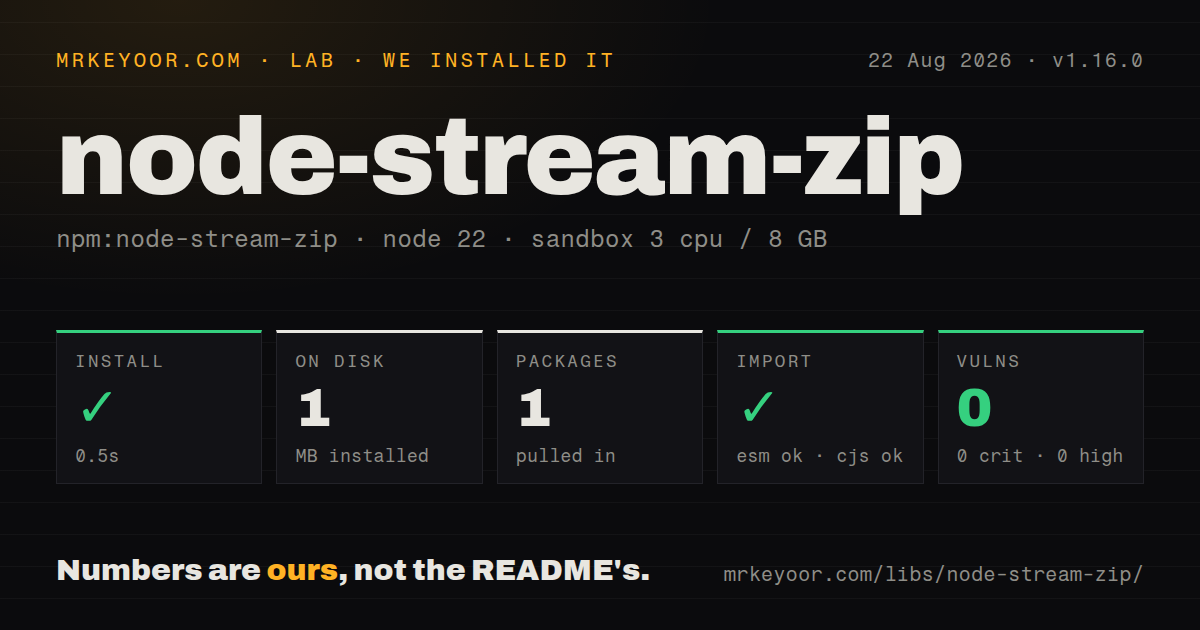
| Install | ✓ · 0.5s | 1 package on disk · 1 MB |
| Import | ✓ | ESM import works · require() works · CommonJS package |
| Browser | n/a | could not be bundled for the browser (Node-only code, most likely) |
| Types | ✓ | TypeScript types bundled |
| Known vulns | 0 | 0 critical · 0 high · 0 moderate · 0 low (npm audit) |
Answers from our run
Does node-stream-zip install cleanly?
Yes. In a fresh container with an empty cache, npm install node-stream-zip finished in 0.5s, leaving 1 package and 1 MB on disk. npm audit reported no known vulnerabilities.
Can node-stream-zip run in a browser?
Not directly: esbuild could not bundle it for the browser in our run, which normally means it depends on Node built-ins. Use it on the server, or find a browser-targeted alternative.
Does node-stream-zip work with both ESM and CommonJS?
Yes. Both import 'node-stream-zip' and require('node-stream-zip') worked in Node 22 in our run. The package is published as CommonJS.
Does node-stream-zip include TypeScript types?
Yes, type declarations ship inside the package, so no @types install is needed.
node-stream-zip or unzipper: which should you use?
unzipper: Use it when ZIP parsing should plug directly into a Node stream pipeline. node-stream-zip 1.16.0 installed in 0.5 seconds as one 1 MB package with 0 audit findings in our sandbox, but esbuild could not make a browser bundle from its Node-only code.
When should you not use node-stream-zip?
You need to create, append to, or rewrite ZIP archives. adm-zip supports writing, while node-stream-zip only reads and extracts.
Use it if
- A server must inspect or unpack ZIP64 archives without buffering the complete file.
- Readable streams are needed for entries too large to hold safely in one Buffer.
- A dependency-free JavaScript reader is preferable to a native addon or external unzip process.
- The callback API's entry events are useful while a very large central directory is still being read.
- You need to create, append to, or rewrite ZIP archives. adm-zip supports writing, while node-stream-zip only reads and extracts.
- The files use AES encryption. The README lists AES archives as out of scope and says opening them throws.
- The code runs in a browser or edge isolate. This implementation depends on Node fs, Buffer, streams, file descriptors, and zlib.
- Legacy filename encodings are unknown. nameEncoding can select a known codec, but the README still flags non-ASCII filenames as a known issue.
- Untrusted archives cannot be given extraction quotas. Default path validation blocks traversal names, but callers still need limits for entry count, expanded bytes, and compression ratio.
Setup reality
We installed node-stream-zip 1.16.0 in 0.5 seconds in a fresh Node 22 container. It left one package and 1 MB on disk. npm audit found 0 known vulnerabilities. The package has 0 direct and 0 peer dependencies, 68 KB unpacked, and bundled TypeScript declarations. It is CommonJS without an exports map; require() and ESM import both worked.
The Promise entry point has unusual syntax: new StreamZip.async({ file }). Opening starts central-directory work, and methods such as entries(), entryData(), stream(), or entriesCount wait for readiness. No credentials or config files are involved. Keep path-name validation enabled for uploaded archives; skipEntryNameValidation accepts names such as ../ and Windows absolute paths that extraction should reject.
entryData() buffers the selected entry even though the archive itself is read in chunks. For an untrusted 1 MB ZIP, compressed metadata alone does not prove the expanded entry is safe. Inspect entry.size, cap total entries and extracted bytes, and use stream() with pipeline for large content. Wait for every pipeline or extraction before close(), then call close() in finally so the file descriptor is released on both success and error.
Our esbuild browser bundle failed because the package uses Node-only modules, which matches its filesystem purpose. AES archives also fail by design. Filename decoding defaults to UTF-8; use nameEncoding only when the producer's codec is known. Version 1.16.0 is the minimum sensible release for user uploads because it fixes compressed-size reading tied to a memory-overflow report. The engines field says Node 0.12 or newer, but that declaration is compatibility history, not a maintained-runtime recommendation.
Patterns
Open a ZIP and inspect its directory list-entries
const StreamZip = require('node-stream-zip');
const zip = new StreamZip.async({ file: 'archive.zip' });

try {
  for (const entry of Object.values(await zip.entries())) {
    console.log(entry.name, entry.isDirectory ? 'dir' : entry.size);
  }
} finally {
  await zip.close();
}
entries() retains the full map. For an archive with a huge entry count, use entry events with storeEntries disabled.
Buffer one bounded text file read-small-entry
const zip = new StreamZip.async({ file: 'archive.zip' });
try {
  const entry = await zip.entry('docs/readme.txt');
  if (!entry || entry.size > 1_000_000) throw new Error('invalid readme');
  const text = (await zip.entryData(entry)).toString('utf8');
} finally {
  await zip.close();
}
entryData() allocates a Buffer for the full expanded entry. Check size before reading data from an untrusted archive.
Pipe an entry without buffering it stream-large-entry
const { pipeline } = require('node:stream/promises');
const { createWriteStream } = require('node:fs');
const zip = new StreamZip.async({ file: 'archive.zip' });

try {
  const input = await zip.stream('media/demo.mp4');
  await pipeline(input, createWriteStream('demo.mp4'));
} finally {
  await zip.close();
}
Await pipeline before close(). Closing the archive while a stream is active cancels pending reads and can leave a partial file.
Extract one named entry extract-one-file
const { mkdir } = require('node:fs/promises');
await mkdir('./output', { recursive: true });

const zip = new StreamZip.async({ file: 'archive.zip' });
try {
  await zip.extract('docs/readme.txt', './output/readme.txt');
} finally {
  await zip.close();
}
Keep the default entry-name checks on for external files and verify that the chosen destination is inside your extraction root.
Unpack one archive directory extract-prefix
const zip = new StreamZip.async({ file: 'archive.zip' });
try {
  await zip.extract('assets/images/', './output/images');
} finally {
  await zip.close();
}
Pass the exact stored prefix, including its trailing slash. Some ZIP producers omit explicit directory entries.
Unpack the entire archive extract-all
const zip = new StreamZip.async({ file: 'archive.zip' });
try {
  const count = await zip.extract(null, './unpacked');
  console.log({ count });
} finally {
  await zip.close();
}
null selects every entry. Validate count and expanded-size limits before offering whole-archive extraction for uploads.
Observe entries without storing the map process-entry-events
const zip = new StreamZip.async({ file: 'large.zip', storeEntries: false });
zip.on('entry', (entry) => {
  console.log(entry.name, entry.compressedSize, entry.size);
});

try {
  await zip.entriesCount;
} finally {
  await zip.close();
}
storeEntries=false saves the map memory, but later entry(name) and entries() lookups are unavailable.
Decode a known legacy filename codec choose-name-encoding
const zip = new StreamZip.async({
  file: 'legacy.zip',
  nameEncoding: 'latin1',
});
try {
  console.log(Object.keys(await zip.entries()));
} finally {
  await zip.close();
}
UTF-8 is the default. Guessing latin1 can silently produce the wrong paths, so use it only with known archive provenance.
Read an existing descriptor open-file-descriptor
const fs = require('node:fs');
const fd = fs.openSync('archive.zip', 'r');
const zip = new StreamZip.async({ fd });
try {
  console.log(await zip.entriesCount);
} finally {
  await zip.close();
}
Coordinate descriptor ownership with surrounding code. Closing or reusing fd before ZIP operations finish corrupts the read lifecycle.
Log each extracted entry track-extraction
const zip = new StreamZip.async({ file: 'archive.zip' });
zip.on('extract', (entry, outputPath) => {
  audit({ name: entry.name, outputPath, size: entry.size });
});
try {
  await zip.extract(null, './unpacked');
} finally {
  await zip.close();
}
The event reports completed entry extraction. It does not replace preflight quotas or cleanup of files written before a later failure.
Use the CommonJS TypeScript declaration import-typescript
import StreamZip = require('node-stream-zip');

const zip = new StreamZip.async({ file: 'archive.zip' });
const entry: StreamZip.ZipEntry | undefined = await zip.entry('data.csv');
await zip.close();
The declarations use export =. A default import depends on esModuleInterop or allowSyntheticDefaultImports in tsconfig.
Listen for callback API readiness use-callback-class
const StreamZip = require('node-stream-zip');
const zip = new StreamZip({ file: 'archive.zip' });

zip.on('error', (error) => {
  console.error(error);
  zip.close();
});
zip.on('ready', () => {
  console.log(zip.entriesCount);
  zip.close();
});
The callback class requires an error listener. Prefer StreamZip.async unless entry timing or a low-level callback-only method is required.
Alternatives
| Package | Registry | Pick it when |
|---|---|---|
| unzipper | npm | Use it when ZIP parsing should plug directly into a Node stream pipeline. |
| yauzl | npm | Use it for a lower-level lazy reader where your code will own extraction and security policy. |
| adm-zip | npm | Use it for modest archives when reading and writing ZIP files matter more than streaming. |
More utils guides
lru-cache · type-fest · ajv · zod · p-limit · find-up · the whole shelf →
How this guide is made: grounded in the library's documentation, release notes, changelog, and issue history, on a fixed rubric — not a hands-on install of every release. The 50 most-downloaded entries are additionally install-verified in clean containers. Corrections: contact the desk.