nano-css review
Our install found a CSS-in-JS construction kit, not a configured styling library. nano-css 5.6.2 starts with create() and put(), which turn style objects into injected browser rules or server-collected CSS. Generated classes, sheets, stable hashes, nesting, keyframes, React components, prefixing, RTL conversion, hydration, and extraction arrive through addons or presets. That lets a team assemble a narrow renderer, but it also makes addon order, server isolation, and client hydration part of the application's own design.
nano-css 5.6.2 installed 22 packages and 18 MB in 3.2 seconds on our box, while its whole-package probe bundled to 1.5 KB minified. Keep it where a team already owns the addon graph; new projects should choose it only after testing SSR hydration, CSP, and peer behavior.
We installed it
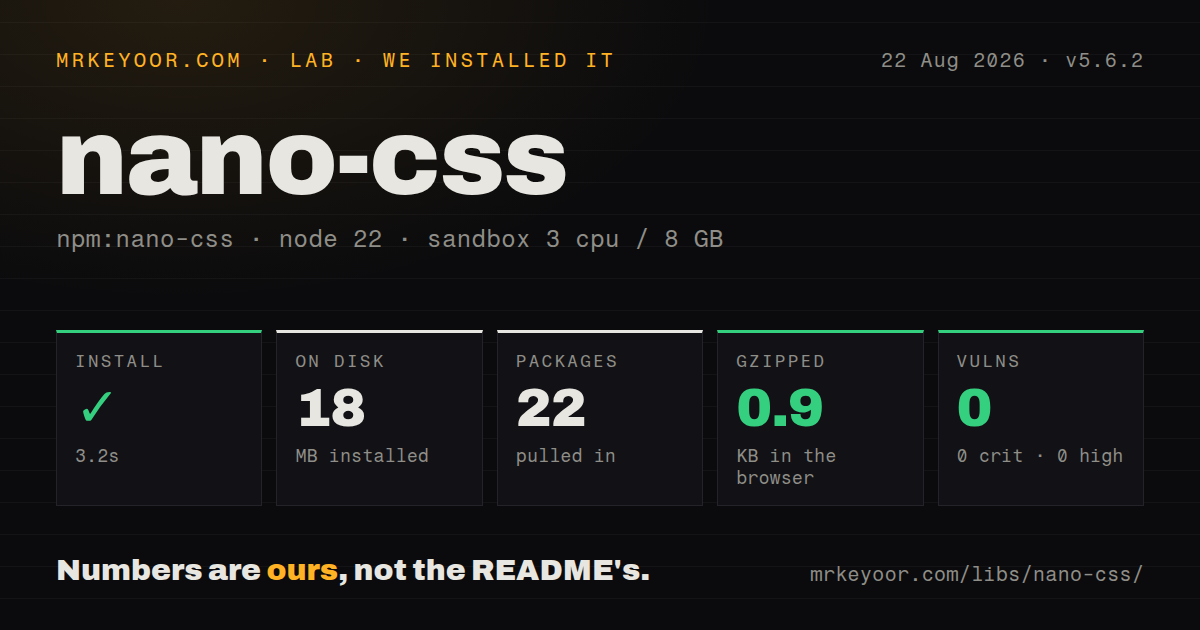
| Install | ✓ · 3.2s | 22 packages on disk · 18 MB |
| Import | ✓ | ESM import works · require() works · CommonJS package |
| Browser | 0.9 KB | gzipped (1.5 KB minified), bundled with esbuild |
| Types | ✓ | TypeScript types bundled |
| Known vulns | 0 | 0 critical · 0 high · 0 moderate · 0 low (npm audit) |
Answers from our run
Does nano-css install cleanly?
Yes. In a fresh container with an empty cache, npm install nano-css finished in 3 seconds, leaving 22 packages and 18 MB on disk. npm audit reported no known vulnerabilities.
How much does nano-css add to a browser bundle?
0.9 KB gzipped (1.5 KB minified) when the whole package is bundled for the browser with esbuild. Importing only part of it is usually smaller.
Does nano-css work with both ESM and CommonJS?
Yes. Both import 'nano-css' and require('nano-css') worked in Node 22 in our run. The package is published as CommonJS.
Does nano-css include TypeScript types?
Yes, type declarations ship inside the package, so no @types install is needed.
nano-css or goober: which should you use?
goober: Use it for a small generated-class API with less addon assembly. nano-css 5.6.2 installed 22 packages and 18 MB in 3.2 seconds on our box, while its whole-package probe bundled to 1.5 KB minified.
When should you not use nano-css?
You expect installation to provide the README's entire feature list; core preinstalls put() while most APIs are separate addons
Use it if
- You need runtime CSS rule insertion without wrapper components or inline style attributes
- A framework-neutral renderer matters and you are prepared to install only the addons you use
- Server-collected CSS and stable client class names must come from the same low-level engine
- An existing nano-css v5 application already relies on its presets, rule, sheet, jsx, or RTL behavior
- You expect installation to provide the README's entire feature list; core preinstalls put() while most APIs are separate addons
- The 0.5 KB README comparison drove the choice; it links to version 1.15.3, while 5.6.2 declares 8 direct dependencies
- SSR must hydrate media queries and keyframes; the hydrate documentation says those rule types are not recovered
- Invalid production CSS must throw: the core catches insertRule failures in production and drops the bad rule
- React Server Components, a strict CSP, or zero runtime styling is required; the default browser path creates and mutates a style element
- Your organization does not accept the Unlicense public-domain dedication
Setup reality
Our Node 22 sandbox installed nano-css 5.6.2 in 3.2 seconds. It left 22 packages and 18 MB on disk, with 8 direct dependencies and 2 peer dependencies. npm audit found 0 known vulnerabilities. The package is 560 KB unpacked, carries the Unlicense, bundles TypeScript declarations, and is CommonJS without an exports map. Both require() and ESM import still worked in our test.
The two peers are react and react-dom with wildcard ranges, even though create() itself is described as framework neutral. Modern npm may install or complain about those peers for a standalone consumer. Only put() is present on a fresh renderer. The sheet preset adds stable names, nesting, atoms, keyframes, rule, and sheet; the React preset installs a broader chain and calls React.createElement.
In a browser, nano-css appends a style element to document.head unless sh points to one you created. Production uses insertRule(), while development writes readable text and creates an extra test sheet. Set NODE_ENV consistently. Our whole-package browser import measured 1.5 KB minified and 0.9 KB gzipped, but each chosen preset and addon changes what the application actually ships.
Create a new renderer for every SSR request, execute lazy sheet rules before reading nano.raw, and use stable naming on both sides. Reusing one renderer across requests keeps accumulated CSS. Client hydration needs the matching style element and does not restore media queries or keyframes. Because addons wrap renderer methods, their documented dependencies and installation order are observable behavior rather than optional organization.
Patterns
Apply a renderer and inject a selector inject-global-rule
import { create } from 'nano-css';

const nano = create({ pfx: 'acme-' });

nano.put('.notice', {
  color: 'tomato',
  border: '1px solid currentColor',
});
The inject global rule path depends on the matching nano-css addon being installed before use. Server and browser renderers must use the same addon order.
Generate a class from a style object generate-class-name
import { create } from 'nano-css';
import { addon as addonStable } from 'nano-css/addon/stable';
import { addon as addonRule } from 'nano-css/addon/rule';

const nano = create();
addonStable(nano);
addonRule(nano);

const className = nano.rule({ color: 'tomato' });
The generate class name path depends on the matching nano-css addon being installed before use. Server and browser renderers must use the same addon order.
Define several lazily inserted classes create-style-sheet
import { preset } from 'nano-css/preset/sheet';

const { sheet } = preset({ pfx: 'acme-' });
const styles = sheet({
  input: { border: '1px solid #aaa' },
  button: { color: 'white', background: 'navy' },
}, 'ContactForm');

button.className = styles.button;
The create style sheet path depends on the matching nano-css addon being installed before use. Server and browser renderers must use the same addon order.
Apply parent references and grouped selectors nest-selectors
import { preset } from 'nano-css/preset/sheet';

const nano = preset();
nano.put('.menu', {
  '&:hover': { color: 'blue' },
  '.icon, .label': { opacity: 0.8 },
  '.dark &': { color: 'white' },
});
The nest selectors path depends on the matching nano-css addon being installed before use. Server and browser renderers must use the same addon order.
Generate a responsive class add-media-query
import { preset } from 'nano-css/preset/sheet';

const { rule } = preset();
const card = rule({
  display: 'grid',
  gridTemplateColumns: '1fr 1fr',
  '@media (max-width: 640px)': {
    gridTemplateColumns: '1fr',
  },
}, 'Card');
The add media query path depends on the matching nano-css addon being installed before use. Server and browser renderers must use the same addon order.
Apply a uniquely named animation create-keyframes
import { preset } from 'nano-css/preset/sheet';

const { keyframes, rule } = preset();
const spin = keyframes({
  '0%': { transform: 'rotate(0deg)' },
  '100%': { transform: 'rotate(360deg)' },
});
const spinner = rule({ animation: `${spin} 800ms linear infinite` });
The create keyframes path depends on the matching nano-css addon being installed before use. Server and browser renderers must use the same addon order.
Build a prop-driven React button create-react-component
import { preset } from 'nano-css/preset/react';

const { styled } = preset({ pfx: 'acme-' });

const Button = styled.button(
  { border: 0, padding: '8px 12px' },
  (props) => ({
    color: 'white',
    background: props.danger ? 'crimson' : 'royalblue',
  }),
  'Button',
);
The create react component path depends on the matching nano-css addon being installed before use. Server and browser renderers must use the same addon order.
Apply one-off styles through a styling block override-component-styles
import { preset } from 'nano-css/preset/react';

const { jsx } = preset();
const Panel = jsx('section', { padding: '16px', background: '#fff' }, 'Panel');

export function Warning() {
  return <Panel css={{ borderLeft: '4px solid orange' }}>Check input</Panel>;
}
The override component styles path depends on the matching nano-css addon being installed before use. Server and browser renderers must use the same addon order.
Collect CSS during server rendering render-server-css
import { preset } from 'nano-css/preset/sheet';

export function renderStyles() {
  const nano = preset({ pfx: 'acme-' });
  const title = nano.rule({ fontWeight: 700 }, 'Title');
  const markup = `<h1 class="${title}">Hello</h1>`;
  return `${markup}<style id="nano-css">${nano.raw}</style>`;
}
The render server css path depends on the matching nano-css addon being installed before use. Server and browser renderers must use the same addon order.
Reuse a server-generated style element hydrate-server-css
import { create } from 'nano-css';
import { addon as addonHydrate } from 'nano-css/addon/hydrate';

const style = document.getElementById('nano-css');
const nano = create({ sh: style, pfx: 'acme-' });
addonHydrate(nano);
The hydrate server css path depends on the matching nano-css addon being installed before use. Server and browser renderers must use the same addon order.
Apply vendor prefixes to emitted declarations prefix-browser-properties
import { create } from 'nano-css';
import { addon as addonPrefixer } from 'nano-css/addon/prefixer';

const nano = create();
addonPrefixer(nano);
nano.put('.layout', { display: 'flex', userSelect: 'none' });
The prefix browser properties path depends on the matching nano-css addon being installed before use. Server and browser renderers must use the same addon order.
Convert a renderer to RTL output flip-right-to-left
import { create } from 'nano-css';
import { addon as addonRtl } from 'nano-css/addon/rtl';

const rtlNano = create({ pfx: 'rtl-' });
addonRtl(rtlNano);
rtlNano.put('.card', { marginLeft: '12px', textAlign: 'left' });
The flip right to left path depends on the matching nano-css addon being installed before use. Server and browser renderers must use the same addon order.
Alternatives
| Package | Registry | Pick it when |
|---|---|---|
| goober | npm | Use it for a small generated-class API with less addon assembly |
| @emotion/css | npm | Use it for a mature runtime class API with broader composition and SSR documentation |
| styled-components | npm | Use it when a React component styling model is preferred over renderer construction |
| @vanilla-extract/css | npm | Use it when styles should be typed and extracted during the build |
More web frontend guides
postcss · react · react-dom · tailwindcss · clsx · htmlparser2 · the whole shelf →
How this guide is made: grounded in the library's documentation, release notes, changelog, and issue history, on a fixed rubric — not a hands-on install of every release. The 50 most-downloaded entries are additionally install-verified in clean containers. Corrections: contact the desk.