mylas review
Mylas 2.1.14 groups common Node filesystem operations into File, Json, Buf, and Dir helpers. It reads and writes UTF-8 strings, parsed JSON, and buffers; creates parent directories before saves; removes directory trees; and searches upward for node_modules folders. Several operations have synchronous or worker-thread variants, and JSON input can pass through its own comment and trailing-comma stripper. The current release updates the build target and development tooling after a 3-year gap, with no documented new runtime feature. It is a typed convenience layer over Node fs, not an atomic file store or portable browser filesystem.
Mylas 2.1.14 installed in 0.7 seconds as 1 package using 1 MB in our sandbox, with 0 audit findings, but its browser bundle failed. It fits Node scripts that value automatic parent creation and its exact grouped API; use node:fs/promises for ordinary I/O, and choose an atomic writer when file integrity matters.
We installed it
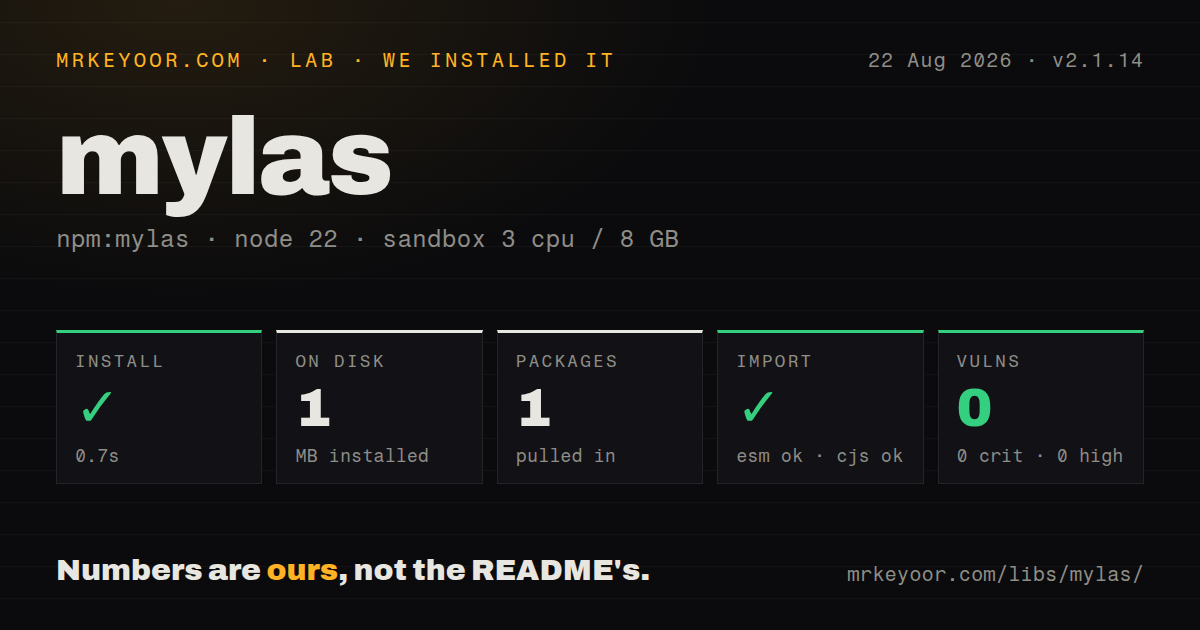
| Install | ✓ · 0.7s | 1 package on disk · 1 MB |
| Import | ✓ | ESM import works · require() works · CommonJS package with exports map |
| Browser | n/a | could not be bundled for the browser (Node-only code, most likely) |
| Types | ✓ | TypeScript types bundled |
| Known vulns | 0 | 0 critical · 0 high · 0 moderate · 0 low (npm audit) |
Answers from our run
Does mylas install cleanly?
Yes. In a fresh container with an empty cache, npm install mylas finished in 0.7s, leaving 1 package and 1 MB on disk. npm audit reported no known vulnerabilities.
Can mylas run in a browser?
Not directly: esbuild could not bundle it for the browser in our run, which normally means it depends on Node built-ins. Use it on the server, or find a browser-targeted alternative.
Does mylas work with both ESM and CommonJS?
Yes. Both import 'mylas' and require('mylas') worked in Node 22 in our run. The package is published as CommonJS with an exports map.
Does mylas include TypeScript types?
Yes, type declarations ship inside the package, so no @types install is needed.
mylas or fs-extra: which should you use?
fs-extra: Choose it for established copy, move, ensure-directory, remove, and JSON helpers beyond Mylas's small surface. Mylas 2.1.14 installed in 0.7 seconds as 1 package using 1 MB in our sandbox, with 0 audit findings, but its browser bundle failed.
When should you not use mylas?
Native node:fs/promises already covers the work. readFile, writeFile, and mkdir with recursive:true avoid another wrapper and expose the full Node API.
Use it if
- A Node tool repeatedly saves small text or JSON files into nested paths and should create missing parent directories automatically.
- One grouped API for strings, buffers, JSON, directory checks, and ancestor node_modules discovery matches an existing codebase.
- Configuration files use comments and trailing commas, and the team has tests covering Mylas's specific stripping behavior.
- A measured large JSON operation benefits from moving parse or stringify work into a newly spawned worker thread.
- Native node:fs/promises already covers the work. readFile, writeFile, and mkdir with recursive:true avoid another wrapper and expose the full Node API.
- Writes must survive crashes or concurrent writers. Mylas writes the destination directly, without a temporary file, fsync, rename, lock, or compare-and-swap step.
- Worker startup must be amortized. Each loadW or saveW call creates a new Worker, and Buffer worker saves copy data into SharedArrayBuffer first.
- You need a defined JSONC or JSON5 grammar. The package uses a handwritten comment and trailing-comma remover, with no syntax-preserving edit support.
- A shared library cannot mutate process globals. Importing mylas/register adds methods to JSON, String, and String.prototype for every module in that process.
Setup reality
We installed mylas 2.1.14 in a fresh Node 22 Bookworm sandbox. npm finished in 0.7 seconds and left exactly 1 package using 1 MB. The package is 60 KB unpacked with 0 direct and 0 peer dependencies; npm audit reported 0 known vulnerabilities. It requires Node 16 or newer, publishes CommonJS behind an exports map, includes TypeScript declarations, and worked through both require() and ESM import. Our browser build failed because its API depends on Node filesystem and worker modules.
No credentials, native compilation, or config file are involved. Prefer named imports such as File, Json, Buf, and Dir. The aggregate default lives behind CommonJS interop, so its shape can be surprising between transpilers and native ESM. Every save creates parent directories recursively before writing. That is convenient for generated output, but a misspelled path can create a new directory tree before the file operation fails or succeeds.
Text encoding is fixed to UTF-8, and Json.save uses compact JSON.stringify output without indentation, a replacer, schema checks, or atomic replacement. TypeScript generics on Json.load only assert the returned type. For commented JSON through the Promise form, hasComments occupies the third argument, which means passing undefined for the optional callback. Concurrent readers can observe incomplete content because saves target the final path directly.
Worker helpers create 1 new thread per call rather than using a pool. Use them after measuring large parse or stringify work; small files usually pay more startup cost than they save. Dir.rm performs forced recursive deletion, so validate any variable path before calling it. Keep mylas/register out of reusable packages because its prototype changes affect unrelated tests and dependencies.
Patterns
Load a UTF-8 file read-text
import { File } from 'mylas'
const text = await File.load('./notes/today.txt')
File.load always returns UTF-8 text. Use Buf.load when byte preservation matters.
Create parents and save text write-text
import { File } from 'mylas'
await File.save('./output/reports/latest.txt', 'ready\n')
Missing parent directories are created. The final file is written directly, so this is not an atomic replacement.
Assert a JSON result type read-typed-json
import { Json } from 'mylas'
type Config = { port: number; flags: string[] }
const config = await Json.load<Config>('./config/app.json')
The generic does not validate input at runtime; JSON.parse output is trusted as Config.
Parse comments and trailing commas read-commented-json
import { Json } from 'mylas'
const config = await Json.load('./tool.jsonc', undefined, true)
Promise callers must leave the callback position undefined to reach the third hasComments argument.
Save compact JSON write-json
import { Json } from 'mylas'
await Json.save('./state/job.json', { id: 'j_42', done: false })
Json.save uses compact JSON.stringify output and writes in place without locking or atomic rename.
Read and save binary bytes copy-buffer
import { Buf } from 'mylas'
const bytes = await Buf.load('./input/logo.png')
await Buf.save('./output/logo.png', bytes)
Buf.save also creates parent directories. It does not stream large files, so the whole Buffer remains in memory.
Move large JSON parsing to a worker parse-in-worker
import { Json } from 'mylas'
const report = await Json.loadW('./data/large-report.json')
Each loadW call starts a fresh Worker. Measure total latency before applying it to many small files.
Write bytes from a worker save-buffer-worker
import { Buf } from 'mylas'
await Buf.saveW('./output/blob.bin', Buffer.from(payload))
The implementation copies bytes into SharedArrayBuffer before sending them to 1 newly created worker.
Create and check a directory manage-directory
import { Dir } from 'mylas'
await Dir.mk('./var/cache/thumbs')
if (!(await Dir.check('./var/cache/thumbs'))) throw new Error('missing cache')
Dir.mk is recursive. Dir.check confirms path existence, not writability or that the path is a directory.
Constrain a recursive removal remove-generated-directory
import path from 'node:path'
import { Dir } from 'mylas'
const target = path.resolve('./var/cache/thumbs')
if (!target.endsWith('/var/cache/thumbs')) throw new Error('unsafe target')
await Dir.rm(target)
Dir.rm uses forced recursive deletion. Mylas provides no trash, undo, or built-in allowed-root check.
List ancestor dependency folders find-node-modules
import { Dir } from 'mylas'
const locations = Dir.nodeModules({ cwd: process.cwd(), relative: false })
for (const location of locations) console.log(location)
The helper walks toward the filesystem root. Do not treat packages found through a user-controlled cwd as trusted code.
Use named helpers from CommonJS use-commonjs
const { File, Json } = require('mylas')
const text = await File.load('./message.txt')
const data = await Json.load('./data.json')
Named exports avoid the aggregate .default shape and worked in our Node 22 require() check.
Alternatives
| Package | Registry | Pick it when |
|---|---|---|
| fs-extra | npm | Choose it for established copy, move, ensure-directory, remove, and JSON helpers beyond Mylas's small surface. |
| jsonfile | npm | Choose it when JSON reading and writing is the only need and output formatting options matter. |
| conf | npm | Choose it for application configuration that needs managed paths, defaults, migrations, and schema checks. |
More utils guides
lru-cache · type-fest · ajv · zod · p-limit · find-up · the whole shelf →
How this guide is made: grounded in the library's documentation, release notes, changelog, and issue history, on a fixed rubric — not a hands-on install of every release. The 50 most-downloaded entries are additionally install-verified in clean containers. Corrections: contact the desk.