fs-extra review
fs-extra 11.4.0 wraps Node's fs API and adds copy, move, remove, emptyDir, ensure helpers, parent-creating writes, and JSON file methods. Callback-free async calls return promises, while synchronous variants retain the Sync suffix. The main CommonJS export includes native fs methods; fs-extra/esm only names the extra methods, so readFile still comes from node:fs/promises. Version 11.4.0 fixes ensureSymlink so a destination that is already a broken symlink raises the proper EEXIST error. The graceful-fs dependency also queues selected work when a process hits EMFILE.
fs-extra 11.4.0 installed as four packages totaling 1 MB in 0.5 seconds with zero audit findings, but our browser build failed because it is Node-only. It pays for itself in filesystem-heavy tools; current Node applications needing only a couple of operations should use node:fs/promises.
We installed it
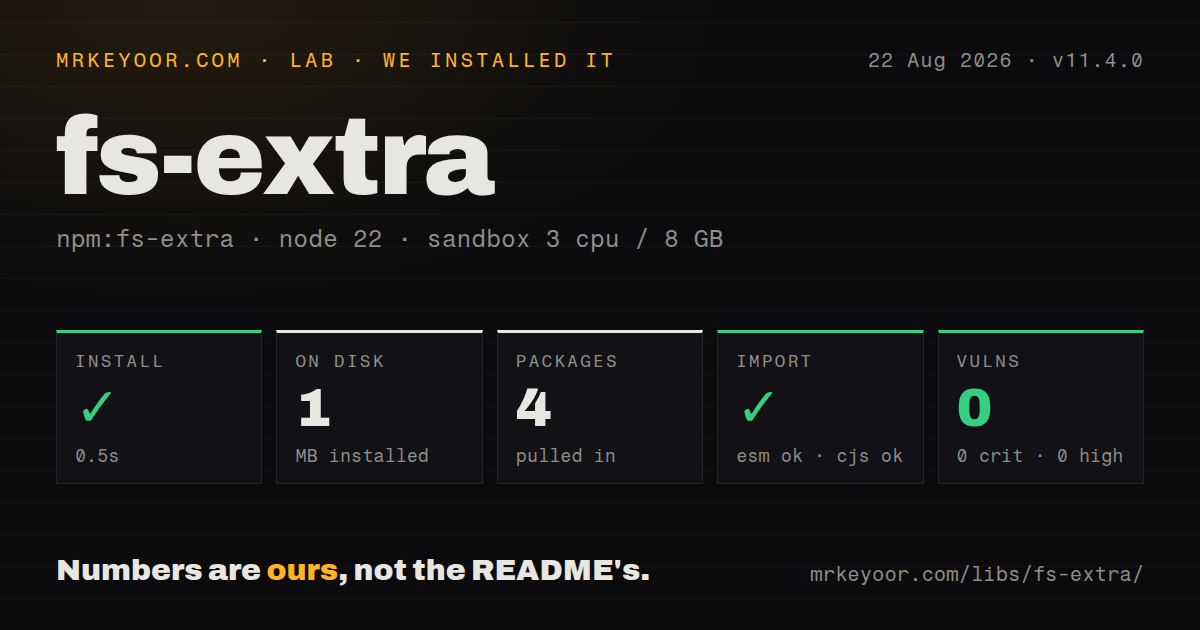
| Install | ✓ · 0.5s | 4 packages on disk · 1 MB |
| Import | ✓ | ESM import works · require() works · CommonJS package with exports map |
| Browser | n/a | could not be bundled for the browser (Node-only code, most likely) |
| Types | — | no TypeScript types found |
| Known vulns | 0 | 0 critical · 0 high · 0 moderate · 0 low (npm audit) |
Answers from our run
Does fs-extra install cleanly?
Yes. In a fresh container with an empty cache, npm install fs-extra finished in 0.5s, leaving 4 packages and 1 MB on disk. npm audit reported no known vulnerabilities.
Can fs-extra run in a browser?
Not directly: esbuild could not bundle it for the browser in our run, which normally means it depends on Node built-ins. Use it on the server, or find a browser-targeted alternative.
Does fs-extra work with both ESM and CommonJS?
Yes. Both import 'fs-extra' and require('fs-extra') worked in Node 22 in our run. The package is published as CommonJS with an exports map.
Does fs-extra include TypeScript types?
No type declarations were found in our install, so TypeScript users need their own declarations.
fs-extra or rimraf: which should you use?
rimraf: Use it when recursive removal is the whole job and a deletion-focused CLI or API is preferable. fs-extra 11.4.0 installed as four packages totaling 1 MB in 0.5 seconds with zero audit findings, but our browser build failed because it is Node-only.
When should you not use fs-extra?
node:fs/promises already handles the project's small set of mkdir, rm, cp, and file operations
Use it if
- A generator or build script uses copy, move, emptyDir, outputFile, and JSON helpers together
- One filesystem wrapper must serve callback callers and newer promise-based code
- File-heavy jobs have hit EMFILE and need the graceful-fs queue underneath the helper API
- The project supports Node versions where native recursive operations have inconsistent histories
- node:fs/promises already handles the project's small set of mkdir, rm, cp, and file operations
- A reusable package would pull three direct dependencies to save one short helper
- Globbing, watching, or walking directories is the actual requirement; fs-extra delegates those jobs elsewhere
- ESM callers expect readFile and other native methods as named exports from fs-extra/esm, where they are deliberately absent
- The target is a browser or edge isolate; our esbuild browser attempt failed on Node filesystem modules
Setup reality
Our install of fs-extra 11.4.0 took 0.5 seconds on Node 22. Four packages occupied 1 MB afterward, while fs-extra itself reports 200 KB unpacked. It declares 3 direct dependencies, zero peers, Node >=14.14, and MIT licensing. npm audit returned zero findings at all severities. require() and ESM import both succeeded through the exports map. No TypeScript declarations were bundled, and esbuild could not make a browser bundle because the code imports Node filesystem modules.
CommonJS require('fs-extra') exposes native fs plus the added helpers. For ESM, the default export from fs-extra is also combined, but named imports from fs-extra/esm only cover extra methods such as outputFile. Import readFile from node:fs/promises. TypeScript users need @types/fs-extra, which is published separately and can lag the runtime package. No credentials or config file are required.
copy walks directories recursively and may run filter callbacks on platform-specific paths. Normalize paths before matching exclusions. A move across devices cannot use one rename; the implementation may copy and then delete. A crash can therefore leave both a partial destination and the source. For deployment artifacts, copy to a sibling staging path, verify it, then rename within the destination filesystem.
remove and emptyDir perform destructive work without checking whether the resolved path is broader than intended. Guard that path in application code. outputFile and outputJson create missing parent directories, so a bad base path can silently produce a believable tree elsewhere. JSON writes are not atomic. Crash-sensitive state needs a temporary sibling file, any required fsync, and a final rename.
Patterns
Copy either a file or a directory copy-file-or-dir
const fs = require('fs-extra')

await fs.copy('/tmp/mydir', '/tmp/copy')
await fs.copy('/tmp/file.txt', '/tmp/copy/file.txt')
copy includes nested directory contents. It does not undo earlier writes after a later failure, so deployment code should validate both paths first.
Filter a recursive copy copy-with-filter
const fs = require('fs-extra')

await fs.copy('src', 'dist', {
  filter: (src, dest) => !src.includes('node_modules'),
  overwrite: true
})
The callback sees each source and destination. Normalize path separators before applying the same exclusion rule on Windows and POSIX.
Move and overwrite a destination move-file
const fs = require('fs-extra')

await fs.move('/tmp/somefile', '/storage/somefile', { overwrite: true })
Across filesystems, move may perform a copy followed by removal rather than one atomic rename. An interruption can leave incomplete state.
Remove a path recursively remove-recursive
const fs = require('fs-extra')

await fs.remove('/tmp/build')
// no error if the path does not exist
remove tolerates a missing target. Resolve and compare the path against an allowed root before deleting a tree.
Ensure a nested directory exists ensure-dir
const fs = require('fs-extra')

await fs.ensureDir('/tmp/this/path/does/not/exist')
// aliases: fs.mkdirs, fs.mkdirp
mkdirs and mkdirp are aliases for this helper. On supported Node versions, fs.mkdir with recursive=true may already cover the requirement.
Create parents before writing a file output-file
const fs = require('fs-extra')

await fs.outputFile('/tmp/a/b/c/file.txt', 'hello')
outputFile creates every missing parent. Validate the base directory because a typo can build a new tree without raising an error.
Load JSON and write formatted output read-write-json
const fs = require('fs-extra')

const pkg = await fs.readJson('./package.json')
await fs.writeJson('./out.json', { name: 'app' }, { spaces: 2 })
await fs.outputJson('./deep/dir/out.json', { ok: true }, { spaces: 2 })
outputJson creates parent directories but does not make the write atomic. Durable configuration needs a temporary file and rename.
Clear a directory without removing it empty-dir
const fs = require('fs-extra')

await fs.emptyDir('/tmp/some/dir')
// dir now exists and is empty
An absent directory is created; an existing one loses all contents. Check the fully resolved target before calling this destructive helper.
Alternatives
| Package | Registry | Pick it when |
|---|---|---|
| rimraf | npm | Use it when recursive removal is the whole job and a deletion-focused CLI or API is preferable. |
| mkdirp | npm | Use it for directory creation in compatibility code that cannot rely on native recursive mkdir. |
| jsonfile | npm | Use this smaller dependency when formatted JSON reads and writes are the only missing helpers. |
| cpy | npm | Use it for glob-based copy tasks or a dedicated copy command with progress reporting. |
More utils guides
lru-cache · type-fest · ajv · zod · p-limit · find-up · the whole shelf →
How this guide is made: grounded in the library's documentation, release notes, changelog, and issue history, on a fixed rubric — not a hands-on install of every release. The 50 most-downloaded entries are additionally install-verified in clean containers. Corrections: contact the desk.