math-expression-evaluator review
math-expression-evaluator 2.0.7 turns calculator text such as `2(3+4)`, `sin90`, `5C2`, and `Sigma(1,5,n)` into JavaScript numbers without using `eval`. An `Mexp` instance lexes the input, converts tokens to postfix form, and evaluates built-in arithmetic, degree-based trigonometry, factorials, permutations, combinations, sums, and products. The current release bundles TypeScript declarations and custom-token support. Our browser build was 13.2 KB minified and 4.2 KB gzipped, which is reasonable for a calculator parser but buys no symbolic algebra or exact arithmetic.
Our math-expression-evaluator 2.0.7 install took 0.6 seconds, added one dependency-free package, and produced a 4.2 KB gzipped browser bundle with 0 audit findings. Choose it for its specific calculator grammar; avoid it for unbounded public input or any result that cannot tolerate JavaScript floating point.
We installed it
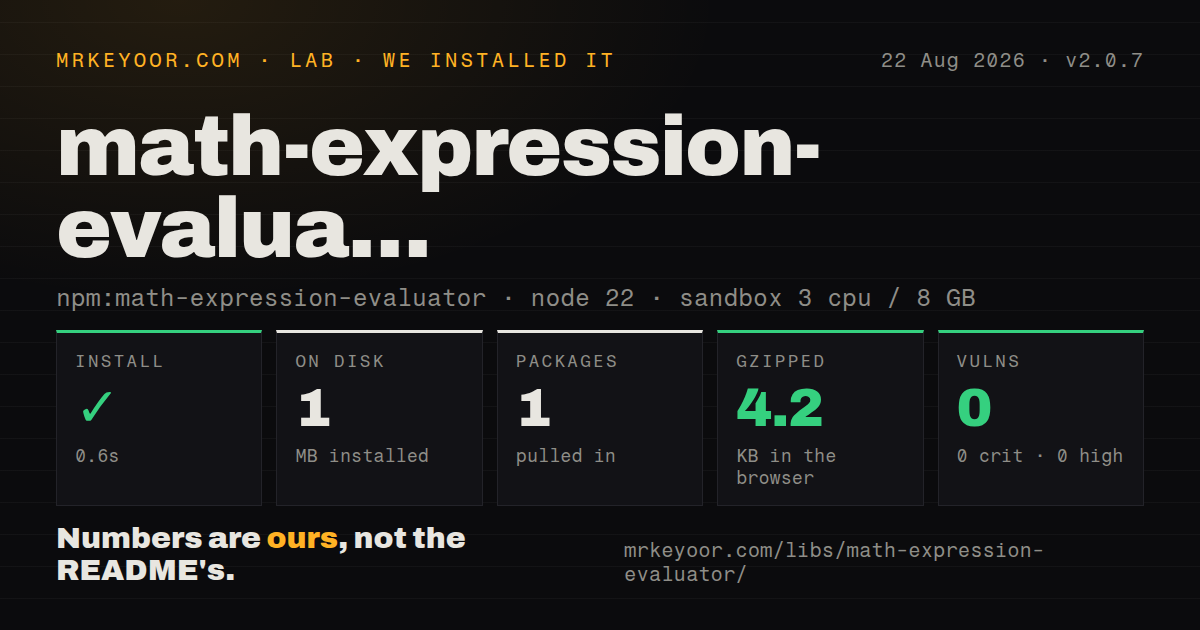
| Install | ✓ · 0.6s | 1 package on disk · 1 MB |
| Import | ✓ | ESM import works · require() works · CommonJS package |
| Browser | 4.2 KB | gzipped (13.2 KB minified), bundled with esbuild |
| Types | ✓ | TypeScript types bundled |
| Known vulns | 0 | 0 critical · 0 high · 0 moderate · 0 low (npm audit) |
Answers from our run
Does math-expression-evaluator install cleanly?
Yes. In a fresh container with an empty cache, npm install math-expression-evaluator finished in 0.6s, leaving 1 package and 1 MB on disk. npm audit reported no known vulnerabilities.
How much does math-expression-evaluator add to a browser bundle?
4.2 KB gzipped (13.2 KB minified) when the whole package is bundled for the browser with esbuild. Importing only part of it is usually smaller.
Does math-expression-evaluator work with both ESM and CommonJS?
Yes. Both import 'math-expression-evaluator' and require('math-expression-evaluator') worked in Node 22 in our run. The package is published as CommonJS.
Does math-expression-evaluator include TypeScript types?
Yes, type declarations ship inside the package, so no @types install is needed.
math-expression-evaluator or mathjs: which should you use?
mathjs: Use it for units, matrices, complex numbers, variables, and a much broader expression language. Our math-expression-evaluator 2.0.7 install took 0.6 seconds, added one dependency-free package, and produced a 4.2 KB gzipped browser bundle with 0 audit findings.
When should you not use math-expression-evaluator?
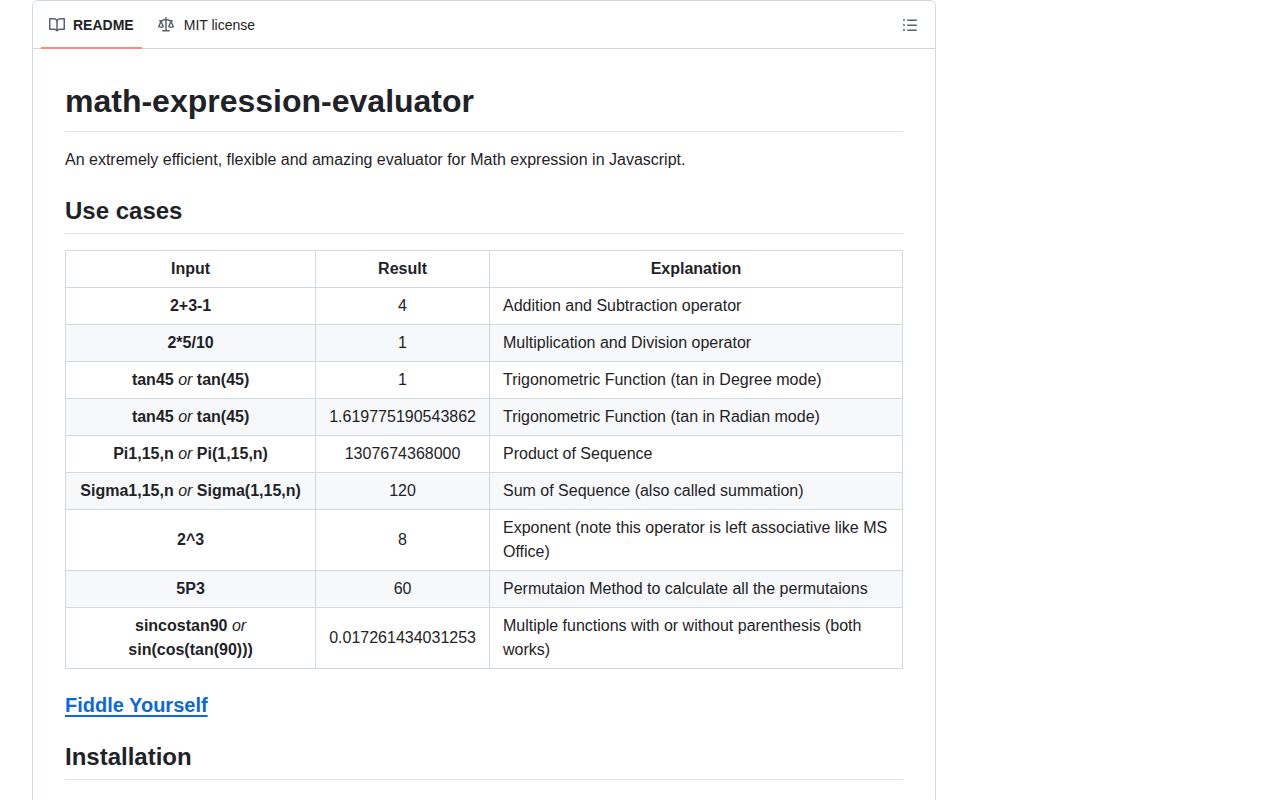
Standard right-associative exponentiation is required: the README says ^ is left-associative, so 2^3^2 produces 64.
Use it if
- Users enter calculator expressions with implicit multiplication or parenthesis-free functions such as `sin90`.
- Degree-mode trigonometry, factorials, combinations, `Sigma`, and `Pi` match the product's grammar.
- A parsed expression should be reused through lex, postfix conversion, and evaluation stages.
- Custom constants or unary functions can be defined once on a dedicated evaluator instance.
- Standard right-associative exponentiation is required: the README says `^` is left-associative, so `2^3^2` produces 64.
- Untrusted server input lacks strict work limits; sequence and combinatoric operations use loops without a documented iteration cap.
- Money, fractions, units, complex values, matrices, or symbolic results are needed; evaluation returns JavaScript `number` values.
- Ordinary named variables are central to the syntax; built-ins mainly expose fixed tokens plus `n` inside `Sigma` and `Pi`.
- Documentation accuracy is a release gate: the README omits an import in its main example, mentions Bower, and contains stale method and logarithm examples.
Setup reality
Our install of math-expression-evaluator 2.0.7 completed in 0.6 seconds. It left 1 package and 1 MB on disk, with 0 direct dependencies, 0 peer dependencies, and 0 known vulnerabilities in npm audit. The published package is 168 KB unpacked and requires no native compiler, credentials, or config file.
The package is CommonJS with no exports map. Both require() and ESM import worked on Node 22, and TypeScript declarations are bundled. const Mexp = require('math-expression-evaluator') matches the emitted entry most directly; default-import syntax can depend on compiler interoperability settings. Create an instance before evaluating expressions.
Trigonometric functions start in degree mode, so sin90 returns 1. Set mexp.math.isDegree = false for radians. The ^ operator groups left to right, implicit multiplication is accepted, and functions may omit parentheses. Those choices are calculator-friendly but can surprise users trained on another grammar, so show the accepted syntax beside the input.
Custom tokens remain on the evaluator after they are added. Use a preconfigured instance per grammar instead of mixing tenant-defined tokens. Catch ordinary Error failures and apply your own limits to expression length, numeric magnitude, factorials, and Sigma or Pi ranges. Our browser bundle measured 13.2 KB minified and 4.2 KB gzipped. Results still use floating-point numbers, including internal 15-place normalization, so do not use them for exact financial calculations.
Patterns
Evaluate a calculator expression evaluate-arithmetic
const Mexp = require('math-expression-evaluator');

const mexp = new Mexp();
const value = mexp.eval('2 + 3 * 4');
console.log(value); // 14
`eval` returns a JavaScript number and throws on syntax it cannot parse, so catch failures at the input boundary.
Accept multiplication without an operator use-implicit-multiplication
const value = mexp.eval('2(3 + 4)');
console.log(value); // 14
The grammar recognizes adjacency such as `2(3+4)`, which should be documented if users also know parsers that reject it.
Calculate trigonometry in degree mode evaluate-degree-trig
const value = mexp.eval('sin90 + cos(0)');
console.log(value); // 2
Fresh `Mexp` instances use degrees; `sin90` therefore evaluates to 1 rather than the sine of 90 radians.
Switch one evaluator to radians switch-to-radians
mexp.math.isDegree = false;
const value = mexp.eval('sin(pi / 2)');
console.log(value); // 1
The mode is mutable instance state. Set it before parsing and avoid sharing an instance across requests with different angle conventions.
Check the package's exponent grouping evaluate-powers
const squaredCube = mexp.eval('(2^3)^2'); // 64
const powerTower = mexp.eval('2^(3^2)'); // 512
The README defines `^` as left-associative, making `2^3^2` equal `(2^3)^2`, or 64.
Evaluate permutations and combinations evaluate-combinatorics
const factorial = mexp.eval('5!'); // 120
const combinations = mexp.eval('5C2'); // 10
const permutations = mexp.eval('5P2'); // 20
Large factorial-style inputs can consume substantial CPU and overflow JavaScript numbers; the library documents no magnitude cap.
Sum a sequence with the built-in variable sum-a-sequence
const total = mexp.eval('Sigma(1, 100, n)');
console.log(total); // 5050
`n` has special meaning inside `Sigma`; validate both bounds before accepting a sequence expression from a user.
Multiply a bounded sequence multiply-a-sequence
const product = mexp.eval('Pi(1, 5, n)');
console.log(product); // 120
`Pi` performs repeated numeric work and can overflow quickly, so an application limit is required for public input.
Reuse the postfix representation reuse-parsed-expression
const lexed = mexp.lex('2 * (3 + 4)');
const postfix = mexp.toPostfix(lexed);
const value = mexp.postfixEval(postfix);
console.log(value); // 14
Lexing and postfix conversion expose the evaluator's stages, but keep the representation within the same 2.x implementation.
Register a custom constant token add-custom-constant
const T = Mexp.TOKEN_TYPES;
mexp.addToken([{
  token: 'x',
  show: 'x',
  type: T.CONSTANT,
  value: 'x',
  precedence: 0,
}]);

const value = mexp.eval('2x + 1', undefined, { x: 3 });
console.log(value); // 7
A token definition and its evaluation values must agree, and additions persist for later calls on that instance.
Add a function to one grammar add-custom-function
const T = Mexp.TOKEN_TYPES;
mexp.addToken([{
  token: 'abs',
  show: 'abs',
  type: T.FUNCTION_WITH_ONE_ARG,
  value: Math.abs,
  precedence: 11,
}]);

console.log(mexp.eval('abs(-4)')); // 4
Custom tokens mutate the evaluator. Build the accepted grammar at startup instead of accepting arbitrary token definitions per request.
Return a controlled syntax error handle-invalid-expression
function calculate(input) {
  if (input.length > 200) throw new Error('Expression too long');
  try {
    const value = mexp.eval(input);
    if (!Number.isFinite(value)) throw new Error('Non-finite result');
    return value;
  } catch {
    throw new Error('Invalid expression');
  }
}
Failures are ordinary errors rather than a typed result object, so translate them before exposing a response to users.
Alternatives
| Package | Registry | Pick it when |
|---|---|---|
| mathjs | npm | Use it for units, matrices, complex numbers, variables, and a much broader expression language. |
| expr-eval | npm | Use it for a smaller parser with named variables and a more conventional expression API. |
| decimal.js | npm | Use it when exact decimal arithmetic matters more than parsing calculator syntax. |
More utils guides
lru-cache · type-fest · ajv · zod · p-limit · find-up · the whole shelf →
How this guide is made: grounded in the library's documentation, release notes, changelog, and issue history, on a fixed rubric — not a hands-on install of every release. The 50 most-downloaded entries are additionally install-verified in clean containers. Corrections: contact the desk.