mathjs review
Our full mathjs 15.2.0 browser import measured 735.4 KB minified and 201.7 KB gzipped because this is far more than a replacement for JavaScript `Math`. One API works across ordinary numbers, BigNumbers, fractions, complex values, physical units, arrays, and matrices. It also parses calculator expressions, compiles formulas, differentiates symbolically, and serializes expression trees. Version 15.2.0 adds amp-hour units plus `num` and `den` fraction helpers, repairs two expression-parser paths that allowed arbitrary JavaScript execution, and supplies missing TypeScript types for logical transform dependencies.
mathjs 15.2.0 used 21 MB on disk and produced a 201.7 KB gzipped full browser bundle in our sandbox, a fair cost only when an application needs several of its numeric types, units, matrices, and parser together. Pick a focused package for one job, and run user-authored expressions outside the main process even on the patched release.
We installed it
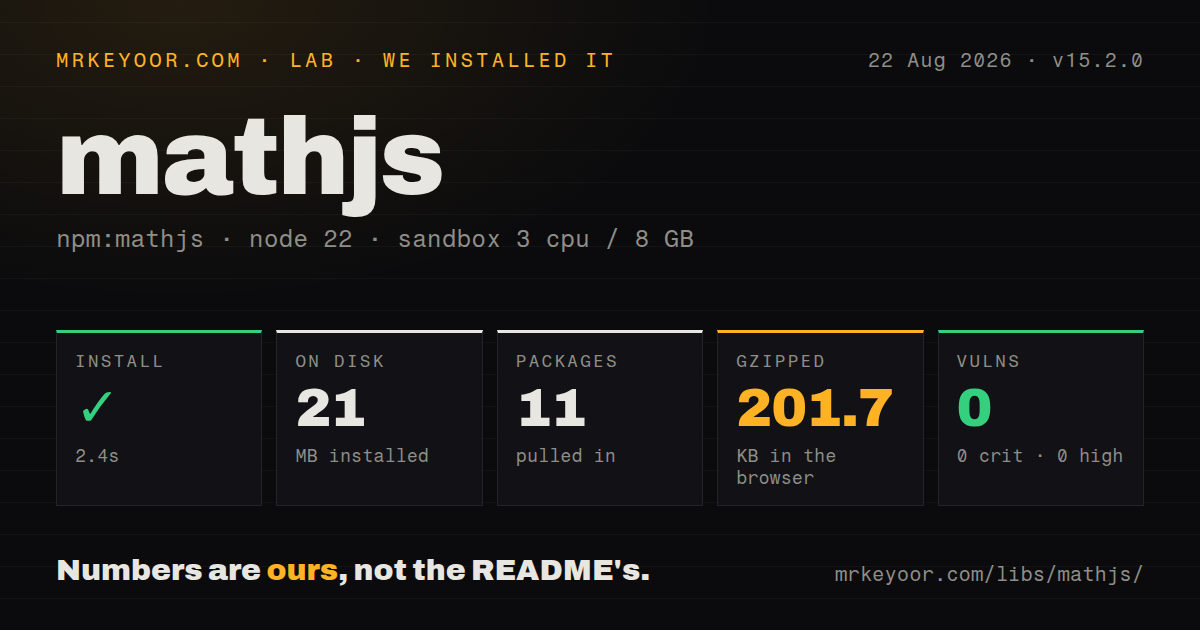
| Install | ✓ · 2.4s | 11 packages on disk · 21 MB |
| Import | ✓ | ESM import works · require() works · ESM package with exports map |
| Browser | 201.7 KB | gzipped (735.4 KB minified), bundled with esbuild |
| Types | ✓ | TypeScript types bundled |
| Known vulns | 0 | 0 critical · 0 high · 0 moderate · 0 low (npm audit) |
Answers from our run
Does mathjs install cleanly?
Yes. In a fresh container with an empty cache, npm install mathjs finished in 2 seconds, leaving 11 packages and 21 MB on disk. npm audit reported no known vulnerabilities.
How much does mathjs add to a browser bundle?
201.7 KB gzipped (735.4 KB minified) when the whole package is bundled for the browser with esbuild. Importing only part of it is usually smaller.
Does mathjs work with both ESM and CommonJS?
Yes. Both import 'mathjs' and require('mathjs') worked in Node 22 in our run. The package is published as ESM with an exports map.
Does mathjs include TypeScript types?
Yes, type declarations ship inside the package, so no @types install is needed.
mathjs or decimal.js: which should you use?
decimal.js: Choose it for arbitrary-precision decimal arithmetic without an expression language or matrix types. mathjs 15.2.0 used 21 MB on disk and produced a 201.7 KB gzipped full browser bundle in our sandbox, a fair cost only when an application needs several of its numeric types, units, matrices, and parser together.
When should you not use mathjs?
Money calculations are the only requirement. decimal.js supplies the decimal engine without mathjs's parser, units, matrices, and 201.7 KB gzipped full import.
Use it if
- A calculator or engineering product needs expressions, physical units, complex values, and matrices under one consistent API.
- The same algorithm must accept several numeric representations through typed function dispatch.
- Users need persistent formula variables, compiled expressions, or symbolic derivatives rather than plain arithmetic calls.
- You can select number-only or dependency-level imports when a 201.7 KB gzipped full browser bundle is too expensive.
- Money calculations are the only requirement. `decimal.js` supplies the decimal engine without mathjs's parser, units, matrices, and 201.7 KB gzipped full import.
- Untrusted formulas would run inside the web server process. The official security guide names unknown parser flaws plus CPU and memory exhaustion, and recommends a worker or child process that can be killed.
- Your runtime is Node 16 or earlier. Mathjs 15.2.0 declares Node 18 or newer and browser support starts with ES2020 engines.
- Callers require one predictable JavaScript return type. `sqrt(-4)` yields Complex, mixed Array and Matrix operations can yield Matrix, and configured instances can produce BigNumber or Fraction values.
- Your licensing policy rejects LGPL components. The package is Apache-2.0, while its README identifies the included JavaScript port of CSparse as LGPL-2.1-or-later.
Setup reality
We installed mathjs 15.2.0 in a fresh unprivileged Node 22 Bookworm container. npm took 2.4 seconds, left 11 packages, and used 21 MB on disk. The package itself is 17,644 KB unpacked with 9 direct dependencies, 0 peer dependencies, and 0 audit findings. It requires Node 18 or newer. The package is ESM with an exports map, and our checks confirmed both require() and ESM import; TypeScript declarations are bundled.
There are no credentials, config files, peer installs, or native compilation. Configuration still deserves an explicit boundary. Use create(all, options) for a private instance when changing the number type, decimal precision, matrix representation, or tolerances. BigNumber input should begin as a decimal string if the source digits must avoid an earlier binary Number conversion. Not every function supports every numeric type, so exercise the exact operations your application calls.
The complete browser build reached 735.4 KB minified and 201.7 KB gzipped in our esbuild run. Named imports allow tree shaking, but a single mixed-type operation may pull Complex, Unit, BigNumber, Fraction, and matrix machinery through its dependency collection. mathjs/number provides lighter implementations when plain JavaScript numbers are enough. Measure the application bundle after choosing imports; package-level tree shaking does not promise a tiny result.
Expression state and execution are the operational risks. evaluate can assign into its scope, and a parser keeps variables and functions until you remove or clear them. Compile repeated trusted formulas once, use a separate Map or parser per user context, and never share mutable scope across requests. Version 15.2.0 fixed 2 arbitrary-code execution flaws. The maintainers still advise disabling parser-visible functions such as import, createUnit, and reviver, then isolating hostile formulas in a worker or child process with time and memory limits.
Patterns
Call selected math functions import-selected-functions
import { log, round, sqrt } from 'mathjs';

round(Math.E, 3);            // 2.718
log(10_000, 10);             // 4
sqrt(-4).toString();         // '2i'
In 15.2.0, `sqrt(-4)` returns a Complex value. A named import helps tree shaking but can still pull mixed-type dependencies.
Evaluate against a Map scope evaluate-scoped-formula
import { evaluate } from 'mathjs';

const scope = new Map([
  ['price', 12.5],
  ['quantity', 4],
]);
const total = evaluate('price * quantity', scope);
The docs recommend Map for scope. An assignment expression mutates that same scope, so create one per request or user context.
Compile a trusted formula once compile-repeated-formula
import { compile } from 'mathjs';

const formula = compile('a * x^2 + b');
const results = [1, 2, 3].map((x) =>
  formula.evaluate({ a: 2, b: 1, x }),
);
Compilation avoids reparsing across 3 evaluations. It does not cap CPU or memory used by a hostile expression.
Keep calculator state per session isolate-parser-session
import { parser } from 'mathjs';

const calc = parser();
calc.evaluate('rate = 1.08');
calc.evaluate('price = 25');
const total = calc.evaluate('price * rate');
calc.clear();
A parser retains assigned variables and functions until `remove` or `clear`. Do not reuse one parser across tenants.
Create a 64-digit decimal instance configure-bignumber-instance
import { all, create } from 'mathjs';

const math = create(all, {
  number: 'BigNumber',
  precision: 64,
  relTol: 1e-60,
  absTol: 1e-63,
});

math.evaluate('0.1 + 0.2').toString(); // '0.3'
Precision and tolerances belong together. Construct source decimals from strings when their digits must not first pass through binary Number.
Read a fraction numerator and denominator extract-fraction-parts
import { den, fraction, num } from 'mathjs';

const ratio = fraction(16, 21);
num(ratio); // 16n
den(ratio); // 21n
`num` and `den` are new in 15.2.0. Fraction internals use bigint, so these results are BigInt values.
Convert compatible physical units convert-physical-unit
import { unit } from 'mathjs';

unit('12.7 cm').to('inch').toString(); // '5 inch'
unit(20, 'degC').to('degF').toString(); // '68 degF'
unit(2, 'Ah').to('coulomb').toString();
Amp-hour unit `Ah` arrived in 15.2.0. Conversion succeeds only between units with compatible dimensions.
Multiply and size a matrix multiply-matrices
import { matrix, multiply, size } from 'mathjs';

const a = matrix([[2, 0], [-1, 3]]);
const b = [[7, 1], [-2, 3]];
const product = multiply(a, b);
product.toArray(); // [[14, 2], [-13, 8]]
size(product);     // [2, 2]
A Matrix input makes this result a Matrix. Since version 15, `size` returns a plain array even for Matrix input.
Build a derivative expression differentiate-symbolically
import { derivative, simplify } from 'mathjs';

const node = derivative('x^3 + 2*x', 'x');
node.toString();
simplify('(x + x) * 2').toString();
Both calls return expression nodes. Formatting is unsuitable for exact string snapshots across releases; test evaluated meaning instead.
Convert a parsed formula to TeX render-expression-tex
import { parse } from 'mathjs';

const node = parse('sqrt(x / x + 1)');
const tex = node.toTex();
`toTex()` returns source text for a TeX renderer. It does not sanitize HTML or mount MathJax for you.
Disable parser-visible mutation helpers restrict-parser-functions
import { all, create } from 'mathjs';

const math = create(all);
const evaluateFormula = math.evaluate;
const blocked = () => { throw new Error('disabled'); };
math.import({
  import: blocked, createUnit: blocked, reviver: blocked,
  evaluate: blocked, parse: blocked, simplify: blocked,
  derivative: blocked, resolve: blocked,
}, { override: true });

evaluateFormula('sqrt(16)');
Version 15.2.0 fixed 2 parser code-execution flaws, but this denylist is still not a process sandbox. Isolate untrusted formulas in a killable worker.
Use the number-only entry point create-number-only-build
import { all, create } from 'mathjs/number';

const math = create(all);
math.add(2, 3); // 5
math.sqrt(9);   // 3
`mathjs/number` omits support for BigNumber, Complex, Fraction, Unit, and matrices in the relevant implementations. Measure your final bundle after importing it.
Alternatives
| Package | Registry | Pick it when |
|---|---|---|
| decimal.js | npm | Choose it for arbitrary-precision decimal arithmetic without an expression language or matrix types. |
| ml-matrix | npm | Choose it when linear algebra is the job and units, symbolic nodes, and calculator syntax are unnecessary. |
| expr-eval | npm | Choose it for a narrower formula evaluator when mathjs's mixed data model is excess weight. |
| nerdamer | npm | Choose it when symbolic algebra and equation manipulation matter more than unit-aware numeric computation. |
More utils guides
lru-cache · type-fest · ajv · zod · p-limit · find-up · the whole shelf →
How this guide is made: grounded in the library's documentation, release notes, changelog, and issue history, on a fixed rubric — not a hands-on install of every release. The 50 most-downloaded entries are additionally install-verified in clean containers. Corrections: contact the desk.