lottie-web review
lottie-web 5.13.0 plays Adobe After Effects compositions exported as Bodymovin JSON in a browser. It renders through SVG, Canvas, or HTML and returns a mutable AnimationItem for play, pause, frame seeking, speed, direction, segments, events, text replacement, and destruction. It is a player, not an animation editor or React component. Version 5.13 avoids running the player during server rendering, caches static transform matrices, fixes gradient cache invalidation and duplicate styles, and adds resetSegments to worker playback. Our whole-package browser import was 301.7 KB minified and 76.7 KB gzipped before adding the animation JSON or image files.
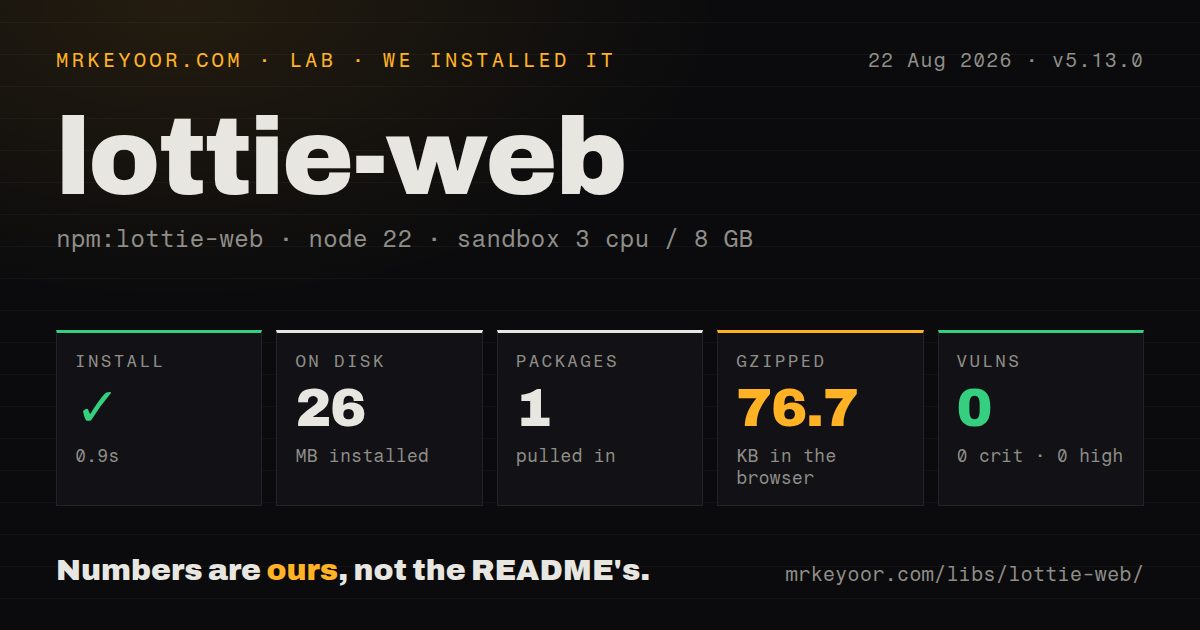
lottie-web 5.13.0 added 26 MB on disk and produced a 76.7 KB gzipped player in our sandbox, even with 0 dependencies and 0 audit findings. That cost makes sense for a tested Bodymovin handoff with frame-level controls; ordinary interface transitions should stay in CSS or a smaller code-authored animation library.
We installed it
| Install | ✓ · 0.9s | 1 package on disk · 26 MB |
| Import | ✓ | ESM import works · require() works · CommonJS package |
| Browser | 76.7 KB | gzipped (301.7 KB minified), bundled with esbuild |
| Types | ✓ | TypeScript types bundled |
| Known vulns | 0 | 0 critical · 0 high · 0 moderate · 0 low (npm audit) |
Answers from our run
Does lottie-web install cleanly?
Yes. In a fresh container with an empty cache, npm install lottie-web finished in 0.9s, leaving 1 package and 26 MB on disk. npm audit reported no known vulnerabilities.
How much does lottie-web add to a browser bundle?
76.7 KB gzipped (301.7 KB minified) when the whole package is bundled for the browser with esbuild. Importing only part of it is usually smaller.
Does lottie-web work with both ESM and CommonJS?
Yes. Both import 'lottie-web' and require('lottie-web') worked in Node 22 in our run. The package is published as CommonJS.
Does lottie-web include TypeScript types?
Yes, type declarations ship inside the package, so no @types install is needed.
lottie-web or @lottiefiles/dotlottie-web: which should you use?
@lottiefiles/dotlottie-web: Choose it for compressed .lottie files and the current LottieFiles browser runtime. lottie-web 5.13.0 added 26 MB on disk and produced a 76.7 KB gzipped player in our sandbox, even with 0 dependencies and 0 audit findings.
When should you not use lottie-web?
Use CSS or the Web Animations API for a fade, transform, or small state change. Those effects do not justify a 76.7 KB gzipped player plus composition data.
Use it if
- A designer already delivers Bodymovin JSON and the browser result needs to follow the After Effects composition.
- The interface seeks by frame, reverses direction, plays named ranges, changes speed, or reacts to playback events.
- Your team can test each exported file with SVG and Canvas and choose based on DOM size, fidelity, and accessibility needs.
- A framework-neutral player is useful and application code can own its creation, listeners, and teardown.
- Use CSS or the Web Animations API for a fade, transform, or small state change. Those effects do not justify a 76.7 KB gzipped player plus composition data.
- The source file depends on image sequences, video, audio, or negative layer stretching. The project lists those After Effects features as unsupported.
- Expressions and masks dominate the composition. Expression coverage is partial, and the README warns that masks can carry a large rendering cost.
- React must own lifecycle declaratively with no custom effect code. This package returns an imperative AnimationItem; a wrapper such as lottie-react is a closer fit.
- You require fast upstream fixes for browser-specific rendering defects. GitHub shows no repository push since September 1, 2025 and lists 859 open issues and pull requests.
Setup reality
Our lottie-web 5.13.0 install completed in 0.9 seconds inside a clean Node 22 Bookworm container. npm added 1 package occupying 26 MB. The package declares 0 direct dependencies and 0 peer dependencies, ships TypeScript declarations, and is 25,780 KB unpacked. npm audit returned 0 known vulnerabilities. require and ESM import both worked although the package is CommonJS without an exports map. A full esbuild import measured 301.7 KB minified and 76.7 KB gzipped.
Bodymovin export is a separate part of the workflow and may create an images directory beside data.json. Supply path or animationData, never both. A path adds CORS, cache, public-base, and relative-image concerns. Importing animationData moves the JSON into your JavaScript graph. When an export uses repeaters and the same object will be loaded twice, clone it first because player initialization may modify the object.
SVG gives you generated DOM plus title and description nodes, but a large composition can create hundreds of elements. Canvas avoids that tree and needs an accessible label outside the drawing. With an existing 2D context and clearCanvas false, the host code must erase each frame. On Safari pages with a base element, call setLocationHref(window.location.href) before loading to repair SVG mask references.
Create the AnimationItem only after a browser DOM exists. Save it, unregister application listeners, and call destroy during unmount. lottie-web does not read prefers-reduced-motion for the application, so turn off autoplay or choose a useful still frame yourself. The 76.7 KB gzip figure covers only the player; measure every exported JSON file, font, and image asset separately.
Patterns
Load a composition from a public URL load-json-url
import lottie from 'lottie-web';

const animation = lottie.loadAnimation({
  container: document.querySelector('#animation'),
  renderer: 'svg',
  loop: true,
  autoplay: true,
  path: '/animations/success/data.json',
});
The JSON and its relative image files need compatible public paths, caching, and CORS response headers.
Load JSON included in the application bundle load-imported-json
import lottie from 'lottie-web';
import success from './success.json';

const animation = lottie.loadAnimation({
  container,
  renderer: 'svg',
  autoplay: false,
  animationData: structuredClone(success),
});
Clone a reused export that contains repeaters because loading may mutate the object. Imported JSON also counts toward the application payload.
Change speed and playback direction change-playback
animation.play();
animation.setSpeed(1.5);
animation.pause();
animation.setDirection(-1);
animation.play();
AnimationItem methods affect 1 player. A global lottie method can affect every registered player when no animation name is given.
Seek to one exact frame seek-frame
animation.goToAndStop(48, true);

const frameCount = animation.getDuration(true);
const seconds = animation.getDuration(false);
The boolean selects units: true means frames and false means seconds.
Play one timeline segment play-frame-range
animation.playSegments([30, 72], true);A true second argument interrupts the current segment. False places the new range after current playback.
Respond when one-shot playback finishes observe-completion
const onComplete = () => showNextStep();
animation.addEventListener('complete', onComplete);

// cleanup
animation.removeEventListener('complete', onComplete);
Use loopComplete for each loop boundary. An endlessly looping AnimationItem does not emit a normal final completion.
Wait for generated SVG elements wait-for-svg-dom
animation.addEventListener('DOMLoaded', () => {
  animation.goToAndStop(0, true);
  document.querySelector('#animation').classList.add('ready');
});
data_ready means the data parsed; DOMLoaded is the point when generated SVG nodes can be queried.
Give an SVG animation an accessible name label-svg-animation
lottie.loadAnimation({
  container,
  renderer: 'svg',
  animationData,
  rendererSettings: {
    title: 'Payment confirmed',
    description: 'A check mark appears inside a circle',
  },
});
Meaningful status still needs equivalent visible text. Decorative animation should usually be hidden from assistive technology.
Replace motion with a chosen still frame respect-reduced-motion
const reduced = matchMedia('(prefers-reduced-motion: reduce)').matches;
const animation = lottie.loadAnimation({
  container, renderer: 'svg', animationData,
  loop: !reduced, autoplay: !reduced,
});
if (reduced) animation.goToAndStop(animation.totalFrames - 1, true);
The package does not apply reduced-motion preferences itself. Verify that the selected final frame communicates the intended state.
Render onto Canvas with a DPR cap use-canvas-renderer
const animation = lottie.loadAnimation({
  container,
  renderer: 'canvas',
  animationData,
  rendererSettings: {
    clearCanvas: true,
    preserveAspectRatio: 'xMidYMid meet',
    dpr: Math.min(devicePixelRatio, 2),
  },
});
Canvas has no readable SVG tree. Put the animation's accessible label and meaning in surrounding HTML.
Repair SVG mask references in Safari repair-safari-mask-refs
import lottie from 'lottie-web';

lottie.setLocationHref(window.location.href);
const animation = lottie.loadAnimation(config);
Call setLocationHref before creating players when an HTML base element causes Safari to resolve SVG mask IDs against the wrong URL.
Destroy the player during unmount tear-down-player
const onComplete = () => showNextStep();
animation.addEventListener('complete', onComplete);

return () => {
  animation.removeEventListener('complete', onComplete);
  animation.destroy();
};
destroy stops playback and empties generated content. Remove application listeners in the same cleanup path.
Alternatives
| Package | Registry | Pick it when |
|---|---|---|
| @lottiefiles/dotlottie-web | npm | Choose it for compressed .lottie files and the current LottieFiles browser runtime. |
| @rive-app/canvas | npm | Choose Rive when state machines and pointer input are part of the authored animation. |
| lottie-react | npm | Choose it when React should manage a component interface around Lottie playback. |
| motion | npm | Choose it for DOM and SVG interface animation written in application code instead of exported from After Effects. |
More web frontend guides
postcss · react · react-dom · tailwindcss · clsx · htmlparser2 · the whole shelf →
How this guide is made: grounded in the library's documentation, release notes, changelog, and issue history, on a fixed rubric — not a hands-on install of every release. The 50 most-downloaded entries are additionally install-verified in clean containers. Corrections: contact the desk.