loguru review
Loguru 0.7.3 is a Python logging replacement built around one preconfigured `logger` object. Import it and stderr output already works; call `logger.add()` to send records to files, streams, callables, coroutines, or standard-library handlers. Each sink can set its own format, filter, level, rotation, retention, compression, queueing, and JSON mode. Version 0.7.3 is a correction release: it repairs Python 3.13 exception diagnosis, Cython frame handling, a race in `logger.remove()`, custom level names passed to `logging.Formatter`, recursive failures inside `__repr__`, and startup when IPython happens to be installed. Our sandbox import worked, and the distribution includes typing metadata, but its process-wide logger changes how applications and reusable packages divide ownership of logging setup.
Loguru 0.7.3 installed in 0.2 seconds, used 1 MB, imported in 0.55 seconds, and produced 0 audit findings in our sandbox. It fits applications that own their entire logging setup; reusable libraries and centrally managed `dictConfig` estates should keep the standard logging boundary.
We installed it
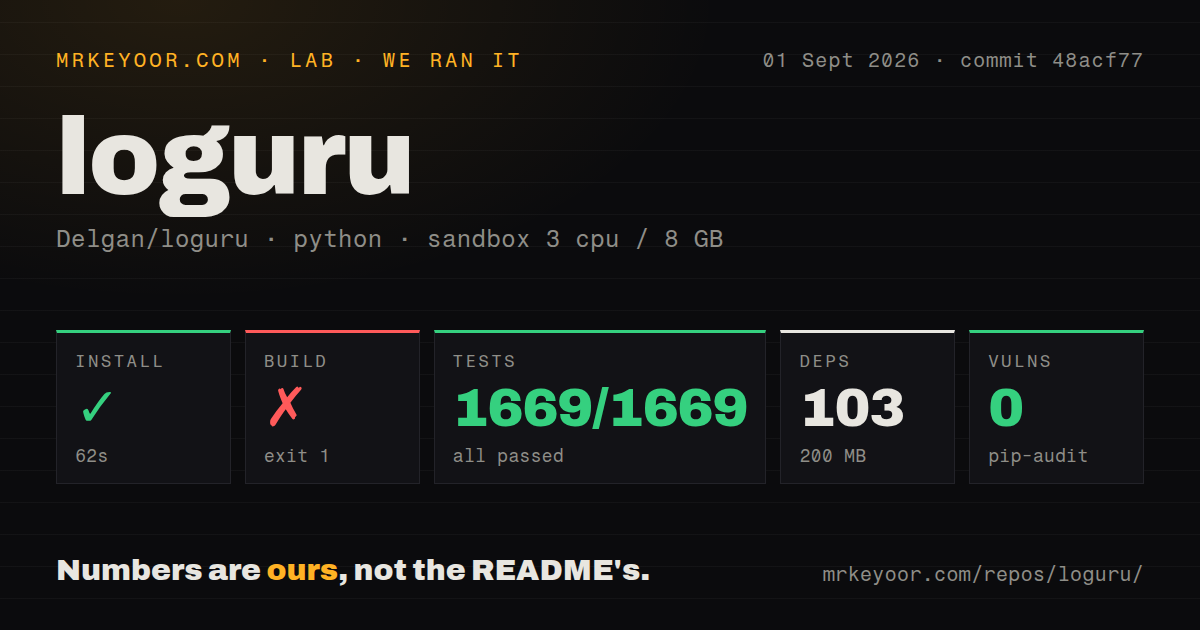
| Install | ✓ · 0.2s | 1 package on disk · 1 MB |
| Import | ✓ | import loguru in 0.55s · pure Python · py.typed · requires Python >=3.5,<4.0 |
| Known vulns | 0 | (pip-audit) |
Answers from our run
Does loguru install cleanly?
Yes. In a fresh container with an empty cache, pip install loguru finished in 0.2s, leaving 1 package and 1 MB on disk. pip-audit reported no known vulnerabilities.
What does loguru need to run?
Python >=3.5,<4.0, and nothing compiled: it is pure Python. In our run import loguru succeeded in 0.55s, and the package ships py.typed for type checkers.
loguru or structlog: which should you use?
structlog: Choose it when structured event dictionaries and processor chains are the main logging model. Loguru 0.7.3 installed in 0.2 seconds, used 1 MB, imported in 0.55 seconds, and produced 0 audit findings in our sandbox.
When should you not use loguru?
You maintain a reusable library whose host application must own handlers. logger.add() and logger.remove() mutate Loguru's single process-wide logger.
Use it if
- Your application should produce readable stderr logs immediately, before a logging configuration layer has been written.
- One sink declaration should own file rotation, retention, compression, formatting, and filtering.
- Async request or job fields need to follow execution through `logger.contextualize()` and Python context variables.
- You want exception backtraces with an explicit production switch that disables local-variable diagnosis.
- You maintain a reusable library whose host application must own handlers. `logger.add()` and `logger.remove()` mutate Loguru's single process-wide logger.
- Your operations setup depends on `dictConfig` or `fileConfig`. Loguru config lives in Python calls, and the README's interception recipe is needed for standard `LogRecord` producers.
- Exception frames may contain credentials or personal data and nobody can guarantee `diagnose=False` on every production sink. The README warns that diagnosis can expose local values.
- Several processes must write through inherited sinks without queueing or shutdown coordination. The docs require `enqueue=True`, picklable state under spawn, and `logger.complete()` to flush queued work.
- Your collector expects a flat JSON event. `serialize=True` emits a `text` value plus a nested `record`, so a custom sink still has to select and reshape fields.
Setup reality
We installed Loguru 0.7.3 in a fresh Python 3.12 Bookworm sandbox. The install succeeded in 0.2 seconds, left 1 package and 1 MB on disk, and import loguru worked in 0.55 seconds. Pip-audit reported 0 known vulnerabilities. The package is pure Python, ships py.typed, accepts Python 3.5 through the 3.x line, and carries the MIT license. Its package metadata reports 27 direct dependencies.
Importing logger creates a formatted stderr sink before your code runs. If startup adds another console sink, every accepted record appears twice. Remove the default sink first, then add destinations with an explicit level and diagnose=False for production. No credentials or config file are required. Environment variables can alter defaults, though a single startup function is easier to review than settings split across shell state and Python.
Standard-library loggers do not start flowing into Loguru by themselves. Frameworks such as Uvicorn may already have handlers, so the documented InterceptHandler has to be installed early and existing framework handlers may need replacement. serialize=True keeps Loguru's nested record shape. A flat contract requires a callable sink, and that sink cannot call the logger again because Loguru detects reentrant use and raises an error.
Threaded sinks are supported directly. Multiple processes need enqueue=True; spawn-based workers also need picklable sink state. Call logger.complete() before process exit to drain the queue. Coroutine sinks require a running event loop, and their completion object must be awaited. Rotation, retention, and compression callbacks run in the logging path, so a slow callback delays the caller even though the main package imported in 0.55 seconds.
Patterns
Write a record with the default sink write-first-record
from loguru import logger

logger.info("indexed {count} documents", count=42)
logger.success("batch {batch_id} finished", batch_id="nightly")
The import has already installed a stderr sink. Messages use brace formatting, and keyword values are also added to the record's `extra` dictionary.
Replace the preinstalled stderr sink replace-console-sink
import sys
from loguru import logger

logger.remove()
console_id = logger.add(
    sys.stdout,
    level="INFO",
    format="{time:YYYY-MM-DD HH:mm:ss} | {level} | {message}",
    diagnose=False,
)
`logger.add()` appends a sink. Remove the sink created at import time first, or accepted records reach both console destinations.
Rotate and expire log files rotate-log-files
from loguru import logger

logger.add(
    "logs/app_{time:YYYY-MM-DD}.log",
    rotation="100 MB",
    retention="14 days",
    compression="gz",
    enqueue=True,
    diagnose=False,
)
Rotation checks run when a record is emitted. Custom retention or compression callables execute in that path and should return quickly.
Carry request fields on a bound logger bind-request-fields
from loguru import logger

request_log = logger.bind(request_id="req-73", user_id=18)
request_log.info("request accepted")
request_log.bind(route="/orders").info("handler entered")
`bind()` returns a new logger view. The original logger does not gain those fields, and a format that names a missing `extra` key raises `KeyError`.
Scope context across await points scope-async-context
from loguru import logger

async def handle(job_id: str):
    with logger.contextualize(job_id=job_id):
        logger.info("job started")
        await run_steps()
        logger.info("job finished")
`contextualize()` stores fields in Python context variables, so concurrent async tasks keep separate values when each task opens its own context.
Log an exception and keep propagating it record-exception
from loguru import logger

@logger.catch(reraise=True, message="invoice import failed")
def import_invoice(path):
    return parse_invoice(path)

with logger.catch(reraise=True):
    import_invoice("invoice.csv")
`logger.catch()` suppresses the exception by default. Set `reraise=True` when the caller, worker, or HTTP framework must still observe the failure.
Use Loguru's built-in JSON shape emit-json-records
import sys
from loguru import logger

logger.remove()
logger.add(sys.stdout, serialize=True, level="INFO", diagnose=False)
logger.bind(order_id="o-19").info("payment captured")
`serialize=True` writes JSON with a rendered `text` field and a nested `record` object. It does not produce a flat collector schema.
Select a flat JSON contract build-flat-json-sink
import json
import sys
from loguru import logger

def write_event(message):
    record = message.record
    event = {
        "time": record["time"].isoformat(),
        "level": record["level"].name,
        "message": record["message"],
        **record["extra"],
    }
    sys.stdout.write(json.dumps(event) + "\n")

logger.add(write_event, level="INFO")
A sink receives a message object whose `.record` holds the structured values. Calling `logger` inside `write_event` is reentrant use and raises an error.
Forward standard LogRecord events intercept-standard-logging
import logging
from loguru import logger

class InterceptHandler(logging.Handler):
    def emit(self, record):
        try:
            level = logger.level(record.levelname).name
        except ValueError:
            level = record.levelno
        logger.opt(exception=record.exc_info, depth=6).log(
            level, record.getMessage()
        )

logging.basicConfig(handlers=[InterceptHandler()], level=0, force=True)
Libraries that call `logging.getLogger()` bypass Loguru until a handler forwards their records. Framework-owned handlers may require separate replacement.
Delay an expensive debug value defer-expensive-formatting
from loguru import logger

logger.opt(lazy=True).debug(
    "cache snapshot: {snapshot}",
    snapshot=lambda: build_cache_snapshot(),
)
With `lazy=True`, callable arguments run only when at least one sink accepts the record's level. Ordinary function arguments are evaluated before the logging call.
Set levels by module name filter-by-module
import sys
from loguru import logger

logger.remove()
logger.add(
    sys.stderr,
    filter={"": "WARNING", "myapp": "INFO", "myapp.sql": "DEBUG"},
    diagnose=False,
)
The empty-string entry is the fallback. More specific module-name entries override it for records whose `name` matches that subtree.
Drain queued records before exit flush-multiprocess-queue
from multiprocessing import Process
from loguru import logger

logger.remove()
logger.add("workers.log", enqueue=True, diagnose=False)

def worker(number):
    logger.info("worker {number} done", number=number)

if __name__ == "__main__":
    jobs = [Process(target=worker, args=(n,)) for n in range(4)]
    for job in jobs: job.start()
    for job in jobs: job.join()
    logger.complete()
`enqueue=True` serializes records through a queue for multiple processes. Spawn start methods also require picklable sink state, and `complete()` flushes pending records.
Alternatives
| Package | Registry | Pick it when |
|---|---|---|
| structlog | PyPI | Choose it when structured event dictionaries and processor chains are the main logging model. |
| python-json-logger | PyPI | Choose it when existing `logging` handlers and `dictConfig` should stay in charge while output becomes JSON. |
| rich | PyPI | Choose `RichHandler` for colored CLI logs and tracebacks without replacing the standard logging API. |
More infra guides
semver · boto3 · opentelemetry-api · @opentelemetry/api · psutil · distro · the whole shelf →
How this guide is made: grounded in the library's documentation, release notes, changelog, and issue history, on a fixed rubric — not a hands-on install of every release. The 50 most-downloaded entries are additionally install-verified in clean containers. Corrections: contact the desk.