lmdb review
lmdb 3.5.6 is a native embedded key-value database binding for Node.js, Bun, and Deno. It memory-maps local LMDB files, performs synchronous reads, queues durable writes off the main thread, and serializes JavaScript objects with MessagePack by default. Ordered scalar and compound keys support range scans; transactions, named databases, record versions, compression, and multi-process access cover more demanding local stores. The 3.5.6 release has no published changelog text, so the current release offers no documented new feature to summarize beyond its matching platform packages.
lmdb 3.5.6 took 4.1 seconds and 21 MB in our install, ran native setup, and could not produce a browser bundle, which makes it a deliberate local-server database choice rather than a drop-in cache everywhere. Pick it for ordered keys and shared local files; pick SQLite when query flexibility matters more than raw key access.
We installed it
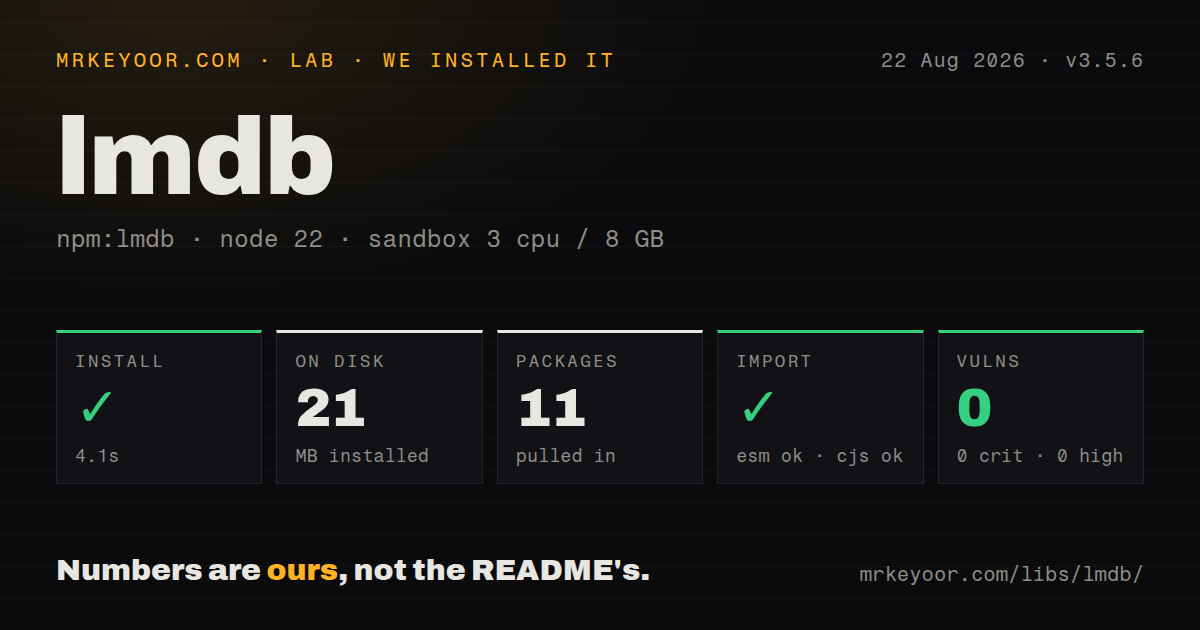
| Install | ✓ · 4.1s | 11 packages on disk · 21 MB · native build step |
| Import | ✓ | ESM import works · require() works · ESM package with exports map |
| Browser | n/a | could not be bundled for the browser (Node-only code, most likely) |
| Types | ✓ | TypeScript types bundled |
| Known vulns | 0 | 0 critical · 0 high · 0 moderate · 0 low (npm audit) |
Answers from our run
Does lmdb install cleanly?
Yes. In a fresh container with an empty cache, npm install lmdb finished in 4 seconds, leaving 11 packages and 21 MB on disk, after a native build step. npm audit reported no known vulnerabilities.
Can lmdb run in a browser?
Not directly: esbuild could not bundle it for the browser in our run, which normally means it depends on Node built-ins. Use it on the server, or find a browser-targeted alternative.
Does lmdb work with both ESM and CommonJS?
Yes. Both import 'lmdb' and require('lmdb') worked in Node 22 in our run. The package is published as ESM with an exports map.
Does lmdb include TypeScript types?
Yes, type declarations ship inside the package, so no @types install is needed.
lmdb or better-sqlite3: which should you use?
better-sqlite3: Use it when an embedded file is right but SQL indexes, joins, and migrations describe the workload better. lmdb 3.5.6 took 4.1 seconds and 21 MB in our install, ran native setup, and could not produce a browser bundle, which makes it a deliberate local-server database choice rather than a drop-in cache everywhere.
When should you not use lmdb?
You need SQL joins, secondary indexes, schema migrations, or exploratory queries; every lookup path must be represented in your LMDB keys
Use it if
- A Node service needs persistent local key-value reads without a separate database server
- Your access patterns can be designed as ordered scalar or compound-key ranges
- Several local processes or worker threads must share one ACID file environment
- You want synchronous reads plus automatically batched asynchronous commits
- You need SQL joins, secondary indexes, schema migrations, or exploratory queries; every lookup path must be represented in your LMDB keys
- The same database must be queried from several machines or a browser; lmdb is an embedded local-file engine with no network service or authentication layer
- Your deployment forbids native addons and compilation; our install ran a native step, and unsupported targets may need a compiler toolchain
- Synchronous reads cannot be allowed to page fault on the main event loop; cold memory-mapped pages can still block despite fast warm reads
- Your transaction callbacks await remote services or long jobs; LMDB has one writer, so holding that transaction open delays other commits
Setup reality
Our Node 22 sandbox installed lmdb 3.5.6 in 4.1 seconds and ran a native or compile step. It left 11 packages and 21 MB on disk, with 6 direct dependencies, no peers, bundled TypeScript declarations, and no npm audit findings. Both require() and ESM import worked. Browser bundling failed in esbuild because the package depends on Node and native facilities, so this belongs in a server, desktop, or supported runtime process rather than browser code.
The package publishes optional prebuilt binaries for common Linux, macOS, and Windows architectures. An unsupported CPU, libc, or install policy can fall back to building source, which requires the native addon toolchain. The database path is live state: mount it on persistent local storage, grant write access, and verify LMDB locking before considering an unusual filesystem. A dotted path is treated as a file; other paths are treated as directories.
Reads return synchronously and may trigger a storage page fault when data is cold. Use prefetch or getMany before latency-sensitive batches when the working set may not be resident. Puts and removes return promises and batch operations issued during the same event turn. Await those promises when later work requires a durable commit. Keep transaction callbacks short; an async callback delays the sole writer and allows unrelated operations to enter surprising order.
Default values use MessagePack. String, JSON, binary, CBOR, and ordered-binary modes return different shapes, while CBOR needs another package. Compression settings must match whenever the same files are opened. Ordered keys cannot contain null characters in strings, and default keys have a 1,978-byte maximum. Always finish explicit read transactions so old pages can be reclaimed. Each process owns its own optional object cache, which means cross-process invalidation needs careful validation.
Patterns
Open a MessagePack database open-database
import { open } from 'lmdb';

const db = open('./data/app.lmdb', {
  encoding: 'msgpack',
});

await db.put('user:42', { name: 'Ada', active: true });
const user = db.get('user:42');
get returns synchronously. Await put when subsequent work depends on the commit reaching durable storage.
Commit a deletion remove-record
const removed = await db.remove('user:42');
if (!removed) console.log('record was already absent');
remove uses the same queued write path as put and resolves after its transaction commits.
Queue several writes in one event turn batch-writes
const pending = [
  db.put('job:1', { status: 'queued' }),
  db.put('job:2', { status: 'queued' }),
  db.put('job:3', { status: 'queued' }),
];
await Promise.all(pending);
Writes issued together can share an automatic batch. Awaiting each put serially removes that batching opportunity.
Change inventory and create an order atomically atomic-transaction
const bought = await db.transaction(() => {
  const item = db.get('inventory:shoe');
  if (!item || item.count < 1) return false;
  db.put('inventory:shoe', { ...item, count: item.count - 1 });
  db.put(['orders', orderId], { sku: 'shoe' });
  return true;
});
Keep this callback synchronous and brief. Awaiting unrelated work holds LMDB's single write transaction open.
Read one compound-key prefix scan-key-range
for (const { key, value } of db.getRange({
  start: ['orders', customerId, 0],
  end: ['orders', customerId, Number.MAX_SAFE_INTEGER],
})) {
  console.log(key[2], value);
}
Array keys sort one element at a time. Plan every required range around a stable prefix.
Reject a stale record version conditional-update
const versioned = open('./data/versioned.lmdb', { useVersions: true });
const current = versioned.getEntry('settings');
const saved = await versioned.put(
  'settings',
  { ...current.value, theme: 'dark' },
  current.version + 1,
  current.version,
);
if (!saved) throw new Error('concurrent change');
The fourth argument is the version that must still exist when the write commits; a mismatch resolves to false.
Create isolated keyspaces in one environment open-named-databases
const root = open('./data/app', { maxDbs: 10 });
const users = root.openDB('users');
const sessions = root.openDB('sessions', { encoding: 'json' });

await users.put(42, { name: 'Ada' });
await sessions.put('token-1', { userId: 42 });
Named databases consume maxDbs capacity and share one LMDB environment. Reserve the root keyspace for their metadata.
Release an explicit read transaction read-snapshot
const snapshot = db.useReadTransaction();
try {
  const first = db.get('account:1', { transaction: snapshot });
  const second = db.get('account:2', { transaction: snapshot });
  compare(first, second);
} finally {
  snapshot.done();
}
Calling done releases the reader slot and lets LMDB reclaim pages that the snapshot had kept visible.
Warm pages before synchronous reads prefetch-records
const keys = ['user:1', 'user:2', 'user:3'];
await db.prefetch(keys);
const users = keys.map((key) => db.get(key));
prefetch moves likely cold-page work away from the later synchronous get calls.
Compress values above a threshold compress-values
const documents = open('./data/documents.lmdb', {
  encoding: 'msgpack',
  compression: { threshold: 1024 },
});
await documents.put('doc:1', largeDocument);
Every process opening these files needs compatible compression settings or stored values cannot be decoded correctly.
Take a consistent snapshot backup-database
await db.backup('./backups/app-2026-08-25.lmdb');Use the database backup method instead of copying live memory-mapped files with an ordinary file command.
Drain writes during shutdown close-database
async function shutdown() {
  await db.flushed;
  await db.close();
}

process.once('SIGTERM', () => {
  shutdown().then(() => process.exit(0));
});
Stop accepting new work before closing. close waits asynchronously for outstanding transactions.
Alternatives
| Package | Registry | Pick it when |
|---|---|---|
| better-sqlite3 | npm | Use it when an embedded file is right but SQL indexes, joins, and migrations describe the workload better |
| classic-level | npm | Use it for the Level API and its adapter ecosystem around ordered key-value storage |
| level | npm | Use it when a higher-level Level package and familiar abstract-level interfaces matter more than LMDB-specific controls |
More data guides
numpy · pandas · fsspec · lxml · pyarrow · sqlalchemy · the whole shelf →
How this guide is made: grounded in the library's documentation, release notes, changelog, and issue history, on a fixed rubric — not a hands-on install of every release. The 50 most-downloaded entries are additionally install-verified in clean containers. Corrections: contact the desk.