better-sqlite3 review
Our install of better-sqlite3 13.0.3 finished in 0.7 seconds and produced a working Node connection to a local SQLite file. The library gives you synchronous prepared statements with run(), get(), all(), and iterate(), along with transaction wrappers, backups, user-defined SQL functions, and extension loading. Version 13 moved the native addon to N-API and ships prebuilt binaries inside the package. It also introduced db.explain() for plans with unbound placeholders and Statement.toString() for expanded, permanently bound SQL. The 13.0.3 patch changes the ARM build environment and leaves the application API alone.
Our better-sqlite3 13.0.3 install took 0.7 seconds, left 2 packages and 27 MB on disk, and returned 0 audit findings, which makes it a lean choice for short local SQL in a Node 22+ process. Skip it when long queries must share the main thread or when several hosts need steady write access to one database.
We installed it
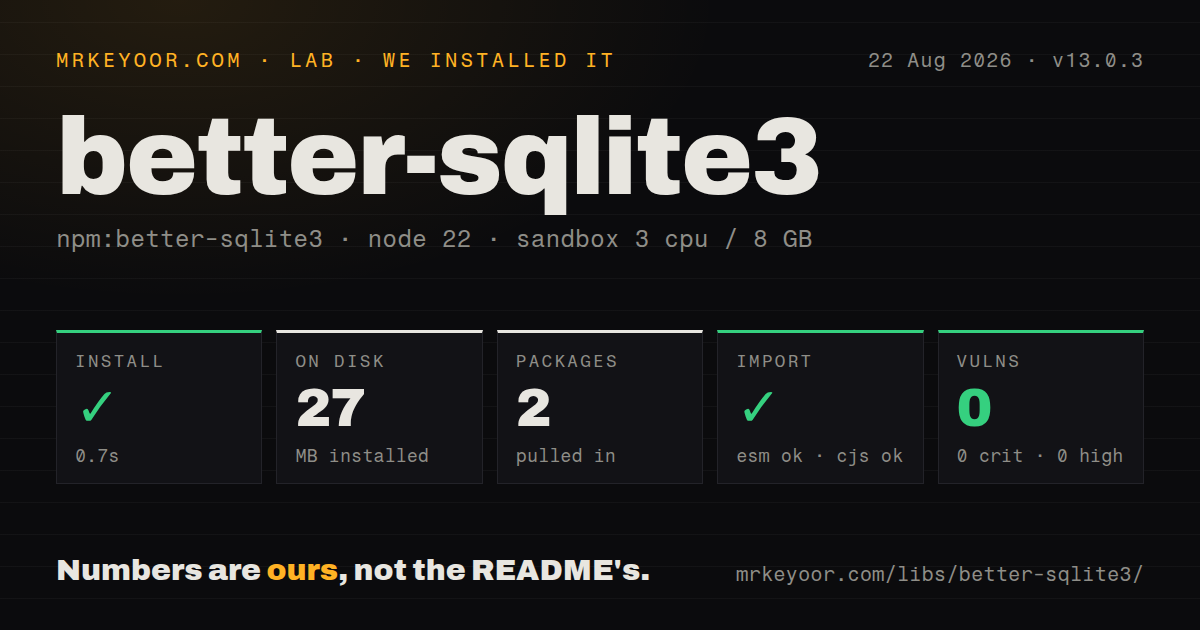
| Install | ✓ · 0.7s | 2 packages on disk · 27 MB · native build step |
| Import | ✓ | ESM import works · require() works · CommonJS package with exports map |
| Browser | n/a | could not be bundled for the browser (Node-only code, most likely) |
| Types | — | no TypeScript types found |
| Known vulns | 0 | 0 critical · 0 high · 0 moderate · 0 low (npm audit) |
Answers from our run
Does better-sqlite3 install cleanly?
Yes. In a fresh container with an empty cache, npm install better-sqlite3 finished in 0.7s, leaving 2 packages and 27 MB on disk, after a native build step. npm audit reported no known vulnerabilities.
Can better-sqlite3 run in a browser?
Not directly: esbuild could not bundle it for the browser in our run, which normally means it depends on Node built-ins. Use it on the server, or find a browser-targeted alternative.
Does better-sqlite3 work with both ESM and CommonJS?
Yes. Both import 'better-sqlite3' and require('better-sqlite3') worked in Node 22 in our run. The package is published as CommonJS with an exports map.
Does better-sqlite3 include TypeScript types?
No type declarations were found in our install, so TypeScript users need their own declarations.
better-sqlite3 or sqlite3: which should you use?
sqlite3: Choose sqlite3 when existing code already depends on its callback-oriented query API. Our better-sqlite3 13.0.3 install took 0.7 seconds, left 2 packages and 27 MB on disk, and returned 0 audit findings, which makes it a lean choice for short local SQL in a Node 22+ process.
When should you not use better-sqlite3?
The target is Node 20, a browser, or an edge worker. Version 13 requires Node >=22, and our esbuild browser bundle failed because the package depends on Node and a native addon.
Use it if
- A Node 22+ process owns one local SQLite file and spends most of its query time on short, indexed statements.
- You want to keep SQL visible and reuse prepared statements without adopting a schema DSL, ORM, or separate database service.
- The application needs SQLite features exposed by the driver, including custom functions, aggregates, virtual tables, backups, or loadable extensions.
- You need exact 64-bit INTEGER values and can opt selected statements into BigInt results with safeIntegers().
- The target is Node 20, a browser, or an edge worker. Version 13 requires Node >=22, and our esbuild browser bundle failed because the package depends on Node and a native addon.
- A request may run slow reports on the main thread. Query methods are synchronous, and the project directs slow work to worker threads so it does not hold up the event loop.
- Many application instances must write the same database. SQLite permits one writer at a time, while the README recommends a full client-server database for a high volume of concurrent writes.
- You expect the driver to supply TypeScript declarations, schema migrations, or generated row types. Our package check found no TypeScript types, and those higher-level tools are outside this API.
- Every deployment platform must avoid native build tools. Version 13 bundles common prebuilt binaries, but an unsupported platform or architecture compiles the addon during installation.
Setup reality
We installed better-sqlite3 13.0.3 in a fresh, unprivileged node:22-bookworm container with 3 CPUs, 8 GB of RAM, and no cache. npm succeeded in 0.7 seconds after running a native or compile step. The finished install held 2 packages and occupied 27 MB. The package reported 26,876 KB unpacked, 1 direct dependency, 0 peer dependencies, and an MIT license. npm audit found 0 known vulnerabilities across every severity level.
The package is CommonJS with an exports map. require() and ESM import both worked in our sandbox. It declares Node >=22 and contains no TypeScript declarations. Version 13 uses N-API and puts common platform binaries in the npm tarball. If no matching binary exists, installation compiles from source, so that machine needs the node-gyp toolchain. Electron builds use electron-rebuild, and native libraries inside app.asar must be unpacked. Our browser bundle attempt failed without producing a usable bundle.
Opening service.db creates the file unless fileMustExist is true. No credentials or configuration file are involved. The constructor waits 5,000 ms for a lock by default before SQLite raises SQLITE_BUSY. Enable WAL when reads and writes need to overlap, then choose the durability setting consciously: this distribution defaults WAL databases to synchronous=NORMAL. Set synchronous=FULL if the latest committed transaction must survive an operating-system crash. Prepare recurring SQL once and keep the connection alive while the process serves work.
A transaction wrapper commits when its callback returns and rolls back when that callback throws. An async callback returns at its first await, so later statements run after the managed transaction has ended. Send genuinely slow queries to a worker with its own connection. Several long-lived readers can also prevent WAL checkpoints and grow the WAL file. Online backup yields between page batches, but a write from a different connection forces the copy to restart.
Patterns
Open a database and switch on WAL open-database
import Database from 'better-sqlite3';

const db = new Database('service.db', { timeout: 5_000 });
db.pragma('journal_mode = WAL');
The constructor creates service.db when it does not exist and waits 5,000 ms for a lock by default. WAL persists in the database file after this pragma runs.
Create related tables in one transaction create-schema
const createSchema = db.transaction(() => {
  db.exec(`
    CREATE TABLE IF NOT EXISTS accounts (
      id INTEGER PRIMARY KEY,
      email TEXT NOT NULL UNIQUE
    );
    CREATE TABLE IF NOT EXISTS jobs (
      id INTEGER PRIMARY KEY,
      account_id INTEGER NOT NULL REFERENCES accounts(id),
      status TEXT NOT NULL
    );
  `);
});

createSchema();
The transaction wrapper rolls back both CREATE statements if either one throws. exec() has no value bindings, so keep user input out of its SQL string.
Insert with named parameters insert-row
const insertAccount = db.prepare(`
  INSERT INTO accounts (email)
  VALUES (@email)
`);

const result = insertAccount.run({ email: 'ada@example.com' });
console.log(result.changes, result.lastInsertRowid);
Named binding objects use the parameter name without the @ prefix. run() reports affected rows and the last inserted row ID instead of returning table data.
Fetch one row or detect a miss read-one-row
const findAccount = db.prepare(`
  SELECT id, email
  FROM accounts
  WHERE id = ?
`);

const account = findAccount.get(accountId);
if (account === undefined) return null;
return account;
get() returns the first result row and returns undefined when no row matches. Reuse the prepared statement rather than compiling this SQL inside every request.
Process a result without building one array iterate-results
const pendingJobs = db.prepare(`
  SELECT id, account_id
  FROM jobs
  WHERE status = ?
  ORDER BY id
`);

for (const job of pendingJobs.iterate('pending')) {
  processJob(job);
}
iterate() yields one row at a time and leaves the statement busy until iteration finishes. Use all() when the complete result is small and needed at once.
Write a batch atomically batch-transaction
const insertJob = db.prepare(`
  INSERT INTO jobs (account_id, status)
  VALUES (?, ?)
`);

const addJobs = db.transaction((jobs) => {
  for (const job of jobs) {
    insertJob.run(job.accountId, job.status);
  }
});

addJobs(jobs);
transaction() commits after this ordinary callback returns and rolls back if it throws. An async callback would end the managed transaction at its first await.
Return SQLite integers as BigInt preserve-integers
const countJobs = db.prepare(`
  SELECT COUNT(*) AS total
  FROM jobs
`).safeIntegers();

const { total } = countJobs.get();
console.log(typeof total, total);
safeIntegers() changes INTEGER results for this statement to BigInt, including values beyond Number's exact range. JSON.stringify needs a replacer or conversion for BigInt.
Handle a duplicate value by error code handle-constraint-error
try {
  insertAccount.run({ email });
} catch (error) {
  if (
    error instanceof Database.SqliteError &&
    error.code === 'SQLITE_CONSTRAINT_UNIQUE'
  ) {
    return { ok: false, reason: 'email-exists' };
  }
  throw error;
}
SqliteError.code carries SQLite's extended result code. SQLITE_CONSTRAINT_UNIQUE is stable enough to match without parsing the human-readable message.
Require an existing read-only database open-readonly
const reportingDb = new Database('snapshot.db', {
  readonly: true,
  fileMustExist: true,
});

const total = reportingDb
  .prepare('SELECT COUNT(*) AS total FROM jobs')
  .get();
readonly prevents writes through this connection, while fileMustExist prevents an accidental new database. The API ignores fileMustExist for readonly connections because readonly already requires a file.
Ask SQLite for a query plan inspect-query-plan
const plan = db.explain(`
  QUERY PLAN
  SELECT id, email
  FROM accounts
  WHERE email = ?
`);

console.table(plan);
db.explain() was added in version 13 and accepts placeholders without bound values. Prefixing with QUERY PLAN returns planner rows instead of low-level bytecode.
Inspect a permanently bound statement inspect-bound-sql
const byStatus = db
  .prepare('SELECT id FROM jobs WHERE status = ?')
  .bind('pending');

console.log(byStatus.toString());
const rows = byStatus.all();
Statement.toString() was added in version 13 and expands values set by bind(). Values passed temporarily to get(), all(), run(), or iterate() do not appear there.
Back up an open database backup-database
const result = await db.backup('service-backup.db', {
  progress({ totalPages, remainingPages }) {
    console.log({ totalPages, remainingPages });
    return 100;
  },
});

console.log(result.remainingPages);
backup() moves 100 pages per event-loop cycle by default and resolves with 0 remaining pages. A write from another connection restarts the copy.
Alternatives
| Package | Registry | Pick it when |
|---|---|---|
| sqlite3 | npm | Choose sqlite3 when existing code already depends on its callback-oriented query API. |
| @libsql/client | npm | Choose @libsql/client when one asynchronous client must talk to local SQLite and a remote libSQL service. |
| drizzle-orm | npm | Choose Drizzle when typed table definitions, query construction, and migrations belong in the same toolkit. |
| kysely | npm | Choose Kysely when TypeScript query types matter and you are willing to provide the SQLite dialect and driver. |
More data guides
numpy · pandas · fsspec · pyarrow · lxml · sqlalchemy · the whole shelf →
How this guide is made: grounded in the library's documentation, release notes, changelog, and issue history, on a fixed rubric — not a hands-on install of every release. The 50 most-downloaded entries are additionally install-verified in clean containers. Corrections: contact the desk.