html-dom-parser review
Html-dom-parser 8.0.2 converts an HTML string into domhandler nodes in Node and browsers, and our browser build measured 6.2 KB minified. The server entry wraps htmlparser2's parseDOM and removes its synthetic root parent. Browser builds select a different entry that parses with native DOM APIs, then converts native nodes into matching Element, Text, Comment, and ProcessingInstruction objects. The result includes children, parent, previous-sibling, next-sibling, tag-name, and attribute links. Version 8 targets ES6 instead of ES5; patch 8.0.2 bundles ESM-only server dependencies into its CommonJS output to fix ERR_REQUIRE_ESM_RACE_CONDITION. This is a tree adapter, not an HTML sanitizer, selector engine, or serializer.
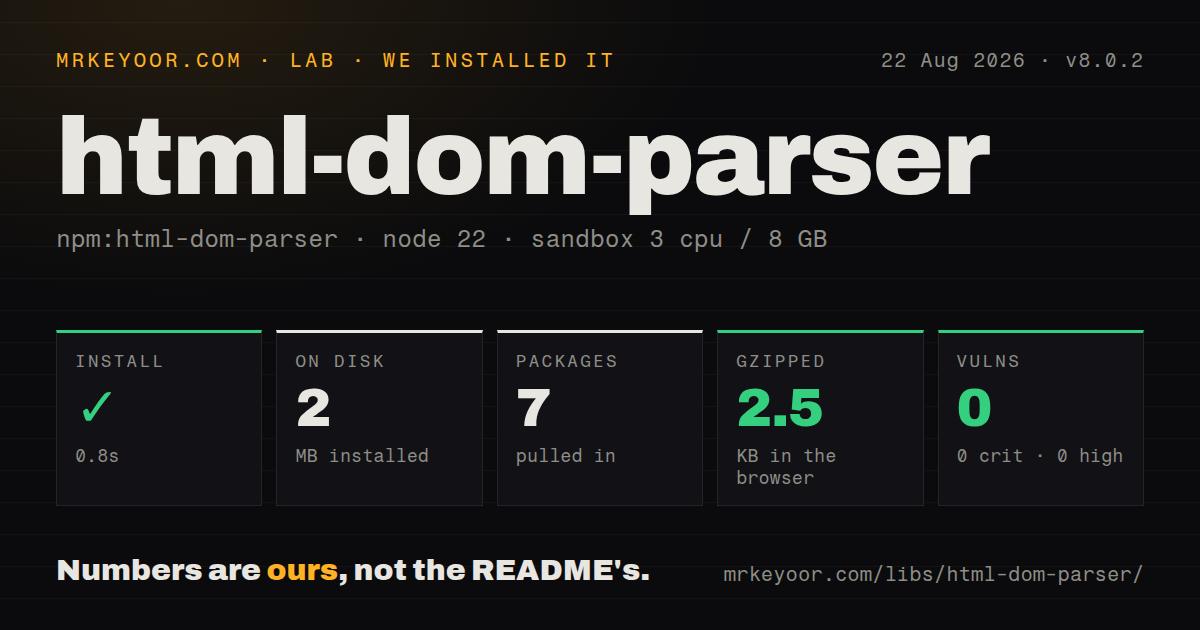
Html-dom-parser 8.0.2 installed in 0.8 seconds, occupied 2 MB across 7 packages, and bundled to 2.5 KB gzipped in our sandbox. Install it when domhandler nodes must cross Node and browser code; use htmlparser2 directly for server-only parsing, and sanitize untrusted input separately.
We installed it
| Install | ✓ · 0.8s | 7 packages on disk · 2 MB |
| Import | ✓ | ESM import works · require() works · CommonJS package with exports map |
| Browser | 2.5 KB | gzipped (6.2 KB minified), bundled with esbuild |
| Types | — | no TypeScript types found |
| Known vulns | 0 | 0 critical · 0 high · 0 moderate · 0 low (npm audit) |
Answers from our run
Does html-dom-parser install cleanly?
Yes. In a fresh container with an empty cache, npm install html-dom-parser finished in 0.8s, leaving 7 packages and 2 MB on disk. npm audit reported no known vulnerabilities.
How much does html-dom-parser add to a browser bundle?
2.5 KB gzipped (6.2 KB minified) when the whole package is bundled for the browser with esbuild. Importing only part of it is usually smaller.
Does html-dom-parser work with both ESM and CommonJS?
Yes. Both import 'html-dom-parser' and require('html-dom-parser') worked in Node 22 in our run. The package is published as CommonJS with an exports map.
Does html-dom-parser include TypeScript types?
No type declarations were found in our install, so TypeScript users need their own declarations.
html-dom-parser or htmlparser2: which should you use?
htmlparser2: Use it for Node-only parsing when you want the underlying streaming parser, parseDOM, and direct control over options. Html-dom-parser 8.0.2 installed in 0.8 seconds, occupied 2 MB across 7 packages, and bundled to 2.5 KB gzipped in our sandbox.
When should you not use html-dom-parser?
Untrusted HTML must become safe to render. Parsing preserves tags and attributes, and the README's Trusted Types example calls a separate DOMPurify sanitizer.
Use it if
- Your code needs domhandler-compatible nodes from HTML fragments in both Node and browser bundles.
- A tool already exchanges trees with html-react-parser, htmlparser2, or another domhandler consumer.
- Server parsing needs htmlparser2 switches such as xmlMode, decodeEntities, or tag-case controls.
- A browser under Trusted Types enforcement must pass a caller-created policy before assigning parsed markup.
- Untrusted HTML must become safe to render. Parsing preserves tags and attributes, and the README's Trusted Types example calls a separate DOMPurify sanitizer.
- Server and browser output must be identical for malformed markup. Node uses htmlparser2 options while browsers use native HTML parsing and ignore most options.
- You need CSS selectors and mutations. The package returns linked nodes but provides no selector engine like Cheerio.
- You only run on Node. htmlparser2 already owns the underlying parseDOM behavior and exposes its parser without the cross-runtime adapter.
- Legacy ES5 or Internet Explorer output is required. Version 8 moved the distributed build to ES6, and version 2 had already removed IE11 support.
Setup reality
We installed html-dom-parser 8.0.2 in a fresh unprivileged Node 22 Bookworm sandbox. npm finished in 0.8 seconds and left 7 packages using 2 MB on disk. The package is 820 KB unpacked, with 2 direct dependencies and 0 peers. npm audit found 0 known vulnerabilities. Both require() and ESM import worked through the exports map. Our inspection found no TypeScript types in the installed package. The browser build measured 6.2 KB minified and 2.5 KB gzipped.
No credentials, native compilation, or project config are needed. ESM uses the default import. CommonJS callers still need require('html-dom-parser').default, a change documented since v5. Version 8.0.2 specifically repairs a CommonJS failure involving ESM-only server dependencies, so projects pinned to 8.0.0 or 8.0.1 should take the patch. The runtime selected by the package conditions changes the parser underneath the same top-level function.
On Node, options pass through to htmlparser2 and can change entity decoding, XML behavior, CDATA recognition, self-closing tags, and case handling. In a browser, native DOM parsing takes over and the README says those controls are unavailable; trustedTypePolicy is the meaningful browser option. Test malformed markup and SVG casing in both runtimes if server rendering must hydrate into a browser result. An empty string returns an empty array, while a non-string throws TypeError.
Returned trees are cyclic because every child points back to its parent and siblings link through prev and next. Direct JSON.stringify therefore fails on ordinary element trees; project the fields you need or use a cycle-aware serializer. A Trusted Types policy controls the innerHTML assignment but does not clean anything unless createHTML calls a sanitizer. Server xmlMode can also change tree meaning in a way the browser path cannot reproduce.
Patterns
Parse a fragment into root nodes parse-html-fragment
import parse from 'html-dom-parser';

const nodes = parse('<p class="lead">Hello <em>there</em></p>');
const paragraph = nodes[0];
console.log(paragraph.type, paragraph.name, paragraph.attribs.class);
The result is always an array because one fragment can contain several root elements, text nodes, or comments.
Load the CommonJS entry correctly load-commonjs-default
const parse = require('html-dom-parser').default;

const nodes = parse('<strong>Important</strong>');
CommonJS requires .default. The migration notes date that interop requirement to v5, and 8.0.2 fixes a separate CommonJS dependency race.
Handle empty HTML handle-empty-fragment
const nodes = parse('');
console.log(nodes.length); // 0
An empty string returns an empty array. Passing null, an object, or another non-string value throws TypeError.
Walk text and element children walk-domhandler-tree
function walk(node) {
  if (node.type === 'text') console.log(node.data);
  if ('children' in node) {
    for (const child of node.children) walk(child);
  }
}

for (const node of parse('<p>Hello <em>there</em></p>')) walk(node);
Traverse children downward. Following parent, prev, and next without a visited set can loop through the cyclic graph.
Read element attributes read-element-attributes
const [link] = parse('<a href="/docs" data-kind="local">Docs</a>');

if (link.type === 'tag') {
  console.log(link.attribs.href, link.attribs['data-kind']);
}
Attribute values remain strings. Parsing does not validate href values or remove event-handler attributes.
Enable XML rules on Node parse-xml-on-server
const nodes = parse('<feed><entry /></feed>', {
  xmlMode: true,
  recognizeSelfClosing: true,
});
These htmlparser2 settings apply to the Node path. Browser builds use native DOM parsing and cannot honor the same option set.
Keep entity text encoded preserve-encoded-entities
const [text] = parse('Tom & Jerry', {
  decodeEntities: false,
});
console.log(text.data);
decodeEntities is server-only. A browser decodes according to its DOM parser and ignores this option.
Keep XML tag casing preserve-xml-tag-case
const [node] = parse('<LinearGradient />', {
  xmlMode: true,
  lowerCaseTags: false,
});
console.log(node.type === 'tag' && node.name);
HTML mode normally lowercases tag names. Browser SVG handling follows native rules and may not match this Node configuration.
Sanitize through a Trusted Types policy apply-trusted-types-policy
import DOMPurify from 'dompurify';
import parse from 'html-dom-parser';

const policy = window.trustedTypes?.createPolicy('parsed-html', {
  createHTML(input) {
    return DOMPurify.sanitize(input);
  },
});
const nodes = parse(untrustedHTML, { trustedTypePolicy: policy });
DOMPurify is separate. A policy that returns its input unchanged satisfies Trusted Types but still leaves unsafe markup intact.
Remove cycles before JSON serialization serialize-tree-safely
function plain(node) {
  if (node.type === 'text' || node.type === 'comment') {
    return { type: node.type, data: node.data };
  }
  return {
    type: node.type,
    name: node.name,
    attributes: node.attribs,
    children: node.children?.map(plain) || [],
  };
}
const json = JSON.stringify(parse('<p>Hello</p>').map(plain));
Direct JSON.stringify sees child.parent and throws on the circular reference. Copy only the downward fields needed by the consumer.
Alternatives
| Package | Registry | Pick it when |
|---|---|---|
| htmlparser2 | npm | Use it for Node-only parsing when you want the underlying streaming parser, parseDOM, and direct control over options. |
| parse5 | npm | Use it for specification-focused document parsing, serialization, or optional source-location data. |
| node-html-parser | npm | Use it when server code wants a higher-level DOM-like API without matching domhandler's exact node classes. |
More web frontend guides
postcss · react · react-dom · tailwindcss · clsx · htmlparser2 · the whole shelf →
How this guide is made: grounded in the library's documentation, release notes, changelog, and issue history, on a fixed rubric — not a hands-on install of every release. The 50 most-downloaded entries are additionally install-verified in clean containers. Corrections: contact the desk.