great-expectations review
Great Expectations 1.21.0 runs named data assertions against pandas, Spark, and SQL-backed batches, then stores validation results and can render them as Data Docs. Its model is explicit: a Data Context owns datasources, assets, batch definitions, expectation suites, validation definitions, and checkpoints. Version 1.21 adds SQL test infrastructure for Trino and ClickHouse, accepts integer batch parameters across datasource families, routes validated expectations into checkpoint orchestration, and adds outlier and multi-column equality expectations across pandas, SQL, and Spark. Our import worked in 5.96 seconds, so the first delay is design work rather than a broken package.
Great Expectations 1.21.0 installed in 1.6 seconds and imported in 5.96 seconds with 0 known vulnerabilities, but our sandbox still held 35 packages and 265 MB. Install it when checks need shared suites, stored results, and Data Docs across several backends; use Pandera for local DataFrame contracts.
We installed it
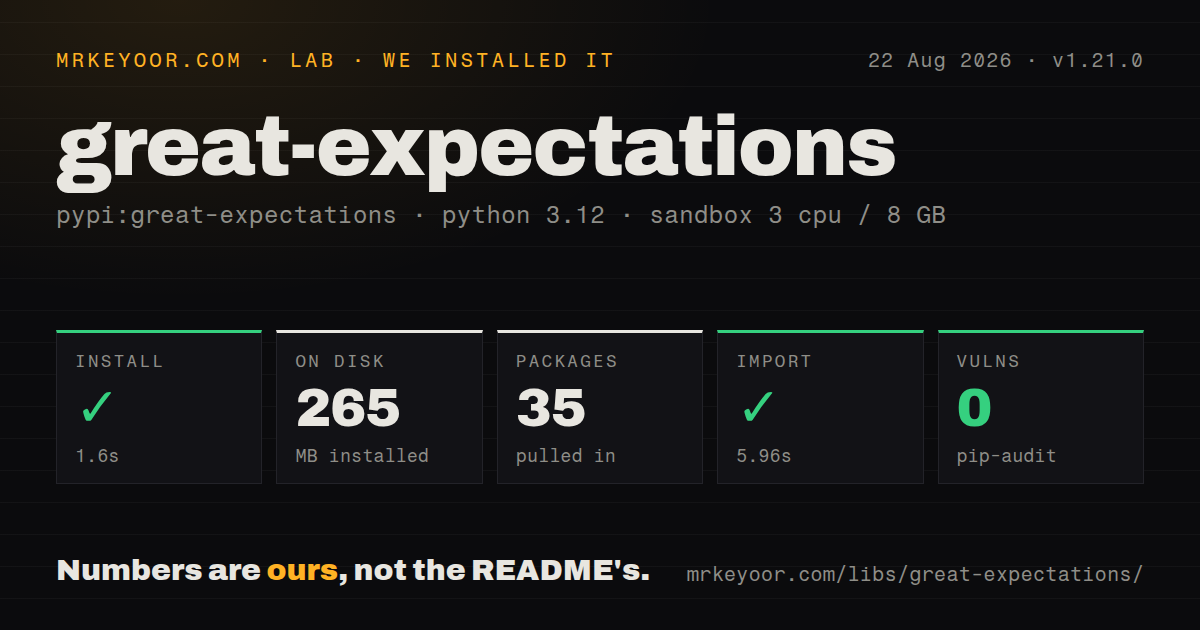

| Install | ✓ · 1.6s | 35 packages on disk · 265 MB |
| Import | ✓ | import great_expectations in 5.96s · pure Python · py.typed · requires Python >=3.10,<3.14 |
| Known vulns | 0 | (pip-audit) |
Answers from our run
Does great-expectations install cleanly?
Yes. In a fresh container with an empty cache, pip install great-expectations finished in 2 seconds, leaving 35 packages and 265 MB on disk. pip-audit reported no known vulnerabilities.
What does great-expectations need to run?
Python >=3.10,<3.14, and nothing compiled: it is pure Python. In our run import great_expectations succeeded in 5.96s, and the package ships py.typed for type checkers.
great-expectations or pandera: which should you use?
pandera: Choose Pandera for typed DataFrame schemas and value checks that live beside Python code without a persistent Data Context. Great Expectations 1.21.0 installed in 1.6 seconds and imported in 5.96 seconds with 0 known vulnerabilities, but our sandbox still held 35 packages and 265 MB.
When should you not use great-expectations?
You only need DataFrame schema and dtype checks near application code. Pandera avoids the Context, Asset, Batch Definition, Validation Definition, and Checkpoint chain
Use it if
- A failed check must leave a stored validation result and an HTML Data Docs page that analysts can inspect without reading an orchestrator log
- One expectation suite needs to describe equivalent checks for pandas, Spark, and supported SQL engines
- Your checks need batch selection, reusable suites, checkpoint actions, and an explicit result object instead of scattered DataFrame assertions
- You need built-in expectations for nulls, ranges, sets, regexes, outliers, and multi-column relationships, with a path for custom expectations
- You only need DataFrame schema and dtype checks near application code. Pandera avoids the Context, Asset, Batch Definition, Validation Definition, and Checkpoint chain
- Your environment must support Python 3.14 or Python 3.9. Version 1.21.0 declares Python 3.10 through 3.13 only
- You are using pre-1.0 tutorials. Old `great_expectations init`, V2 or V3 Data Context examples, and hand-edited checkpoint YAML describe an API that 1.21.0 no longer exposes
- Your SQLAlchemy version is constrained by another tool. Database extras bring their own drivers and compatibility ranges, so warehouse support can create resolver conflicts
- A simple null check does not justify a 35-package, 265 MB environment or 138 declared direct dependencies on your deployment target
Setup reality
We installed Great Expectations 1.21.0 in 1.6 seconds in a fresh Python 3.12 container. It left 35 packages and 265 MB on disk, and import great_expectations took 5.96 seconds. Pip-audit found 0 known vulnerabilities. The package is pure Python, ships py.typed, declares 138 direct dependencies, requires Python 3.10 through 3.13, and uses Apache-2.0. Database and Spark connections still need the matching driver or package extra.
Choose the Data Context before defining checks. gx.get_context() is ephemeral, while file mode writes a gx/ project directory that survives another process. The object chain then has 6 named layers after the Context: datasource and asset, batch definition, suite, validation definition, and checkpoint. Reusing a name can raise or require an update method, so provisioning code must be idempotent. Put connection strings in environment-backed configuration instead of committed project files.
For an in-memory DataFrame, pass batch_parameters={'dataframe': df} when fetching or running the batch; the DataFrame is not stored in the asset. SQL expectations execute warehouse queries. A whole-table batch can scan a large relation once per metric or expectation, so define date or column partitions before scheduling checks. Version 1.21.0 accepts integer batch parameters across datasource families, which removes one source of type surprises.
A checkpoint returns a result object when expectations fail; it does not automatically stop Airflow, Dagster, Prefect, or a shell job. Inspect result.success and raise in your adapter. Data Docs need an UpdateDataDocsAction before static output is rebuilt. Our measurement setup covered installation and import only, not a live warehouse, so driver authentication, query cost, and backend-specific SQL remain deployment work.
Patterns
Select persistent or temporary state create-context
import great_expectations as gx

# in-memory, discarded when the process ends
context = gx.get_context()

# persisted to a gx/ directory you can commit
context = gx.get_context(mode='file')
The default Context exists only in memory. Use file mode when suites and checkpoints must still exist after this Python process exits.
Run one check against a DataFrame validate-dataframe-quickly
import great_expectations as gx
import great_expectations.expectations as gxe
import pandas as pd

df = pd.read_csv('orders.csv')
context = gx.get_context()

batch = (
    context.data_sources.add_pandas('local')
    .add_dataframe_asset('orders')
    .add_batch_definition_whole_dataframe('all')
    .get_batch(batch_parameters={'dataframe': df})
)

result = batch.validate(gxe.ExpectColumnValuesToNotBeNull(column='order_id'))
print(result.success)
Supply the DataFrame through `batch_parameters` when the batch is fetched. A DataFrame asset stores its definition, not the current rows.
Collect related checks in a suite build-expectation-suite
suite = context.suites.add(gx.ExpectationSuite(name='orders_daily'))

suite.add_expectation(gxe.ExpectColumnValuesToNotBeNull(column='order_id'))
suite.add_expectation(gxe.ExpectColumnValuesToBeUnique(column='order_id'))
suite.add_expectation(
    gxe.ExpectColumnValuesToBeBetween(column='amount', min_value=0, max_value=100000)
)
suite.add_expectation(
    gxe.ExpectColumnValuesToBeInSet(column='status', value_set=['new', 'paid', 'refunded'])
)
`context.suites.add` expects a new name. Provisioning that may run 2 times should fetch and update the suite or use the matching update operation.
Make a checkpoint runnable run-checkpoint
batch_definition = (
    context.data_sources.add_pandas('local')
    .add_dataframe_asset('orders')
    .add_batch_definition_whole_dataframe('all')
)

validation = context.validation_definitions.add(
    gx.ValidationDefinition(data=batch_definition, suite=suite, name='orders_daily_check')
)

checkpoint = context.checkpoints.add(
    gx.Checkpoint(name='orders_daily_cp', validation_definitions=[validation])
)

result = checkpoint.run(batch_parameters={'dataframe': df})
print(result.success)
A Checkpoint receives Validation Definitions, and each one pairs a Batch Definition with a Suite. Create those named objects before constructing the Checkpoint.
Point a datasource at PostgreSQL connect-sql-database
data_source = context.data_sources.add_postgres(
    name='warehouse',
    connection_string='postgresql+psycopg2://user:pass@host:5432/analytics',
)
asset = data_source.add_table_asset(name='orders', table_name='public.orders')
batch_definition = asset.add_batch_definition_whole_table('full_table')
Install the PostgreSQL extra and driver separately. Whole-table batches can issue expensive queries for each expectation, so partition large relations.
Select a daily warehouse batch partition-by-date
daily = asset.add_batch_definition_daily(
    name='by_order_date', column='order_date'
)

batch = daily.get_batch(
    batch_parameters={'year': 2026, 'month': 8, 'day': 7}
)
The year, month, and day select one partition. This keeps a scheduled check away from an unbounded table scan.
Treat a query result as an asset query-based-asset
asset = data_source.add_query_asset(
    name='recent_paid_orders',
    query="SELECT * FROM public.orders WHERE status = 'paid' AND order_date >= CURRENT_DATE - 7",
)
batch_definition = asset.add_batch_definition_whole_table('last_7_days')
A query asset avoids creating a database view, but the SQL can execute repeatedly while the Suite computes metrics. Watch warehouse cost and latency.
Request unexpected values for debugging read-failed-rows
from great_expectations import ResultFormat

result = batch.validate(
    gxe.ExpectColumnValuesToBeInSet(column='status', value_set=['new', 'paid']),
    result_format=ResultFormat.COMPLETE,
)
print(result.result['partial_unexpected_list'])
`COMPLETE` can return every unexpected value. Reserve it for bounded debugging data because a large failing batch can produce a large result.
Refresh Data Docs after validation generate-data-docs
from great_expectations.checkpoint import UpdateDataDocsAction

checkpoint = context.checkpoints.add(
    gx.Checkpoint(
        name='orders_daily_cp',
        validation_definitions=[validation],
        actions=[UpdateDataDocsAction(name='update_docs')],
    )
)
checkpoint.run(batch_parameters={'dataframe': df})
context.open_data_docs()
The action rebuilds static Data Docs after the Checkpoint runs. Publishing those files to teammates is a separate storage or web-server step.
Inject a threshold at run time parameterise-expectations
suite.add_expectation(
    gxe.ExpectColumnValuesToBeBetween(
        column='amount', min_value=0, max_value={'$PARAMETER': 'max_amount'}
    )
)

result = batch.validate(suite, expectation_parameters={'max_amount': 250000})
Every `$PARAMETER` reference must receive a value when validation runs. A missing `max_amount` fails resolution instead of silently omitting the expectation.
Turn a failed result into a failed job fail-pipeline-on-error
result = checkpoint.run(batch_parameters={'dataframe': df})

if not result.success:
    failures = [
        r.expectation_config.type
        for run in result.run_results.values()
        for r in run.results
        if not r.success
    ]
    raise ValueError(f'data quality failed: {failures}')
`checkpoint.run()` reports expectation failure through `result.success`. Raise from the orchestrator adapter if downstream tasks must stop.
Load a stored checkpoint in another process persist-configuration
context = gx.get_context(mode='file', project_root_dir='.')

# later, in a different process
context = gx.get_context(mode='file', project_root_dir='.')
checkpoint = context.checkpoints.get('orders_daily_cp')
checkpoint.run(batch_parameters={'dataframe': df})
File mode reads definitions from the `gx/` project directory. Keep credentials outside that directory even when its Suite and Checkpoint files are committed.
Alternatives
| Package | Registry | Pick it when |
|---|---|---|
| pandera | PyPI | Choose Pandera for typed DataFrame schemas and value checks that live beside Python code without a persistent Data Context. |
| soda-core | PyPI | Choose Soda Core when analysts should maintain warehouse checks in YAML and run them through a CLI. |
| dbt-core | PyPI | Choose dbt Core when SQL tests belong beside the warehouse models that create the data. |
More data guides
numpy · pandas · fsspec · lxml · pyarrow · sqlalchemy · the whole shelf →
How this guide is made: grounded in the library's documentation, release notes, changelog, and issue history, on a fixed rubric — not a hands-on install of every release. The 50 most-downloaded entries are additionally install-verified in clean containers. Corrections: contact the desk.