dbt-core review
dbt-core 1.12.3 is the Python CLI that turns a directory of templated SQL models into an ordered warehouse build. `ref()` and `source()` establish the graph; adapters translate that project for PostgreSQL, BigQuery, Snowflake, and other databases. The project format also covers data tests, snapshots, macros, documentation, and selectors. It begins after source data reaches the warehouse and has no scheduler. The 1.12.3 patch repairs signed Azure Blob artifact uploads and raises the `sqlparse` requirement to a fixed line. Python v1 work has moved to the `1.latest` branch because `main` now holds the Rust-based v2 beta.
dbt-core 1.12.3 installed in 2.4 seconds but expanded to 57 packages and 98 MB in our sandbox, with 0 audit findings and a working 0.08-second import. Adopt it for a real warehouse model graph, then budget separately for an adapter, credentials, orchestration, and the coming Python-to-Rust engine decision.
We installed it
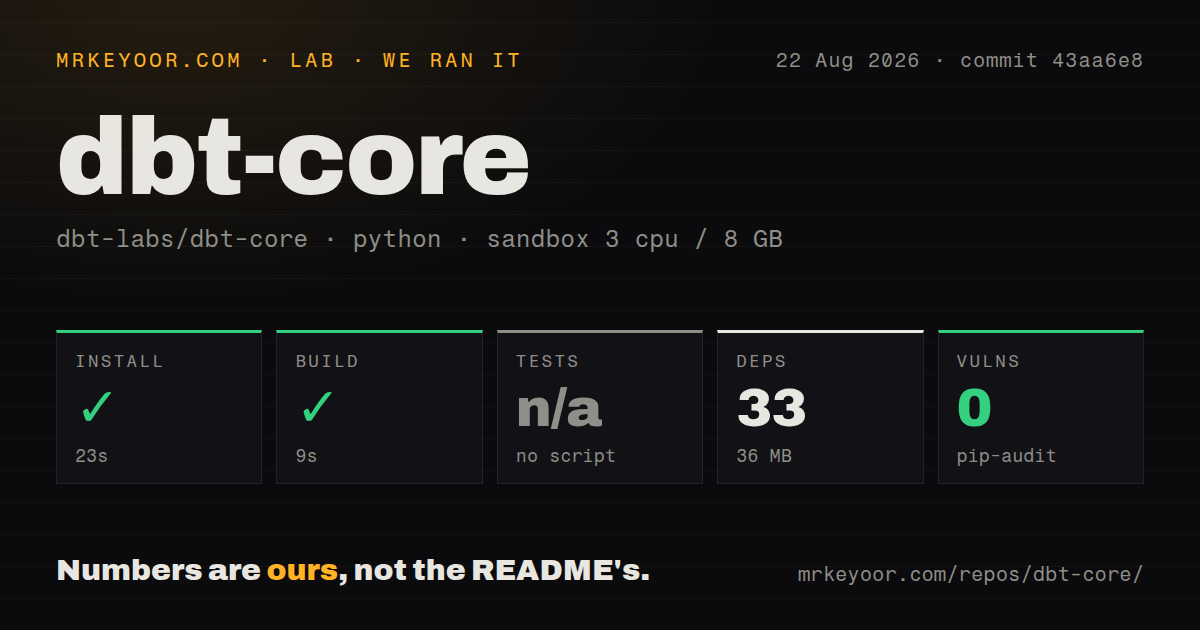
| Install | ✓ · 2.4s | 57 packages on disk · 98 MB |
| Import | ✓ | import dbt in 0.08s · pure Python · py.typed · requires Python >=3.10 |
| Known vulns | 0 | (pip-audit) |
Answers from our run
Does dbt-core install cleanly?
Yes. In a fresh container with an empty cache, pip install dbt-core finished in 2 seconds, leaving 57 packages and 98 MB on disk. pip-audit reported no known vulnerabilities.
What does dbt-core need to run?
Python >=3.10, and nothing compiled: it is pure Python. In our run import dbt succeeded in 0.08s, and the package ships py.typed for type checkers.
dbt-core or sqlmesh: which should you use?
sqlmesh: Choose it when virtual data environments, plan-based changes, and column lineage matter more than dbt compatibility. dbt-core 1.12.3 installed in 2.4 seconds but expanded to 57 packages and 98 MB in our sandbox, with 0 audit findings and a working 0.08-second import.
When should you not use dbt-core?
Data still has to be extracted or loaded; dbt-core transforms relations already present in the target system
Use it if
- Warehouse transformations are mostly SQL and should share dependency ordering, tests, lineage, and documentation
- Analysts need to change production models through reviewable files without building a custom execution framework
- Incremental models, snapshots, source declarations, and graph selectors appear repeatedly in the analytics workflow
- A maintained adapter supports your database and explicitly accepts dbt-core 1.12
- Data still has to be extracted or loaded; dbt-core transforms relations already present in the target system
- You expect the package to schedule runs, retry jobs, or manage backfills; an orchestrator must call the CLI
- The Python environment cannot absorb 57 installed packages and 98 MB plus the selected database adapter
- A ground-up engine transition is unacceptable right now; Python v1 lives on `1.latest`, while the repository's default branch is the Rust v2 beta
- The project contains only a few stable queries, so two YAML files, Jinja compilation, generated artifacts, and adapter versioning would add more ceremony than control
Setup reality
We installed dbt-core 1.12.3 in a fresh Python 3.12 Bookworm sandbox in 2.4 seconds. It left 57 packages and 98 MB on disk; pip-audit found 0 known vulnerabilities. The distribution declares 25 direct dependencies, needs Python 3.10 or newer, is pure Python, and ships py.typed. import dbt completed in 0.08 seconds. The measured package metadata did not supply a license value.
dbt-core cannot connect to a warehouse alone. Install an adapter whose supported core range includes 1.12. The repository keeps dbt_project.yml; connection targets usually live in ~/.dbt/profiles.yml, and its top-level key must match the project's profile. Load passwords with env_var() instead of committing them. dbt debug checks path discovery, credentials, adapter loading, and the target connection before a build burns warehouse time.
Every model passes through Jinja before the database sees SQL. target/compiled shows the rendered model, while target/run includes the materialization wrapper that actually executed. Partial parsing caches state in target/partial_parse.msgpack; remove that file or pass --no-partial-parse when an environment or macro change appears stale. Ignore generated target and dbt_packages directories, but commit dependency declarations and lock data.
The threads value controls simultaneous warehouse queries, so raising it can hit connection, quota, or transaction limits even when the Python process looks idle. dbt build follows graph order and runs tests, yet it supplies no clock or retry queue. Release 1.12.3 now sends Azure's required BlockBlob header, accepts HTTP 201 for signed artifact uploads, and requires a newer sqlparse; compile and run a representative target after updating the lockfile.
Patterns
Pair core with one warehouse driver install-adapter
python -m venv .venv
source .venv/bin/activate
pip install dbt-core==1.12.3 dbt-postgres
dbt --version
`dbt --version` reports core and adapter versions on separate lines. An adapter is mandatory for database work, and its declared dbt-core range should be checked before either package is upgraded.
Define a Postgres target outside the repository configure-profile
# ~/.dbt/profiles.yml
analytics:
  target: dev
  outputs:
    dev:
      type: postgres
      host: localhost
      user: analyst
      password: "{{ env_var('DBT_PASSWORD') }}"
      port: 5432
      dbname: warehouse
      schema: dev_alice
      threads: 4
The `analytics` key must equal the `profile` value in `dbt_project.yml`. Keep secrets in environment variables and run `dbt debug` to verify which profile and target the CLI found.
Let `ref()` create the model edge reference-model
-- models/orders_daily.sql
select
  date_trunc('day', created_at) as order_day,
  count(*) as order_count
from {{ ref('stg_orders') }}
group by 1
`ref()` resolves the target relation and records dependency order. Writing the warehouse table name directly prevents dbt from seeing that edge and can make selection or build order wrong.
Attach freshness rules to a raw table declare-source
version: 2

sources:
  - name: shop
    schema: raw
    loaded_at_field: loaded_at
    freshness:
      warn_after: {count: 6, period: hour}
    tables:
      - name: orders
A source declaration does not ingest rows. Freshness runs only when the relevant command or orchestration step is invoked, so include it explicitly in the production schedule.
Check identifiers and an enum-like field test-columns
version: 2

models:
  - name: stg_orders
    columns:
      - name: order_id
        data_tests: [unique, not_null]
      - name: status
        data_tests:
          - accepted_values:
              values: ['placed', 'shipped', 'returned']
Current docs use `data_tests`; the older `tests` key remains compatible but is deprecated. These queries run in the warehouse, so large tables can make a simple assertion expensive.
Limit rows only on incremental executions build-incrementally
{{ config(materialized='incremental', unique_key='event_id') }}

select * from {{ source('events', 'raw_events') }}
{% if is_incremental() %}
where loaded_at > (select max(loaded_at) from {{ this }})
{% endif %}
The condition is false for the initial relation and for `--full-refresh`. Late-arriving rows need a lookback or another merge rule, and the supported incremental strategies depend on the adapter.
Track row history from an update timestamp snapshot-records
snapshots:
  - name: customer_history
    relation: source('shop', 'customers')
    config:
      schema: snapshots
      unique_key: customer_id
      strategy: timestamp
      updated_at: updated_at
Snapshot tables preserve prior states that rebuilding a source may not restore. Include their destination schema in backup and retention planning, and ensure the declared unique key is genuinely stable.
Extract one repeated SQL expression write-macro
{% macro cents_to_units(column_name) %}
  ({{ column_name }} / 100.0)
{% endmacro %}

select {{ cents_to_units('amount_cents') }} as amount
from {{ ref('stg_orders') }}
A macro emits text before the warehouse parses it. When an error location looks unrelated to the call, open the compiled model and inspect the SQL produced by the expansion.
Choose ancestors or descendants from the graph select-graph
dbt build --select stg_orders+
dbt build --select +orders_daily
dbt build --select tag:nightly
A suffix `+` adds descendants; a prefix `+` adds ancestors. Preview broad selectors before combining them with `--full-refresh`, which can rebuild far more warehouse data than intended.
Compare rendered SQL with executed SQL inspect-compiled-sql
dbt compile --select orders_daily
cat target/compiled/analytics/models/orders_daily.sql
cat target/run/analytics/models/orders_daily.sql
The compiled file shows the rendered model. The run file also contains the materialization wrapper, so adapter-specific DDL or transaction errors may appear only in the second output.
Resolve a pinned dbt package install-packages
# packages.yml
packages:
  - package: dbt-labs/dbt_utils
    version: [">=1.0.0", "<2.0.0"]

# shell
dbt deps
Commit the declaration and resolved lock information. Ignore the downloaded `dbt_packages` directory so CI reproduces dependencies through `dbt deps` instead of repository leftovers.
Turn off anonymous usage events before first run disable-telemetry
# ~/.dbt/profiles.yml
config:
  send_anonymous_usage_stats: false
Place the setting in the profile before invoking the CLI on a restricted network. This changes dbt's usage-event setting; it does not control warehouse logs or telemetry emitted by an adapter.
Alternatives
| Package | Registry | Pick it when |
|---|---|---|
| sqlmesh | PyPI | Choose it when virtual data environments, plan-based changes, and column lineage matter more than dbt compatibility. |
| dagster | PyPI | Choose it when scheduling, asset checks, backfills, and mixed Python plus SQL jobs are the main job. |
| apache-airflow | PyPI | Choose it to coordinate many job types when warehouse SQL is only one step in a larger DAG. |
More data guides
numpy · pandas · fsspec · pyarrow · lxml · sqlalchemy · the whole shelf →
How this guide is made: grounded in the library's documentation, release notes, changelog, and issue history, on a fixed rubric — not a hands-on install of every release. The 50 most-downloaded entries are additionally install-verified in clean containers. Corrections: contact the desk.