formik review
Formik 2.4.9 is a React form-state package built around controlled values and a shared context. We measured 53.3 KB minified and 17.4 KB gzipped for a browser import of the package. In return, Formik keeps values, errors, touched flags, validation and submit state under one API, with Field, FieldArray, Form and hooks for custom controls. The current release fixes JSX ref handling for React 19. It includes TypeScript declarations, although string field paths and several any-typed helper values leave gaps in end-to-end form typing.
Formik 2.4.9 added 17.4 KB gzipped in our browser test and left 14 packages on disk, so it is easiest to justify in React apps already organized around its controlled form state. Greenfield forms should compare React Hook Form or TanStack Form before accepting that client cost and the 702-issue backlog.
We installed it
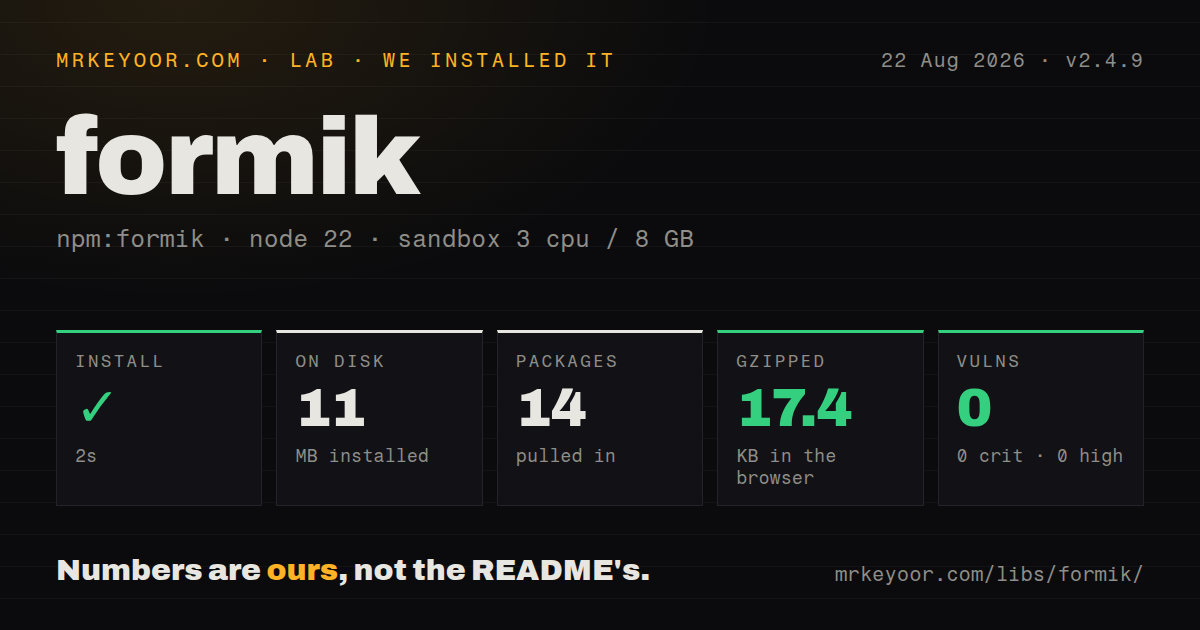
| Install | ✓ · 2s | 14 packages on disk · 11 MB |
| Import | ✓ | ESM import works · require() works · CommonJS package |
| Browser | 17.4 KB | gzipped (53.3 KB minified), bundled with esbuild |
| Types | ✓ | TypeScript types bundled |
| Known vulns | 0 | 0 critical · 0 high · 0 moderate · 0 low (npm audit) |
Answers from our run
Does formik install cleanly?
Yes. In a fresh container with an empty cache, npm install formik finished in 2 seconds, leaving 14 packages and 11 MB on disk. npm audit reported no known vulnerabilities.
How much does formik add to a browser bundle?
17.4 KB gzipped (53.3 KB minified) when the whole package is bundled for the browser with esbuild. Importing only part of it is usually smaller.
Does formik work with both ESM and CommonJS?
Yes. Both import 'formik' and require('formik') worked in Node 22 in our run. The package is published as CommonJS.
Does formik include TypeScript types?
Yes, type declarations ship inside the package, so no @types install is needed.
formik or react-hook-form: which should you use?
react-hook-form: Choose it for new React forms that benefit from uncontrolled inputs and field-level subscriptions. Formik 2.4.9 added 17.4 KB gzipped in our browser test and left 14 packages on disk, so it is easiest to justify in React apps already organized around its controlled form state.
When should you not use formik?
You are choosing for a new form-heavy app where rerender isolation matters; React Hook Form and TanStack Form offer field-granular models
Use it if
- You are maintaining a React app whose forms already share Formik 2 components, helpers and validation conventions
- Your team wants controlled values, touched state, errors and submission status in one inspectable object
- Your forms use nested paths or repeatable arrays and need the FieldArray operations documented by Formik
- You need both field-level and whole-form validation, with an optional Yup schema adapter
- You are choosing for a new form-heavy app where rerender isolation matters; React Hook Form and TanStack Form offer field-granular models
- A 17.4 KB gzipped full-package browser result is too much for your route; our measured bundle also starts from 8 direct dependencies
- You expect field names and values to be checked as one TypeScript path; setFieldValue accepts a string and React.SetStateAction<any>
- Your workflow unmounts fields before submit; Formik's field-level validators only run for mounted fields
- You need active issue turnaround: GitHub search currently finds 702 open issues, and the repository has not been pushed since the 2.4.9 release in November 2025
Setup reality
In our install, Formik 2.4.9 completed in 2 seconds, producing 14 packages and 11 MB on disk. npm audit reported 0 known vulnerabilities. The package has 8 direct dependencies, 1 React peer, an Apache-2.0 license and 624 KB unpacked. It is CommonJS without an exports map, though require() and ESM import both worked. Types are bundled. The full import built to 53.3 KB minified and 17.4 KB gzipped.
React 16.8 or newer satisfies the peer range. Yup is absent from the install, so add it only when using validationSchema. Every controlled field needs an initial value, including empty strings and arrays. Names such as profile.email and friends[0].name drive nested access at runtime; TypeScript does not prove those strings match your Values shape.
Change and blur validation are enabled by default. Expensive validators can run on each edit unless validateOnChange or validateOnBlur is changed. touched depends on forwarding onBlur from Field or useField. FieldArray also validates after array operations by default, and its top-level error can be a string while item errors form an array. Check the value's shape before rendering it.
Formik clears isSubmitting after an async onSubmit promise settles. If the handler returns no promise, finish the cycle with setSubmitting(false). New initialValues do not replace current state unless enableReinitialize is true; resetForm({ values }) can instead establish a new baseline after saving. Version 2.4.9 fixes React 19 JSX ref handling, while npm still exposes a 3.0.0-next prerelease. Keep production code on the stable 2.x contract unless you are testing that migration deliberately.
Patterns
Create a typed Formik form build-typed-form
import { Field, Form, Formik } from 'formik'

type Values = { email: string }

export function Signup() {
  return (
    <Formik<Values>
      initialValues={{ email: '' }}
      validate={(values) =>
        values.email ? {} : { email: 'Required' }
      }
      onSubmit={async (values) => save(values)}
    >
      {({ errors, touched, isSubmitting }) => (
        <Form>
          <Field name="email" type="email" />
          {touched.email && errors.email && <p>{errors.email}</p>}
          <button disabled={isSubmitting}>Save</button>
        </Form>
      )}
    </Formik>
  )
}
initialValues must include email from the first render. The string passed to Field is not checked as a keyof Values.
Validate with an installed Yup schema use-yup-schema
import * as yup from 'yup'

const schema = yup.object({
  email: yup.string().email('Use a valid email').required('Required'),
})

<Formik
  initialValues={{ email: '' }}
  validationSchema={schema}
  onSubmit={submit}
>
  <Form><Field name="email" /></Form>
</Formik>
Yup is a separate npm dependency. Formik converts Yup errors into an object shaped like values and touched.
Connect a design-system input with useField build-custom-field
function TextInput({ label, ...props }) {
  const [field, meta] = useField(props)
  return (
    <label>
      {label}
      <input {...field} {...props} />
      {meta.touched && meta.error ? <span>{meta.error}</span> : null}
    </label>
  )
}

<TextInput name="displayName" label="Display name" />
Spread field before the final props only when intentional overrides are acceptable. onBlur must reach the input for touched state to update.
Update a field from its previous value update-field-functionally
<button
  type="button"
  onClick={() => setFieldValue('quantity', (current) => current + 1)}
>
  Add one
</button>
Functional setFieldValue support is present in Formik 2.4.7 and later. The field parameter remains a string and the callback value is typed as any.
Defer validation during a burst of updates skip-change-validation
await setFieldValue('country', 'CA', false)
await setFieldValue('region', '', false)
const errors = await validateForm()
The third setFieldValue argument disables validation for that call. validateForm() then checks the resulting form once.
Add and remove rows with FieldArray manage-field-array
<FieldArray name="friends">
  {({ push, remove }) => (
    <>
      {values.friends.map((friend, index) => (
        <div key={friend.id}>
          <Field name={`friends[${index}].name`} />
          <button type="button" onClick={() => remove(index)}>Remove</button>
        </div>
      ))}
      <button type="button" onClick={() => push({ id: crypto.randomUUID(), name: '' })}>Add</button>
    </>
  )}
</FieldArray>
FieldArray operations run validation and update touched by default. Use a stable item id as the React key even though the Formik path uses the current index.
Handle both array and item validation errors render-array-errors
const friendsError = getIn(errors, 'friends')

return typeof friendsError === 'string'
  ? <p>{friendsError}</p>
  : <ErrorMessage name={`friends[${index}].name`} />
A Yup array rule can produce a string, while failed child rules produce a nested array. Rendering the array directly can crash React.
Reset when a loaded record changes reinitialize-record
<Formik
  initialValues={{ title: record.title }}
  enableReinitialize
  onSubmit={saveRecord}
>
  <Form><Field name="title" /></Form>
</Formik>
enableReinitialize uses deep equality on initialValues and resets edits when a different baseline arrives. Avoid feeding it an object that changes accidentally.
Make saved values the new clean state set-new-baseline
onSubmit={async (values, actions) => {
  const saved = await api.save(values)
  actions.resetForm({ values: saved })
}}
resetForm({ values }) changes the initial baseline as well as current values, so dirty becomes false after the save.
Store a form-wide API failure handle-server-error
onSubmit={async (values, actions) => {
  try {
    await api.createAccount(values)
  } catch (error) {
    actions.setStatus({ message: 'Account creation failed' })
  }
}}

{status?.message && <div role="alert">{status.message}</div>}
status accepts any value and has no schema. Field-specific server failures belong in setFieldError when the response identifies a field.
Collect checkbox choices in an array configure-checkbox-group
<Formik initialValues={{ roles: [] }} onSubmit={submit}>
  <Form>
    <label><Field type="checkbox" name="roles" value="editor" /> Editor</label>
    <label><Field type="checkbox" name="roles" value="reviewer" /> Reviewer</label>
  </Form>
</Formik>
Checkboxes sharing a name and carrying distinct value props update an array. initialValues.roles must start as an array.
Build a form directly with useFormik use-formik-without-context
const formik = useFormik({
  initialValues: { query: '' },
  onSubmit: search,
})

return (
  <form onSubmit={formik.handleSubmit}>
    <input name="query" value={formik.values.query} onChange={formik.handleChange} />
  </form>
)
useFormik does not create Formik context. Field, FastField, ErrorMessage and FieldArray cannot connect beneath this form.
Alternatives
| Package | Registry | Pick it when |
|---|---|---|
| react-hook-form | npm | Choose it for new React forms that benefit from uncontrolled inputs and field-level subscriptions |
| @tanstack/react-form | npm | Choose it when strong type inference and fine-grained reactive form state justify a newer API |
| react-final-form | npm | Choose it when subscription-based rendering and the separate Final Form state engine fit the application |
| final-form | npm | Choose the framework-neutral core when React components should not own the form model |
More web frontend guides
postcss · react · react-dom · tailwindcss · clsx · htmlparser2 · the whole shelf →
How this guide is made: grounded in the library's documentation, release notes, changelog, and issue history, on a fixed rubric — not a hands-on install of every release. The 50 most-downloaded entries are additionally install-verified in clean containers. Corrections: contact the desk.