flask-sqlalchemy review
Flask-SQLAlchemy 3.1.1 connects SQLAlchemy 2 to Flask: it creates engines from Flask configuration, scopes a session to the active application context, supplies a declarative model base, and adds pagination plus HTTP 404 helpers. The current release deprecates the package's `__version__` attribute, while the 3.1 line added `model_class` for SQLAlchemy 2 declarative bases. Our install also confirmed that it ships `py.typed`. This is Flask integration around SQLAlchemy, so query design, relationships, transactions, dialect behavior, and migrations still come from SQLAlchemy and Alembic.
Flask-SQLAlchemy 3.1.1 installed in 0.4 seconds and occupied 19 MB across 11 packages in our sandbox, with typed metadata and 0 pip-audit findings; install it when Flask and SQLAlchemy 2 are already settled choices. Choose plain SQLAlchemy if the data layer must outlive Flask, and add a database driver plus Alembic migrations for production use.
We installed it
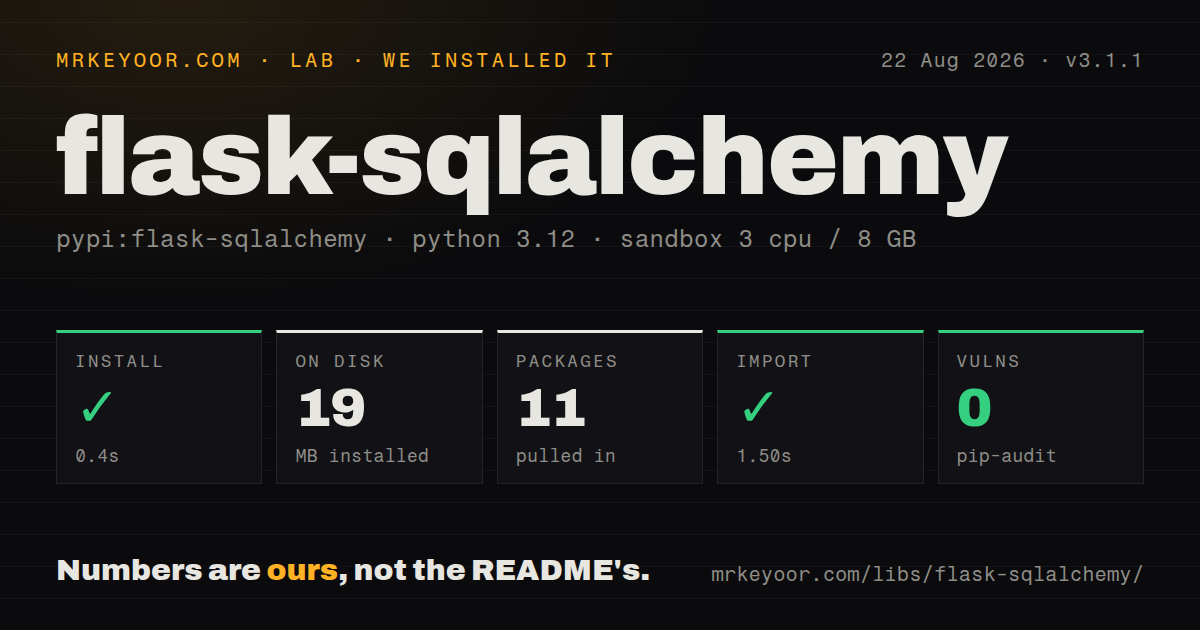
| Install | ✓ · 0.4s | 11 packages on disk · 19 MB |
| Import | ✓ | import flask_sqlalchemy in 1.50s · pure Python · py.typed · requires Python >=3.8 |
| Known vulns | 0 | (pip-audit) |
Answers from our run
Does flask-sqlalchemy install cleanly?
Yes. In a fresh container with an empty cache, pip install flask-sqlalchemy finished in 0.4s, leaving 11 packages and 19 MB on disk. pip-audit reported no known vulnerabilities.
What does flask-sqlalchemy need to run?
Python >=3.8, and nothing compiled: it is pure Python. In our run import flask_sqlalchemy succeeded in 1.50s, and the package ships py.typed for type checkers.
flask-sqlalchemy or SQLAlchemy: which should you use?
SQLAlchemy: You want direct control of engines and sessions, or the same data layer must run outside Flask. Flask-SQLAlchemy 3.1.1 installed in 0.4 seconds and occupied 19 MB across 11 packages in our sandbox, with typed metadata and 0 pip-audit findings; install it when Flask and SQLAlchemy 2 are already settled choices.
When should you not use flask-sqlalchemy?
Your code is not tied to Flask: plain SQLAlchemy provides the ORM without requiring a Flask application context
Use it if
- Your Flask service already uses SQLAlchemy 2 and you want its session cleaned up with each Flask application context
- Your application factory needs one unbound extension object that can be initialized against different Flask apps
- Your routes can use `get_or_404`, `one_or_404`, or `paginate` without moving HTTP behavior into the model layer
- A small Flask application needs named database binds and can accept separate engine and metadata state for each bind
- Your code is not tied to Flask: plain SQLAlchemy provides the ORM without requiring a Flask application context
- You want an ORM that hides SQLAlchemy's concepts: the official quickstart uses SQLAlchemy 2 statements and directs deeper query questions to SQLAlchemy's tutorial
- You need schema changes handled automatically: `create_all()` creates absent tables but does not alter existing ones, so the docs point to Alembic-based migration tools
- Your codebase still centers on `Model.query`: the current docs call the query interface legacy and teach `db.session.execute(db.select(...))` instead
- You require a core Pallets-maintained extension with a frequent release cadence: the README labels this a Pallets Community Ecosystem project and asks for maintainers
Setup reality
Our fresh Python 3.12 install of Flask-SQLAlchemy 3.1.1 succeeded in 0.4 seconds. It left 11 packages using 19 MB, declared 2 direct dependencies, imported as flask_sqlalchemy in 1.50 seconds, and produced 0 known findings in pip-audit. The package is pure Python, requires Python 3.8 or newer, carries the BSD License label, and includes py.typed. A PostgreSQL or MySQL deployment still needs the matching database driver because the extension does not install one for you.
Set SQLALCHEMY_DATABASE_URI or SQLALCHEMY_BINDS before db.init_app(app). Engines are created during initialization, so later Flask config edits do not rebuild them. Relative SQLite URLs resolve beneath Flask's instance folder rather than beside the module. An application factory should create one SQLAlchemy object at import time and bind it inside create_app; constructing a second extension for the same app triggers an error.
db.session, db.engine, create_all(), and query helpers need an active Flask application context. Requests and Flask CLI commands provide one; scripts and tests must push one explicitly. Context teardown removes the scoped session, but it does not commit pending work. Commit successful units of work yourself, and call rollback after a failed flush or commit before using that session again.
Import every model before calling create_all(), then use Alembic or Flask-Migrate once a schema exists. Named binds create separate engines and metadata registries; they do not turn several databases into one atomic transaction. The SQLAlchemy 2 select path is the current API, while Model.query remains only as a legacy convenience. Leave SQLALCHEMY_TRACK_MODIFICATIONS off unless signal callbacks justify its documented session-tracking cost.
Patterns
Bind one extension inside an app factory initialize-app-factory
from flask import Flask
from flask_sqlalchemy import SQLAlchemy
from sqlalchemy.orm import DeclarativeBase

class Base(DeclarativeBase):
    pass

db = SQLAlchemy(model_class=Base)

def create_app():
    app = Flask(__name__, instance_relative_config=True)
    app.config["SQLALCHEMY_DATABASE_URI"] = "sqlite:///app.sqlite"
    db.init_app(app)
    return app
`init_app` creates the engines immediately, so set the database URI and engine options before this call.
Declare a model with SQLAlchemy 2 typing define-typed-model
from sqlalchemy import String
from sqlalchemy.orm import Mapped, mapped_column

class User(db.Model):
    id: Mapped[int] = mapped_column(primary_key=True)
    username: Mapped[str] = mapped_column(String(80), unique=True, index=True)
    email: Mapped[str] = mapped_column(String(255))
Flask-SQLAlchemy generates a table name when `__tablename__` is absent; set one yourself when database naming must stay fixed.
Create a fresh local schema create-local-schema
app = create_app()

with app.app_context():
    from myapp import models
    db.create_all()
`create_all()` sees only imported models and never alters an existing table, so use it for fresh databases rather than migrations.
Run a SQLAlchemy 2 select select-rows
stmt = (
    db.select(User)
    .where(User.email.endswith("@example.com"))
    .order_by(User.username)
)
users = db.session.execute(stmt).scalars().all()
The 3.1 docs teach select statements through `db.session`; `Model.query` remains a legacy interface.
Return 404 when a row is absent fetch-or-404
from flask import render_template

@app.get("/users/<int:user_id>")
def user_detail(user_id):
    user = db.get_or_404(User, user_id, description="User not found")
    return render_template("user.html", user=user)
`get_or_404` aborts the Flask request, which makes it convenient in views and a poor fit for framework-neutral service code.
Cap a paginated query paginate-query
from flask import request

stmt = db.select(User).order_by(User.username)
page = db.paginate(
    stmt,
    page=request.args.get("page", 1, type=int),
    per_page=request.args.get("per_page", 20, type=int),
    max_per_page=100,
)
Set `max_per_page` when the request controls page size; the helper can then keep one request from selecting an unbounded page.
Commit a write and recover from failure commit-write
from sqlalchemy.exc import IntegrityError

user = User(username="ada", email="ada@example.com")
db.session.add(user)
try:
    db.session.commit()
except IntegrityError:
    db.session.rollback()
    raise
Flask context teardown removes the session but does not commit it; a failed transaction needs rollback before that session can continue.
Load related rows without an N+1 loop eager-load-relationship
from sqlalchemy.orm import selectinload

stmt = (
    db.select(User)
    .options(selectinload(User.posts))
    .order_by(User.id)
)
users = db.session.execute(stmt).scalars().all()
`selectinload` fetches the relationship while the app-scoped session is available and avoids a query for each parent row.
Configure a production connection pool configure-production-engine
import os

app.config.update(
    SQLALCHEMY_DATABASE_URI=os.environ["DATABASE_URL"],
    SQLALCHEMY_ENGINE_OPTIONS={
        "pool_pre_ping": True,
        "pool_recycle": 300,
    },
)
The URI chooses a SQLAlchemy dialect and driver; install that driver separately before the app starts.
Attach a model to a named bind route-model-to-bind
app.config["SQLALCHEMY_BINDS"] = {
    "auth": "sqlite:///auth.sqlite",
}

class LoginEvent(db.Model):
    __bind_key__ = "auth"
    id: Mapped[int] = mapped_column(primary_key=True)
A bind gets its own engine and metadata; separate binds do not share one atomic database transaction.
Use the session outside a request query-in-script
app = create_app()

with app.app_context():
    user_count = db.session.scalar(
        db.select(db.func.count()).select_from(User)
    )
    print(user_count)
Scripts and background jobs must push an app context before touching `db.session` or `db.engine`.
Provide an app context in a pytest fixture test-with-context
import pytest

@pytest.fixture()
def app():
    app = create_app()
    app.config["TESTING"] = True
    with app.app_context():
        db.create_all()
        yield app
        db.session.remove()
        db.drop_all()
This rebuilds the schema for each fixture lifetime; larger suites usually isolate tests with transaction rollback instead.
Alternatives
| Package | Registry | Pick it when |
|---|---|---|
| SQLAlchemy | PyPI | You want direct control of engines and sessions, or the same data layer must run outside Flask |
| peewee | PyPI | A compact active-record-style API fits your small service better than SQLAlchemy's unit-of-work model |
| Flask-Migrate | PyPI | You are keeping Flask-SQLAlchemy and need Alembic migrations exposed through Flask commands |
| alembic | PyPI | You want SQLAlchemy schema migrations without coupling migration commands to Flask |
More web backend guides
ws · urllib3 · requests · undici · anyio · express · the whole shelf →
How this guide is made: grounded in the library's documentation, release notes, changelog, and issue history, on a fixed rubric — not a hands-on install of every release. The 50 most-downloaded entries are additionally install-verified in clean containers. Corrections: contact the desk.