alembic review
Alembic turns database schema changes into a graph of Python revision files. Each revision has an upgrade path, an optional downgrade path, and a reference to its parent revision, so teams can review DDL beside the application that needs it. Autogenerate compares a live database with SQLAlchemy MetaData and writes a candidate migration, not a finished one. Release 1.19.1 corrects false check-constraint changes when a constraint is attached to a column.
Alembic 1.19.1 installed in 0.4 seconds and used 18 MB in our sandbox, with 0 known vulnerabilities, so package cost is minor for SQLAlchemy teams that will review every revision. Skip it if you expect autogenerate to infer renames or make large-table DDL safe during a live rollout.
We installed it
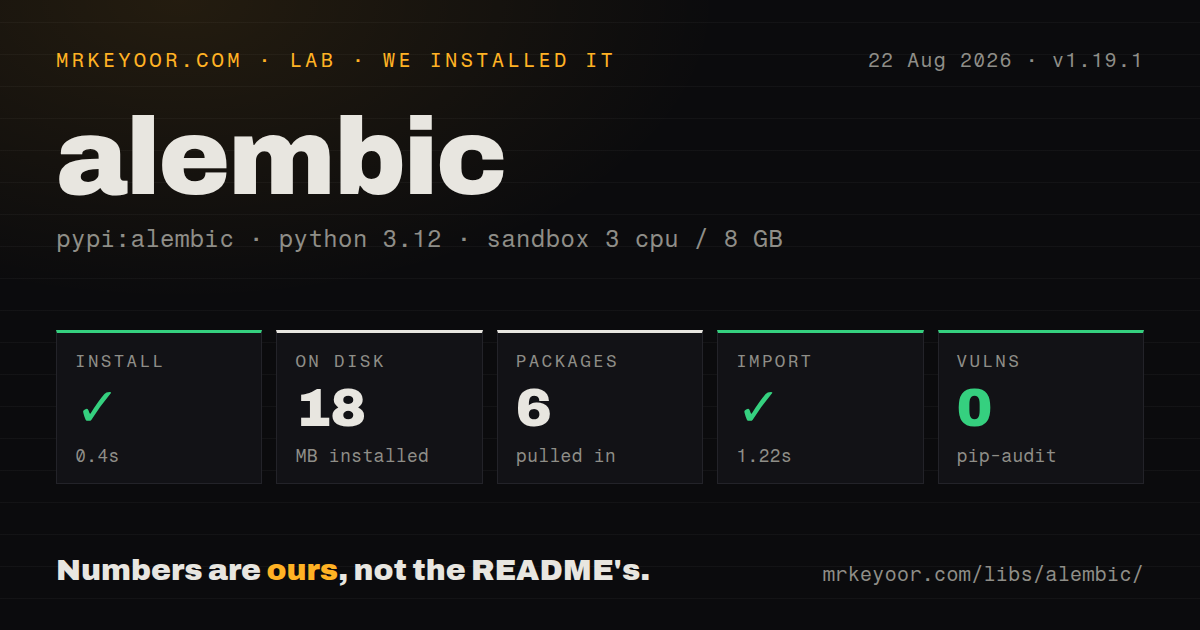
| Install | ✓ · 0.4s | 6 packages on disk · 18 MB |
| Import | ✓ | import alembic in 1.22s · pure Python · py.typed · requires Python >=3.10 |
| Known vulns | 0 | (pip-audit) |
Answers from our run
Does alembic install cleanly?
Yes. In a fresh container with an empty cache, pip install alembic finished in 0.4s, leaving 6 packages and 18 MB on disk. pip-audit reported no known vulnerabilities.
What does alembic need to run?
Python >=3.10, and nothing compiled: it is pure Python. In our run import alembic succeeded in 1.22s, and the package ships py.typed for type checkers.
alembic or yoyo-migrations: which should you use?
Pick yoyo-migrations when explicit SQL and Python steps matter more than comparing SQLAlchemy models Alembic 1.19.1 installed in 0.4 seconds and used 18 MB in our sandbox, with 0 known vulnerabilities, so package cost is minor for SQLAlchemy teams that will review every revision.
When should you not use alembic?
You need rename detection you can trust without review; autogenerate commonly represents a renamed table or column as a drop followed by an add
Discussed on
- hnFlask by Example – Part 2 – Postgres, SQLAlchemy, and Alembic40 points
- hnAsh AI: A Comprehensive LLM Toolbox for Ash Framework12 points
- hnAsh AI: A Comprehensive LLM Toolbox for Ash Framework8 points
- hnIgniter: Rethinking Elixir Code Generation with Project Patching7 points
- hnFixing Alembic's Multiple Heads Problem with Git6 points
Use it if
- Your application already describes tables with SQLAlchemy MetaData and you want reviewable migration files
- Feature branches can produce separate revision heads that must later be joined with an explicit merge revision
- A DBA needs generated SQL files instead of allowing the deployment process to execute DDL directly
- Your test matrix includes SQLite and you can accept Alembic's table copy workflow for unsupported ALTER operations
- You need rename detection you can trust without review; autogenerate commonly represents a renamed table or column as a drop followed by an add
- Another framework owns the schema model; Django migrations already understand Django model state and avoid a second migration graph
- Your release process expects automatic rollback of lost data; downgrade functions are handwritten and cannot restore values removed by destructive DDL
- You want online backfills and lock management included; Alembic emits migration operations but leaves chunking, dual writes, and database-specific rollout safety to your code
- The team will not resolve multiple heads before deployment; a plain upgrade to head becomes ambiguous when parallel branches remain unmerged
Setup reality
Our Alembic 1.19.1 install finished in 0.4 seconds in a clean Python 3.12 container. Six packages used 18 MB, pip-audit found 0 known vulnerabilities, and import alembic completed in 1.22 seconds. The package is pure Python, declares 5 direct dependencies, requires Python 3.10 or newer, and ships py.typed. Its installed metadata did not identify a license.
alembic init creates alembic.ini, env.py, a revision template, and a versions directory. You must import the modules that register your tables and assign their MetaData to target_metadata; otherwise autogenerate sees an incomplete model. Keep credentials outside the INI file. If a URL passes through ConfigParser, percent signs in encoded credentials need escaping.
Autogenerate compares that loaded MetaData with one live database. Version 1.19.1 fixes incorrect check-constraint detection for column-bound constraints, but it still cannot know that a drop and an add mean a rename. Inspect every generated revision before committing it, especially operations that remove columns, constraints, or tables. Offline --sql output also cannot run migration logic that depends on selecting live rows.
The default environment uses a synchronous SQLAlchemy connection. Async applications need Alembic's async template or their own run_sync bridge. SQLite batch operations may create a replacement table and copy rows because its ALTER TABLE support is limited. Two feature branches can create 2 heads from one parent; keep both histories and add a merge revision rather than editing revision IDs after teammates have applied them.
Patterns
Create the revision directory initialize-environment
alembic init migrationsThis writes `alembic.ini` and `migrations/env.py`. Neither file knows where your models live until you configure it.
Expose all table metadata load-models
from myapp.db import Base
import myapp.models  # registers mapped tables

target_metadata = Base.metadata
An unimported model is absent from MetaData. Autogenerate can then propose dropping a table that still exists in the database.
Read the connection URL from the environment inject-url
import os

url = os.environ["DATABASE_URL"].replace("%", "%%")
config.set_main_option("sqlalchemy.url", url)
ConfigParser interprets `%` as interpolation syntax, so encoded percent signs must be doubled before setting the option.
Create a candidate migration generate-revision
alembic revision --autogenerate -m "add invoice status"
# review migrations/versions/*.py
alembic upgrade head
Autogenerate does not identify a rename as intent. Check any drop and add pair before applying the revision.
Add and later constrain a column add-column
def upgrade():
    op.add_column("invoice", sa.Column("status", sa.String(24), nullable=True))

def downgrade():
    op.drop_column("invoice", "status")
On a populated table, backfill the nullable column before a later revision sets `nullable=False`. Alembic does not schedule that data rollout for you.
See the database and repository state inspect-revisions
alembic current
alembic heads
alembic history --verbose
If `heads` prints more than 1 revision, parallel branches have produced separate tips in the migration graph.
Join parallel revision branches merge-heads
alembic merge -m "merge billing branches" heads
alembic upgrade head
A merge revision records both parent heads. It usually needs no schema operation of its own.
Produce SQL without connecting render-sql
alembic upgrade base:head --sql > migration.sqlOffline mode can render DDL for review, but migration code that reads current rows cannot work without a live connection.
Alter a SQLite table in batch mode alter-sqlite
with op.batch_alter_table("account") as batch_op:
    batch_op.alter_column("email", nullable=False)
SQLite may require Alembic to create a replacement table and copy all rows for this operation.
Mark a pre-existing schema stamp-schema
alembic stamp head`stamp` only updates Alembic's version table. It runs none of the upgrade functions, so verify the schema already matches that head.
Detect an ungenerated model change in CI check-drift
alembic checkThe command exits unsuccessfully when autogenerate would produce upgrade operations against the configured database.
Upgrade a test database from Python run-programmatically
from alembic import command
from alembic.config import Config

cfg = Config("alembic.ini")
cfg.set_main_option("sqlalchemy.url", test_url)
command.upgrade(cfg, "head")
Running the revision chain in tests catches migration failures that `MetaData.create_all()` bypasses.
Alternatives
| Package | Registry | Pick it when |
|---|---|---|
| yoyo-migrations | PyPI | Pick it when explicit SQL and Python steps matter more than comparing SQLAlchemy models |
| django | PyPI | Use Django's migration graph when Django models already define the application's schema |
| flyway | PyPI | Consider it only for a Python wrapper around an existing Flyway workflow; the PyPI package is not the main Flyway distribution |
More data guides
numpy · pandas · fsspec · pyarrow · lxml · sqlalchemy · the whole shelf →
How this guide is made: grounded in the library's documentation, release notes, changelog, and issue history, on a fixed rubric — not a hands-on install of every release. The 50 most-downloaded entries are additionally install-verified in clean containers. Corrections: contact the desk.