estree-util-build-jsx review
`estree-util-build-jsx` 3.0.1 performs one compiler pass: it walks an ESTree that already contains JSX nodes and replaces those nodes with JavaScript call expressions. It supports classic factories such as `React.createElement`, React-style automatic runtime imports, fragments, file-level pragmas, development locations, spreads, and namespaced tags. The function changes the supplied tree in place and returns nothing; parsing and code generation remain your responsibility. Release 3.0.1 fixes placement so directive prologues stay before an inserted runtime import. Our bundle check found 2.3 KB gzipped, but the narrow API only makes sense inside an AST pipeline.
`estree-util-build-jsx` 3.0.1 added only 1 MB across 7 installed packages in our sandbox and produced a 2.3 KB gzipped browser build. Install it when you already own an ESTree; for source strings, a compiler such as esbuild covers the parser and printer that this package intentionally omits.
We installed it
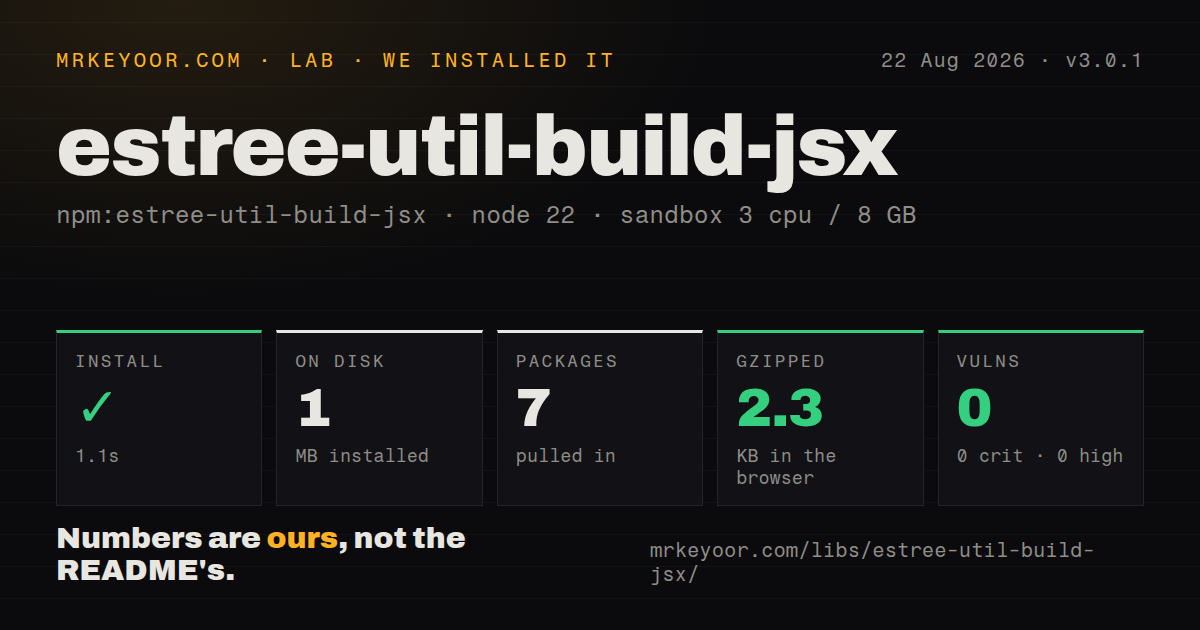
| Install | ✓ · 1.1s | 7 packages on disk · 1 MB |
| Import | ✓ | ESM import works · require() works · ESM package with exports map |
| Browser | 2.3 KB | gzipped (7.1 KB minified), bundled with esbuild |
| Types | ✓ | TypeScript types bundled |
| Known vulns | 0 | 0 critical · 0 high · 0 moderate · 0 low (npm audit) |
Answers from our run
Does estree-util-build-jsx install cleanly?
Yes. In a fresh container with an empty cache, npm install estree-util-build-jsx finished in 1 seconds, leaving 7 packages and 1 MB on disk. npm audit reported no known vulnerabilities.
How much does estree-util-build-jsx add to a browser bundle?
2.3 KB gzipped (7.1 KB minified) when the whole package is bundled for the browser with esbuild. Importing only part of it is usually smaller.
Does estree-util-build-jsx work with both ESM and CommonJS?
Yes. Both import 'estree-util-build-jsx' and require('estree-util-build-jsx') worked in Node 22 in our run. The package is published as ESM with an exports map.
Does estree-util-build-jsx include TypeScript types?
Yes, type declarations ship inside the package, so no @types install is needed.
estree-util-build-jsx or @babel/plugin-transform-react-jsx: which should you use?
@babel/plugin-transform-react-jsx: Use it when the pipeline already uses Babel ASTs or needs Babel-specific JSX switches. estree-util-build-jsx 3.0.1 added only 1 MB across 7 installed packages in our sandbox and produced a 2.3 KB gzipped browser build.
When should you not use estree-util-build-jsx?
You start with a JavaScript string and want executable output. The README points that job to esbuild or SWC because this utility includes neither parser nor printer.
Use it if
- Your compiler already holds an ESTree `Program` with `JSXElement` or `JSXFragment` nodes and needs an in-place lowering pass.
- A unified or recma pipeline must preserve the same tree between JSX transformation and later JavaScript passes.
- Source comments need to select `@jsxRuntime`, `@jsxImportSource`, `@jsx`, or `@jsxFrag` on a file-by-file basis.
- Classic output must call a custom hyperscript function or retain namespaced JSX names.
- You start with a JavaScript string and want executable output. The README points that job to esbuild or SWC because this utility includes neither parser nor printer.
- The rest of the transform stack uses Babel nodes. Babel's JSX plugin works on that AST shape and avoids an ESTree conversion boundary.
- You expect source maps, Fast Refresh, minification, or bundler hooks. `buildJsx` only rewrites nodes in the object it receives.
- Babel's pure annotations, `useSpread`, `useBuiltIns`, `filter`, or namespace rejection are requirements. The README lists those as algorithm or option differences.
- The automatic-runtime package does not export `./jsx-runtime` and `./jsx-dev-runtime`. Generated imports append those subpaths and will fail resolution without them.
Setup reality
Our install of estree-util-build-jsx 3.0.1 finished in 1.1 seconds in a clean Node 22 Bookworm container. npm left 7 packages totaling 1 MB and reported 0 vulnerabilities at every severity. The package has 4 direct dependencies, 0 peers, and 64 KB unpacked. It includes TypeScript declarations and an exports map. Although its metadata declares ESM, both require() and ESM import worked in our Node 22 checks.
The input must already be a JSX-aware ESTree. Acorn plus acorn-jsx, Espree, or esast-util-from-js can create one; a printer such as estree-util-to-js handles the other end. buildJsx(tree, options) mutates tree and returns undefined. Plain Acorn reports comments through onComment but does not attach them to the program, so assign tree.comments before this pass when file pragmas matter.
Classic mode calls React.createElement and React.Fragment unless you provide other names. It does not import those identifiers. Automatic mode inserts imports from <importSource>/jsx-runtime; development mode uses jsx-dev-runtime and jsxDEV. The target package needs export-map entries for those subpaths. Version 3.0.1 keeps directive prologues ahead of the inserted import, which matters for files beginning with strings such as use client.
Our browser build measured 7.1 KB minified and 2.3 KB gzipped. No credential or native-build step is involved. Location records appear in development output only when the parser supplied positions and filePath identifies the source. Namespaced JSX is accepted, unlike Babel's default rejection. Spread attributes in classic mode become Object.assign calls, with no option to switch to Babel's other spread forms.
Patterns
Lower JSX to classic calls lower-classic-jsx
import {buildJsx} from 'estree-util-build-jsx'

buildJsx(tree, {
  pragma: 'React.createElement',
  pragmaFrag: 'React.Fragment'
})
`buildJsx` changes `tree` and returns `undefined`; classic mode does not insert a React import.
Parse JSX and retain comments with Acorn parse-acorn-jsx
import {Parser} from 'acorn'
import jsx from 'acorn-jsx'

const comments = []
const tree = Parser.extend(jsx()).parse(source, {
  ecmaVersion: 'latest',
  sourceType: 'module',
  onComment: comments
})
tree.comments = comments
Acorn does not attach collected comments to the program. Without `tree.comments`, `@jsxRuntime` and related file directives are invisible.
Transform and print an ESTree print-transformed-tree
import {buildJsx} from 'estree-util-build-jsx'
import {toJs} from 'estree-util-to-js'

buildJsx(tree, {runtime: 'automatic'})
const output = toJs(tree).value
This package supplies no printer or source map. The generator decides formatting and mapping behavior after the in-place pass.
Insert React automatic-runtime calls use-automatic-runtime
buildJsx(tree, {
  runtime: 'automatic',
  importSource: 'react'
})
The pass appends `/jsx-runtime` to `importSource` and imports only the helpers used by the tree.
Generate Preact runtime imports target-preact-runtime
buildJsx(tree, {
  runtime: 'automatic',
  importSource: 'preact'
})
Pass `preact`, not `preact/jsx-runtime`; the transform adds the runtime suffix itself.
Use a custom classic factory call-hyperscript
buildJsx(tree, {
  runtime: 'classic',
  pragma: 'h',
  pragmaFrag: 'Fragment'
})
Both identifiers must already be in scope. Member expressions such as `ui.h` also work as pragma strings.
Add jsxDEV source information emit-development-jsx
buildJsx(tree, {
  runtime: 'automatic',
  development: true,
  filePath: 'src/card.jsx'
})
Useful line and column data requires parser locations. Development mode emits more code and imports from `jsx-dev-runtime`.
Select a runtime inside a source file configure-runtime-comment
/** @jsxRuntime automatic */
/** @jsxImportSource preact */

const button = <button>Save</button>
The parser must retain these comments. A classic-only `@jsx` directive conflicts with automatic runtime and causes an error.
Wrap the pass for a recma pipeline wrap-recma-plugin
import {buildJsx} from 'estree-util-build-jsx'

export function recmaJsx(options) {
  return function transform(tree) {
    buildJsx(tree, options)
  }
}
Unified keeps the same tree when the transformer returns nothing. Use `recma-build-jsx` if a maintained wrapper already covers the pipeline.
Keep a directive before generated imports preserve-directive-prologue
'use client'

export const View = () => <main>Hello</main>
Version 3.0.1 fixes generated automatic-runtime imports so a directive such as `use client` remains at the start of the program.
Lower namespaced JSX names transform-namespaces
const node = <svg:path xml:lang="en" />The transform accepts namespace syntax and emits string names. Babel throws for namespaces by default unless configured otherwise.
Keep the original tree reference use-immutable-reference
const sameTree = tree
buildJsx(tree)
console.assert(tree === sameTree)
The function returns `undefined` and rewrites nodes on the supplied object, so do not assign its return value to `tree`.
Alternatives
| Package | Registry | Pick it when |
|---|---|---|
| @babel/plugin-transform-react-jsx | npm | Use it when the pipeline already uses Babel ASTs or needs Babel-specific JSX switches. |
| esbuild | npm | Use it to parse source, lower JSX, print code, and emit source maps in one tool. |
| sucrase | npm | Use it for quick source-to-source JSX and TypeScript transforms without managing AST nodes. |
More web frontend guides
postcss · react · react-dom · tailwindcss · clsx · htmlparser2 · the whole shelf →
How this guide is made: grounded in the library's documentation, release notes, changelog, and issue history, on a fixed rubric — not a hands-on install of every release. The 50 most-downloaded entries are additionally install-verified in clean containers. Corrections: contact the desk.