isomorphic-dompurify review
isomorphic-dompurify 3.23.0 gives browser and Node code one DOMPurify import. A browser build uses the real window; the Node path creates a jsdom window because DOMPurify sanitizes a DOM tree rather than parsing strings alone. The wrapper exposes sanitize(), hooks, configuration, DOMPurify types, an explicit-window factory, and clearWindow() for long-running servers. Version 3.23.0 updates DOMPurify and development dependencies without changing that surface. In our measured 3.22.0 install, both CommonJS require and ESM import worked, and the browser bundle was 11 KB gzipped.
isomorphic-dompurify 3.22.0 occupied 29 MB across 40 packages in our sandbox, while its browser path measured 11 KB gzipped and had 0 audit findings. Install the current 3.23.0 wrapper when one DOMPurify policy must span SSR and browser code; browser-only projects should use DOMPurify directly.
We installed it
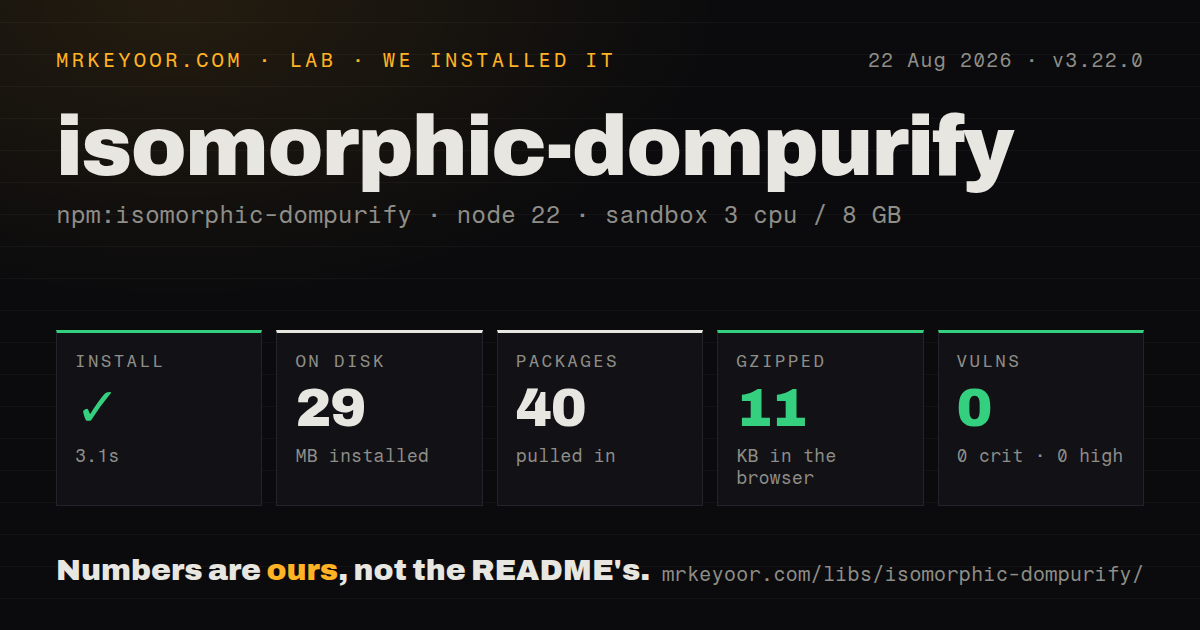
| Install | ✓ · 3.1s | 40 packages on disk · 29 MB |
| Import | ✓ | ESM import works · require() works · CommonJS package with exports map |
| Browser | 11 KB | gzipped (28.6 KB minified), bundled with esbuild |
| Types | ✓ | TypeScript types bundled |
| Known vulns | 0 | 0 critical · 0 high · 0 moderate · 0 low (npm audit) |
Answers from our run
Does isomorphic-dompurify install cleanly?
Yes. In a fresh container with an empty cache, npm install isomorphic-dompurify finished in 3 seconds, leaving 40 packages and 29 MB on disk. npm audit reported no known vulnerabilities.
How much does isomorphic-dompurify add to a browser bundle?
11 KB gzipped (28.6 KB minified) when the whole package is bundled for the browser with esbuild. Importing only part of it is usually smaller.
Does isomorphic-dompurify work with both ESM and CommonJS?
Yes. Both import 'isomorphic-dompurify' and require('isomorphic-dompurify') worked in Node 22 in our run. The package is published as CommonJS with an exports map.
Does isomorphic-dompurify include TypeScript types?
Yes, type declarations ship inside the package, so no @types install is needed.
isomorphic-dompurify or dompurify: which should you use?
dompurify: Use it for browser-only sanitization or when you prefer to create and own the Node DOM instance. isomorphic-dompurify 3.22.0 occupied 29 MB across 40 packages in our sandbox, while its browser path measured 11 KB gzipped and had 0 audit findings.
When should you not use isomorphic-dompurify?
Sanitization happens only in a browser; direct DOMPurify avoids installing jsdom for a server path you will never use
Use it if
- The same HTML-sanitizing module must run during Node server rendering and in a browser
- DOMPurify hooks, profiles, Trusted Types output, and TypeScript types are needed on both sides of an application
- A server process can carry jsdom and periodically reset the wrapper's internal window
- The deployment already runs a Node release accepted by the package's narrow engine range
- Sanitization happens only in a browser; direct DOMPurify avoids installing jsdom for a server path you will never use
- The server is earlier than Node 22.22.2, Node 24.15.0, or Node 26; the 3.x engine range rejects those older patch levels
- A 29 MB installed footprint is too much for the service or function; our 3.22.0 sandbox needed 40 packages for the wrapper and its server DOM
- Your CommonJS deployment matches the documented ERR_REQUIRE_ESM failure around jsdom dependencies; the README's workaround pins a much older jsdom and needs security review
- Code will modify sanitized markup afterward or add broad custom URI, tag, and attribute rules; those changes can reopen paths the default DOMPurify policy removed
Setup reality
We installed isomorphic-dompurify 3.22.0 in a fresh unprivileged Node 22 Bookworm container with 3 CPUs and 8 GB of RAM. npm completed in 3.1 seconds and left 40 packages using 29 MB on disk. The wrapper itself was 56 KB unpacked with 2 direct dependencies and no peers. npm audit reported 0 known vulnerabilities. The package requires Node ^22.22.2, ^24.15.0, or >=26.0.0.
Version 3.22.0 is CommonJS with an exports map that selects Node or browser entry files. require() and ESM import worked in our sandbox, and TypeScript declarations are included. A full browser import measured 28.6 KB minified and 11 KB gzipped. The browser branch avoids jsdom at runtime, while the Node installation still contains the server DOM dependency.
Node sanitization reuses an internal jsdom window. The project documents progressive slowdown and memory growth as DOM state accumulates in a long-running process. clearWindow() closes that window and creates a fresh one. It also discards hooks and persistent setConfig() state, so reapply policy after cleanup. Decide whether cleanup happens after each request or after a bounded batch based on measured traffic and allocation cost.
The current 3.23.0 release updates DOMPurify from 3.4.13 to 3.4.14 according to its release notes. This wrapper publishes upstream DOMPurify changes as minor versions because it cannot assume upstream patches preserve behavior. Pin the minor, keep malicious HTML fixtures for the exact allowlist, and review upgrades. The README also records a CommonJS ERR_REQUIRE_ESM case with a jsdom override; reproduce the production module mode before relying on that workaround.
Patterns
Clean untrusted markup sanitize-html
import DOMPurify from 'isomorphic-dompurify';

const clean = DOMPurify.sanitize(userHtml);
renderTrustedMarkup(clean);
sanitize() returns markup under DOMPurify's default policy. Perform this at the final HTML sink and avoid adding attributes or nodes afterward.
Limit output to HTML html-profile
import { sanitize } from 'isomorphic-dompurify';

const clean = sanitize(input, {
  USE_PROFILES: { html: true },
});
The HTML profile excludes SVG and MathML. USE_PROFILES takes precedence over ALLOWED_TAGS rather than merging with it.
Permit a small formatting set allow-formatting
const clean = sanitize(input, {
  ALLOWED_TAGS: ['p', 'strong', 'em', 'a'],
  ALLOWED_ATTR: ['href'],
});
A short allowlist narrows accepted markup. Test every URL scheme and output context that the application permits.
Remove style markup forbid-inline-style
const clean = sanitize(input, {
  FORBID_TAGS: ['style'],
  FORBID_ATTR: ['style'],
});
FORBID_TAGS and FORBID_ATTR add restrictions to the selected policy. Later code can still introduce unsafe style content.
Remove link targets with a hook add-hook
import { addHook, removeHook, sanitize, type NodeHook } from 'isomorphic-dompurify';

const stripTarget: NodeHook = node => {
  if ('removeAttribute' in node) node.removeAttribute('target');
};
addHook('afterSanitizeAttributes', stripTarget);
try {
  sanitize(input);
} finally {
  removeHook('afterSanitizeAttributes', stripTarget);
}
Hooks modify the shared sanitizer instance. Remove a request-scoped hook in finally, and reapply persistent hooks after clearWindow().
Log removed elements during debugging inspect-removals
DOMPurify.sanitize(input);
for (const removal of DOMPurify.removed) {
  console.debug(removal);
}
DOMPurify documents removed as diagnostic data from the latest sanitization call. Do not treat that list as proof that output is safe.
Apply a temporary shared policy set-config
import { clearConfig, sanitize, setConfig } from 'isomorphic-dompurify';

setConfig({ USE_PROFILES: { html: true } });
try {
  sanitize(input);
} finally {
  clearConfig();
}
setConfig() creates shared mutable state and causes per-call configuration to be ignored. Avoid changing it concurrently across requests.
Reset the server DOM after a batch clear-window
import { clearWindow, sanitize } from 'isomorphic-dompurify';

try {
  for (const row of rows) row.safeHtml = sanitize(row.html);
} finally {
  clearWindow();
}
clearWindow() closes and replaces the Node jsdom window. It is a browser no-op and removes hooks and persistent config on the server.
Bind a sanitizer to an explicit window isolated-instance
import DOMPurify from 'isomorphic-dompurify';
import { JSDOM } from 'jsdom';

const dom = new JSDOM('');
try {
  const purify = DOMPurify(dom.window);
  purify.sanitize(input);
} finally {
  dom.window.close();
}
The factory creates an instance for the supplied window. When you construct jsdom yourself, closing that window is your responsibility.
Return a document fragment dom-fragment
const fragment = sanitize(input, {
  RETURN_DOM_FRAGMENT: true,
});
inspect(fragment.childNodes);
Returned nodes belong to the active browser or jsdom window. Do not keep server nodes after clearWindow() closes their owner.
Request TrustedHTML output trusted-types
const trusted = sanitize(input, {
  RETURN_TRUSTED_TYPE: true,
});
element.innerHTML = trusted;
TrustedHTML is available only where the Trusted Types API exists. The page's CSP and policy setup still control whether the sink accepts it.
Lock sanitizer behavior with a fixture regression-test
import { expect, test } from 'vitest';
import { sanitize } from 'isomorphic-dompurify';

test('drops click handlers', () => {
  const clean = sanitize('<button onclick="steal()">Pay</button>');
  expect(clean).not.toContain('onclick');
});
Wrapper minor releases can carry DOMPurify behavior changes. Keep malicious fixtures for the exact configuration and markup sinks used in production.
Alternatives
| Package | Registry | Pick it when |
|---|---|---|
| dompurify | npm | Use it for browser-only sanitization or when you prefer to create and own the Node DOM instance |
| sanitize-html | npm | Use it for a Node-centered sanitizer with explicit tags, attributes, iframe hosts, and URL-scheme policy |
| xss | npm | Use it when a smaller whitelist sanitizer matches the application's HTML and parser requirements |
More security guides
cryptography · jose · pyjwt · dompurify · jsonwebtoken · oauthlib · the whole shelf →
How this guide is made: grounded in the library's documentation, release notes, changelog, and issue history, on a fixed rubric — not a hands-on install of every release. The 50 most-downloaded entries are additionally install-verified in clean containers. Corrections: contact the desk.