xss review
xss 1.0.15, also called js-xss, turns an untrusted HTML string into a smaller allowed subset. Its parser escapes unknown tags by default, drops attributes outside a per-tag list, checks URL-bearing attributes, and delegates allowed inline CSS to cssfilter. Hooks can replace each decision. Version 1.0.15 adds `<kbd>` to the default list and can emit single-quoted attribute values. Our browser build measured 6.2 KB gzipped, but the right policy matters far more than the byte count.
xss 1.0.15 installed in 0.9 seconds as 3 packages using 1 MB, produced a 6.2 KB gzipped browser build, and had 0 audit findings in our sandbox. Install it only with a tested allowlist and URL policy; for plain text use framework escaping, and for browser-first HTML compare DOMPurify.
We installed it
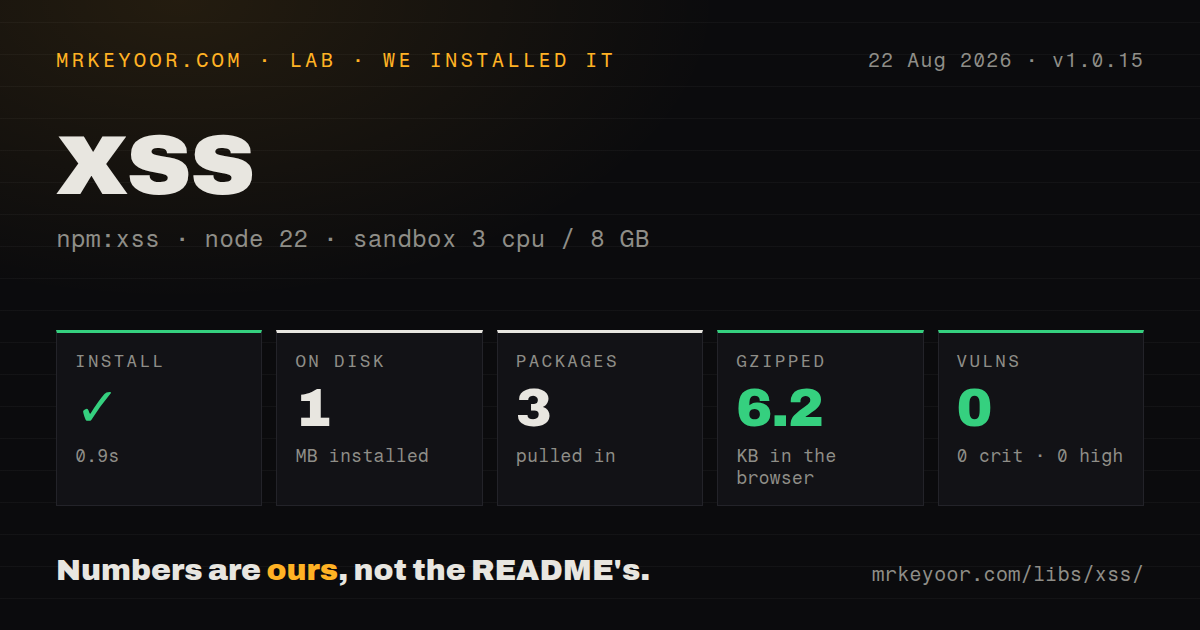
| Install | ✓ · 0.9s | 3 packages on disk · 1 MB |
| Import | ✓ | ESM import works · require() works · CommonJS package |
| Browser | 6.2 KB | gzipped (18.4 KB minified), bundled with esbuild |
| Types | ✓ | TypeScript types bundled |
| Known vulns | 0 | 0 critical · 0 high · 0 moderate · 0 low (npm audit) |
Answers from our run
Does xss install cleanly?
Yes. In a fresh container with an empty cache, npm install xss finished in 0.9s, leaving 3 packages and 1 MB on disk. npm audit reported no known vulnerabilities.
How much does xss add to a browser bundle?
6.2 KB gzipped (18.4 KB minified) when the whole package is bundled for the browser with esbuild. Importing only part of it is usually smaller.
Does xss work with both ESM and CommonJS?
Yes. Both import 'xss' and require('xss') worked in Node 22 in our run. The package is published as CommonJS.
Does xss include TypeScript types?
Yes, type declarations ship inside the package, so no @types install is needed.
xss or dompurify: which should you use?
dompurify: Use it for DOM-based sanitization in browsers, or on a server paired with a maintained DOM implementation. xss 1.0.15 installed in 0.9 seconds as 3 packages using 1 MB, produced a 6.2 KB gzipped browser build, and had 0 audit findings in our sandbox.
When should you not use xss?
Users submit plain text. Render through the framework's escaped text path and avoid dangerouslySetInnerHTML or equivalent raw HTML insertion.
Use it if
- Your product intentionally accepts user-authored HTML and its allowed tags, attributes, URL schemes, and styles can be written down exactly.
- The same string sanitizer must run in Node and a bundled browser without relying on a DOM implementation.
- Unsupported markup should appear escaped, or selected tag bodies should be removed under an explicit policy.
- A reusable FilterXSS instance or command-line pass fits an existing stored-HTML workflow.
- Users submit plain text. Render through the framework's escaped text path and avoid `dangerouslySetInnerHTML` or equivalent raw HTML insertion.
- You want browser-native DOM parsing and an active browser-security focus. DOMPurify is the better comparison before choosing this character-level parser.
- Only HTTPS links are acceptable. The default URL check also accepts other schemes and relative forms, so it needs a narrower `safeAttrValue` policy.
- You plan to allow `style` while setting `css: false`. The README says that setting stops style-content filtering and leaves CSS acceptance to your code.
- You need `filterXSSWithResult` from the current repository README. That API is newer than the published 1.0.15 tarball and is absent from its shipped declaration.
Setup reality
We installed xss 1.0.15 in a fresh Node 22 Bookworm sandbox. npm finished in 0.9 seconds and left 3 packages using 1 MB on disk. xss is 200 KB unpacked, declares 2 direct dependencies and 0 peers, and uses MIT. Bundled TypeScript declarations were present, and npm audit found 0 known vulnerabilities.
The package is CommonJS without an exports map. Both require() and ESM import worked in our Node 22 checks. Its published engine floor is Node >=0.10.0, which says little about current platform testing. A full browser import built to 18.4 KB minified and 6.2 KB gzipped. Bundle the package yourself; the README says its RawGit browser URL is unsuitable for production.
Supplying allowList or whiteList replaces the defaults. Start from an empty list for a small policy, or clone getDefaultWhiteList() before extending it. Unknown tags are escaped unless stripIgnoreTag is true, and their inner text remains unless stripIgnoreTagBody removes named bodies such as script. Adding style invokes cssfilter unless you disable it.
Hook return strings enter the output directly. Escape attribute values and never return the original rejected tag merely to preserve custom markup. The default URL policy accepts more than HTTP and HTTPS, so wrap safeAttrValue when product rules are narrower. Keep hostile fixtures for malformed tags, mixed-case attributes, encoded protocols, CSS, comments, and every custom hook, then rerun them on upgrades.
Patterns
Apply the shipped allowlist sanitize-default
const xss = require("xss")

const clean = xss(
  "<p>Hello <strong>friend</strong></p><script>alert(1)</script>"
)
Disallowed tags are escaped by default, so their text remains visible. Removing a script body requires `stripIgnoreTagBody`.
Allow a small HTML subset minimal-policy
const clean = xss(untrustedHtml, {
  allowList: {
    p: [],
    strong: [],
    em: [],
    a: ["href", "title"],
  },
})
Passing `allowList` replaces the default table. This example does not inherit any other allowed tags or attributes.
Clone and extend the default table extend-defaults
const allowList = xss.getDefaultWhiteList()
allowList.mark = ["class"]

const clean = xss(untrustedHtml, { allowList })
Use the cloned result rather than mutating `xss.whiteList`, which could change another sanitizer call in the same process.
Reuse one compiled policy reuse-instance
const filter = new xss.FilterXSS({
  allowList: {
    p: [],
    pre: [],
    code: ["class"],
  },
  stripIgnoreTag: true,
})

const first = filter.process(commentA)
const second = filter.process(commentB)
`stripIgnoreTag` drops rejected tag syntax but retains its text. The FilterXSS instance keeps one options object across calls.
Drop selected elements and their contents remove-tag-bodies
const clean = xss(untrustedHtml, {
  allowList: { p: [], strong: [], em: [] },
  stripIgnoreTag: true,
  stripIgnoreTagBody: ["script", "style", "iframe"],
})
Body removal applies to tags outside the allowlist. Listing only `script` does not remove text inside another rejected element.
Remove markup while preserving ordinary text plain-text-subset
const text = xss(untrustedHtml, {
  allowList: {},
  stripIgnoreTag: true,
  stripIgnoreTagBody: ["script", "style"],
})
The output follows xss parsing and entity handling; it is not guaranteed to match a browser DOM's `textContent` whitespace.
Permit selected data attributes data-attributes
const clean = xss(untrustedHtml, {
  onIgnoreTagAttr(tag, name, value) {
    if (tag === "div" && /^data-[a-z0-9-]+$/.test(name)) {
      return `${name}="${xss.escapeAttrValue(value)}"`
    }
  },
})
A hook return value is inserted into output. Constrain the attribute name and escape its value before returning markup.
Narrow anchor URLs to HTTPS https-links
const strict = new xss.FilterXSS({
  allowList: { a: ["href", "title"] },
  safeAttrValue(tag, name, value, cssFilter) {
    if (tag === "a" && name === "href") {
      const decoded = xss.friendlyAttrValue(value).trim()
      if (!/^https:\/\//i.test(decoded)) return ""
    }
    return xss.safeAttrValue(tag, name, value, cssFilter)
  },
})
The built-in URL policy accepts more forms than HTTPS. This wrapper narrows anchor href values while delegating other attributes.
Allow only named CSS properties inline-css
const filter = new xss.FilterXSS({
  allowList: { span: ["style"] },
  css: {
    whiteList: {
      color: true,
      "font-weight": /^(normal|bold|[1-9]00)$/i,
    },
  },
})
Style is absent from the default HTML allowlist. Setting `css: false` would stop cssfilter from checking the value.
Record tags rejected by the policy audit-rejected-tags
const rejected = new Set()

const clean = xss(untrustedHtml, {
  onIgnoreTag(tag) {
    rejected.add(tag)
    return undefined
  },
})
Returning undefined keeps the default escaped output. Returning the original tag string would bypass that handling.
Choose single-quoted attributes single-quote-output
const clean = xss(
  '<a href="https://example.com">link</a>',
  { singleQuotedAttributeValue: true },
)
Version 1.0.15 adds this serialization option. It changes quote syntax without changing which attributes or URLs pass.
Filter one file from the command line sanitize-cli
npx xss -i untrusted.html -o sanitized.htmlThe CLI uses package defaults. Application-specific policies and regression fixtures belong in JavaScript code and automated tests.
Alternatives
| Package | Registry | Pick it when |
|---|---|---|
| dompurify | npm | Use it for DOM-based sanitization in browsers, or on a server paired with a maintained DOM implementation. |
| sanitize-html | npm | Use it for server-side HTML parsing with detailed tag transforms, nesting rules, and URL-scheme configuration. |
| rehype-sanitize | npm | Use it when untrusted content already travels through a unified or rehype syntax-tree pipeline. |
More security guides
cryptography · jose · pyjwt · dompurify · jsonwebtoken · oauthlib · the whole shelf →
How this guide is made: grounded in the library's documentation, release notes, changelog, and issue history, on a fixed rubric — not a hands-on install of every release. The 50 most-downloaded entries are additionally install-verified in clean containers. Corrections: contact the desk.