docker review
`docker` 7.2.0 is the official Python client for a Docker Engine daemon. Its high-level client creates containers, pulls images, follows logs, and manages networks, volumes, services, and Swarm objects. `APIClient` exposes lower-level Engine calls when the object API hides an option or progress stream. The current release adds Docker CLI context support: `from_env()` can follow the active context, while `from_context()` selects one by name. Our Python 3.12 sandbox imported it in 0.67 seconds. The distribution is pure Python but has no `py.typed` marker.
Our `docker` 7.2.0 install took 0.4 seconds, occupied 3 MB, and returned 0 audit findings, making the package cheap to add when Python genuinely needs Engine control. Skip it for Compose or buildx automation, and isolate its blocking calls in asyncio services.
We installed it
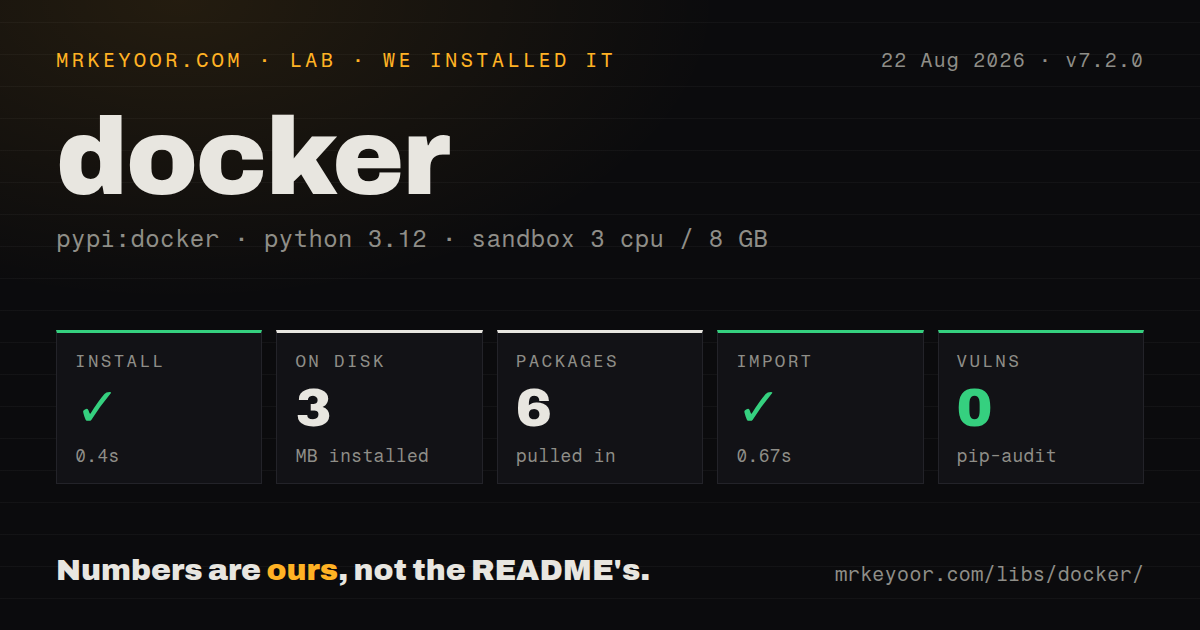
| Install | ✓ · 0.4s | 6 packages on disk · 3 MB |
| Import | ✓ | import docker in 0.67s · pure Python · requires Python >=3.8 |
| Known vulns | 0 | (pip-audit) |
Answers from our run
Does docker install cleanly?
Yes. In a fresh container with an empty cache, pip install docker finished in 0.4s, leaving 6 packages and 3 MB on disk. pip-audit reported no known vulnerabilities.
What does docker need to run?
Python >=3.8, and nothing compiled: it is pure Python. In our run import docker succeeded in 0.67s.
docker or python-on-whales: which should you use?
python-on-whales: Choose it when Python should drive Docker CLI features including Compose and buildx. Our docker 7.2.0 install took 0.4 seconds, occupied 3 MB, and returned 0 audit findings, making the package cheap to add when Python genuinely needs Engine control.
When should you not use docker?
Your build depends on buildx features such as multi-platform output, secret mounts, or advanced BuildKit cache controls. The SDK calls Engine build APIs and does not reproduce the full buildx command surface.
Discussed on
- hnDocker cannot be downloaded without logging into Docker Store1,620 points
- hnDocker is deleting Open Source organisations - what you need to know1,556 points
- hnTell HN: Docker pull fails in Spain due to football Cloudflare block1,157 points
- hnDocker Hub Hacked – 190k accounts, GitHub tokens revoked, builds disabled1,146 points
- hnI ditched Docker for Podman1,123 points
Use it if
- A Python worker needs to create, inspect, stop, and remove containers through structured Engine responses.
- Test infrastructure needs container logs, exit codes, health data, and cleanup under direct program control.
- A service consumes Docker event, stats, pull, or log streams without parsing CLI text.
- The same Python code must address local sockets, secured TCP daemons, SSH endpoints, or named Docker CLI contexts.
- Your build depends on buildx features such as multi-platform output, secret mounts, or advanced BuildKit cache controls. The SDK calls Engine build APIs and does not reproduce the full buildx command surface.
- You need to operate Compose projects. The documented resources cover the Engine API, while Compose v2 is a separate CLI and specification.
- Every I/O path must be asyncio-native. Client calls and streaming iterators are synchronous, so an event-loop service has to move them to a worker thread.
- You only want a temporary database or broker in tests. Testcontainers adds wait strategies and lifecycle cleanup that this lower-level client leaves to your code.
- Strict typing must come from the installed runtime distribution. Our 7.2.0 package had no `py.typed` file, despite exposing a large object and response-dictionary API.
Setup reality
We installed docker 7.2.0 in a fresh Python 3.12 Bookworm container. The install finished in 0.4 seconds, left 6 packages using 3 MB, and pip-audit found 0 known vulnerabilities. It is pure Python, declares 12 direct dependencies, requires Python 3.8 or newer, and imported in 0.67 seconds. The wheel does not include py.typed, so a successful import does not give strict type checkers a supported typed-package contract.
The package installs a client, not a daemon. docker.from_env() still needs a reachable Engine socket and permission to use it. A Linux socket commonly grants host-level control, so mounting /var/run/docker.sock into an application is a security decision. Remote TCP daemons need proper TLS verification; SSH transport uses the ssh extra. Registry pulls can also depend on a credential helper binary that must exist in the runtime environment.
Version 7.2.0 changed daemon selection. With no DOCKER_HOST, from_env() can read DOCKER_CONTEXT or the active context in ~/.docker/config.json. A context switch can therefore redirect an unattended process. Set the host or context explicitly, or pass use_context=False, when the target must remain fixed. Long pulls and builds may also need a larger request timeout than the default client setting.
Calls block the calling thread, and log or event generators may stay open indefinitely. Close streams and the client during shutdown. Resource objects retain inspection data in attrs; call reload() after another process changes a container. Bind-mount paths are resolved on the daemon host, which matters immediately when Python and Docker run on different machines.
Patterns
Open a client and verify the Engine connect-and-ping
import docker

client = docker.from_env(timeout=120)
try:
    if not client.ping():
        raise RuntimeError('Docker Engine did not answer')
    print(client.version()['ApiVersion'])
finally:
    client.close()
In 7.2.0, `from_env()` may use the active Docker CLI context when `DOCKER_HOST` is unset. Pin the endpoint for unattended jobs.
Connect through a named CLI context choose-context
import docker

client = docker.from_context('staging', timeout=120)
try:
    print(client.info()['Name'])
finally:
    client.close()
`from_context()` was added in 7.2.0 and reads context metadata from the Docker CLI configuration visible to this process.
Run a command and collect its output run-one-shot
output = client.containers.run(
    'python:3.12-slim',
    ['python', '-c', 'print(6 * 7)'],
    remove=True,
)
print(output.decode().strip())
Without `detach=True`, `run()` waits and returns output bytes. A nonzero process exit raises `ContainerError`.
Start a named background container start-detached-container
container = client.containers.run(
    'redis:7-alpine',
    detach=True,
    name='cache-test',
    ports={'6379/tcp': None},
    labels={'owner': 'integration-test'},
)
container.reload()
print(container.attrs['NetworkSettings']['Ports'])
Published ports belong to the Docker host. When the daemon is remote, the address is not the Python process's machine.
Wait for exit and inspect the result wait-for-container
result = container.wait(timeout=300)
container.reload()
print(result['StatusCode'])
print(container.attrs['State']['OOMKilled'])
logs = container.logs(stdout=True, stderr=True)
Read any required logs before removal. `reload()` refreshes cached inspection fields after the container stops.
Follow a container's output follow-logs
stream = container.logs(stream=True, follow=True, timestamps=True)
try:
    for chunk in stream:
        print(chunk.decode(errors='replace').rstrip())
finally:
    stream.close()
The iterator blocks while it waits for data. Close it during cancellation or service shutdown.
Keep exec stdout and stderr separate exec-with-stderr
result = container.exec_run(
    ['sh', '-c', 'printf out; printf err >&2'],
    demux=True,
    workdir='/tmp',
)
stdout, stderr = result.output
print(result.exit_code, stdout, stderr)
With `demux=True` and `stream=False`, output is a two-item tuple. Streaming changes it to an iterator of tuples.
Read image-pull progress events pull-with-progress
for event in client.api.pull(
    'nginx', tag='1.27-alpine', stream=True, decode=True
):
    print(event.get('status'), event.get('progress', ''))
The low-level API exposes decoded progress records. The high-level `images.pull()` call waits for completion.
Send a local build context build-image
image, events = client.images.build(
    path='./service',
    tag='example/service:dev',
    rm=True,
)
for event in events:
    if 'stream' in event:
        print(event['stream'], end='')
The SDK archives the directory and sends it to the daemon. Keep secrets out with `.dockerignore`; use buildx when the Dockerfile needs its feature set.
Pass registry credentials for a pull pull-private-image
auth = {'username': 'ci', 'password': registry_token}
image = client.images.pull(
    'registry.example.com/team/app',
    tag='latest',
    auth_config=auth,
)
Do not log `auth_config`. A configured credential helper also has to be installed inside the process environment.
List test containers by label find-by-label
items = client.containers.list(
    all=True,
    filters={'label': 'owner=integration-test'},
)
for item in items:
    item.reload()
    print(item.name, item.status)
`list()` returns running containers by default. Cleanup code needs `all=True` to see exited containers.
Watch container lifecycle events consume-events
events = client.events(
    decode=True,
    filters={'type': 'container', 'event': ['start', 'die']},
)
try:
    for event in events:
        print(event['Action'], event['Actor']['Attributes'].get('name'))
finally:
    events.close()
The event stream can end on daemon or network failure. Reconnect with a `since` timestamp if missing an event is unacceptable.
Alternatives
| Package | Registry | Pick it when |
|---|---|---|
| python-on-whales | PyPI | Choose it when Python should drive Docker CLI features including Compose and buildx. |
| aiodocker | PyPI | Choose it for an asyncio-native client built on aiohttp. |
| podman-py | PyPI | Choose it when the target service is Podman and pod operations belong in the same API. |
More infra guides
semver · boto3 · opentelemetry-api · @opentelemetry/api · psutil · distro · the whole shelf →
How this guide is made: grounded in the library's documentation, release notes, changelog, and issue history, on a fixed rubric — not a hands-on install of every release. The 50 most-downloaded entries are additionally install-verified in clean containers. Corrections: contact the desk.