databricks-sql-connector review
Databricks SQL Connector is the vendor's Python DB API 2.0 driver for SQL warehouses and compatible clusters. It talks to Databricks over HTTPS through a Thrift client, so hosts do not need an ODBC or JDBC driver. Cursors execute parameterized SQL, expose catalog metadata, cancel statements, move files through staging commands, and can return Arrow tables when the optional PyArrow extra is installed. Release 4.4.0 drops Python 3.9, reports affected-row counts for DML on the Thrift backend, and stops requiring a local staging path for remote REMOVE operations. Our clean install imported quickly and had no audit findings, though its resolved environment still occupied 114 MB.
Use this connector for direct Python access to Databricks SQL, especially when Arrow results or OAuth matter. Pick databricks-sqlalchemy for ORM code, and use file staging plus COPY INTO instead of treating executemany as a bulk loader.
We installed it
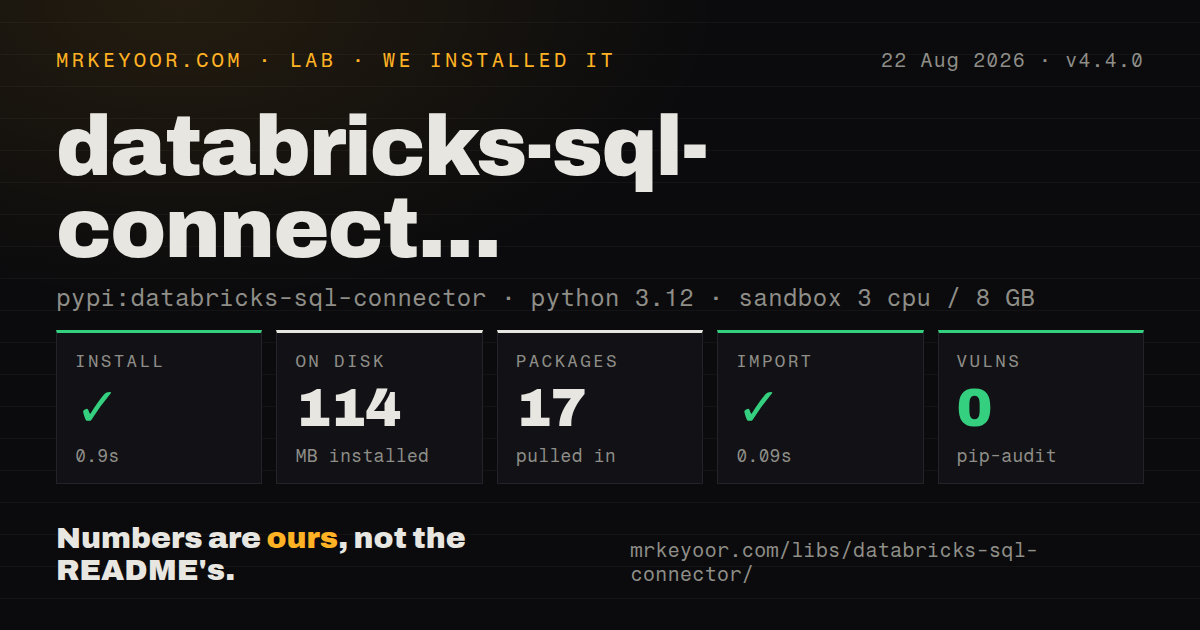
| Install | ✓ · 0.9s | 17 packages on disk · 114 MB |
| Import | ✓ | import databricks in 0.09s · pure Python · py.typed · requires Python >=3.10,<4.0 |
| Known vulns | 0 | (pip-audit) |
Answers from our run
Does databricks-sql-connector install cleanly?
Yes. In a fresh container with an empty cache, pip install databricks-sql-connector finished in 0.9s, leaving 17 packages and 114 MB on disk. pip-audit reported no known vulnerabilities.
What does databricks-sql-connector need to run?
Python >=3.10,<4.0, and nothing compiled: it is pure Python. In our run import databricks succeeded in 0.09s, and the package ships py.typed for type checkers.
databricks-sql-connector or databricks-sdk: which should you use?
databricks-sdk: Use it for jobs, clusters, workspace objects, and other REST APIs when running SQL is only a small part of the task. Use this connector for direct Python access to Databricks SQL, especially when Arrow results or OAuth matter.
When should you not use databricks-sql-connector?
You need a lean client for one small query. Our installation produced 17 packages and used 114 MB, before your application code or cached results.
Use it if
- Your Python service must query a Databricks SQL warehouse without installing a system ODBC or JDBC driver.
- Existing code expects PEP 249 connections, cursors, bound parameters, row metadata, commit, and rollback.
- Large query results should arrive as Arrow tables for transfer into pandas, Polars, or another Arrow-aware consumer.
- The same client needs OAuth credentials, Unity Catalog metadata calls, query cancellation, or volume staging commands.
- You need a lean client for one small query. Our installation produced 17 packages and used 114 MB, before your application code or cached results.
- Your application is built around SQLAlchemy. Since 4.0.0, the dialect has lived in the separate databricks-sqlalchemy package.
- You are serving latency-sensitive transactional reads. Warehouse availability and query execution sit outside the connector, and this driver does not turn Databricks into an OLTP database.
- You intend to load many individual rows with executemany. The connector runs each parameter set as a separate operation rather than sending one batched insert.
- Your runtime is Python 3.9. Version 4.4.0 requires Python 3.10 or newer, regardless of older wording that may still appear in repository documentation.
Setup reality
We installed databricks-sql-connector 4.4.0 in a clean Python 3.12 Bookworm container. It completed in 0.9 seconds, resolved 17 packages, and used 114 MB on disk. The package declares 16 direct dependencies, requires Python 3.10 through 3.x, is pure Python, includes py.typed, and carries Apache-2.0 licensing. import databricks worked in 0.09 seconds. pip-audit found 0 known vulnerabilities in that resolved environment. Arrow fetching and the Rust kernel backend use optional extras that can change what gets installed.
A connection needs a bare server_hostname, an http_path copied from the warehouse or cluster connection details, and credentials. Supplying a full https:// workspace URL where the hostname belongs is a common configuration error. Personal access tokens go in access_token. OAuth user-to-machine may open a browser, which rules it out for unattended jobs. Machine-to-machine examples use a credentials provider and the separately installed Databricks SDK; the service principal also needs workspace assignment and permission on the target compute and data.
PyArrow is required for fetchall_arrow() and fetchmany_arrow(). The [kernel] extra installs the native Rust client core and PyArrow, then use_kernel=True selects it. Version 4.4.0 no longer supports Python 3.9. Autocommit starts enabled, so transaction code must disable it before relying on rollback. execute_async() is a pollable connector API rather than an asyncio coroutine. For bulk loading, avoid executemany() at scale because parameter sets run separately; upload files to a volume and issue COPY INTO instead.
Patterns
Open a token-authenticated connection connect-and-query
import os
from databricks import sql

with sql.connect(
    server_hostname=os.getenv("DATABRICKS_SERVER_HOSTNAME"),
    http_path=os.getenv("DATABRICKS_HTTP_PATH"),
    access_token=os.getenv("DATABRICKS_TOKEN"),
) as connection:
    with connection.cursor() as cursor:
        cursor.execute("SELECT * FROM range(10)")
        for row in cursor.fetchall():
            print(row)
Pass only the host name to server_hostname and copy http_path from Compute connection details. Context managers close the cursor and the remote session even when execution raises.
Bind named query values named-parameters
with connection.cursor() as cursor:
    cursor.execute(
        "SELECT :name AS name, :age AS age, :active AS active",
        {"name": "Jane", "age": 30, "active": True},
    )
    print(cursor.fetchone())
Native server-side binding is the default. Keep values outside the SQL string; inline parameter mode performs client-side substitution and reintroduces injection risk.
Read one row several ways read-rows-as-dicts
cursor.execute("SELECT id, name FROM main.default.users LIMIT 5")
rows = cursor.fetchall()

print(rows[0][0])          # positional, Row subclasses tuple
print(rows[0].name)        # attribute access
print(rows[0].asDict())    # {"id": 1, "name": "Jane"}
Connector rows behave like tuples and also expose fields by name. Use cursor.description when downstream code needs the server-reported column metadata.
Receive an Arrow table or chunks fetch-arrow-table
cursor.execute("SELECT * FROM samples.nyctaxi.trips LIMIT 100000")
table = cursor.fetchall_arrow()   # pyarrow.Table
df = table.to_pandas()

# or stream it in chunks
cursor.execute("SELECT * FROM big_table")
while (batch := cursor.fetchmany_arrow(50_000)).num_rows:
    process(batch)
Install the pyarrow extra before using either method. Chunked fetching bounds client memory when a complete result table would be too large.
Build a multi-row insert bulk-insert
with connection.cursor() as cursor:
    cursor.execute("CREATE TABLE IF NOT EXISTS squares (x int, x_squared int)")

    squares = [(i, i * i) for i in range(1000)]
    values = ",".join(f"({x}, {y})" for x, y in squares)
    cursor.execute(f"INSERT INTO squares VALUES {values}")
This example controls its own integers, so interpolation is safe here. For real bulk ingestion, stage a file and run COPY INTO; executemany submits parameter sets separately.
Poll an asynchronously submitted statement async-execute
import time

with connection.cursor() as cursor:
    cursor.execute_async("SELECT COUNT(*) FROM huge_fact_table")

    while cursor.is_query_pending():
        time.sleep(5)

    cursor.get_async_execution_result()
    print(cursor.fetchall())
execute_async starts a server query and returns control, but it does not produce an awaitable. Poll at a sensible interval, then call get_async_execution_result before fetching rows.
Cancel work from another thread cancel-query
import threading
from databricks import sql

def run():
    try:
        cursor.execute("SELECT SUM(a.id - b.id) FROM range(1000000000) a CROSS JOIN range(100000000) b GROUP BY (a.id - b.id)")
    except sql.exc.RequestError:
        print("cancelled")

threading.Thread(target=run).start()
time.sleep(15)
cursor.cancel()
A synchronous execute call blocks its thread, so cancellation must come from another thread or control path. Handle the connector exception raised by the interrupted statement.
Commit or roll back several statements transactions
connection.autocommit = False

with connection.cursor() as cursor:
    try:
        cursor.execute("UPDATE accounts SET balance = balance - 100 WHERE id = 1")
        cursor.execute("UPDATE accounts SET balance = balance + 100 WHERE id = 2")
        connection.commit()
    except Exception:
        connection.rollback()
        raise
    finally:
        connection.autocommit = True
Connections begin in autocommit mode. Transaction support also depends on the Databricks compute and table features backing the statements.
Create machine-to-machine credentials oauth-m2m
import os
from databricks.sdk.core import Config, oauth_service_principal
from databricks import sql

hostname = os.getenv("DATABRICKS_SERVER_HOSTNAME")

def credential_provider():
    return oauth_service_principal(Config(
        host=f"https://{hostname}",
        client_id=os.getenv("DATABRICKS_CLIENT_ID"),
        client_secret=os.getenv("DATABRICKS_CLIENT_SECRET"),
    ))

connection = sql.connect(
    server_hostname=hostname,
    http_path=os.getenv("DATABRICKS_HTTP_PATH"),
    credentials_provider=credential_provider,
)
Install databricks-sdk separately. A valid client secret is insufficient until the service principal is assigned to the workspace and granted access to the warehouse and data.
Inspect Unity Catalog metadata list-catalog-metadata
with connection.cursor() as cursor:
    print(cursor.catalogs().fetchall())
    print(cursor.schemas(catalog_name="main").fetchall())
    print(cursor.tables(catalog_name="main", schema_name="default").fetchall())
    print(cursor.columns(catalog_name="main", schema_name="default", table_name="users").fetchall())
These metadata methods return the cursor for immediate fetching. Pattern arguments accept percent wildcards when an exact catalog object name is unknown.
Put a local file into staging volume-ingestion
import os
from databricks import sql

local_dir = os.path.dirname(os.path.realpath("september.csv"))

with sql.connect(
    server_hostname=os.getenv("DATABRICKS_SERVER_HOSTNAME"),
    http_path=os.getenv("DATABRICKS_HTTP_PATH"),
    access_token=os.getenv("DATABRICKS_TOKEN"),
    staging_allowed_local_path=local_dir,
) as connection:
    with connection.cursor() as cursor:
        cursor.execute(
            "PUT 'september.csv' INTO 'stage://tmp/me@example.com/sales/september.csv' OVERWRITE"
        )
PUT and GET are restricted to the configured local directory tree. In 4.4.0, REMOVE no longer needs that setting because it touches only the remote staging location.
Select the Rust kernel client use-kernel-backend
# pip install "databricks-sql-connector[kernel]"
connection = sql.connect(
    server_hostname=host,
    http_path=http_path,
    access_token=token,
    use_kernel=True,
)
Install the kernel extra first; use_kernel=True does not fall back to Thrift when the native package is missing. Its wheel requires Python 3.10 or newer and the result path also needs PyArrow.
Alternatives
| Package | Registry | Pick it when |
|---|---|---|
| databricks-sdk | PyPI | Use it for jobs, clusters, workspace objects, and other REST APIs when running SQL is only a small part of the task. |
| databricks-sqlalchemy | PyPI | Use it when SQLAlchemy Core or ORM integration matters; the dialect was split from this connector in version 4.0.0. |
| pyodbc | PyPI | Use it when your fleet already carries ODBC drivers and one DB API client must connect to several database products. |
More data guides
numpy · pandas · fsspec · pyarrow · lxml · sqlalchemy · the whole shelf →
How this guide is made: grounded in the library's documentation, release notes, changelog, and issue history, on a fixed rubric — not a hands-on install of every release. The 50 most-downloaded entries are additionally install-verified in clean containers. Corrections: contact the desk.