cssnano review
cssnano 8 is a production-time CSS minifier built as a PostCSS plugin. Its default preset runs separate optimizers for comments, colors, selectors, values, duplicate rules, and other CSS syntax while aiming to keep the rendered result unchanged. The advanced preset makes assumptions about seeing the complete stylesheet set, so it needs more caution around third-party or runtime CSS. Version 8.0.9 updates colordx and SVGO to pick up their latest fixes; 8.0.8 had corrected gradient shortening to use the specification algorithm. Our browser build failed on Node-only code, which confirms that cssnano belongs in the build process rather than application code.
cssnano 8.0.8 took 5.7 seconds and 21 MB across 67 installed packages in our sandbox, with 0 audit findings, so its cost makes sense mainly inside an existing PostCSS production build. Use the default preset first; reach for a standalone compiler when PostCSS-specific control is not part of the requirement.
We installed it
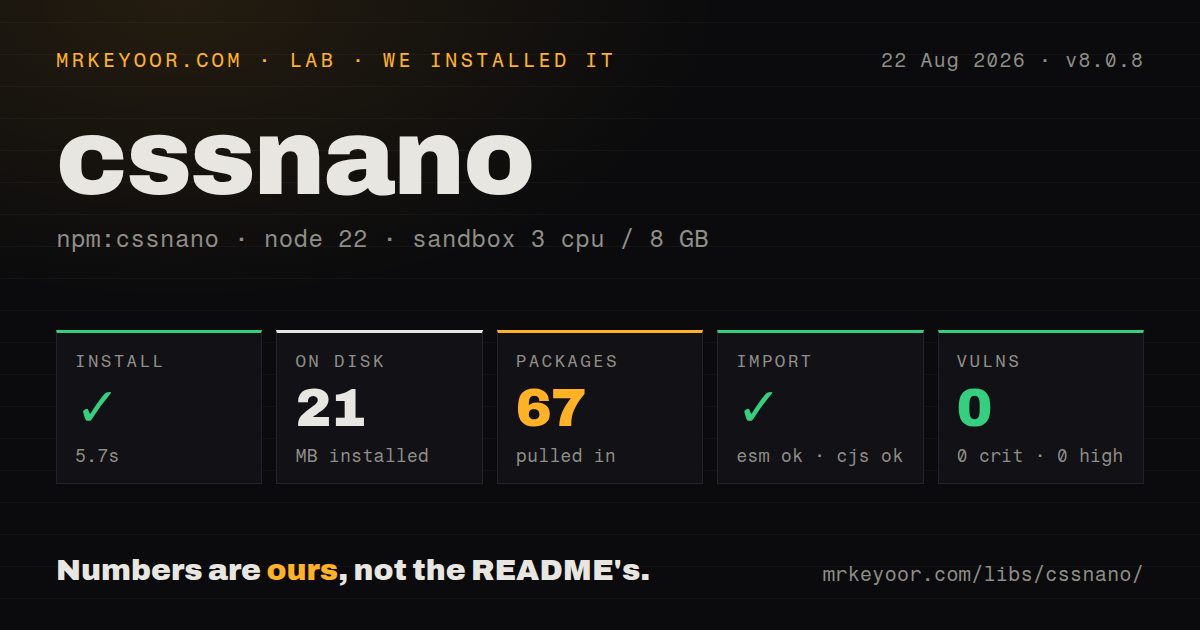
| Install | ✓ · 5.7s | 67 packages on disk · 21 MB |
| Import | ✓ | ESM import works · require() works · CommonJS package with exports map |
| Browser | n/a | could not be bundled for the browser (Node-only code, most likely) |
| Types | — | no TypeScript types found |
| Known vulns | 0 | 0 critical · 0 high · 0 moderate · 0 low (npm audit) |
Answers from our run
Does cssnano install cleanly?
Yes. In a fresh container with an empty cache, npm install cssnano finished in 6 seconds, leaving 67 packages and 21 MB on disk. npm audit reported no known vulnerabilities.
Can cssnano run in a browser?
Not directly: esbuild could not bundle it for the browser in our run, which normally means it depends on Node built-ins. Use it on the server, or find a browser-targeted alternative.
Does cssnano work with both ESM and CommonJS?
Yes. Both import 'cssnano' and require('cssnano') worked in Node 22 in our run. The package is published as CommonJS with an exports map.
Does cssnano include TypeScript types?
No type declarations were found in our install, so TypeScript users need their own declarations.
cssnano or lightningcss: which should you use?
lightningcss: Choose it for a Node 22 build that values native-speed minification and syntax lowering in one compiler. cssnano 8.0.8 took 5.7 seconds and 21 MB across 67 installed packages in our sandbox, with 0 audit findings, so its cost makes sense mainly inside an existing PostCSS production build.
When should you not use cssnano?
Your build is pinned to Node 20; cssnano 8 accepts Node ^22.11.0, ^24.11.0, or 26+ only
Use it if
- Your Node 22.11+ build already uses PostCSS and you want minification to operate on the same parsed CSS tree
- A particular rewrite needs to be disabled or configured while the rest of the default preset stays active
- Browserslist targets should influence optimizers that can emit different CSS for different browser sets
- You maintain output fixtures and can inspect stylesheet changes after cssnano patch upgrades
- Your build is pinned to Node 20; cssnano 8 accepts Node ^22.11.0, ^24.11.0, or 26+ only
- You need code that runs in the browser; our esbuild browser bundle failed because cssnano reaches Node-only modules
- PostCSS is not otherwise present and a standalone compiler such as Lightning CSS already handles minification and syntax lowering
- Styles arrive from widgets or runtime injection and you plan to use the advanced preset; whole-project transforms can rename or discard values they cannot see elsewhere
- Your bundler already minifies the final CSS asset; a second minification pass costs build time and complicates regression tracing
Setup reality
Our install of cssnano 8.0.8 completed in 5.7 seconds in a clean Node 22 container. The install left 67 packages occupying 21 MB, while npm audit reported 0 known vulnerabilities. The published package declared 2 direct dependencies and 1 PostCSS peer, and its own unpacked files measured 40 KB. We found no TypeScript types in that measured package. The How we test method used an unprivileged container with no package cache.
The measured 8.0.8 entry was CommonJS behind an exports map, and both require() and ESM import loaded it. A browser bundle did not compile because the dependency path uses Node-only code. Version 8 also has a tight engine rule: Node ^22.11.0, ^24.11.0, or 26+. CI images on Node 20 must move first, even if the existing PostCSS setup still starts there.
Install PostCSS beside cssnano because it is a peer dependency. Put cssnano after plugins whose generated output should be compressed. An inline preset takes precedence over config discovery, so do not pass one while expecting cssnano.config.js to supply different options. PostCSS owns source-map input and output; cssnano does not repair missing from, to, or previous-map settings. Version 8.0.9 updates colordx and SVGO rather than changing this configuration contract.
The default preset is the sensible first run. The separately installed advanced preset may rewrite identifiers or remove declarations based on a whole-project view. Test pages that mix 2 or more bundles, embedded widgets, and styles inserted by JavaScript before enabling it. Keep a before-and-after CSS fixture for every disabled optimizer, since patch releases such as 8.0.8 can deliberately change emitted gradients without altering your config file.
Patterns
Minify at the end of a PostCSS chain configure-postcss
// postcss.config.cjs
module.exports = {
  plugins: [
    require('autoprefixer'),
    require('cssnano')({ preset: 'default' }),
  ],
};
cssnano 8 requires Node 22.11+ and a compatible PostCSS peer. Run generators and prefixing before the minifier.
Keep development CSS readable limit-to-production
// postcss.config.cjs
const plugins = [require('autoprefixer')];
if (process.env.NODE_ENV === 'production') {
  plugins.push(require('cssnano')({ preset: 'default' }));
}
module.exports = { plugins };
A single NODE_ENV check keeps local rebuilds readable while CI and local production builds use the same 1 preset.
Move preset choices into cssnano.config.js use-config-file
// cssnano.config.js
module.exports = {
  preset: ['default', { discardComments: { removeAll: true } }],
};

// postcss.config.cjs
module.exports = { plugins: [require('cssnano')()] };
Call cssnano with no inline preset when using this file. An inline preset prevents the separate config from supplying those options.
Turn off one unsafe rewrite disable-transform
require('cssnano')({
  preset: ['default', {
    mergeRules: false,
    convertValues: { length: false },
  }],
});
Use false to remove a preset plugin and an object to configure one. Preserve the CSS case that exposed the problem as a regression fixture.
Retain bang comments keep-license-comments
require('cssnano')({
  preset: ['default', {
    discardComments: { remove: (text) => !text.startsWith('!') },
  }],
});
This keeps comments beginning with !. Check the actual license terms before deleting every notice from a distributed asset.
Run cssnano from a Node script process-css-string
const postcss = require('postcss');
const cssnano = require('cssnano');

const result = await postcss([cssnano({ preset: 'default' })])
  .process(sourceCss, { from: 'src/site.css', to: 'dist/site.css' });
await fs.promises.writeFile('dist/site.css', result.css);
PostCSS processing is asynchronous. Await the result and provide from and to so warnings and map paths refer to real files.
Carry an upstream source map emit-source-map
const result = await postcss([cssnano()]).process(sourceCss, {
  from: 'build/site.css',
  to: 'public/site.css',
  map: { inline: false, prev: upstreamMap },
});
await fs.promises.writeFile('public/site.css.map', result.map.toString());
PostCSS owns the 2 map stages. Without prev, the final map points to the intermediate CSS rather than its original sources.
Skip optimization of embedded SVG protect-svg-urls
require('cssnano')({
  preset: ['default', { svgo: false }],
});
The SVGO optimizer can change SVG stored inside CSS url() values. Disable it when a reproduced icon or mask regression points to that pass.
Use the advanced preset with exclusions try-advanced-preset
// npm install cssnano-preset-advanced
require('cssnano')({
  preset: ['advanced', { zindex: false, discardUnused: { fontFace: false } }],
});
The advanced preset is a separate package. Test all CSS bundles together because identifier and unused-value rewrites can miss runtime or vendor styles.
Pass cssnano options through webpack configure-webpack-minifier
const CssMinimizerPlugin = require('css-minimizer-webpack-plugin');
module.exports = { optimization: { minimizer: ['...', new CssMinimizerPlugin({
  minimizerOptions: { preset: ['default', { svgo: false }] },
})] } };
css-minimizer-webpack-plugin uses cssnano by default. Avoid a second cssnano pass in postcss-loader for the same final asset.
Alternatives
| Package | Registry | Pick it when |
|---|---|---|
| lightningcss | npm | Choose it for a Node 22 build that values native-speed minification and syntax lowering in one compiler |
| csso | npm | Choose it when one standalone CSS optimizer is preferable to a PostCSS peer and preset chain |
| clean-css | npm | Choose it when its level 1 and level 2 controls already match an established Node asset pipeline |
More web frontend guides
postcss · react · react-dom · tailwindcss · clsx · htmlparser2 · the whole shelf →
How this guide is made: grounded in the library's documentation, release notes, changelog, and issue history, on a fixed rubric — not a hands-on install of every release. The 50 most-downloaded entries are additionally install-verified in clean containers. Corrections: contact the desk.