clickhouse-connect review
clickhouse-connect is ClickHouse's official Python HTTP driver. It sends queries and inserts, streams large results, binds typed parameters, and maps data to Python rows, NumPy, pandas, Polars, or Arrow. The package also contains a ClickHouse-focused SQLAlchemy dialect and optional async and embedded chDB paths. Version 1.7.2 is a repair release: it fixes SQLAlchemy 2.x reflection, DISTINCT set operations, literal escaping, trailing-semicolon query formatting, parameter names containing $, and proxy paths. Our import worked, but the 19 declared direct dependencies make this more than a thin HTTP wrapper.
clickhouse-connect 1.7.2 installed in 0.4 seconds and occupied 13 MB across five packages, with a working import and no audit findings in our sandbox. It is a sound HTTP client for ClickHouse and DataFrame work, but native TCP users and applications needing full SQLAlchemy ORM behavior should choose another driver.
We installed it
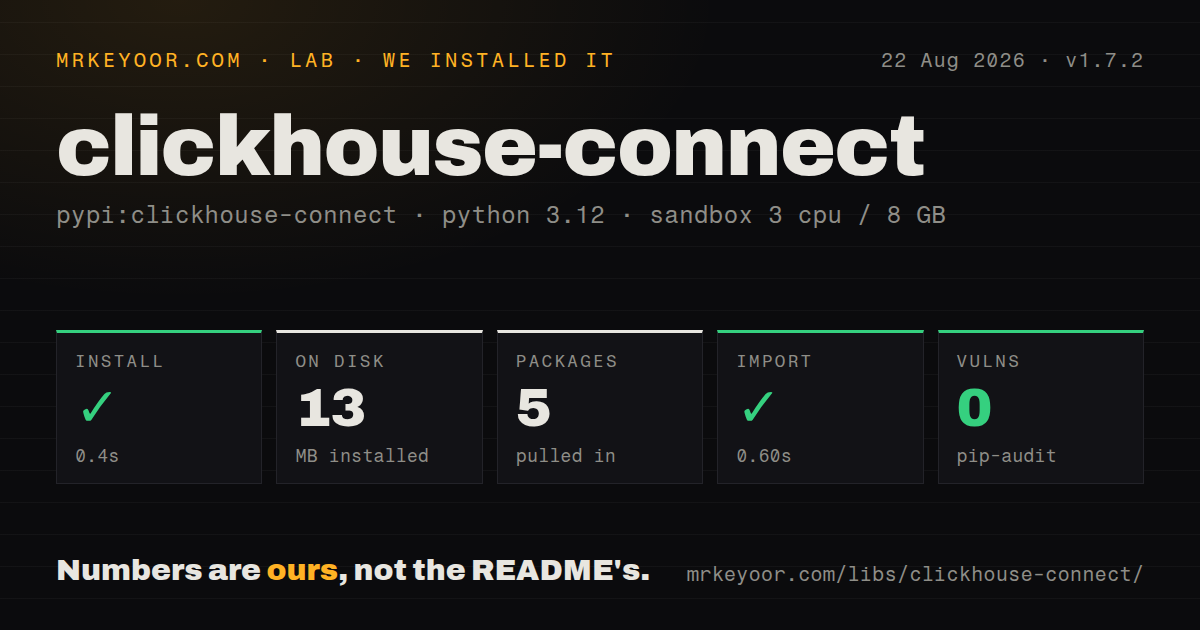
| Install | ✓ · 0.4s | 5 packages on disk · 13 MB |
| Import | ✓ | import clickhouse_connect in 0.60s · compiled extensions · py.typed · requires Python >=3.10,<3.15 |
| Known vulns | 0 | (pip-audit) |
Answers from our run
Does clickhouse-connect install cleanly?
Yes. In a fresh container with an empty cache, pip install clickhouse-connect finished in 0.4s, leaving 5 packages and 13 MB on disk. pip-audit reported no known vulnerabilities.
What does clickhouse-connect need to run?
Python >=3.10,<3.15, and a platform wheel with compiled extensions. In our run import clickhouse_connect succeeded in 0.60s, and the package ships py.typed for type checkers.
clickhouse-connect or clickhouse-driver: which should you use?
clickhouse-driver: Choose it when the native ClickHouse TCP protocol is a requirement. clickhouse-connect 1.7.2 installed in 0.4 seconds and occupied 13 MB across five packages, with a working import and no audit findings in our sandbox.
When should you not use clickhouse-connect?
You require the native ClickHouse TCP protocol. This driver deliberately uses HTTP; clickhouse-driver is the established TCP option.
Use it if
- Your Python service connects to ClickHouse through its HTTP or HTTPS interface and needs an official client.
- Analytics code needs to exchange ClickHouse results with pandas, Polars, NumPy, or PyArrow.
- Large result sets need row, column, DataFrame, or Arrow streaming rather than full materialization.
- Superset or SQLAlchemy Core is in use and the documented ClickHouse dialect subset covers the queries.
- You require the native ClickHouse TCP protocol. This driver deliberately uses HTTP; clickhouse-driver is the established TCP option.
- Your design depends on full SQLAlchemy ORM behavior. The README excludes UPDATE compilation, relationship and foreign-key reflection, autoincrement, RETURNING, and cascades.
- Python 3.9 must remain supported. Version 1.7.2 declares Python 3.10 through 3.14.
- Writes need invisible automatic retries with exactly-once semantics. Replaying an insert can duplicate rows, so the client does not generally retry commands and inserts.
- You want embedded chDB to behave like the remote async client. The README labels that backend experimental, and its documented limits include one engine path per process and no async client.
Setup reality
We installed clickhouse-connect 1.7.2 in a fresh Python 3.12 Bookworm container. Installation took 0.4 seconds, produced five installed packages, and occupied 13 MB. The package declares 19 direct dependencies, includes compiled extensions and py.typed, and requires Python 3.10 or newer but earlier than 3.15. import clickhouse_connect worked in 0.60 seconds. pip-audit found no known vulnerabilities. The metadata reports Apache-2.0.
A successful import does not prove connectivity. You still need a ClickHouse host, HTTP port, username, password, and usually a database. For TLS, set secure and verification options deliberately. An SSH tunnel may need server_host_name so certificate checks use the server's real hostname. Reuse a client so its HTTP connection pool survives between queries, and close it during application shutdown.
Optional methods have optional packages behind them. Install the matching extra before using async, pandas, Polars, Arrow, SQLAlchemy, Alembic, or chDB examples. The async client uses aiohttp and its constructor is awaited. Results expose convenient materialized properties, but those load the complete response. Use a streaming context manager for uncertain result sizes so an early return or exception still closes the HTTP response.
Server-side placeholders include a ClickHouse type, such as {start:DateTime}; they bind values, not arbitrary identifiers. Version 1.7.2 fixes formatting around trailing semicolons and comments, proxy paths, $ in parameter names, and several SQLAlchemy literal cases. Remove any hand-written pre-escaping workaround after testing the generated SQL. The dialect is strongest with SQLAlchemy Core and Superset. Its README lists missing ORM operations, so check that list before model design.
Patterns
Create one HTTPS client connect-over-https
import os
import clickhouse_connect

client = clickhouse_connect.get_client(
    host=os.environ['CLICKHOUSE_HOST'],
    port=8443,
    username=os.environ['CLICKHOUSE_USER'],
    password=os.environ['CLICKHOUSE_PASSWORD'],
    database='analytics',
    secure=True,
    verify=True,
)
Keep one client for its connection pool and close it during application shutdown.
Verify TLS through an SSH tunnel connect-through-tunnel
client = clickhouse_connect.get_client(
    host='127.0.0.1',
    port=18443,
    username=user,
    password=password,
    secure=True,
    verify=True,
    server_host_name='clickhouse.example.com',
)
server_host_name preserves certificate hostname verification when the TCP destination is localhost.
Issue DDL and scalar commands run-command
client.command(
    'CREATE TABLE IF NOT EXISTS events '
    '(ts DateTime, kind LowCardinality(String)) '
    'ENGINE MergeTree ORDER BY ts'
)
server_version = client.command('SELECT version()')
Use query rather than command when the response contains a table-shaped result.
Read named columns and rows query-rows
result = client.query(
    'SELECT kind, count() AS total FROM events GROUP BY kind ORDER BY total DESC'
)
for row in result.named_results():
    print(row['kind'], row['total'])
Convenience result properties materialize the response. Stream results whose size is not bounded.
Bind server-side parameters bind-typed-values
result = client.query(
    'SELECT ts, kind FROM events '
    'WHERE ts >= {start:DateTime} AND kind = {kind:String}',
    parameters={'start': start, 'kind': requested_kind},
)
The placeholder contains a ClickHouse type. Do not use value parameters for table or column identifiers.
Insert a batch of rows insert-python-rows
client.insert(
    'events',
    [[created_at, 'signup'], [paid_at, 'purchase']],
    column_names=['ts', 'kind'],
)
Keep every row in column_names order. Inserts are not generally retried because replay may duplicate data.
Process a large response incrementally stream-query-rows
with client.query_row_stream(
    'SELECT ts, kind FROM events ORDER BY ts'
) as rows:
    for ts, kind in rows:
        process_event(ts, kind)
The context manager closes the HTTP response when iteration stops early or processing raises.
Return a pandas DataFrame query-pandas
frame = client.query_df(
    'SELECT toDate(ts) AS day, count() AS total '
    'FROM events GROUP BY day ORDER BY day'
)
Install the pandas extra; the package metadata requires pandas 2 or newer for that extra.
Insert a pandas DataFrame insert-pandas
client.insert_df(
    'events',
    frame[['ts', 'kind']],
)
DataFrame names and order must match writable target columns unless you supply an InsertContext.
Fetch an Arrow table query-arrow
table = client.query_arrow(
    'SELECT ts, kind FROM events WHERE ts >= {start:DateTime}',
    parameters={'start': start},
)
print(table.schema)
Install the arrow extra and check ClickHouse-to-Arrow type conversions for nullable and nested columns.
Run two async queries use-async-client
import asyncio
import clickhouse_connect

async def counts():
    async with await clickhouse_connect.get_async_client() as client:
        events, users = await asyncio.gather(
            client.query('SELECT count() FROM events'),
            client.query('SELECT count() FROM users'),
        )
        return events.first_item, users.first_item
Install the async extra. The factory itself is awaitable, and application code should bound concurrency.
Limit one query apply-query-settings
result = client.query(
    'SELECT * FROM events',
    settings={
        'max_execution_time': 20,
        'max_result_rows': 50_000,
        'result_overflow_mode': 'break',
    },
)
A readonly ClickHouse user may not be permitted to change these settings, so enforce hard limits in server profiles too.
Alternatives
| Package | Registry | Pick it when |
|---|---|---|
| clickhouse-driver | PyPI | Choose it when the native ClickHouse TCP protocol is a requirement. |
| sqlalchemy | PyPI | Choose the general toolkit when one application must support several SQL dialects and ClickHouse-specific helpers are secondary. |
| duckdb | PyPI | Choose it for embedded analytical SQL over local files and DataFrames without a ClickHouse server. |
More data guides
numpy · pandas · fsspec · lxml · pyarrow · sqlalchemy · the whole shelf →
How this guide is made: grounded in the library's documentation, release notes, changelog, and issue history, on a fixed rubric — not a hands-on install of every release. The 50 most-downloaded entries are additionally install-verified in clean containers. Corrections: contact the desk.