azure-storage-blob review
azure-storage-blob 12.30.0 is the Python data-plane client for Azure Blob Storage. It creates containers, uploads and downloads block blobs, lists object names, manages leases, snapshots, tags, tiers, and signed access URLs. It does not provision storage accounts; that belongs to Azure management tooling. The 12.30.0 release accepts dual-stack and IPv6 endpoint suffixes, adds directory-level SAS creation and the Smart access tier, and gives transfer methods one shared default for concurrency.
azure-storage-blob 12.30.0 installed in 0.6 seconds and occupied 23 MB in our sandbox, with typed APIs and 0 audit findings; install it when Azure-specific blob controls matter. Skip it for provider-neutral storage code or for account provisioning, which this data-plane client does not do.
We installed it
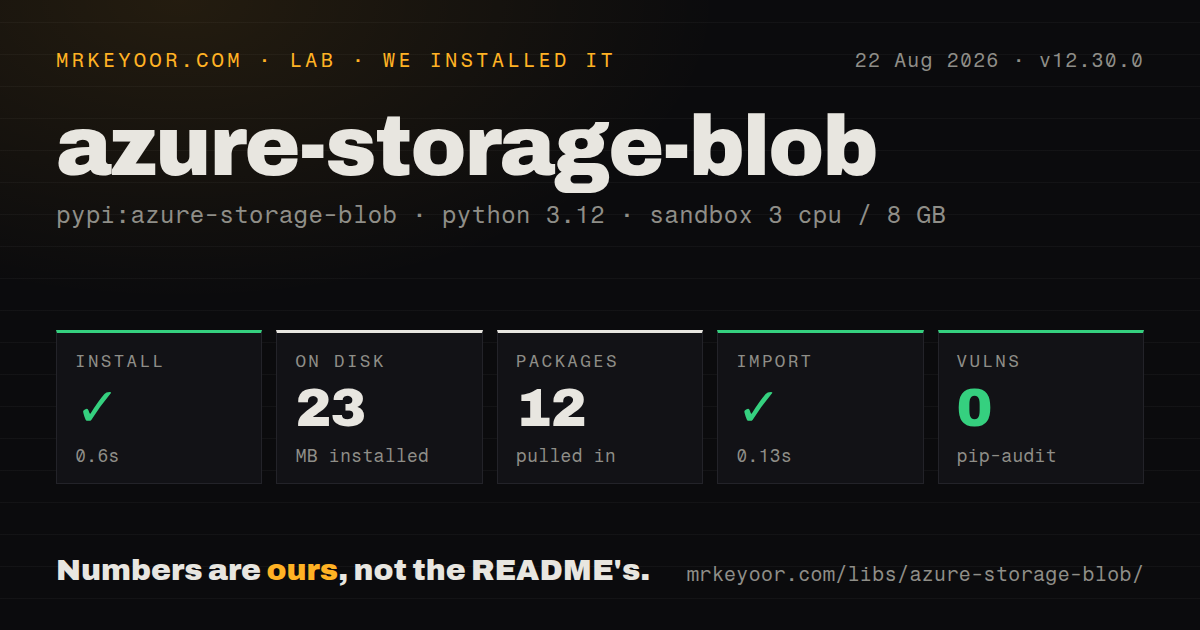
| Install | ✓ · 0.6s | 12 packages on disk · 23 MB |
| Import | ✓ | import azure in 0.13s · pure Python · py.typed · requires Python >=3.9 |
| Known vulns | 0 | (pip-audit) |
Answers from our run
Does azure-storage-blob install cleanly?
Yes. In a fresh container with an empty cache, pip install azure-storage-blob finished in 0.6s, leaving 12 packages and 23 MB on disk. pip-audit reported no known vulnerabilities.
What does azure-storage-blob need to run?
Python >=3.9, and nothing compiled: it is pure Python. In our run import azure succeeded in 0.13s, and the package ships py.typed for type checkers.
azure-storage-blob or google-cloud-storage: which should you use?
google-cloud-storage: Choose it when the objects and workload live in Google Cloud Storage. azure-storage-blob 12.30.0 installed in 0.6 seconds and occupied 23 MB in our sandbox, with typed APIs and 0 audit findings; install it when Azure-specific blob controls matter.
When should you not use azure-storage-blob?
The job is provider-neutral object storage; fsspec or a narrow internal adapter avoids exposing Azure client types throughout the codebase
Use it if
- Python code must read or write blobs in an existing Azure Storage account
- Uploads need ETag conditions, leases, block staging, snapshots, tags, or access-tier control
- The service uses Entra ID, managed identity, account keys, or short-lived SAS credentials
- Both synchronous workers and asyncio services need clients with the same storage model
- The job is provider-neutral object storage; fsspec or a narrow internal adapter avoids exposing Azure client types throughout the codebase
- The application only needs S3; boto3 matches AWS authentication, events, and service behavior directly
- You expect this package to create accounts or assign roles; those are management-plane operations handled elsewhere
- Async support must work with no extra install; the README requires an async transport such as aiohttp
- A public download can be served directly by a stable URL or CDN and no authenticated blob operation is needed
Setup reality
Our Python 3.12 sandbox installed azure-storage-blob 12.30.0 in 0.6 seconds. Twelve packages used 23 MB on disk, and pip-audit reported 0 known vulnerabilities. The package has 5 direct dependencies, requires Python 3.9 or newer, is pure Python, and includes py.typed. Importing azure took 0.13 seconds. The base install does not include an Entra credential helper or an asyncio transport.
A working client needs an account URL plus a credential. DefaultAzureCredential comes from the separate azure-identity package, and the chosen identity needs an Azure Blob data role. A subscription Owner or Contributor assignment does not by itself grant blob data access. Connection strings and account keys work, but they carry broad secrets. SAS URLs should have a short expiry, narrow permissions, and no exposure in logs.
Uploads overwrite nothing unless you pass overwrite=True or use a conditional request. For concurrent writers, send an ETag with IfNotModified or use a lease instead of relying on a prior exists() check. download_blob() returns a downloader; readall() holds the whole blob in memory, while readinto() and chunks() suit larger objects. Transport chunk boundaries are unrelated to lines or records.
The asyncio clients live under azure.storage.blob.aio and need an async HTTP transport such as aiohttp. Close async credentials and service clients so their sessions release sockets. max_concurrency controls parallel transfer requests, not application-wide worker count. Version 12.30.0 also recognizes account URLs using -ipv6 and -dualstack suffixes, but network reachability and DNS remain deployment concerns.
Patterns
Authenticate with a token credential connect-with-entra-id
from azure.identity import DefaultAzureCredential
from azure.storage.blob import BlobServiceClient

credential = DefaultAzureCredential()
service = BlobServiceClient(
    account_url="https://myaccount.blob.core.windows.net",
    credential=credential,
)
container = service.get_container_client("uploads")
azure-identity is a separate install. The identity also needs a Blob data role; a management role alone does not permit object access.
Open a client from a connection string connect-with-connection-string
import os
from azure.storage.blob import BlobServiceClient

service = BlobServiceClient.from_connection_string(
    os.environ["AZURE_STORAGE_CONNECTION_STRING"]
)
blob = service.get_blob_client("uploads", "report.csv")
Treat the environment value as a broad credential. Accounts that disable shared-key authorization require a token credential instead.
Upload a file and set its media type upload-file
from azure.storage.blob import ContentSettings

with open("report.csv", "rb") as source:
    container.upload_blob(
        name="reports/report.csv",
        data=source,
        overwrite=True,
        content_settings=ContentSettings(content_type="text/csv"),
    )
upload_blob raises ResourceExistsError for an existing name unless overwrite=True is passed. ContentSettings controls the stored content type.
Write a blob to a local file download-to-file
blob = container.get_blob_client("reports/report.csv")

with open("report.csv", "wb") as target:
    blob.download_blob(max_concurrency=4).readinto(target)
download_blob returns a downloader object. readinto streams into the file handle instead of creating one bytes object for the complete blob.
Decode a small text blob read-small-blob
downloader = container.download_blob("notes/today.txt", encoding="utf-8")
text = downloader.readall()
print(text)
readall keeps the entire response in memory, so reserve this form for blobs with a known upper bound.
Consume a download in chunks iterate-download-chunks
downloader = container.download_blob("exports/large.ndjson")

for chunk in downloader.chunks():
    consume(chunk)
A network chunk may split a line or JSON record. The consumer must carry an incomplete record into the next chunk.
List blobs under a name prefix list-prefix
for item in container.list_blobs(name_starts_with="reports/2026/"):
    print(item.name, item.size, item.last_modified)
list_blobs pages lazily as the loop advances. Converting it to a list retains every result in memory.
Delete without a check-then-delete race delete-if-present
from azure.core.exceptions import ResourceNotFoundError

try:
    container.delete_blob("reports/old.csv", delete_snapshots="include")
except ResourceNotFoundError:
    pass
Handling ResourceNotFoundError makes deletion idempotent and avoids an extra exists request that could become stale.
Issue a 15-minute read SAS create-read-sas
from datetime import datetime, timedelta, timezone
from azure.storage.blob import BlobSasPermissions, generate_blob_sas

expiry = datetime.now(timezone.utc) + timedelta(minutes=15)
token = generate_blob_sas(
    account_name=service.account_name,
    container_name="uploads",
    blob_name="report.csv",
    account_key=account_key,
    permission=BlobSasPermissions(read=True),
    expiry=expiry,
)
url = f"{blob.url}?{token}"
Anyone holding the resulting URL can read until expiry. Limit its permission and keep the query token out of logs and analytics.
Write metadata and indexed tags set-metadata-and-tags
blob.set_blob_metadata({"source": "daily-import"})
blob.set_blob_tags({"stage": "raw", "dataset": "orders"})

for match in container.find_blobs_by_tags("\"stage\" = 'raw'"):
    print(match.name)
set_blob_metadata replaces the complete metadata mapping. Blob index tags are separate and can be searched with find_blobs_by_tags.
Reject a stale overwrite with an ETag guard-update-with-etag
from azure.core import MatchConditions

properties = blob.get_blob_properties()
blob.upload_blob(
    new_data,
    overwrite=True,
    etag=properties.etag,
    match_condition=MatchConditions.IfNotModified,
)
If another writer changes the blob, IfNotModified makes this call fail rather than replacing the newer value.
List blobs with async clients use-async-client
from azure.identity.aio import DefaultAzureCredential
from azure.storage.blob.aio import BlobServiceClient

async with DefaultAzureCredential() as credential:
    async with BlobServiceClient(account_url=url, credential=credential) as service:
        container = service.get_container_client("uploads")
        async for item in container.list_blobs():
            print(item.name)
The async API needs a transport such as aiohttp. Closing the credential and service client releases their sessions and sockets.
Alternatives
| Package | Registry | Pick it when |
|---|---|---|
| google-cloud-storage | PyPI | Choose it when the objects and workload live in Google Cloud Storage. |
| boto3 | PyPI | Choose it for Amazon S3 and AWS-native credentials, events, and service options. |
| minio | PyPI | Choose it for an S3-compatible MinIO deployment with a smaller provider-specific surface. |
More infra guides
semver · boto3 · opentelemetry-api · @opentelemetry/api · psutil · distro · the whole shelf →
How this guide is made: grounded in the library's documentation, release notes, changelog, and issue history, on a fixed rubric — not a hands-on install of every release. The 50 most-downloaded entries are additionally install-verified in clean containers. Corrections: contact the desk.