aws-cdk review
`aws-cdk` 2.1138.0 is the Node-based command line that turns a CDK application's cloud assembly into AWS CloudFormation operations. It initializes projects, synthesizes templates, compares stacks, publishes assets, bootstraps accounts, deploys, imports, rolls back, detects drift, and destroys named stacks. The constructs used to describe infrastructure live in `aws-cdk-lib`; this package is the operator-facing toolkit. Release 2.1138.0 adds an `errors-only` progress mode and lets `cdk import` pass CloudFormation notification ARNs. It also fixes proxy protocol validation, leaked temporary assemblies from `cdk flags --set`, and refactoring failures around bundled assets.
aws-cdk 2.1138.0 installed in 1.1 seconds and occupied 24 MB in our sandbox, but neither module loader could import it on Node 22.23.2; install it for the `cdk` executable, not application code. It fits AWS teams that already accept CloudFormation, bootstrap resources, credential setup, and reviewable account mutations.
We installed it
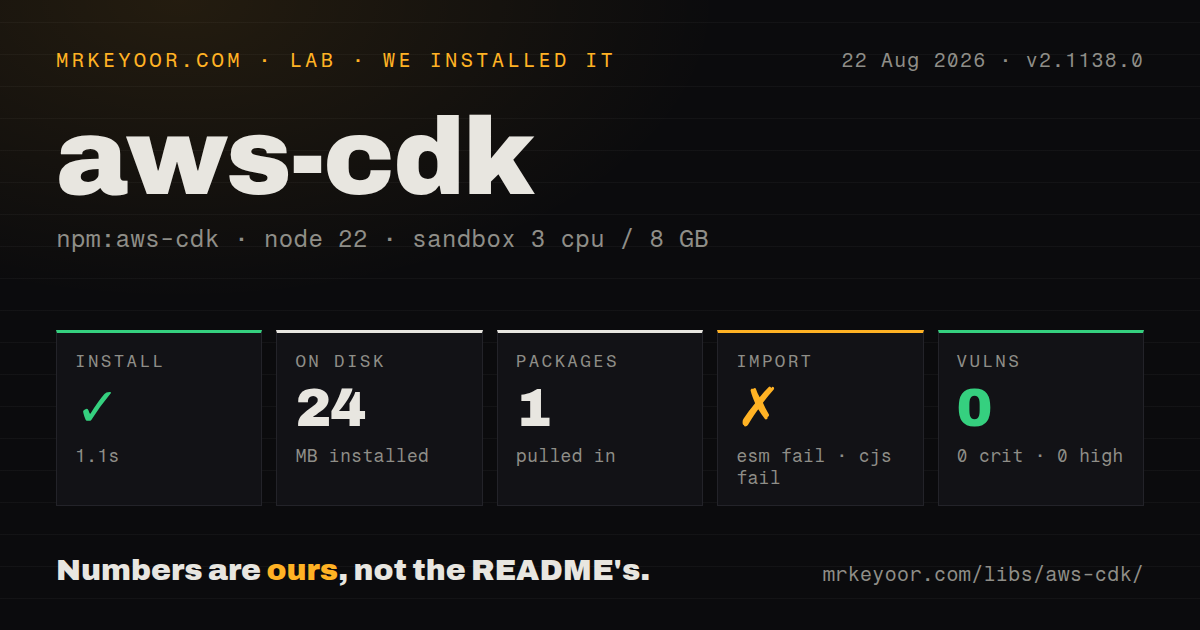
| Install | ✓ · 1.1s | 1 package on disk · 24 MB |
| Import | ✗ | ESM import fails · require() fails · CommonJS package with exports map |
| Browser | n/a | could not be bundled for the browser (Node-only code, most likely) |
| Types | ✓ | TypeScript types bundled |
| Known vulns | 0 | 0 critical · 0 high · 0 moderate · 0 low (npm audit) |
Answers from our run
Does aws-cdk install cleanly?
Yes. In a fresh container with an empty cache, npm install aws-cdk finished in 1 seconds, leaving 1 package and 24 MB on disk. npm audit reported no known vulnerabilities.
Can aws-cdk run in a browser?
Not directly: esbuild could not bundle it for the browser in our run, which normally means it depends on Node built-ins. Use it on the server, or find a browser-targeted alternative.
Does aws-cdk work with both ESM and CommonJS?
Neither plain import nor require succeeded in our sandbox, so it needs a bundler or extra setup.
Does aws-cdk include TypeScript types?
Yes, type declarations ship inside the package, so no @types install is needed.
aws-cdk or serverless: which should you use?
serverless: Choose it for application-centered AWS serverless deployments where a smaller service configuration is preferable to a general construct graph. aws-cdk 2.1138.0 installed in 1.1 seconds and occupied 24 MB in our sandbox, but neither module loader could import it on Node 22.23.2; install it for the cdk executable, not application code.
When should you not use aws-cdk?
You want a provider-neutral infrastructure workflow. The command set, credentials, bootstrap stack, asset stores, and deployment semantics are specific to AWS and CloudFormation.
Use it if
- Your infrastructure is already modeled with AWS CDK constructs and CloudFormation is the deployment control plane.
- CI needs reproducible synth, diff, asset publication, and deployment commands for several AWS accounts or regions.
- You need CloudFormation change sets, stack dependency ordering, context lookups, and bootstrap resources handled through one CLI.
- Developers need short feedback loops for disposable stacks through `cdk watch`, while production still deploys through reviewed CloudFormation changes.
- You want a provider-neutral infrastructure workflow. The command set, credentials, bootstrap stack, asset stores, and deployment semantics are specific to AWS and CloudFormation.
- You only need to define constructs in application code. That API is in `aws-cdk-lib`; installing this 24 MB CLI as a runtime dependency gives the application no useful import surface.
- Your build must run entirely offline. Synthesis can perform AWS context lookups, asset bundling may invoke Docker, and deployment publishes files or images before CloudFormation runs.
- Your security policy forbids a tool from creating account-wide support resources. `cdk bootstrap` deploys the CDKToolkit stack with buckets, roles, policies, and an ECR repository used by later deployments.
- You need a normal JavaScript library import. Both `require('aws-cdk')` and ESM import failed under Node 22.23.2 in our sandbox; the supported entry point is the `cdk` executable.
Setup reality
Our fresh install of aws-cdk 2.1138.0 completed in 1.1 seconds and left one package using 24 MB. The package has zero direct and peer dependencies, 24172 KB unpacked, bundled TypeScript declarations, an Apache-2.0 license, and a Node 18 minimum. npm audit reported zero known vulnerabilities. Despite its CommonJS metadata and exports map, both require() and ESM import failed on Node 22.23.2. Use the cdk binary; our browser bundle also failed.
The first useful command still needs a CDK app plus cdk.json, whose app value tells the CLI how to execute that app. AWS operations resolve credentials through the normal SDK chain, so profiles, SSO sessions, role assumptions, account, and region must be settled in local shells and CI. Keep the CLI current: after the version line split at 2.1000.0, its number no longer tracks aws-cdk-lib, and compatibility follows cloud-assembly schema support and release timing.
Environment lookups write values to cdk.context.json. Commit deliberate context so CI synthesizes the same template, then reset individual keys when you intend to query AWS again. The default assembly directory is cdk.out; asset bundling can call Docker and asset publication needs bootstrap buckets or repositories. Version 2.1138.0 fixes one temporary-directory leak from cdk flags --set, but generated assemblies still deserve normal build-artifact cleanup.
Deploying multiple stacks with --concurrency respects declared stack dependencies, though AWS API and CloudFormation throttles still apply. Hotswap sends supported changes directly to services and creates drift, so keep it in development accounts. --require-approval never removes the CLI prompt, not the need for a review gate. A change-set diff requires deployment permissions; template mode is cheaper but can misclassify replacements.
Patterns
Create a TypeScript CDK application initialize-typescript-app
mkdir orders-infra && cd orders-infra
npx aws-cdk@2.1138.0 init app --language typescript
`cdk init` requires an empty directory and writes project files plus `cdk.json`; pinning the CLI version keeps generated scaffolding repeatable.
Define the synthesis command configure-app-command
{
  "app": "npx ts-node --prefer-ts-exts bin/orders-infra.ts",
  "output": "cdk.out",
  "context": { "stage": "dev" }
}
Save this as `cdk.json`. Synth, diff, and deploy execute the `app` command, so its dependencies must exist in CI.
Prepare one deployment environment bootstrap-account-region
AWS_PROFILE=platform npx cdk bootstrap aws://123456789012/us-east-1This creates or updates the CDKToolkit CloudFormation stack. Inspect trust, execution policy, and qualifier settings before bootstrapping shared accounts.
Generate a template without deployment synthesize-cloud-assembly
npx cdk synth OrdersStack --quiet
ls -la cdk.out
Synth writes a full cloud assembly to `cdk.out`. Context lookups and Docker-backed asset bundling can still contact external services.
Read stack names in automation list-stacks-json
npx cdk list --long --jsonPipeline stages use hierarchical paths. `--all` selects top-level stacks, while `**` is needed to match nested stage stacks.
Fail CI on an accurate infrastructure diff diff-with-change-set
npx cdk diff OrdersStack --method change-set --failChange-set mode needs AWS deployment permissions and reports replacement behavior more accurately than template comparison.
Deploy a named stack and record outputs deploy-with-review-policy
npx cdk deploy OrdersStack \
  --require-approval broadening \
  --progress errors-only \
  --outputs-file cdk-outputs.json
Version 2.1138.0 accepts `errors-only` for progress. The approval option governs the interactive security prompt, so CI still needs its own authorization step.
Create a change set for later execution prepare-reviewed-change-set
npx cdk deploy OrdersStack \
  --method prepare-change-set \
  --change-set-name release-42
Prepare mode creates the change set without executing it. Confirm that asset publication finished before another system approves execution.
Deploy independent stacks in parallel deploy-stacks-concurrently
npx cdk deploy 'Platform/**' --concurrency 3 --require-approval broadeningThe CLI keeps declared dependencies ordered. A value of 3 does not prevent AWS service throttling or conflicts caused by undeclared shared resources.
Replace a cached AWS lookup refresh-one-context-key
npx cdk context
npx cdk context --reset 2
npx cdk synth OrdersStack
Reset the numbered entry you mean to refresh. Committed `cdk.context.json` values otherwise keep synthesis stable across machines.
Apply supported development changes quickly watch-development-stack
AWS_PROFILE=developer npx cdk watch DevStack --hotswap-fallbackHotswap can bypass CloudFormation and leave drift. Use it for development stacks where a later full deployment can reconcile state.
Delete one disposable stack destroy-named-stack
npx cdk destroy DevStack --force`--force` skips the confirmation prompt. Retention policies, non-empty buckets, and resources outside CloudFormation can survive or block deletion.
Alternatives
| Package | Registry | Pick it when |
|---|---|---|
| serverless | npm | Choose it for application-centered AWS serverless deployments where a smaller service configuration is preferable to a general construct graph. |
| aws-cdk-local | npm | Use it only when the target is LocalStack and you accept a wrapper around the same CDK command model. |
| cdk-nag | npm | Add it beside CDK when the missing requirement is rule-based construct compliance checks rather than another deployment engine. |
More infra guides
semver · boto3 · opentelemetry-api · @opentelemetry/api · psutil · distro · the whole shelf →
Related reading
How this guide is made: grounded in the library's documentation, release notes, changelog, and issue history, on a fixed rubric — not a hands-on install of every release. The 50 most-downloaded entries are additionally install-verified in clean containers. Corrections: contact the desk.