asyncpg review
asyncpg 0.31.0 is a PostgreSQL driver built for asyncio, with its own API rather than Python DB-API compatibility. It speaks PostgreSQL's binary protocol and gives application code direct access to numbered query parameters, Record rows, transactions, prepared statements, server cursors, COPY, LISTEN/NOTIFY, arrays, composite values, and custom codecs. This release adds Python 3.14 wheels plus experimental free-threaded and subinterpreter support. It also adds PostgreSQL service-file connections, avoids named statements when preparation caching is off, fixes multi-port connection strings, and closes a pool leak. Our Python 3.12 import succeeded in 0.36 seconds; the package includes compiled extensions but no py.typed marker.
asyncpg 0.31.0 installed in 0.2 seconds and used 13 MB in our sandbox, with a working import and 0 audit findings; it is a sensible direct driver for asyncio services committed to PostgreSQL. Choose something else for DB-API compatibility, synchronous callers, database portability, or PgBouncer transaction pooling that cannot disable statement caching.
We installed it
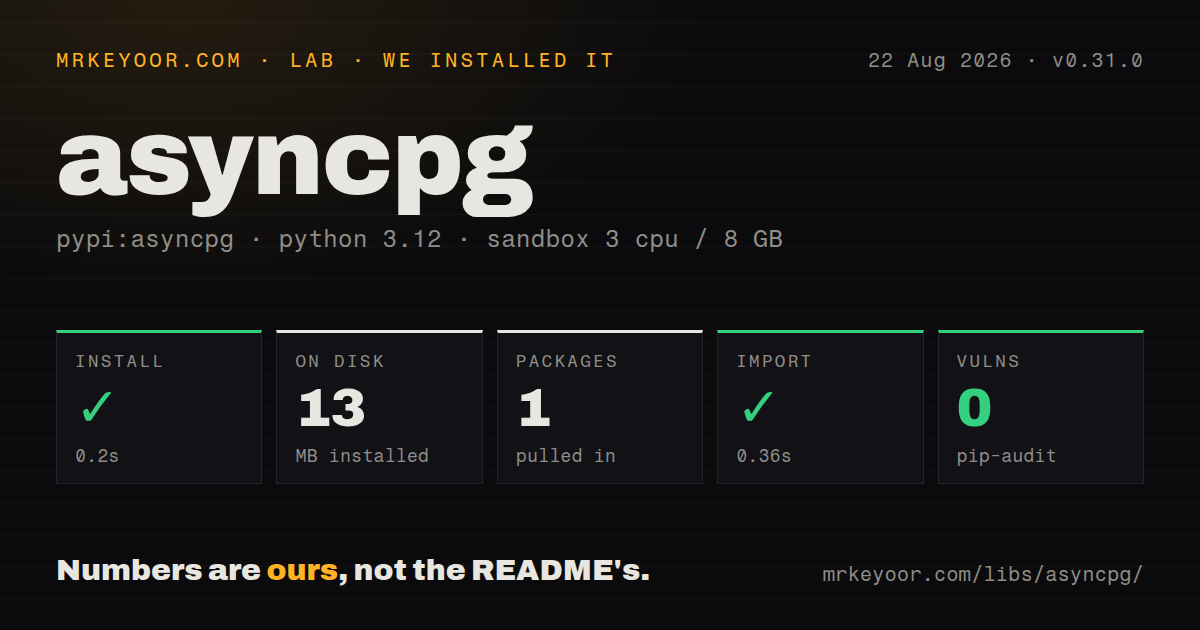
| Install | ✓ · 0.2s | 1 package on disk · 13 MB |
| Import | ✓ | import asyncpg in 0.36s · compiled extensions · requires Python >=3.9.0 |
| Known vulns | 0 | (pip-audit) |
Answers from our run
Does asyncpg install cleanly?
Yes. In a fresh container with an empty cache, pip install asyncpg finished in 0.2s, leaving 1 package and 13 MB on disk. pip-audit reported no known vulnerabilities.
What does asyncpg need to run?
Python >=3.9.0, and a platform wheel with compiled extensions. In our run import asyncpg succeeded in 0.36s.
asyncpg or psycopg: which should you use?
Pick psycopg when one PostgreSQL driver must cover synchronous code, asyncio code, and DB-API integrations. asyncpg 0.31.0 installed in 0.2 seconds and used 13 MB in our sandbox, with a working import and 0 audit findings; it is a sensible direct driver for asyncio services committed to PostgreSQL.
When should you not use asyncpg?
The same data layer must support synchronous jobs or DB-API consumers. asyncpg is asyncio-only, while psycopg exposes sync and async interfaces.
Discussed on
Use it if
- Your service already runs on asyncio and talks only to PostgreSQL.
- You want to keep SQL visible while using native PostgreSQL features such as COPY, arrays, composite types, cursors, or LISTEN/NOTIFY.
- A bounded async connection pool and async transaction contexts fit your request lifecycle.
- You prefer PostgreSQL's $1 parameter syntax and explicit type handling over a DB-API facade.
- The same data layer must support synchronous jobs or DB-API consumers. asyncpg is asyncio-only, while psycopg exposes sync and async interfaces.
- You need to switch among PostgreSQL, MySQL, and SQLite. The README tests PostgreSQL 9.5 through 18 and makes no support promise for other protocol-compatible databases.
- PgBouncer uses transaction or statement pooling and you cannot turn off the driver's statement cache. The official FAQ says prepared statements do not work correctly in those modes unless statement_cache_size is 0.
- Your deployment requires pure Python wheels. Our 0.31.0 install contained .so extensions, so an unsupported platform can fall back to a native build.
- Your type-checking policy requires a py.typed marker from every runtime dependency. Our installed package did not ship one.
Setup reality
Our install of asyncpg 0.31.0 completed in 0.2 seconds in a fresh Python 3.12 Bookworm container. It left one package and 13 MB on disk; pip-audit found 0 known vulnerabilities. The package metadata showed 3 direct dependencies and Python 3.9 or newer. import asyncpg worked in 0.36 seconds. The wheel had compiled .so files and no py.typed marker, which matters on uncommon build targets and in strict typed-package checks.
Connections accept a PostgreSQL DSN or separate host, port, user, password, and database values. Version 0.31.0 also reads named services from a PostgreSQL service file. Query values use $1, $2, and later positions. asyncpg does strict PostgreSQL type conversion; json and jsonb arrive as strings unless you register a decoder. Put codec setup in create_pool's init callback so all replacement connections receive it.
The pool defaults to 10 minimum and 10 maximum connections. Four worker processes can therefore reserve 40 database sessions before handling traffic, so set both limits from the server's connection budget. A connection acquired with async with returns to the pool on exit. Call pool.close() during shutdown. Cursor iteration must stay inside a transaction because PostgreSQL portals close outside that scope.
Each connection caches up to 100 prepared statements by default. PgBouncer transaction and statement modes can hand later calls to a different server session, so the official FAQ directs users to set statement_cache_size=0. In 0.31.0, explicit prepare() uses an unnamed statement by default when that cache is disabled. Keep LISTEN work on a dedicated connection; returning it to a general pool resets listeners and makes notification ownership hard to reason about.
Patterns
Open one connection and fetch records connect-and-fetch
import asyncio
import asyncpg

async def main():
    conn = await asyncpg.connect('postgresql://app:secret@localhost/app')
    try:
        rows = await conn.fetch(
            'SELECT id, email FROM users WHERE active = $1', True
        )
        print([dict(row) for row in rows])
    finally:
        await conn.close()

asyncio.run(main())
Query placeholders start at $1. fetch() returns immutable Record values, so convert each row before passing it to a JSON encoder.
Set pool limits explicitly bound-connection-pool
pool = await asyncpg.create_pool(
    dsn,
    min_size=2,
    max_size=8,
    command_timeout=20,
)

async with pool.acquire() as conn:
    pending = await conn.fetchval('SELECT count(*) FROM jobs WHERE done = false')

await pool.close()
create_pool defaults to 10 minimum and 10 maximum connections per process. Multiply your chosen maximum by every worker and replica.
Commit two writes together transaction-block
async with pool.acquire() as conn:
    async with conn.transaction():
        await conn.execute(
            'UPDATE accounts SET balance = balance - $1 WHERE id = $2', 50, 1
        )
        await conn.execute(
            'UPDATE accounts SET balance = balance + $1 WHERE id = $2', 50, 2
        )
The outer block commits after a normal exit and rolls back on an exception. A nested transaction context creates a savepoint.
Return only the result shape you need choose-fetch-method
row = await conn.fetchrow(
    'SELECT id, email FROM users WHERE id = $1', user_id
)
email = await conn.fetchval(
    'SELECT email FROM users WHERE id = $1', user_id
)
status = await conn.execute(
    'DELETE FROM sessions WHERE expires_at < now()'
)
fetchrow() and fetchval() return None when no record matches. execute() returns PostgreSQL's command-status string.
Iterate a server cursor stream-query-results
async with pool.acquire() as conn:
    async with conn.transaction():
        async for row in conn.cursor(
            'SELECT id, payload FROM events ORDER BY id', prefetch=500
        ):
            await handle(row)
A cursor factory raises outside a transaction because its PostgreSQL portal needs that transaction to remain open.
Load tuples with COPY bulk-copy-records
result = await conn.copy_records_to_table(
    'events',
    records=[(1, 'created'), (2, 'sent')],
    columns=['id', 'kind'],
)
print(result)
COPY has no ON CONFLICT branch. Load into a staging table first when the final operation needs deduplication or upsert rules.
Install JSON codecs on every pooled connection decode-json-columns
import json

async def init_connection(conn):
    for type_name in ('json', 'jsonb'):
        await conn.set_type_codec(
            type_name,
            schema='pg_catalog',
            encoder=json.dumps,
            decoder=json.loads,
        )

pool = await asyncpg.create_pool(dsn, init=init_connection)
json and jsonb decode to strings by default. The init hook runs for connections created later as well as the first pool members.
Match a constraint error by class handle-unique-violation
try:
    await conn.execute(
        'INSERT INTO users(email) VALUES ($1)', email
    )
except asyncpg.UniqueViolationError as exc:
    raise ValueError(
        f'duplicate constraint: {exc.constraint_name}'
    ) from exc
asyncpg maps PostgreSQL SQLSTATE values to exception subclasses. Do not parse the server's human-readable error text.
Keep notifications on their own connection listen-for-notifications
def receive(connection, pid, channel, payload):
    asyncio.create_task(process(payload))

listener = await asyncpg.connect(dsn)
await listener.add_listener('jobs', receive)

# during shutdown
await listener.remove_listener('jobs', receive)
await listener.close()
Pool reset removes listeners when a connection is released. Use a dedicated connection and hand slow callback work to another task.
Turn off cached statements for transaction pooling configure-pgbouncer
pool = await asyncpg.create_pool(
    'postgresql://app:secret@pgbouncer:6432/app',
    statement_cache_size=0,
    min_size=1,
    max_size=8,
)
The official FAQ requires statement_cache_size=0 with PgBouncer transaction or statement pooling. This removes asyncpg's 100-entry per-connection cache.
Connect through a PostgreSQL service entry use-service-file
conn = await asyncpg.connect(
    service='reporting',
    servicefile='/run/secrets/pg_service.conf',
)
try:
    version = await conn.fetchval('SELECT version()')
finally:
    await conn.close()
The service and servicefile parameters were added in 0.31.0. The named entry supplies connection settings from the PostgreSQL service file.
Bound a single slow query apply-query-timeout
try:
    rows = await conn.fetch(
        'SELECT * FROM expensive_report($1)',
        account_id,
        timeout=5,
    )
except asyncio.TimeoutError:
    raise RuntimeError('report query exceeded 5 seconds')
Per-call timeout overrides the connection's command_timeout for this operation. Cancellation still needs application-level handling and logging.
Alternatives
| Package | Registry | Pick it when |
|---|---|---|
| psycopg | PyPI | Pick it when one PostgreSQL driver must cover synchronous code, asyncio code, and DB-API integrations. |
| aiopg | PyPI | Pick it when an asyncio wrapper around psycopg's established DB-API behavior matches an older stack. |
| databases | PyPI | Pick it when a small async query layer spanning several SQL backends is more useful than direct PostgreSQL protocol access. |
More data guides
numpy · pandas · fsspec · pyarrow · lxml · sqlalchemy · the whole shelf →
How this guide is made: grounded in the library's documentation, release notes, changelog, and issue history, on a fixed rubric — not a hands-on install of every release. The 50 most-downloaded entries are additionally install-verified in clean containers. Corrections: contact the desk.