archiver review
Archiver 8 writes ZIP and TAR output from Node streams. Feed it strings, buffers, readable streams, individual paths, whole directories, or glob results, then pipe the archive to a file or an HTTP response. The 8.0.0 release changed the package to ESM and raised its floor to Node 18. Both import styles worked on our Node 22 box, although the package contains no TypeScript declarations and its Node filesystem imports prevented a browser build. It creates archives only; it cannot inspect or extract one.
Archiver 8.0.0 took 5 seconds and 11 MB across 41 installed packages in our sandbox, with zero audit findings, but its browser build failed and it shipped no TypeScript types. Install it for Node services or release jobs that must stream mixed inputs into ZIP or TAR; choose a reader or browser-specific package for either of those jobs.
We installed it
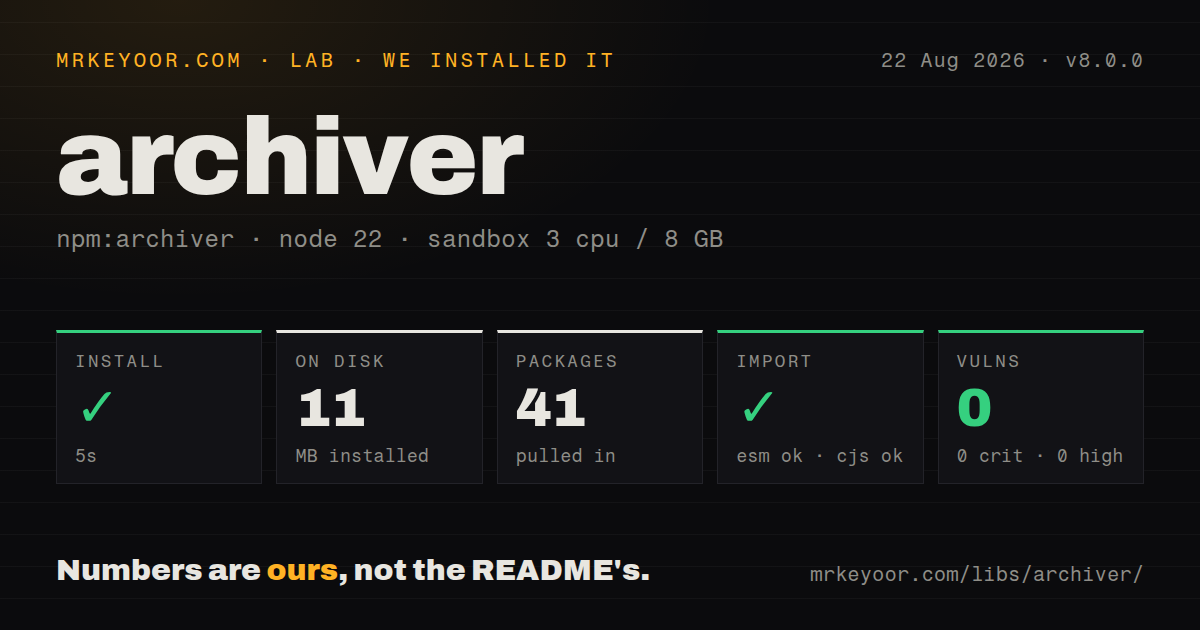
| Install | ✓ · 5s | 41 packages on disk · 11 MB |
| Import | ✓ | ESM import works · require() works · ESM package with exports map |
| Browser | n/a | could not be bundled for the browser (Node-only code, most likely) |
| Types | — | no TypeScript types found |
| Known vulns | 0 | 0 critical · 0 high · 0 moderate · 0 low (npm audit) |
Answers from our run
Does archiver install cleanly?
Yes. In a fresh container with an empty cache, npm install archiver finished in 5 seconds, leaving 41 packages and 11 MB on disk. npm audit reported no known vulnerabilities.
Can archiver run in a browser?
Not directly: esbuild could not bundle it for the browser in our run, which normally means it depends on Node built-ins. Use it on the server, or find a browser-targeted alternative.
Does archiver work with both ESM and CommonJS?
Yes. Both import 'archiver' and require('archiver') worked in Node 22 in our run. The package is published as ESM with an exports map.
Does archiver include TypeScript types?
No type declarations were found in our install, so TypeScript users need their own declarations.
archiver or yazl: which should you use?
yazl: Pick it for a focused streaming ZIP writer when TAR, globs, and directory helpers are unnecessary. Archiver 8.0.0 took 5 seconds and 11 MB across 41 installed packages in our sandbox, with zero audit findings, but its browser build failed and it shipped no TypeScript types.
When should you not use archiver?
You need extraction or archive inspection. Archiver has writers for ZIP and TAR but no reader API; unzipper, yauzl, or tar covers that side.
Discussed on
- hnYark: Advanced and easy YouTube archiver now stable444 points
- hnBorgBackup: Deduplicating archiver with compression and encryption334 points
- hnBorgBackup: Deduplicating Archiver258 points
- hnTwitter archiver: Make your own simple, public, searchable Twitter archive167 points
- hnDeduplicating Archiver with Compression and Encryption134 points
Use it if
- A Node endpoint must send a ZIP while files are still being read instead of buffering the finished download.
- A packaging job needs to mix generated text, file streams, directory trees, and glob selections in one archive.
- ZIP entries need controlled paths, timestamps, Unix modes, prefixes, or STORE mode for compressed media.
- A long archive task needs entry, progress, warning, and error events that can feed logs or a job status page.
- You need extraction or archive inspection. Archiver has writers for ZIP and TAR but no reader API; `unzipper`, `yauzl`, or `tar` covers that side.
- The archive is built in a browser. Our esbuild browser attempt stopped on Node-only modules, while `jszip` is intended to run there.
- Your code still calls `archiver('zip')`. The 8.0.0 README imports `ZipArchive` or `TarArchive`, and the release declares ESM plus Node 18 as breaking changes.
- Your TypeScript policy forbids community declaration packages. We found no types in 8.0.0, so typed projects must add `@types/archiver` or maintain declarations themselves.
- All you need is a small ZIP made from a few known inputs. `yazl` has a narrower ZIP writer and avoids Archiver's discovery queues and nine direct dependencies.
Setup reality
We installed archiver 8.0.0 in an empty Node 22 Bookworm container. npm finished in 5 seconds and left 41 packages occupying 11 MB. The published package lists nine direct dependencies, no peers, and 72 KB unpacked. Our audit returned zero known vulnerabilities across critical, high, moderate, and low severities.
Node 18 is the minimum. Version 8 declares type: module and provides an exports map, yet both import and require() succeeded in our Node 22 test. It does not bundle TypeScript declarations. There are no credentials or project config files, but a TypeScript build needs @types/archiver or its own module declaration.
Wire listeners before pipe() and finalize(). Archiver may emit destination events immediately after finalization, so waiting for the file stream's close event must be arranged first. An ENOENT during file discovery arrives through warning; other warnings and error events need explicit handling. Calling finalize() closes input to the archive. It does not prove that the destination file descriptor has closed.
Filesystem work goes through a stat queue whose documented default concurrency is 4, while entries themselves are appended in order. Abort the archive when an HTTP client disconnects or queued reads and compression can continue after the response is gone. Our browser bundle failed on the package's Node filesystem and stream chain. Keep this dependency in server or build code, and choose STORE for JPEG, MP4, or other inputs that are already compressed.
Patterns
Stream files into a ZIP write-zip-file
import { createWriteStream } from 'node:fs'
import { ZipArchive } from 'archiver'

const output = createWriteStream('report.zip')
const archive = new ZipArchive({ zlib: { level: 6 } })

archive.on('error', (error) => { throw error })
archive.pipe(output)
archive.file('report.csv', { name: 'report.csv' })
await archive.finalize()
A completed `finalize()` call stops new entries; wait for the output stream to close before publishing or moving the file.
Confirm the file descriptor has closed wait-for-output-close
import { once } from 'node:events'

const closed = once(output, 'close')
archive.pipe(output)
archive.append('ready\n', { name: 'status.txt' })
await archive.finalize()
await closed
console.log(archive.pointer())
Create the `close` wait before finalization because a tiny archive can finish during the same turn of the event loop.
Return a ZIP over HTTP stream-http-download
app.get('/download', (req, res) => {
  res.attachment('photos.zip')
  const archive = new ZipArchive({ zlib: { level: 6 } })
  archive.on('error', (error) => res.destroy(error))
  res.on('close', () => {
    if (!res.writableFinished) archive.abort()
  })
  archive.pipe(res)
  archive.directory('photos', 'photos')
  archive.finalize()
})
An interrupted response should call `abort()` so pending stats and compression do not outlive the client connection.
Mix generated and streamed entries append-generated-content
archive.append('name,total\nAda,42\n', { name: 'sales.csv' })
archive.append(Buffer.from(JSON.stringify(meta)), { name: 'meta.json' })
archive.append(logStream, { name: 'logs/current.log' })
Strings, buffers, and readable streams all require a `name`; that value is the entry path stored in the archive.
Map a directory to an archive path add-directory
archive.directory('public/assets', 'assets')

// Put the directory contents at the archive root instead.
archive.directory('legal', false)
The second argument is the destination directory. Passing `false` writes the selected directory's contents at archive root.
Select build output with a glob add-glob
archive.glob('**/*.js', {
  cwd: 'dist',
  ignore: ['**/*.map'],
}, { prefix: 'app' })
An explicit `cwd` fixes the source base, while `prefix` changes only the paths written inside the archive.
Write a compressed TAR archive create-tar-gzip
import { createWriteStream } from 'node:fs'
import { TarArchive } from 'archiver'

const archive = new TarArchive({
  gzip: true,
  gzipOptions: { level: 6 },
})
archive.pipe(createWriteStream('release.tar.gz'))
archive.directory('dist', 'package')
await archive.finalize()
TAR uses `gzip` and `gzipOptions`; the ZIP-specific `zlib` setting does not configure a tarball.
Skip recompressing media files store-compressed-files
const archive = new ZipArchive({ store: true })
archive.file('trailer.mp4', { name: 'trailer.mp4' })
archive.file('cover.jpg', { name: 'cover.jpg' })
ZIP STORE mode avoids deflate CPU for formats such as JPEG and MP4 that generally arrive compressed already.
Make entry metadata repeatable set-entry-metadata
archive.file('scripts/deploy.sh', {
  name: 'bin/deploy.sh',
  mode: 0o755,
  date: new Date('2026-01-01T00:00:00Z'),
})
A fixed date keeps archive timestamps stable between builds, and `mode` records Unix permissions for compatible extractors.
Handle a missing input explicitly handle-missing-files
archive.on('warning', (error) => {
  if (error.code === 'ENOENT') {
    console.warn('Skipped missing input:', error.message)
    return
  }
  throw error
})
archive.on('error', (error) => { throw error })
File stat failures such as `ENOENT` are warnings. An archive can otherwise finish successfully while omitting an expected path.
Expose archive progress report-progress
archive.on('progress', ({ entries, fs }) => {
  console.log(entries.processed + '/' + entries.total)
  console.log(fs.processedBytes + '/' + fs.totalBytes + ' bytes')
})
Filesystem byte totals exclude appended buffers and arbitrary streams, although those sources still increase the processed entry count.
Use version 8 from CommonJS load-with-require
const { ZipArchive } = require('archiver')

const archive = new ZipArchive({ zlib: { level: 6 } })
`require()` worked under Node 22 in our test. Check the oldest Node version you support because the package only states a Node 18 minimum.
Alternatives
| Package | Registry | Pick it when |
|---|---|---|
| yazl | npm | Pick it for a focused streaming ZIP writer when TAR, globs, and directory helpers are unnecessary. |
| jszip | npm | Pick it for ZIP creation or reading in browser code when the working set fits available memory. |
| adm-zip | npm | Pick it for short synchronous ZIP jobs where blocking the Node process is acceptable. |
| tar | npm | Pick it when the format is always TAR and the same package must also list or extract entries. |
More utils guides
lru-cache · type-fest · ajv · zod · p-limit · find-up · the whole shelf →
How this guide is made: grounded in the library's documentation, release notes, changelog, and issue history, on a fixed rubric — not a hands-on install of every release. The 50 most-downloaded entries are additionally install-verified in clean containers. Corrections: contact the desk.