Version 8.9.0 puts JavaScript around visible shell commands
At commit 65fc542, zx declared version 8.9.0 and supported Node.js 12.17 or newer, Bun 1.0 or newer, Deno 1.x and 2.x, and GraalVM Node.js. Its $ tagged template sends a command to a shell while escaping interpolated values. You keep the familiar command line, then use JavaScript for arrays, conditions, error handling, and parallel jobs. That is a sensible step when a twenty-line Bash script has started behaving like an application.
Each command returns a ProcessPromise, which resolves to a ProcessOutput with stdout, stderr, and the exit code. The API can return text, lines, buffers, or parsed JSON, and its pipes accept another command, a writable stream, or a file path. Ordinary Promise.all runs independent commands together. zx earns its place when those features remove homemade process wrappers; a short sequence of fixed commands may still be clearer in a package script.
What happened when we ran it
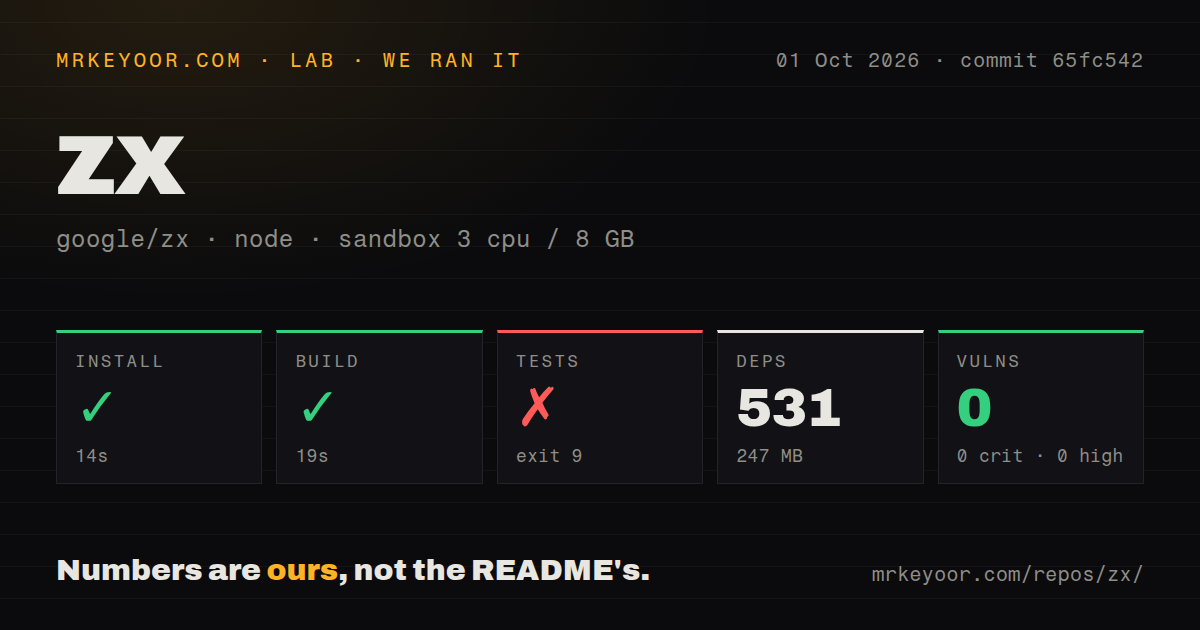
Our measurement setup cloned commit 65fc542, a 1.8 MB checkout with 180 files and about 36,772 lines of source. On 3 CPUs and 8 GB of RAM, npm installed 531 packages in 14 seconds and occupied 247 MB. The build succeeded in another 19 seconds. We used the lab-node:22 image in an unprivileged Debian container with no secrets, so these figures describe repository setup rather than command speed.
The test command failed with exit 9 after 21 seconds. Its size check passed at 944.52 kB against a 944.6 kB limit, and every checked file matched the Prettier style. The next step invoked node --experimental-transform-types ./test/all.test.js; Node printed bad option: --experimental-transform-types. The log shows no unit-test results, so claiming a test count or blaming a particular test would go beyond the evidence.
On our box, npm audit reported 0 known vulnerabilities across critical, high, moderate, and low severities. The repository contains 8 CI workflow files and a tests directory, though it has no top-level Dockerfile. Those signals show that maintainers have automated checks. They do not turn our failed Node 22 run green. A contributor using the measured commit should pin a runtime that accepts the repository's test command or expect the same stop before unit tests begin.
Bash or PowerShell remains required across four runtimes
zx 8.9.0 lists four runtime families, yet its setup guide still requires some form of Bash or PowerShell. Bash is the default. Windows users can choose WSL, Git Bash, Windows PowerShell, or PowerShell 7 through the supplied helpers. That choice controls the commands and quoting rules below zx, so support for Windows does not make grep, Unix paths, or Bash syntax portable to PowerShell by itself.
Deno installation asks for read, system, environment, and process-run permissions. TypeScript definitions ship with the package, while Node users need a compiler, loader, or native type-stripping route and the documented module settings. The setup guide also tells TypeScript consumers to install Node and fs-extra type packages. None of this is difficult, but it makes the runtime, module format, shell, and script dependencies part of the deployment contract.
Escaped arguments help, while remote execution raises the trust bar
Version 8.9.0 escapes values inserted through ${...} and treats array items as separate arguments. This is safer than building one command string from raw input, provided executable syntax stays outside the interpolation. The CLI can also execute a script directly from an HTTPS URL and can install missing imports with --install. Both are convenient on a trusted workstation. In CI, pin the source and dependency versions because those modes fetch code during execution.
Open issue #525 explains why --install is a poor substitute for a normal locked dependency setup. The report says it may install a dependency even when the project already has it, puts versions in import comments that update tools may miss, and handles workspace packages incorrectly. The issue remained open after an update on September 25, 2026. Use the flag for disposable scripts, not for a release job that must reproduce the same dependency graph months later.
An open 8.9.0 temp-path report needs attention
zx 8.9.0 has an open report that tempfile(name) and tempdir(prefix) can accept path segments outside the intended temporary directory. Issue #1519 was filed October 2, 2026, after the reporter demonstrated the behavior and warned about callers that pass download names, command-line input, or archive entries. Pull request #1520 proposed a fix and was still open on October 4. This is a user report, not a result from our sandbox.
The practical boundary is narrow: do not send untrusted filenames or prefixes into those helpers while the report remains unresolved. Many zx scripts never call either function, so the issue does not condemn the whole process API. It does matter for automation that downloads or unpacks user-controlled material under a service account. Check the issue and the released code you plan to deploy instead of assuming a pending pull request is already protection.
August code and October issue work show active maintenance
GitHub listed 45,776 stars, 20 open issues, and 46 open pull requests on October 4, 2026. The last repository push was August 14, and issue and pull-request activity continued into October. The latest tagged release was 8.8.5 from October 19, 2025, while the measured commit identified itself as 8.9.0. That older release date alone is weak evidence of project health because code and triage continued afterward.
zx is easiest to recommend when a script already needs promises, structured output, or shared TypeScript code. Our 14-second install and 19-second build make evaluation cheap, but the 531-package tree and Node 22 test stop belong in the decision. Pin the runtime, keep interpolated values separate from shell syntax, and run the real scripts on every shell you claim to support. If those conditions sound excessive, Execa or a small package script is probably the cleaner fit.